
JS-102 · Lesson 4 of 12 · 27 min
Destructuring, spread and rest
▶ Video coming soon A video version of this lesson is on the way.
By the end of November, Lucy Tran's shift records have grown. Each one now holds the program, the date, the start time, a crew list and a contact object for the shift lead with a name, a phone number and an email address. Mira's code to read them has grown too, and much of it is lines like const program = shift.program; const start = shift.start; const leadName = shift.lead.name; repeated in every function that touches a shift.
For the session planned for Thursday, November 26, Gareth brings three pieces of modern syntax that shrink that kind of code. Destructuring unpacks values from arrays and objects into variables in one statement. Spread expands an array or object into its individual parts, which makes copying and combining easy. Rest does the opposite, gathering several values into one array or object. All three use either square brackets, curly braces or three dots, and the trick is recognizing which job the syntax is doing in each place.
Array destructuring
Array destructuring assigns the items of an array to variables by position. You write the variable names inside square brackets on the left of the equals sign, and the array on the right. The first name gets the item at index 0, the second gets index 1, and so on. Names you leave out are skipped, and names with no matching item get undefined.
const shiftTimes = ['9:00', '13:00', '17:00'];

const [first, second] = shiftTimes;
console.log(first, second);

const [, , last] = shiftTimes;
console.log(last);

const [a, b, c, d] = shiftTimes;
console.log(d);9:00 13:00 17:00 undefined
What this code does
The first statement takes the items at positions 0 and 1 and ignores the rest. The second uses empty places marked by commas to skip two items and take only the third. The last asks for four values from a three-item array, so the extra variable d is undefined.
Destructuring can also supply a default value, used when the matching item is missing or undefined, and it can collect the remaining items with rest syntax: three dots before the last name. A neat use of array destructuring is swapping two variables without a temporary one.
const [lead = 'unassigned', ...others] = ['Amara', 'Jonah', 'Priya'];
console.log(lead, others);

const [backup = 'unassigned'] = [];
console.log(backup);

let morning = 'pantry';
let afternoon = 'kitchen';
[morning, afternoon] = [afternoon, morning];
console.log(morning, afternoon);Amara [ "Jonah", "Priya" ] unassigned kitchen pantry
What this code does
The first line takes Amara as the lead and gathers the other two names into a new array called others. The second destructures an empty array, so the default value unassigned is used instead of undefined. The last part swaps two variables by building a two-item array and unpacking it in the opposite order.
Object destructuring
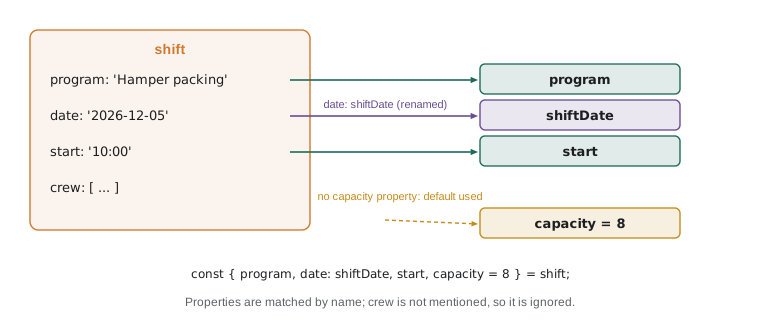
Object destructuring unpacks properties by name rather than by position. You write property names inside curly braces on the left, and each becomes a variable holding the property's value. Because matching is by name, the order does not matter, and properties you do not mention are simply ignored. This is the form you will use most often.
const shift = {
  program: 'Hamper packing',
  date: '2026-12-05',
  start: '10:00',
  crew: ['Amara', 'Dev'],
};

const { program, start } = shift;
console.log(program, 'starts at', start);

const { date: shiftDate, capacity = 8 } = shift;
console.log(shiftDate, capacity);Hamper packing starts at 10:00 2026-12-05 8
What this code does
The first destructuring creates two variables, program and start, from the properties with those names. The second renames the date property to a variable called shiftDate, using a colon. The shift has no capacity property, so the default value of 8 is used.
The colon in { date: shiftDate } reads as "take the property date and put it in a variable called shiftDate". It is easy to read backwards, because in an object literal the colon goes the other way round, with the property name on the left and the value on the right. Here, too, the property name is on the left; the new variable name is on the right. Renaming is useful when a property name clashes with a variable you already have, or when it is too short to be clear.
Nested destructuring
When a property holds another object or an array, the pattern can reach inside it. You write a second pattern where the variable name would go. This mirrors the shape of the data: braces for objects, brackets for arrays. Nested patterns are powerful but can become hard to read, so most teams limit them to one or two levels.
const shift = {
  program: 'Pantry',
  lead: { name: 'Lucy Tran', phone: '555-0142' },
  crew: ['Amara', 'Jonah', 'Priya'],
};

const {
  lead: { name: leadName },
  crew: [firstVolunteer, ...rest],
} = shift;

console.log(leadName);
console.log(firstVolunteer, rest.length);
console.log(typeof lead);Lucy Tran Amara 2 undefined
What this code does
The pattern reaches into the lead object to take its name, and into the crew array to take the first volunteer and gather the others. Only the innermost names become variables: leadName, firstVolunteer and rest. The word lead in the pattern only describes where to look, so no variable called lead is created.
If a nested object might be missing, a nested pattern will throw a TypeError, because JavaScript cannot read a property of undefined. A default of an empty object at that level, as in { lead: { name } = {} } = shift, protects against that. For data from outside the program, optional chaining, written ?., is often clearer: shift.lead?.name gives undefined instead of an error.
Destructuring in function parameters
Destructuring is most useful in the parameter list of a function. When a function takes an object, the parameter can be a pattern, so the function receives exactly the properties it needs as variables, with defaults for any that are optional. Callers pass a single object, and because properties are matched by name, they can list them in any order and leave out the optional ones. This is often called an options object.
function describeShift({ program, start = '9:00', crew = [] }) {
  const people = crew.length === 1 ? 'volunteer' : 'volunteers';
  return `${program} at ${start} with ${crew.length} ${people}`;
}

console.log(describeShift({ program: 'Pantry', start: '13:00', crew: ['Amara', 'Jonah'] }));
console.log(describeShift({ crew: ['Priya'], program: 'Kitchen' }));
console.log(describeShift({ program: 'Hamper packing' }));Pantry at 13:00 with 2 volunteers Kitchen at 9:00 with 1 volunteer Hamper packing at 9:00 with 0 volunteers
What this code does
The function's single parameter is a pattern that pulls out program, start and crew, with defaults for the last two. The second call lists its properties in a different order and leaves out start, so the default time is used. The third leaves out the crew as well, so the default empty array gives a count of 0.
Compare that with a function written as describeShift(program, start, crew). A caller who wants the default start time but a particular crew has to write describeShift('Kitchen', undefined, ['Priya']) and remember which position is which. With an options object, each argument is labelled at the call site. Many built-in and library functions take options objects for the same reason, including fetch, Intl.NumberFormat and toLocaleString.
One more default makes the whole parameter optional: function describeShift({ program = 'General', start = '9:00' } = {}). The = {} at the end means "if no object is passed at all, destructure an empty one". Without it, calling describeShift() with no arguments throws a TypeError.
Spread with arrays
Spread syntax, three dots before an array, expands the array into its separate items wherever a list of values is expected: inside a new array literal, or in the arguments of a function call. It is the easiest way to copy an array, to join several arrays or to add items to a copy without changing the original.
const morning = ['Amara', 'Jonah'];
const afternoon = ['Priya', 'Dev'];

const allDay = [...morning, ...afternoon];
const withLead = ['Lucy', ...morning];
const copy = [...morning];
copy.push('Sana');

console.log(allDay);
console.log(withLead);
console.log(morning, copy);

const boxes = [12, 30, 7];
console.log(Math.max(...boxes));[ "Amara", "Jonah", "Priya", "Dev" ] [ "Lucy", "Amara", "Jonah" ] [ "Amara", "Jonah" ] [ "Amara", "Jonah", "Sana" ] 30
What this code does
Spreading both arrays inside a new array literal joins them into one list of four names. A copy made with spread is a separate array, so pushing a new name onto it leaves morning unchanged. Spreading boxes into Math.max passes the three numbers as separate arguments, and Math.max returns the largest, 30.
Math.max(boxes), without the dots, would give NaN, because Math.max expects separate numbers and receives a single array. Spread is the bridge between the two forms. It works with any iterable, a value that can be looped over with for...of, so [...'Hub'] gives ['H', 'u', 'b'] and [...new Set(list)] turns a set back into an array.
Spread with objects
Spread also works inside object literals, where it copies all of an object's own properties into the new object. When two spreads, or a spread and an explicit property, supply the same property name, the one written later wins. This makes spread the standard way to make an updated copy of an object, and to merge default settings with the ones a caller provides.
const defaults = { capacity: 8, start: '9:00', reminders: true };
const hamperSettings = { capacity: 20, location: 'warehouse' };

const settings = { ...defaults, ...hamperSettings };
console.log(settings);

const shift = { program: 'Pantry', crew: 4 };
const updated = { ...shift, crew: shift.crew + 1 };
console.log(shift.crew, updated.crew);{ capacity: 20, start: "9:00", reminders: true, location: "warehouse" }
4 5What this code does
The merged settings start with every default and then apply the hamper settings, so the later capacity of 20 replaces the default of 8 and the new location is added. The second part copies the shift and replaces one property in the copy. The original still has a crew of 4, while the updated copy has 5.
Order matters: { ...hamperSettings, ...defaults } would let the defaults overwrite the program's own choices, which is the wrong way round. Put the general values first and the specific ones last. The update pattern, { ...old, changed: newValue }, is everywhere in modern front-end code, because frameworks such as React expect you to create new objects rather than change existing ones.
Shallow copies
Spread makes a shallow copy. It copies the top level of properties, but if a property holds an object or an array, the copy holds a reference to the same inner object, not a copy of it. Changing the inner object through the copy therefore changes it for the original too. This is the most important thing to understand about spread, and the cause of many puzzling bugs.
const original = { program: 'Kitchen', crew: ['Priya'] };
const shallow = { ...original };
shallow.program = 'Pantry';
shallow.crew.push('Jonah');

console.log(original.program, original.crew);

const deep = structuredClone(original);
deep.crew.push('Amara');
console.log(original.crew.length, deep.crew.length);Kitchen [ "Priya", "Jonah" ] 2 3
What this code does
Changing program on the shallow copy does not affect the original, because that property was copied. Pushing onto crew does affect the original, because both objects share the same crew array. structuredClone makes a deep copy with its own separate crew array, so adding Amara to it leaves the original with two names.
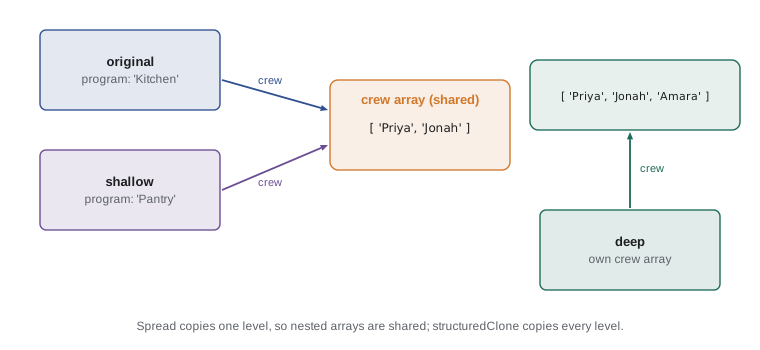
structuredClone is a built-in function in browsers and in Node.js 17 and later that makes a deep copy of most data: objects, arrays, dates, maps and sets, nested to any depth. It cannot copy functions or class methods. For simple data records, it is the safest way to get a completely independent copy. When you only need to change one nested level, the spread pattern can be nested too: { ...shift, lead: { ...shift.lead, phone: '555-0199' } }.
Rest parameters
Rest parameters use the same three dots as spread but do the opposite job: in a function's parameter list, they gather any number of arguments into a real array. A rest parameter must be the last parameter. It replaces the old arguments object, which looked like an array but lacked map, filter and the other array methods.
function totalBoxes(...counts) {
  return counts.reduce((sum, n) => sum + n, 0);
}

function logShift(program, ...crew) {
  console.log(`${program}: ${crew.length} on shift (${crew.join(', ')})`);
}

console.log(totalBoxes(12, 30, 7));
console.log(totalBoxes());
logShift('Pantry', 'Amara', 'Jonah', 'Priya');49 0 Pantry: 3 on shift (Amara, Jonah, Priya)
What this code does
totalBoxes collects however many numbers it receives into an array called counts and adds them, so three numbers give 49 and no numbers give 0. logShift takes the first argument as the program and gathers the rest into crew. Because crew is a real array, its length and join method work directly.
Rest also appears in destructuring, as you saw with ...others and ...rest above. In an object pattern, it gathers the properties you did not name into a new object, which is a tidy way to remove a property from a copy: const { phone, ...publicLead } = lead gives an object with everything except the phone number.
const lead = { name: 'Lucy Tran', phone: '555-0142', email: 'lucy@riverside-food-hub.example' };
const { phone, ...publicLead } = lead;
console.log(publicLead);
console.log(Object.keys(lead).length, Object.keys(publicLead).length);{ name: "Lucy Tran", email: "lucy@riverside-food-hub.example" }
3 2What this code does
The pattern takes phone into its own variable and gathers every other property into a new object called publicLead. That object can be shown on the public volunteer page without the phone number. The original lead object still has all three properties, while the copy has two.
| Syntax | Where it appears | What it does | Example |
|---|---|---|---|
| [a, b] = arr | Left of =, or a parameter | Array destructuring by position | const [first] = times |
| { a, b } = obj | Left of =, or a parameter | Object destructuring by name | const { program } = shift |
| ...name in a pattern | Last item of a pattern | Rest: gathers what is left | const [lead, ...others] = crew |
| ...name in parameters | Last parameter | Rest: gathers extra arguments | function f(...nums) |
| ...arr in [ ] or a call | Array literal or arguments | Spread: expands the items | Math.max(...boxes) |
| ...obj in { } | Object literal | Spread: copies the properties | { ...defaults, ...custom } |
The table points to a simple test for the three dots. If they appear where values are being received (a pattern on the left of an equals sign or a parameter list), they are rest and gather things up. If they appear where values are being supplied (inside a literal or a function call), they are spread and expand things out.
Worked problem
Refactoring a function with destructuring
Mira's older function begins: function reminder(shift) { const program = shift.program; const start = shift.start || '9:00'; const name = shift.lead.name; return name + ' leads ' + program + ' at ' + start; }. Rewrite the beginning with destructuring and explain any change in behaviour.
Show solution
- The function uses three values: program, start and the lead's name. All three can come from a pattern in the parameter list.
- program needs no default: { program }.
- start has a fallback of '9:00'. Writing { start = '9:00' } gives the same result when start is missing or undefined.
- The lead's name is nested: { lead: { name } }.
- Combined, the first line becomes function reminder({ program, start = '9:00', lead: { name } }), and the body can build the message with a template literal.
- One behaviour changes. The old || also replaced an empty string with '9:00'; a destructuring default replaces only undefined. Check whether empty strings can occur in the data.
Answer: function reminder({ program, start = '9:00', lead: { name } }). It is shorter and lists the inputs at a glance, but a default applies only to undefined, not to every falsy value.
Try it yourself
Describe a shift
Write summary(shift) using destructuring in the parameter list. It should take program, date and crew from the shift, with crew defaulting to an empty array, and return a line such as Pantry on 2026-12-01: Amara, Jonah.
If the crew is empty, the line should end with no crew yet instead of the names.
function summary(shift) {
  // replace shift with a destructuring pattern
}

console.log(summary({ program: 'Pantry', date: '2026-12-01', crew: ['Amara', 'Jonah'] }));
console.log(summary({ date: '2026-12-05', program: 'Hamper packing' }));
Try it yourself
Merge settings and total the boxes
Complete makeSettings(custom), which returns a new object containing every property of DEFAULTS, replaced by any properties in custom. Use object spread, and make sure DEFAULTS is not changed.
Then complete addBoxes(...counts) with a rest parameter so that it returns the total of all its arguments. Run the starter's calls.
const DEFAULTS = { capacity: 8, start: '9:00', reminders: true };

function makeSettings(custom) {
  // spread DEFAULTS first, then custom
}

function addBoxes() {
  // gather the arguments with a rest parameter and add them
}

console.log(makeSettings({ capacity: 20, start: '10:00' }));
console.log(DEFAULTS.capacity);
console.log(addBoxes(5, 10, 15, 20));
Common mistakes
Mistakeconst { date: shiftDate } = shift creates a variable called date.
InsteadIt creates shiftDate. The name before the colon is the property; the name after it is the new variable.
MistakeA destructuring default replaces any falsy value.
InsteadIt replaces only undefined. An empty string, 0 or null is kept.
MistakeA copy made with spread is completely independent.
InsteadSpread copies one level. Nested objects and arrays are shared; use structuredClone for a deep copy.
Mistake{ ...custom, ...defaults } lets the custom values win.
InsteadLater properties win, so put the defaults first and the custom values last.
MistakeMath.max(boxes) finds the largest number in the array boxes.
InsteadIt gives NaN. Spread the array into separate arguments: Math.max(...boxes).
Summary and key terms
- Array destructuring assigns items to variables by position; object destructuring assigns properties by name.
- A colon renames a variable and an equals sign gives a default that replaces undefined.
- Patterns can be nested and can appear in function parameters, which makes options objects easy.
- Spread syntax expands an array into items or copies an object's properties into a new object; later properties win.
- Spread makes shallow copies, so nested objects are shared; structuredClone makes a deep copy.
- Rest syntax gathers remaining items, properties or arguments into an array or object.
- Three dots are rest where values are received and spread where values are supplied.
- destructuring
- Unpacking values from an array or object into separate variables in one statement.
- array destructuring
- Destructuring that assigns array items to variables by position.
- object destructuring
- Destructuring that assigns object properties to variables by name.
- default value
- A value used in destructuring or parameters when the matching value is undefined.
- options object
- A single object argument whose named properties act as a function's settings.
- spread syntax
- Three dots that expand an array or object into its individual items or properties.
- rest syntax
- Three dots that gather remaining items, properties or arguments into one array or object.
- rest parameter
- A last parameter written with three dots that collects extra arguments into an array.
- shallow copy
- A copy of the top level of an object, sharing any nested objects with the original.
- deep copy
- A copy in which nested objects are copied too, made for example with structuredClone.
- iterable
- A value, such as an array, string or set, that can be looped over with for...of and spread.
Practice problems
Work each problem on paper first, then reveal the answer to check.
What does const [x, , y] = [1, 2, 3] assign to y?
Show answer
3. The empty place skips the second item.
What does const { size = 'small' } = { size: null } assign to size?
Show answer
null. Defaults apply only to undefined.
Write an expression that copies the array list and adds 'Sana' to the end of the copy.
Show answer
[...list, 'Sana'].
Why might changing copy.crew also change original.crew after const copy = { ...original }?
Show answer
Spread is shallow, so both objects point to the same crew array.
In function f(first, ...others), what is others when f is called with one argument?
Show answer
An empty array.
Lesson quiz · 5 questions
Score 60% or more to complete this lesson.
Create a free account to save your progress, take quizzes and earn a certificate.