
HSE-352 · Lesson 5 of 12 · 22 min
Lone worker devices and apps
Check-ins depend on the worker being able to make the call. A lone worker device fills the gap: it lets the worker raise an alarm in a second, often without being seen, and some devices raise an alarm by themselves when the worker falls or stops moving. Devices have become cheaper and more capable, and for overnight workers at a station they are now standard. But a device is only as good as the system behind it: who receives the alarm, how fast they act, and whether the device is charged, switched on and actually worn.
Alberta requires a personal emergency transmitter for anyone working alone at a retail fuel outlet or convenience store, monitored by the employer or someone the employer designates (Lesson 2). British Columbia and Saskatchewan have similar requirements for late-night retail. This lesson looks at the kinds of devices, how monitoring works, and how to choose, test and look after them.
Kinds of alarm
Stations use several kinds of alarm, often together:
- Fixed panic buttons: buttons under the counter, in the back office or in the cooler, wired to the alarm panel. They are reliable and cheap, but they only work if the worker can reach them, which is no help in the lot, the washroom or the bin enclosure.
- Wireless pendants and belt clips: small transmitters linked to the alarm panel or a base station. They go wherever the worker goes on the site, as long as they stay in range.
- Smartphone apps: apps that turn the worker's phone into a lone worker device, with a panic button, timed check-ins and location. They are cheap and flexible, but depend on the phone being charged, on and in the worker's pocket rather than in a locker.
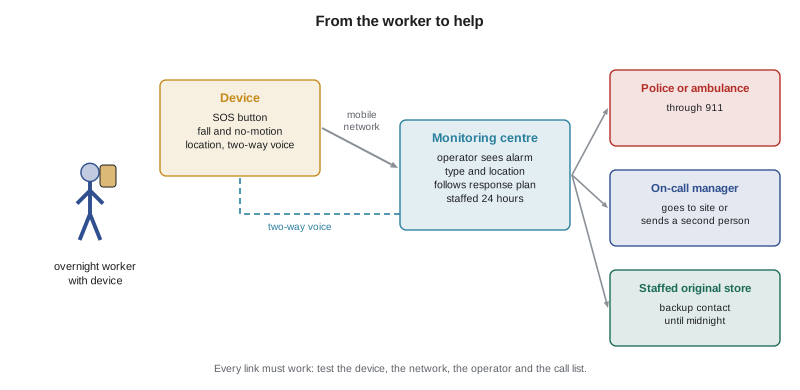
- Dedicated lone worker devices: small units worn on a lanyard or belt with an SOS button, two-way voice, location and sensors, connected over the mobile network to a monitoring centre.
- Satellite devices: for drivers and workers outside mobile coverage, such as on rural highways. Mike's hauler uses them for night deliveries to remote sites.
Some alarms are silent: the robber does not know help has been called. Others sound locally to scare someone off or to bring help from nearby. For robbery, silent alarms are generally preferred, because a loud alarm can make a nervous robber more dangerous. For a fall or a medical emergency, a device that lets the worker talk to the monitoring centre is better than a silent one, because the operator can find out what is wrong and reassure the worker.
Automatic alerts
The biggest advance in lone worker devices is the alarm that does not need the worker to press anything. Common automatic features include:
- Fall detection: an accelerometer senses a sudden drop followed by stillness and raises an alarm after a short warning that the worker can cancel.
- No-motion or man-down alert: the device raises an alarm if it does not move for a set time, such as 2 minutes, after a warning.
- Timed check-in: the worker starts a timer before a task, for example 25 minutes for the fuel delivery; if they do not stop it in time, the device raises an alarm.
- Missed check-in: the app or monitoring centre raises an alarm if a scheduled check-in does not arrive.
Automatic alerts matter most for the hazards that leave the worker unable to call: a collapse, a head injury, a bad fall. Lesson 3 found that the medical emergency was one of the highest residual risks at the new site. Only an automatic alert brings help quickly when the worker cannot help themselves.
Automatic features also cause false alarms: a phone dropped on the floor, a device left on a shelf while the worker mops, a worker sitting still on a break. Each false alarm has a cost, and too many make workers switch features off. Good systems give a clear warning before raising the alarm, such as a vibration and a beep, and let the worker cancel it with one action. Settings should be tuned to the work: a no-motion time of 2 minutes may be too short for a cashier who stands still at the till, and 10 minutes may be too long for someone alone in the lot.
How monitoring works
When a device raises an alarm, it goes to whoever is monitoring it. There are three common set-ups:
- Employer monitoring: the alarm goes to a manager's phone or to another staffed store. Cheap, but it fails if that person is asleep, busy or out of signal.
- Alarm company monitoring: the alarm goes to the same central station that monitors the store's burglar and fire alarms. Operators follow a written response plan, usually calling police for a panic alarm.
- Lone worker monitoring centre: the alarm goes to a centre that specializes in lone workers, where operators see the worker's location, can listen in or talk through the device, and follow an escalation plan written with the employer.
Whatever the set-up, the employer must write a response plan with the monitor. It should say who the operator calls first, when to call police, ambulance or fire, who on the employer's side to tell, and what information to pass on: the site address, the entrances, where the worker is likely to be, and any known risks. A monitoring centre that receives an alarm from Northfield's new site but does not know whether it is a robbery or a fall, or which door police should use, loses minutes that may matter.
Time to help
The point of a device is to shorten the time between something going wrong and help arriving. That time has several parts: how long until the alarm is raised, how long the monitor takes to act, and how long the responder takes to travel. The program below compares four arrangements for a worker who collapses at a random moment during the late-night band at the new site, using illustrative times.
# Compare average time to help for a worker who collapses and cannot call.
# Times in minutes, illustrative. A collapse happens at a random moment.
TRAVEL = 14          # ambulance travel time to the highway site
systems = {
    "hourly check-ins only":               {"interval": 60, "grace": 10, "auto": None, "act": 6},
    "30-min check-ins only":               {"interval": 30, "grace": 10, "auto": None, "act": 6},
    "device, no-motion alert at 2 min":    {"interval": None, "grace": 0, "auto": 2, "act": 2},
    "device plus 30-min check-ins":        {"interval": 30, "grace": 10, "auto": 2, "act": 2},
}
for name, s in systems.items():
    if s["auto"] is not None:
        detect = s["auto"] + 0.5          # alert time plus the cancel warning
    else:
        detect = s["interval"] / 2 + s["grace"]   # on average, half an interval passes before the next check-in is due
    total = detect + s["act"] + TRAVEL
print(f"{name:36} alarm after {detect:5.1f} help after {total:5.1f} min")hourly check-ins only alarm after 40.0 help after 60.0 min 30-min check-ins only alarm after 25.0 help after 45.0 min device, no-motion alert at 2 min alarm after 2.5 help after 18.5 min device plus 30-min check-ins alarm after 2.5 help after 18.5 min
With hourly check-ins only, a worker who collapses waits on average about an hour for help, and as long as 90 minutes in the worst case, when the collapse comes just after a check-in. Halving the interval helps, but the average is still about 45 minutes. A device with an automatic alert cuts the average to under 20 minutes, most of which is the ambulance's travel time, which no device can change. For a cardiac arrest, survival falls quickly with every minute without help, so the difference between an hour and under 20 minutes is the difference that matters. Check-ins still have a place alongside the device: they catch problems the device cannot see, such as a device left on a shelf, and they keep the worker in touch with someone through the night.
Choosing a device
When Northfield chose a device for the new site, Leah and the workers tried three on trial shifts. They found these questions useful:
- Does it cover the hazards from the assessment, including falls and collapse, or only a panic button?
- Can it be used without being seen, for example a button that can be pressed through a pocket?
- Does it have two-way voice, so that the operator can talk to the worker?
- Does it work everywhere on the site: in the cooler, the back office, the car wash bay and the far end of the lot? Mobile coverage inside walk-in coolers is often poor.
- How long does the battery last, and how does the worker know it is low?
- Who monitors it, and is the monitor staffed around the clock with a written response plan?
- Is it comfortable enough that workers will actually wear it for a whole shift?
- What does it record, who can see the location data, and when?
The workers' views decided it. One device had every feature but was heavy and caught on the counter edge; the cashiers took it off within an hour. The one they chose was smaller, clipped to a lanyard, had a button that was easy to find by touch, and vibrated clearly before a no-motion alarm.
Privacy and trust
Lone worker devices and apps can track where a worker is. That is useful in an emergency, but it can feel like surveillance. Workers are more likely to wear a device if they know exactly what it records and why. Good practice is to collect location only during working hours, only for safety, and to let the monitor see it only when an alarm is raised, not as a running map of the worker's movements. Write this down and tell the workers before the device is introduced. Privacy law in each province and state may also set rules for what an employer can collect and how long it can keep it.
Testing and looking after devices
A device that is flat, switched off or left in a locker protects no one. Build simple checks into every shift:
- At the start of each shift, the worker checks the battery, switches the device on, sends a test alarm or a test check-in, and waits for the monitor to confirm it.
- Charging: keep chargers at the store, and charge devices between shifts, not during them.
- Coverage: test from every part of the site at least once, and again after any change to the building or the mobile network.
- Regular tests of the whole chain: at least monthly, send a planned alarm and check that the monitor responds as the plan says, including calling the right people.
- Records: log each test, each real alarm and each false alarm, and review them with the workers.
When a device fails, the worker needs a fallback: the fixed panic buttons, the store phone and the check-in procedure. A worker should never be left alone with no working means of calling for help. If the device fails at the start of a shift and cannot be replaced, the procedure should say what happens instead, such as shorter check-in intervals by phone or a second worker.
For supervisors: making sure devices are worn
Check that devices are worn, not just issued. Look at the start-of-shift test records, glance at the device when you visit, and ask workers what gets in the way of wearing it. If workers take devices off, find out why. The answer is usually comfort, false alarms or a feeling of being watched, and each of those can be fixed. Never use location data from a safety device to discipline a worker for routine things like the length of a break; that is the fastest way to make workers leave the device in a drawer.
Worked problem
The device in the cooler
During the trial, the overnight worker at the new site notices that when she is inside the walk-in cooler restocking, the device shows no signal. She spends about 15 minutes in the cooler twice a night. What should Northfield do?
Show solution
- The cooler is a place where the worker could fall or be trapped, and the device cannot raise an alarm from it. That is a gap in the system.
- Short-term: make the cooler an event check-in, with a timed alarm started before going in, so that the device raises an alarm outside if she does not come out and stop it. Check that the cooler door opens from the inside and has a light switch inside.
- Longer-term: ask the device supplier about a signal booster, add a wired panic button inside the cooler, and move most cooler restocking to the day shift.
Answer: Treat the cooler as a gap: use a timed alarm before entering, check the inside release, add a fixed button or signal booster, and move restocking to staffed hours.
Common mistakes
MistakeRelying only on a panic button under the counter.
InsteadUse a wearable device that goes wherever the worker goes.
MistakeBuying a device without a monitoring plan.
InsteadWrite a response plan with a monitor staffed around the clock.
MistakeChoosing the device with the most features.
InsteadChoose the one workers will actually wear, with the features the assessment needs.
MistakeAssuming the device works everywhere.
InsteadTest coverage in every part of the site, including coolers.
MistakeUsing location data to check up on breaks.
InsteadUse it only for safety, and say so in writing.
Summary and key terms
- Lone worker devices let a worker raise an alarm quickly and, with automatic alerts, even when they cannot press a button.
- Options include fixed panic buttons, pendants, apps, dedicated devices and satellite units.
- Fall detection, no-motion and timed alerts matter most for collapse and injury.
- A device is only as good as its monitoring and the written response plan behind it.
- Automatic alerts can cut the average time to help from about an hour to a few minutes plus travel.
- Choose devices with workers, protect their privacy, and test the device and the whole chain regularly.
- Personal emergency transmitter
- A device a worker carries to call for help, monitored by the employer or a designate.
- Fall detection
- A device feature that senses a fall and raises an alarm automatically.
- No-motion alert
- An alarm raised when the device has not moved for a set time.
- Timed check-in
- A timer the worker starts before a task, which raises an alarm if not stopped in time.
- Monitoring centre
- A staffed centre that receives alarms and follows a response plan.
- Response plan
- Written instructions telling the monitor what to do with each kind of alarm.
Practice problems
Work each problem on paper first, then reveal the answer to check.
Why is a fixed panic button under the counter not enough on its own?
Show answer
It only works if the worker can reach it, so it is no help in the lot, washroom, cooler or bin area.
Name three automatic alert features.
Show answer
Fall detection, no-motion alerts and timed check-ins (and missed check-in alarms).
Why are silent alarms generally preferred for robbery?
Show answer
A loud alarm can make a nervous robber more dangerous.
What should a response plan tell the monitoring centre?
Show answer
Who to call first, when to call 911, who to tell at the employer and site details such as address, entrances and risks.
Give three checks to build into the start of every shift.
Show answer
Check the battery, switch the device on and send a test alarm or check-in that the monitor confirms.
Why do workers sometimes stop wearing devices?
Show answer
Discomfort, false alarms or feeling watched.
Lesson quiz · 5 questions
Score 60% or more to complete this lesson.
Create a free account to save your progress, take quizzes and earn a certificate.