
GCP-211 · Lesson 2 of 12 · 19 min
Email authentication: SPF, DKIM and DMARC
▶ Video coming soon A video version of this lesson is on the way.
Teresa Okonjo, Birchline's information security manager, joins the second session with a printout. Last spring a customer received an email that looked like a Birchline order confirmation, with a link to "update your payment details". It was not from Birchline; someone had simply typed birchline.example into the From line of a message sent from their own server. "Nothing stopped them," Teresa says, "because we never told the world which servers are allowed to send our mail." This lesson covers the three standards that do that: SPF, DKIM and DMARC. Gmail checks all three on mail it receives, and since 2024 Google has required senders to use them, so Birchline needs them right before head office moves.
The problem: the From address is just text
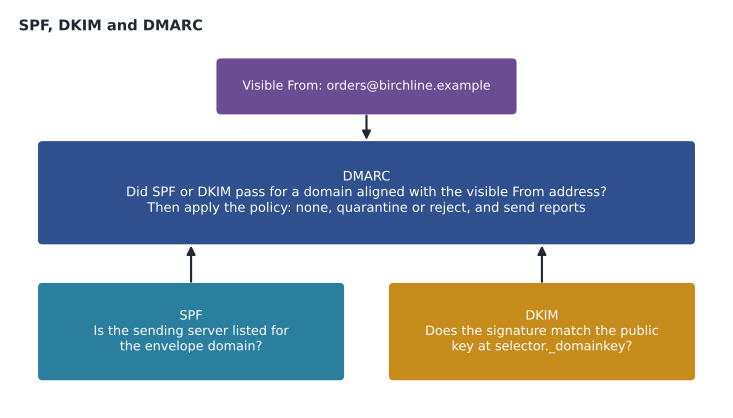
Email was designed without a way to prove who sent a message. The address a reader sees in the From line, the header From, is whatever the sending software writes there. There is also a second, hidden address used for bounces, the envelope sender (also called the return path or MAIL FROM). The three standards add proof in layers. SPF lets a domain list the servers allowed to send with its envelope sender. DKIM lets a domain sign messages so that receivers can check the signature against a public key in DNS. DMARC ties the two to the visible From address and tells receivers what to do when checks fail.
SPF: which servers may send
An SPF record is a TXT record at the domain that lists permitted senders. A receiving server takes the envelope sender's domain, looks up its SPF record and checks whether the connecting server's address is allowed. The record is a list of mechanisms read from left to right, ending with an all term that says what to do with everything else.
birchline.example. TXT "v=spf1 include:_spf.google.com include:spf.protection.outlook.com include:mail.shopmailer.example ip4:198.51.100.25 ~all"The include mechanism pulls in another domain's list, which is how Google, Microsoft and mailing services publish their ranges. ip4 and ip6 list addresses directly. The ending ~all (soft fail) says other servers are probably not authorized; -all (hard fail) says they definitely are not. Sofia prefers to end with ~all while the record is still changing and to rely on DMARC for enforcement, which is also Google's general guidance.
SPF has one strict limit that catches many organizations: evaluating a record may cause at most 10 DNS lookups. Each include, a, mx, exists and redirect term counts, and so do the lookups inside the records it includes. Over the limit, the check returns an error and SPF fails for every message. Birchline's record has four terms that look harmless, so Owen checks the real count with the lookup counts Teresa's team gathered from each provider's published record.
# Lookups each term needs, including the nested includes inside it.
# The counts for third-party includes are illustrative; check each provider's record.
terms = {
    "include:_spf.google.com": 1 + 3,
    "include:spf.protection.outlook.com": 1 + 1,
    "include:mail.shopmailer.example": 1 + 2,
    "ip4:198.51.100.25": 0,
}
LIMIT = 10
total = 0
for term, lookups in terms.items():
    total += lookups
    print(f"{term:40} {lookups} lookups (running total {total})")
print("Total:", total, "of", LIMIT, "->", "OK" if total <= LIMIT else "too many: SPF will fail")

# Adding the marketing team's newsletter service would add another include.
newsletter = 1 + 3
print("With the newsletter service:", total + newsletter, "->",
"OK" if total + newsletter <= LIMIT else "too many: SPF will fail")include:_spf.google.com 4 lookups (running total 4) include:spf.protection.outlook.com 2 lookups (running total 6) include:mail.shopmailer.example 3 lookups (running total 9) ip4:198.51.100.25 0 lookups (running total 9) Total: 9 of 10 -> OK With the newsletter service: 13 -> too many: SPF will fail
What this code does
The check adds up how many DNS lookups a receiving server would need to evaluate Birchline's SPF record, term by term, including the extra lookups hidden inside each provider's own record. It compares the total with the limit of ten that the SPF standard sets. It then adds the newsletter service the marketing team wants and shows that the record would go over the limit, which would make SPF fail for all of Birchline's mail.
The record uses 9 of the 10 allowed lookups, and the newsletter service the marketing team has asked for would push it to 13. Sofia's answer is to send newsletters from a subdomain, news.birchline.example, with its own SPF record that includes only the newsletter service. Subdomains each get their own SPF record and lookup budget, and the newsletter's reputation stays separate from everyday mail.
DKIM: a signature on each message
DKIM (DomainKeys Identified Mail) adds a digital signature to a header of each outgoing message. The sending system signs with a private key; receivers fetch the matching public key from DNS at a name made of a selector and the domain, and check that the signed parts of the message were not changed in transit. A valid signature proves that the message was sent by a system that holds the domain's key, and it survives forwarding better than SPF, which breaks when a forwarder sends the message from its own server.
In Workspace, Owen turns DKIM on under Apps, Google Workspace, Gmail, Authenticate email. For each domain he generates a key (2048-bit is the recommended length where the DNS host supports long TXT records), keeps the default selector google unless it clashes with an existing one, publishes the TXT record that the console shows, waits for DNS to update and then clicks Start authentication. Until that last click, Gmail does not sign with the new key, which is a common reason administrators think DKIM is on when it is not.
google._domainkey.birchline.example. TXT "v=DKIM1; k=rsa; p=MIIBIjANBgkqhkiG9w0BAQEFAAOCAQ8AMIIBCgKCAQEA..."Every system that sends mail as birchline.example needs its own DKIM setup: Exchange for the users still there, the e-commerce platform for order confirmations, the newsletter service for news.birchline.example. Each one has its own selector, so several keys can be published at once. Owen adds the domain alias birchlineoutfitters.example and the secondary domain trailheadrentals.example to his list as well; each domain that sends mail through Gmail needs its own key.
DMARC: tying it to the visible From
SPF and DKIM each prove something about a domain, but not necessarily the domain the reader sees. A spammer can send from a server that passes SPF for their own envelope domain while writing birchline.example in the From line. DMARC (Domain-based Message Authentication, Reporting and Conformance) closes that gap with alignment: a message passes DMARC only if SPF or DKIM passes for a domain that matches the header From domain. The domain owner publishes a DMARC record at _dmarc.domain that states a policy for messages that fail and where to send reports.
_dmarc.birchline.example. TXT "v=DMARC1; p=none; rua=mailto:dmarc-reports@birchline.example; adkim=r; aspf=r; pct=100"| Tag | Meaning | Birchline's value |
|---|---|---|
| p | Policy for failing mail: none (monitor), quarantine (spam folder) or reject | none at first |
| rua | Where receivers send daily aggregate reports | dmarc-reports@birchline.example, a group |
| adkim, aspf | Alignment mode: relaxed (r) allows subdomains, strict (s) requires an exact match | r |
| pct | How much failing mail the policy applies to, out of 100 | 100 |
| sp | Policy for subdomains if different from p | not set yet |
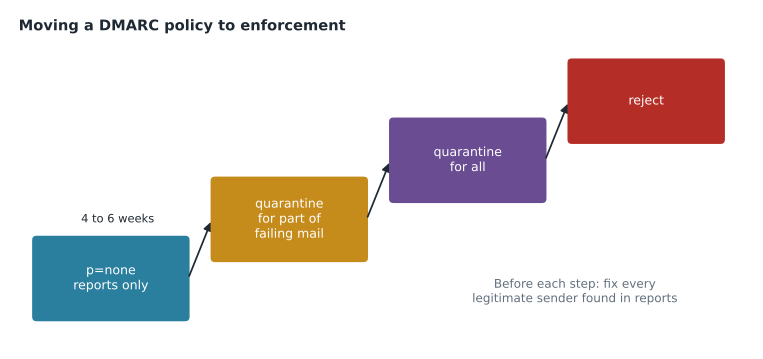
The reports are the reason to start with p=none. Each day, large receivers send XML summaries listing which servers sent mail claiming to be from birchline.example and whether each passed SPF, DKIM and alignment. Teresa's team will read them with a report service for a few weeks, find every legitimate sender they forgot (Sofia predicts the payroll provider and the old intranet's notification server), fix those, then move the policy step by step.
Google's sender requirements
Since February 2024, Gmail has applied sender requirements to mail sent to personal Gmail accounts, and Google stepped up enforcement in late 2025, with failing mail increasingly delayed or rejected. Every sender must authenticate with SPF or DKIM, have valid forward and reverse DNS for sending servers, use TLS and keep user-reported spam rates low. Bulk senders, defined as those who have sent about 5,000 or more messages a day to personal Gmail accounts, must also have SPF and DKIM and a DMARC record (p=none is enough), pass DMARC alignment, keep the spam rate below 0.3 reported messages in every 100 delivered (Google suggests staying under 0.1) and offer one-click unsubscribe in marketing messages, honouring requests within two days. Once a domain is treated as a bulk sender, it stays one.
Birchline's newsletter goes to about 220,000 customers, many of them on personal Gmail accounts, so news.birchline.example is clearly a bulk sender. The everyday staff mail is not, but the same records protect it. Teresa adds the list to the head-office readiness checklist that Sofia keeps for February.
| Requirement | All senders | Bulk senders |
|---|---|---|
| SPF or DKIM | At least one | Both |
| DMARC record | Recommended | Required (policy may be none) |
| DMARC alignment | Recommended | Required |
| Reverse DNS and TLS | Required | Required |
| Spam rate | Keep low | Below 0.3 in every 100 messages |
| One-click unsubscribe | Not required | Required for marketing mail |
Forwarding, mailing lists and subdomains
Authentication has edge cases that show up in DMARC reports and help desk tickets. When a message is forwarded automatically, for example from a former employee's personal address to a new one, the forwarding server sends it from its own address, so SPF for the original domain fails. DKIM usually survives, because the signed content is unchanged, which is why Sofia insists on DKIM for every sender rather than relying on SPF. Mailing lists that add a footer or change the subject break the DKIM signature as well; many list services now rewrite the From address to their own domain or add an ARC header (Authenticated Received Chain) that records the original results, and Gmail takes ARC into account when it trusts the forwarder.
Subdomains inherit the parent domain's DMARC policy unless they publish their own record or the parent sets an sp tag. That is useful for protection, because attackers often invent subdomains such as billing.birchline.example, and with a reject policy on the parent those fail too. It also means that when Birchline eventually moves to p=reject, any forgotten system sending from an unregistered subdomain will stop being delivered, so the reports must cover subdomain traffic before each step. Teresa plans to set sp=reject early for subdomains that never send mail, since no legitimate message should ever carry them.
Checking the result
Owen tests each change by sending a message from his pilot account to an external address and opening Show original in the recipient's Gmail, which reports SPF, DKIM and DMARC results and shows the full headers. The Admin console's email log search and the Google Admin Toolbox's tools for checking MX and TXT records and analysing message headers help with the same job from the administrator's side.
Common mistakes
MistakeAdding every new mailing service as another SPF include.
InsteadCount the lookups; move bulk mail to a subdomain with its own record when the limit is near.
MistakeGenerating a DKIM key and forgetting to click Start authentication.
InsteadAfter publishing the TXT record and waiting for DNS, start authentication in the console.
MistakePublishing p=reject on the first day.
InsteadStart with p=none and reports, fix every legitimate sender, then tighten in steps.
MistakeAssuming a message passes DMARC because SPF passed.
InsteadSPF must pass for a domain aligned with the visible From, or DKIM must pass for an aligned domain.
Worked problem
Why a payroll notice failed DMARC
Three weeks into monitoring, the aggregate reports show 1,240 messages a week with a From of payroll@birchline.example sent from a payroll provider's servers. SPF passes for the provider's own envelope domain, payrollhost.example, and there is no DKIM signature. Why do they fail DMARC, and what fixes it?
Show solution
- DMARC requires SPF or DKIM to pass for a domain aligned with the header From, birchline.example.
- SPF passes, but for payrollhost.example, which is not aligned with birchline.example, so it does not count for DMARC.
- There is no DKIM signature, so DKIM cannot provide alignment either. The messages fail DMARC.
- The best fix is to set up DKIM signing at the provider with a birchline.example selector, which gives aligned DKIM and survives forwarding.
- Alternatively, the provider may support a custom envelope domain such as bounce.birchline.example, included in that subdomain's SPF record, which gives aligned SPF under relaxed alignment.
Answer: They fail because neither check passes for an aligned domain; aligned DKIM at the provider fixes it before the policy moves beyond none.
Summary and key terms
- The visible From address is only text; SPF, DKIM and DMARC add proof.
- SPF lists permitted sending servers for the envelope domain and allows at most 10 DNS lookups.
- DKIM signs messages with a private key whose public key sits in DNS at a selector; in Workspace, publish the key and then start authentication.
- DMARC requires SPF or DKIM to pass for a domain aligned with the header From, sets a policy of none, quarantine or reject, and sends reports.
- Start with p=none, fix senders found in reports, then tighten.
- Google requires authentication from all senders, and bulk senders of about 5,000 or more messages a day to Gmail accounts must also have DMARC, alignment, low spam rates and one-click unsubscribe.
- SPF
- A DNS record listing servers allowed to send mail for a domain's envelope sender.
- DKIM
- A digital signature on messages, checked against a public key published in DNS.
- Selector
- The label that tells receivers which DKIM public key to fetch.
- DMARC
- A policy that requires aligned SPF or DKIM and says what to do with failing mail.
- Alignment
- A match between the domain that passed SPF or DKIM and the visible From domain.
- Aggregate report
- A daily summary from receivers of mail claiming to be from a domain.
- Envelope sender
- The hidden return address used for bounces, checked by SPF.
- Bulk sender
- In Google's terms, a sender of about 5,000 or more messages a day to personal Gmail accounts.
Practice problems
Work each problem on paper first, then reveal the answer to check.
Why does Sofia move newsletters to news.birchline.example?
Show answer
The main SPF record would exceed 10 lookups, and a subdomain gets its own record and keeps bulk mail reputation separate.
What is the last step of turning on DKIM in the Admin console?
Show answer
Clicking Start authentication after the TXT record has been published and DNS has updated.
What does p=none do?
Show answer
It asks receivers to take no special action on failing mail but still send reports, so the owner can find legitimate senders.
Lesson quiz · 5 questions
Score 60% or more to complete this lesson.
Create a free account to save your progress, take quizzes and earn a certificate.