
GCP-211 · Lesson 10 of 12 · 19 min
Marketplace apps and API access
▶ Video coming soon A video version of this lesson is on the way.
When Teresa's team ran a report on the account in the week before the pilot, they found something nobody expected: in the Cloud Identity account that Birchline's Google Cloud administrators had used since 2025, people had already signed in to 23 outside apps with their Birchline Google accounts, from a diagramming tool to a calendar scheduling service. Each sign-in had asked for permission to read some Google data, and each person had clicked Allow. "Every one of those is a door," Teresa says. "Some are fine. We need to know which, and decide who holds the keys from now on." This lesson covers how third-party apps get access to Workspace data, the Google Workspace Marketplace, the API controls that decide which apps may connect, and service accounts with domain-wide delegation.
How apps get access: OAuth and scopes
Most apps that connect to Google data use OAuth. The app asks Google for permission on the user's behalf, listing scopes that describe what it wants: for example, read-only access to Calendar, the ability to send mail as the user, or full access to Drive. The user sees a consent screen, agrees, and the app receives a token it can use until it expires or is revoked. Some scopes are narrow and low-risk, such as seeing the user's basic profile for Sign in with Google. Others are broad, such as reading and deleting all of a user's mail, and Google labels many of them as sensitive or restricted scopes, which require extra review of the app by Google before it can be widely used.
| Scope example (described) | Risk | Why |
|---|---|---|
| Basic profile and email address (Sign in with Google) | Low | Identifies the user; no access to content |
| Read-only access to Calendar events | Medium | Reveals meetings and attendees |
| Read, compose and send email | High | Can read all mail and send as the user |
| See, edit, create and delete all Drive files | High | Full control of the user's files |
| Access to files the app creates or the user opens with it | Lower | Limited to specific files |
API controls
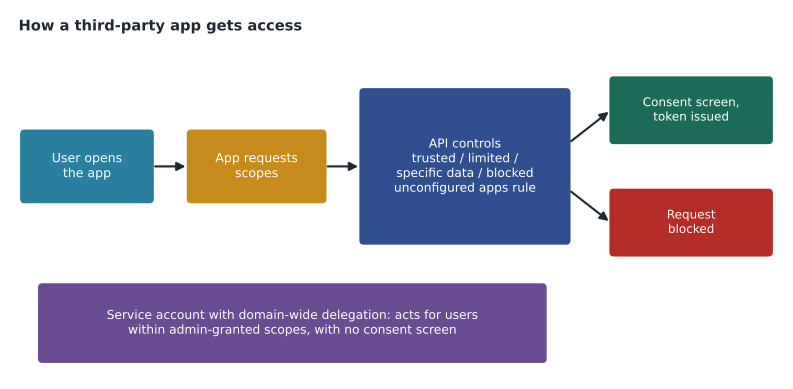
The API controls live in the Admin console under Security, Access and data control, API controls. They decide which apps may request access to which Google services for which users, before the user ever sees a consent screen.
Under App access control, administrators can see apps that users have already connected and configure an access level for each app, per OU or group where supported:
- Trusted: the app can request any scope, including restricted ones, and users can grant access.
- Limited (sometimes described as access to unrestricted Google services only): the app can use services that administrators have not marked as restricted.
- Specific Google data: the app can request only the scopes the administrator selects for it.
- Blocked: the app cannot request access to Google data from users in that OU or group.
Administrators can also mark individual Google services, such as Gmail or Drive, as restricted, so that only trusted apps may access them, and they choose a setting for unconfigured third-party apps: apps that nobody has reviewed yet. The options include allowing users to access any unconfigured app, allowing only apps that request basic sign-in information, or not allowing users to access unconfigured apps at all. Restricting unconfigured apps is the key decision: with it, every new app a user tries must be reviewed before it can read data.
There is a separate setting for users under 18 in education accounts, which does not apply to Birchline, and a setting that controls whether users may authorize Google's own apps, which Birchline leaves on.
Reviewing the 23 apps
Teresa's team exports the list of connected apps, with the number of users and the scopes each requested, and Owen sorts them by risk before the review meeting. He scores each app by its broadest scope and by how many people use it, so that the meeting starts with the apps that matter most.
risk = {"profile": 1, "calendar.readonly": 2, "drive.file": 2, "drive": 3, "gmail.modify": 3, "gmail.send": 3}
apps = [   # (app, users, scopes requested) - an excerpt of the 23, with simplified scope names
    ("DiagramDesk", 41, ["profile", "drive.file"]),
    ("MeetSlot", 12, ["profile", "calendar.readonly"]),
    ("MailMerger", 6, ["profile", "gmail.send", "gmail.modify", "drive"]),
    ("QuickSignin Survey", 3, ["profile"]),
    ("FileShifter", 2, ["drive"]),
]
rows = []
for name, users, scopes in apps:
    top = max(risk[s] for s in scopes)
    rows.append((top, users, name, scopes))
for top, users, name, scopes in sorted(rows, reverse=True):
    level = {1: "low", 2: "medium", 3: "high"}[top]
print(f"{name:20} users {users:3} highest risk {level:6} scopes: {', '.join(scopes)}")MailMerger users 6 highest risk high scopes: profile, gmail.send, gmail.modify, drive FileShifter users 2 highest risk high scopes: drive DiagramDesk users 41 highest risk medium scopes: profile, drive.file MeetSlot users 12 highest risk medium scopes: profile, calendar.readonly QuickSignin Survey users 3 highest risk low scopes: profile
What this code does
The review sheet gives each kind of permission a risk score from one to three, then looks at an excerpt of the apps found in Birchline's account with how many people use each and which permissions it asked for. For every app it takes the riskiest permission requested, then sorts the apps so the riskiest and most widely used come first. The output gives the review meeting its agenda: the mail tool with broad mail and Drive access tops the list, and the sign-in-only survey tool comes last.
The meeting reaches quick decisions. MailMerger, which can read and send all mail for six people, is blocked until Marketing explains its use; they confirm it was a one-time experiment. FileShifter, with full Drive access for two people, is blocked too. DiagramDesk asks only for files the user opens with it and is widely used, so it becomes trusted for head office after a check of the vendor's security documentation. MeetSlot gets specific Google data with read-only Calendar. The survey tool, which only signs users in, can stay under the unconfigured apps rule. Then the unconfigured apps setting changes to allow only apps that request basic sign-in information, so the next new app with broader scopes needs a request first.
Blocking an app or changing its access does not delete what it already copied, so the review also includes revoking existing tokens. Administrators can see and revoke a user's tokens from the user's security settings in the console, and the OAuth log events show which apps were granted access and when.
The Google Workspace Marketplace
The Google Workspace Marketplace lists apps that integrate with Workspace, including add-ons that appear inside Gmail, Docs, Sheets and Calendar. Administrators control it under Apps, Google Workspace Marketplace apps.
- Settings decide whether users can install any app, only apps on an allowlist, or no apps at all.
- Allowlisting an app lets users install it themselves if they want it.
- Installing for users (sometimes called domain install) puts an app in front of users in chosen OUs or groups, with the administrator granting its permissions once for everyone.
Marketplace settings and API controls work together. An add-on installed from the Marketplace still requests scopes, and API controls still apply; trusting an app in API controls does not install it, and allowlisting it in the Marketplace does not trust it. Birchline will allow users to install only allowlisted apps, with a short request form for new ones, and will domain-install the two add-ons every head office user needs: the e-signature add-on Legal already uses and the expense receipt add-on Finance chose.
Service accounts and domain-wide delegation
Some integrations do not act for one signed-in user but for many: a scheduling system that writes every store employee's shifts to their calendars, for example, or the HR system that updates user records. These use a service account in Google Cloud, and an administrator grants it domain-wide delegation: permission to act as any user in the account for specific scopes, without a consent screen.
Client ID: 104826519305552174431
Scopes:
  https://www.googleapis.com/auth/calendar.events
Domain-wide delegation is powerful: the service account can act as any user, including administrators, within the scopes granted. Google's guidance is to grant the narrowest scopes possible, keep the service account's keys protected (or avoid keys entirely where the integration supports it), restrict who can manage the Google Cloud project that owns it and review delegations regularly. The scheduling integration gets one scope, calendar events, and nothing else. When the vendor asked for full Gmail access "for notifications", Owen refused; notifications can be sent from the vendor's own mail service, authenticated as described in lesson 2.
| Need | Mechanism | Control |
|---|---|---|
| A person uses a third-party app with their data | OAuth consent | API controls: app access and unconfigured apps |
| Add-ons inside Gmail and Docs | Marketplace install | Marketplace settings and allowlist, plus API controls |
| A system acts for many users | Service account with domain-wide delegation | Admin-granted scopes; Google Cloud project access |
| Staff scripts automating their own work | Apps Script with OAuth | API controls treat scripts as apps |
Administrators' own tools
Administrators also use APIs. The Admin SDK (Directory, Reports and other APIs) lets scripts create users, change groups and pull audit data, and command-line tools built on it are popular with Workspace administrators for bulk changes that the console makes slow. Owen plans to use a small set of scripts for reports and bulk updates. They run under a service account or his own admin account in a Google Cloud project that only the IT team can manage, with the Admin SDK APIs enabled for that project and only the scopes the scripts need. Teresa adds one rule: administrators' tools follow the same review as users' apps, because a compromised admin script is more dangerous than a compromised user app.
The integration register
Every approved integration gets a line in Birchline's integration register, a Sheet in the IT shared drive: the app or service account, the business owner, the access level or delegated scopes, the OUs or groups it applies to, the date of approval and the date of the next review. The register is the answer to the question auditors will ask: who decided that this outside system could read our data, and when was it last checked? Each quarter, Owen compares the register with the connected-apps report in the console and the domain-wide delegation list. Anything in the console that is not in the register is investigated; anything in the register that nobody uses any more is removed, its tokens revoked and its delegation deleted.
The first quarterly review is planned for March 2027, after head office moves. Sofia expects the list of connected apps to grow quickly once a thousand people have accounts, which is exactly why the unconfigured apps rule has to be in place before February rather than after.
Common mistakes
MistakeLeaving unconfigured third-party apps allowed for all scopes.
InsteadAllow only basic sign-in for unconfigured apps, and review requests.
MistakeBlocking an app and assuming its copied data is gone.
InsteadRevoke tokens and ask the vendor about deletion; blocking stops future access.
MistakeTrusting an app in API controls and thinking it is now installed.
InsteadMarketplace installation and API trust are separate decisions.
MistakeGranting domain-wide delegation with broad scopes to save time.
InsteadGrant the narrowest scopes and review delegations regularly.
Worked problem
Approving the scheduling integration
Operations wants shifts from Birchline's scheduling system to appear in store staff's calendars. The vendor offers either a user-by-user OAuth connection or a service account. What should Owen choose and configure?
Show solution
- A user-by-user connection would need 800 store staff to consent individually, and new hires would be missed, so a service account suits the need better.
- The vendor's service account lives in a Google Cloud project; Owen asks for it to be created in Birchline's own project bl-shared-svc, so Birchline controls its keys and access.
- In the Admin console's domain-wide delegation settings, Owen adds the service account's client ID with only the calendar events scope.
- He tests in the pilot with three test accounts, checks the Calendar audit events to see the integration's writes, then enables it for /Stores.
- He records the delegation, its scope and its owner in the integration register and adds it to the quarterly review.
Answer: A service account in Birchline's project with domain-wide delegation for calendar events only, tested in the pilot and recorded for review.
Summary and key terms
- Apps get access to Google data through OAuth, requesting scopes that users consent to; broad scopes are higher risk.
- API controls decide which apps can request access: trusted, limited, specific Google data or blocked, per OU or group, plus restricted Google services and a setting for unconfigured apps.
- Allowing only basic sign-in for unconfigured apps forces a review of new apps.
- Blocking does not delete copied data; revoke tokens.
- The Workspace Marketplace can be open, allowlisted or closed, and administrators can install apps for users; installation and API trust are separate.
- Service accounts with domain-wide delegation act for many users; grant narrow scopes, protect keys and review delegations.
- OAuth
- The standard by which an app gets a user's permission to access their data.
- Scope
- A description of the data and actions an app requests.
- Token
- The credential an app receives after consent, valid until it expires or is revoked.
- API controls
- Admin console settings that decide which apps can access which Google services.
- Unconfigured third-party app
- An app that administrators have not yet given an access level.
- Marketplace allowlist
- Apps that users may install themselves from the Google Workspace Marketplace.
- Service account
- A Google Cloud identity used by a system rather than a person.
- Domain-wide delegation
- Permission for a service account to act as users for specific scopes.
Practice problems
Work each problem on paper first, then reveal the answer to check.
Why does Owen sort the 23 apps by their broadest scope and number of users?
Show answer
So the review starts with the apps that could do the most harm to the most people.
What changes when unconfigured apps are limited to basic sign-in?
Show answer
New apps that request more than sign-in information must be reviewed and configured before users can grant them access.
Why did Owen refuse the vendor's request for full Gmail access?
Show answer
The integration only needs calendar events; notifications can come from the vendor's own authenticated mail service.
Lesson quiz · 5 questions
Score 60% or more to complete this lesson.
Create a free account to save your progress, take quizzes and earn a certificate.