
GCP-112 · Lesson 4 of 12 · 18 min
Human-in-the-loop and review workflows
▶ Video coming soon A video version of this lesson is on the way.
Three weeks into the product description pilot, Marisa, one of Birchline's two merchandising editors, raises a concern at the Friday check-in. The drafts are good, so good that she has caught herself skimming them. "Yesterday I nearly approved a tent listed as a four-person tent when the spec sheet says three," she says. "The writing was so smooth I stopped reading for facts." Farah is pleased she said it out loud. A review step that people skim is not a control; it is a rubber stamp. This lesson is about designing human involvement that actually catches problems, and about deciding where people need to be involved at all.
What human-in-the-loop means
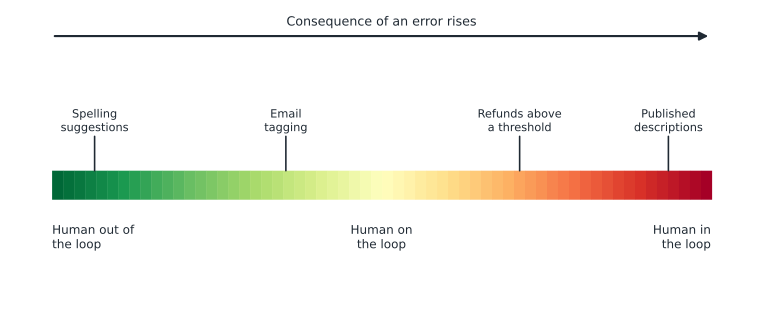
Human-in-the-loop (HITL) means that a person is part of the process at a point where they can check, correct, approve or override what an AI system produces before it has its effect. The term covers a range of designs, and leaders should be precise about which one they mean.
| Design | What the person does | Example |
|---|---|---|
| Human-in-the-loop | Approves or edits each output before it is used | An editor approves every product description before it is published |
| Human-on-the-loop | Monitors outputs and can intervene; most outputs go out without individual approval | A supervisor watches a dashboard of automated email tags and corrects misroutes |
| Human-in-command | Sets goals and limits and can stop the system; does not see individual outputs | Managers set what an agent may do and switch it off if it misbehaves |
| Human-out-of-the-loop | No person checks before effect | Spelling suggestions accepted by the user, or spam filtering |
The right design depends on the consequences of an error and how quickly it can be undone. A wrong product description harms trust and might cause returns, so Birchline puts a person in the loop for every one. A misrouted internal email costs a few minutes, so a person on the loop is enough. An automated refund, if Birchline ever allowed one, would need firm limits set by people in command, and very likely a person in the loop for any amount above a small threshold.
Why review fails, and how to make it work
Marisa's near-miss has a name. Automation bias is the tendency to trust an automated system's output and to stop checking it carefully, especially when it is usually right. It grows with fluent, confident outputs and with time pressure. Research on automation in aviation and medicine has observed the effect for decades, and generative AI makes it stronger because the output reads as if a careful person wrote it. A review step that does not counter automation bias drifts towards approving everything.
Farah and the editors redesign the review so that it directs attention to where errors are likely, rather than asking reviewers to read for everything at once.
- Show the evidence beside the claim. The prompt from lesson 3 lists every factual claim in the draft. The review screen shows each claim next to the spec sheet line it came from, so checking is a comparison, not a hunt.
- Highlight the risky parts. Capacity, sizing, waterproof ratings, weights and safety claims are shown in bold with a tick box each. Those are where an error causes returns or harm.
- Make gaps visible. Any MISSING field blocks approval until an editor fills it from the supplier or removes the claim.
- Keep the volume humane. Editors review in batches of no more than 20 drafts, with a break, because attention falls with fatigue.
- Plant known errors occasionally. Once a week, the system inserts a test draft with a deliberate factual mistake. If it is approved, the team knows the review has slipped. Editors know this happens, which itself keeps them alert.
- Let reviewers reject easily. Rejecting a draft and writing from scratch must be as easy as approving, or people will approve to save clicks.
After the redesign, Marisa's catch rate on the planted errors goes from three in four to every one over the next month. More importantly, the conversation has changed: reviewers now see their role as checking facts, not polishing prose.
Review that scales: confidence, sampling and escalation
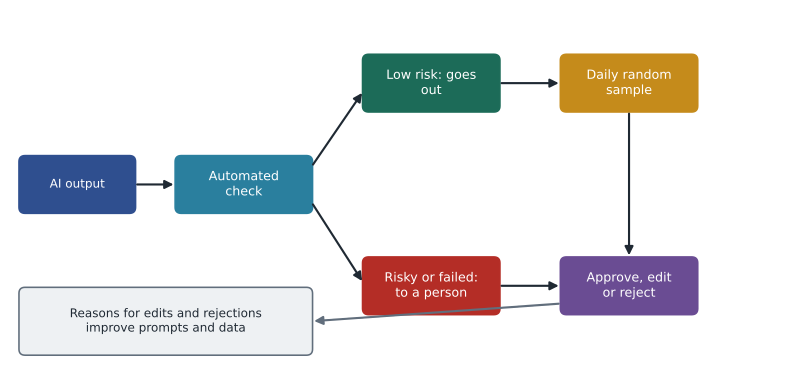
Not every use case can afford a person reading every output. The customer email assistant planned for 2027 might handle thousands of emails a week. For high-volume uses, organizations combine several review mechanisms.
| Mechanism | How it works | Where Birchline plans to use it |
|---|---|---|
| Confidence or rule thresholds | Outputs that meet clear rules or scores go through; the rest go to a person | Email replies about simple order status go to a quick check; anything about refunds goes to a full review |
| Sampling | A random share of automated outputs is checked by people each day | Supervisors check 30 tagged emails a day to measure accuracy |
| Escalation paths | The system hands off to a person when a topic, sentiment or request is sensitive | Complaints about injury or safety always go to a supervisor |
| User feedback | Users rate or flag outputs, and flags are reviewed | Staff using the policy assistant can mark an answer as wrong |
| Second-model checks | Another model or rule set checks the first output for specific problems | A check that every price mentioned matches the catalogue |
These mechanisms only work if someone looks at the results. Birchline's rule is that every sampling plan has a named owner and a weekly number: the share of sampled outputs that were correct. If it falls below the agreed level, the use case drops back to full review until the cause is found.
Measuring review quality
Review creates data that tells the team how good the AI system is. Two simple measures from classification are useful for leaders. Suppose an automated check flags outputs it thinks are wrong. Precision asks: of the outputs it flagged, how many really were wrong? Recall asks: of the outputs that really were wrong, how many did it flag? A check with low precision wastes reviewers' time on false alarms; a check with low recall lets errors through.
# One week of sampled outputs from an automated fact check.
# Each pair: (check flagged it as wrong?, reviewer found it really wrong?)
results = [(True, True)] * 18 + [(True, False)] * 6 + [(False, True)] * 4 + [(False, False)] * 172
tp = sum(1 for f, w in results if f and w)
fp = sum(1 for f, w in results if f and not w)
fn = sum(1 for f, w in results if not f and w)
precision = tp / (tp + fp)
recall = tp / (tp + fn)
print(f"Sampled outputs: {len(results)}")
print(f"Flagged: {tp + fp}, really wrong: {tp + fn}")
print(f"Precision: {precision:.2f} Recall: {recall:.2f}")Sampled outputs: 200 Flagged: 24, really wrong: 22 Precision: 0.75 Recall: 0.82
What this code does
A week of 200 sampled outputs is sorted by whether the automatic fact check flagged each one and whether a reviewer found it really wrong. From those counts the program works out precision, how many flagged outputs were truly wrong, and recall, how many wrong outputs were caught. The results are 0.75 and 0.82.
In that week, the check caught 18 of the 22 real errors, a recall of about 0.82, and 18 of its 24 flags were real, a precision of 0.75. Four errors slipped past it, which is why Birchline still samples unflagged outputs too. Leaders do not need to calculate these daily, but they should ask for them, because a vendor demonstration that reports only overall accuracy can hide a check that misses most of the errors that matter.
Designing the reviewer's job
Review is work, and it is easier to sustain when it is designed as a real job rather than an afterthought. Birchline's editors agreed three working rules with Jules. Review time is scheduled in their calendars, not squeezed between other tasks. Reviewers rotate between drafting and reviewing during the week, which keeps their judgement fresh and stops review from feeling like proofreading a machine all day. And each month the team spends half an hour looking at the hardest cases together, which spreads knowledge about where the tool goes wrong and keeps everyone's standards aligned. These rules cost little, and they are a large part of why the catch rate stayed high after the novelty of the pilot wore off.
Worked problem
Recall of a check
A check flags 30 outputs, of which 24 really are wrong. Reviewers find 40 wrong outputs in total in the same batch. What is the check's recall?
Show solution
- Recall = real errors flagged ÷ all real errors.
- Real errors flagged = 24.
- All real errors = 40.
- Recall = 24 ÷ 40 = 0.6.
Answer: The recall is 0.6: the check caught 6 out of every 10 real errors.
Scoring outputs with a rubric
For outputs that are not simply right or wrong, such as the quality of a description or a summary, reviewers score against a rubric: a short list of criteria with defined levels. A rubric makes reviewers more consistent with each other and turns opinions into numbers that can be tracked.
rubric = {"accurate": 0.4, "complete": 0.2, "on_brand": 0.2, "readable": 0.2}
reviews = [
    {"accurate": 5, "complete": 4, "on_brand": 4, "readable": 5},
    {"accurate": 3, "complete": 4, "on_brand": 5, "readable": 5},
    {"accurate": 5, "complete": 5, "on_brand": 3, "readable": 4},
]
for i, r in enumerate(reviews, 1):
    total = sum(rubric[k] * v for k, v in r.items())
    flag = "  <- below 4 on accuracy" if r["accurate"] < 4 else ""
print(f"Draft {i}: {total:.1f} out of 5{flag}")Draft 1: 4.6 out of 5 Draft 2: 4.0 out of 5 <- below 4 on accuracy Draft 3: 4.4 out of 5
What this code does
A review rubric gives each quality a weight, with accuracy counting most. Each draft's scores are multiplied by the weights and added to give a total out of 5. Any draft scoring below 4 on accuracy is flagged for attention even if its total looks fine.
In this rubric, accuracy carries the most weight, and that any draft scoring below 4 on accuracy is flagged regardless of its total. A beautifully written description with a wrong capacity is still a failure. Designing the rubric this way keeps the team's priorities explicit.
Feedback loops: making review improve the system
Review is most valuable when it feeds back into the system. Every rejection and correction at Birchline is tagged with a reason: wrong fact, missing fact, off-brand, too long, or other. Each Friday, Jules and Farah look at the reasons. When wrong facts cluster around one supplier's spec sheets, the fix is to correct the data. When tone complaints cluster, the fix is a better example in the prompt. Over the first two months, the share of drafts needing major edits falls from about one in four to about one in ten, mostly because of these fixes rather than any change to the model.
This loop also guards against a quieter risk. If editors simply rewrote bad drafts without recording why, the team would never learn where the system fails, and the same mistakes would recur every week.
Who is accountable?
A person in the loop does not move accountability to the AI system. Birchline's policy, which lesson 9 places inside its governance framework, states that the person who approves an output is responsible for it, as they would be for work drafted by a junior colleague. That is fair only if the organization gives reviewers the time, tools and training to do the job well, which is why the redesigned review screen and batch limits matter. If reviewers are expected to approve 200 drafts an hour, the organization, not the reviewer, has designed in the failure.
Common mistakes
MistakeAdding a human approval step and assuming it controls risk.
InsteadDesign review to counter automation bias: show evidence, highlight risky claims, limit volume and test with planted errors.
MistakeUsing the same level of oversight for every use case.
InsteadMatch human involvement to the consequence of an error and how easily it can be undone.
MistakeReporting only overall accuracy for an automated check.
InsteadAsk for precision and recall, especially recall on the errors that matter.
MistakeLetting reviewers fix outputs without recording why.
InsteadTag every correction with a reason and use the reasons to improve prompts and data.
MistakeHolding reviewers accountable without giving them time and tools.
InsteadSet humane volumes and provide evidence-side-by-side review screens.
Summary and key terms
- Human-in-the-loop means a person can check, correct, approve or override AI output before it takes effect; human-on-the-loop and human-in-command designs give lighter oversight for lower-risk uses.
- Match oversight to the consequence and reversibility of errors.
- Automation bias makes people stop checking fluent outputs, so effective review shows evidence beside claims, highlights risky facts, makes gaps visible, limits volumes and tests with planted errors.
- At scale, combine thresholds, sampling, escalation, user feedback and automated checks, measured with precision and recall.
- Rubrics make quality scores consistent, and tagging corrections creates a feedback loop that improves prompts and data.
- The approver stays accountable, so the organization must give reviewers what they need.
- Human-in-the-loop
- A design where a person checks or approves each output before it takes effect.
- Human-on-the-loop
- A design where a person monitors outputs and can intervene, without approving each one.
- Automation bias
- The tendency to over-trust automated output and stop checking it.
- Escalation path
- A rule that hands sensitive or uncertain cases to a person.
- Sampling
- Checking a random subset of automated outputs to measure quality.
- Precision
- Of the items flagged, the share that were really positive.
- Recall
- Of the items that were really positive, the share that were flagged.
- Rubric
- A set of criteria and levels used to score outputs consistently.
- Feedback loop
- Using review results to improve prompts, data and the system.
Practice problems
Work each problem on paper first, then reveal the answer to check.
Why did Marisa nearly approve the wrong tent capacity?
Show answer
Automation bias: fluent, usually correct drafts made her skim instead of checking facts.
Which oversight design suits automated internal email tagging?
Show answer
Human-on-the-loop, with sampling and the ability to correct misroutes, because errors are cheap and easily undone.
A check has high precision but low recall. What is the practical risk?
Show answer
Most of its flags are real, but it misses many errors, so they reach users unless other sampling catches them.
Lesson quiz · 5 questions
Score 60% or more to complete this lesson.
Create a free account to save your progress, take quizzes and earn a certificate.