
GCP-102 · Lesson 9 of 12 · 19 min
Trust and security in the cloud
▶ Video coming soon A video version of this lesson is on the way.
In the spring of 2026 a competitor of Birchline's, a regional sporting goods chain, was hit by ransomware. Its tills stopped, its online shop went dark for nine days and customer records were posted online. Teresa Okonjo, Birchline's information security manager, keeps the news story pinned to her office wall. When the steering committee approved the cloud move, she asked one question before anything else: "Will we be safer or less safe in Google Cloud, and what do we have to do to make sure it is safer?" This lesson follows how Teresa and Owen answered it. It covers the threats organizations face, the core ideas of cloud security, how Google secures its own infrastructure, and the Google Cloud products that help a customer defend its side of the shared responsibility line.
The threats organizations face
The exam guide lists the threats a digital leader should recognize and their business impact. Ransomware encrypts or steals an organization's data and demands payment, stopping operations and exposing data. Malware and viruses are malicious software in general, used to steal data, spy or damage systems. Phishing tricks people into revealing passwords or running malicious attachments, and remains one of the most common ways attackers get in. A distributed denial-of-service (DDoS) attack floods a service with traffic from many sources so that real customers cannot reach it. Cryptomining abuse uses an organization's compromised computing resources to mine cryptocurrency, leaving it with the bill. Misconfiguration, such as a storage bucket accidentally made public or a firewall rule left too open, is one of the leading causes of cloud data exposures. Unsecured third-party systems, such as a supplier with weak security and access to Birchline's network, provide a back door. Physical damage from fire, flood or hardware failure can destroy systems. And a newer category, attacks on large language models, includes attempts to trick AI systems into ignoring their instructions, revealing confidential data or producing harmful output, often called prompt injection.
The business impact goes far beyond IT: lost sales while systems are down, the cost of recovery, regulatory penalties, legal claims, and lasting damage to customer trust. Teresa's competitor estimated its losses in the tens of millions, most of it from the nine days without sales and the months of rebuilding its reputation.
| Threat | Business impact | Example defence |
|---|---|---|
| Ransomware | Systems stopped, data stolen | Backups kept separate and tested, least privilege, threat detection |
| Phishing | Stolen passwords and access | Multi-factor authentication, security keys, staff training |
| DDoS | Shop unreachable during a sale | Cloud Armor and Google's global network absorbing traffic |
| Misconfiguration | Data exposed publicly | Secure defaults, policy guardrails, Security Command Center findings |
| Cryptomining | Unexpected large bills | Budget alerts, anomaly detection, strong access controls |
| Third-party weakness | A back door into the network | Limited, monitored partner access through managed APIs |
| LLM attacks | An AI assistant leaking data or misbehaving | Model Armor screening prompts and responses, grounding, limited permissions |
Core security ideas
Security professionals often start with the CIA triad. Confidentiality means only authorized people and systems can see data. Integrity means data is accurate and has not been changed without authorization. Availability means systems and data are there when legitimate users need them. Google's exam guide adds two business concerns alongside these: control, meaning the organization decides who can do what with its data and systems, and compliance, meaning it meets the laws, regulations and standards that apply to it, a topic lesson 10 develops.
Several more terms appear in the guide. Least privilege means giving each person and system only the access needed for their job, nothing more. Privileged access is the high-level access administrators hold, which attackers prize most and which therefore needs the tightest controls. Zero trust is a security model that trusts no user or device automatically because of where it sits on the network; every request is verified based on identity, device and context. Security by default means products ship with secure settings already on, rather than leaving customers to switch them on. Security posture is the overall strength of an organization's security at a point in time, and cyber resilience is its ability to keep operating and recover quickly when an attack succeeds. A firewall filters network traffic according to rules. Data loss prevention (DLP) finds and protects sensitive data such as card numbers or health information so it is not exposed or sent where it should not go.
Encryption
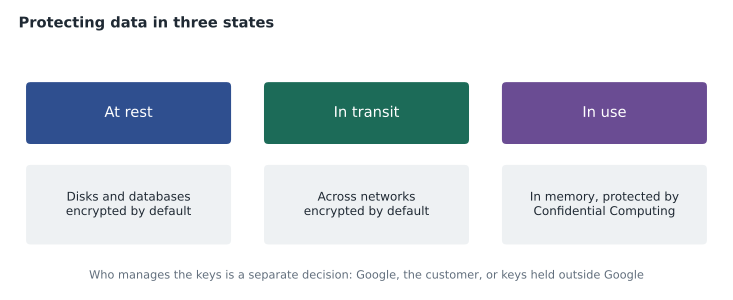
Encryption transforms readable data into an unreadable form that only someone with the right key can turn back, a process called decryption. Data can be protected in three states. Data at rest is stored on disks or in databases. Data in transit is moving across a network, for example between a customer's browser and the shop. Data in use is being processed in memory. Google Cloud encrypts customer data at rest by default and encrypts data in transit across its network. Protecting data in use is harder, because data normally has to be decrypted to be processed; Confidential Computing addresses this by keeping data encrypted in memory while it is processed, using special hardware.
Encryption is only as strong as the management of its keys. By default Google manages the keys for customers. Organizations with stricter requirements can manage their own keys in Google's key management service, or even hold keys outside Google entirely, so that data cannot be read without a key the customer controls. Birchline uses Google-managed keys for most data and customer-managed keys for its customer database, a decision driven by Teresa's preference for control rather than a legal requirement.
Authentication, authorization and auditing
Three steps control access. Authentication proves who someone is, usually with a password plus something more. Authorization decides what an authenticated person or system is allowed to do. Auditing records what they actually did, so that actions can be reviewed and investigated. Multi-factor authentication (MFA), which Google often calls 2-step verification (2SV), requires a second factor such as a code from an app or a physical security key in addition to a password, which stops most attacks based on stolen passwords. Identity and Access Management (IAM) is Google Cloud's system for authorization, and lesson 10 looks at it in detail.
Google's side: secure by design
Google describes its infrastructure as secure by design and protected through defence in depth: many independent layers of protection so that the failure of one does not expose data. The layers include physically secured data centres with strict access controls, custom-designed servers and networking hardware, a purpose-built chip in its servers that helps verify that machines boot with legitimate software, encryption of data at rest and in transit, a private global network, and large teams of security engineers monitoring for threats. Few organizations could build anything comparable for themselves, which is one reason many conclude that a well-configured cloud is safer than their own data centre.
The phrase that matters is well-configured. Google also describes its relationship with customers as shared fate: beyond its own side of the shared responsibility model, it provides secure defaults, blueprints and tools to help customers secure their side. The tools only help if they are used, and Teresa's plan puts them at the centre of Birchline's security operations.
Google as part of the security team
The exam guide frames several products as Google acting like part of the customer's security team. Google Threat Intelligence brings together what Google learns about attackers from its global visibility, the frontline incident response work of Mandiant, Google's security consulting arm, and VirusTotal, a widely used service for analysing suspicious files and links. It tells defenders who is attacking organizations like theirs and how. Security Command Center is Google Cloud's central place for security and risk: it finds misconfigurations, vulnerabilities and threats across an organization's Google Cloud resources and shows them in priority order. Google Security Operations (formerly known as Chronicle) is a security operations platform that collects security data at large scale, detects threats and helps analysts investigate and respond; Gemini built into it helps analysts search and summarize in plain language.
Other products protect specific layers. Cloud Armor defends web applications against DDoS attacks and common web attacks at the edge of Google's network. Firewalls and Virtual Private Cloud (VPC) networks isolate and filter traffic, and Cloud VPN and Cloud Interconnect connect networks privately, as lesson 8 described. Identity-Aware Proxy applies zero-trust access, letting staff reach internal applications based on identity and context rather than a VPN. Sensitive Data Protection discovers and masks sensitive data such as card numbers. Certificate Manager handles the certificates that encrypt web traffic. Cloud Logging records activity for audit and investigation.
| Product | What it does |
|---|---|
| Google Threat Intelligence | Knowledge of attackers from Google, Mandiant and VirusTotal |
| Security Command Center | Finds and prioritizes misconfigurations, vulnerabilities and threats |
| Google Security Operations | Collects security data, detects threats, supports investigation and response |
| Cloud Armor | DDoS and web attack protection for applications |
| Identity-Aware Proxy | Zero-trust access to applications based on identity and context |
| Sensitive Data Protection | Finds, classifies and masks sensitive data |
| Confidential Computing | Keeps data encrypted while it is being processed |
| Model Armor | Screens AI prompts and responses for attacks and harmful content |
Securing AI
AI systems add new things to protect. Google describes securing the AI stack in layers: the infrastructure the models run on, the data used to train and ground them, the models themselves, the platform used to build and deploy them, and the agents that act on their output. AI Protection is Google's set of capabilities in Security Command Center for discovering AI assets, assessing their risks and detecting threats against them. Model Armor screens the prompts sent to AI models and the responses they return, blocking attempts to manipulate the model, leaks of sensitive data and harmful content. Birchline's shopping assistant from lesson 5 will sit behind Model Armor, use only the product and stock data it needs, and have no permission to change orders, so that even a successful manipulation could do little harm.
# Ranking risks by likelihood and impact (each scored 1 to 5) to decide what to fix first.
risks = {"Public storage bucket by mistake": (4, 4), "Ransomware via phishing": (3, 5),
         "DDoS during holiday sale": (2, 4), "Prompt injection on shop assistant": (3, 3),
         "Warehouse fire": (1, 5)}
for name, (likely, impact) in sorted(risks.items(), key=lambda r: -r[1][0] * r[1][1]):
print(f"{likely * impact:2} {name}")16 Public storage bucket by mistake 15 Ransomware via phishing 9 Prompt injection on shop assistant 8 DDoS during holiday sale 5 Warehouse fire
What this code does
Each risk is given a likelihood score and an impact score from 1 to 5, and the two are multiplied to give a priority score. The risks are then sorted from highest to lowest score. A publicly exposed storage bucket and ransomware come out on top, so they should be addressed first.
A simple score like this is crude, but it forces a conversation about priorities. Teresa's top two, public buckets and ransomware, led directly to two of Birchline's first security controls: organization policies that prevent public buckets, and phishing-resistant security keys for every administrator.
Common mistakes
MistakeAssuming data in the cloud is safe because the provider is secure.
InsteadThe provider secures its infrastructure; the customer must configure access, data and resources correctly.
MistakeRelying on a network perimeter alone.
InsteadAdopt zero trust: verify every request based on identity, device and context.
MistakeTreating encryption as solved because it is on by default.
InsteadDecide who manages the keys, and consider Confidential Computing for sensitive data in use.
MistakeForgetting AI systems in the security plan.
InsteadProtect the data, models and agents, screen prompts with tools such as Model Armor, and limit what agents can do.
Cloud versus on-premises security
The exam guide asks you to compare security in the cloud with security on premises, and Teresa's comparison for the committee was balanced. On premises, Birchline controls everything and is responsible for everything: the locks on the server room door, the firewall, every patch, every backup and every alarm, staffed by a small team that cannot watch the systems around the clock. In the cloud, Google handles the physical, hardware and network layers at a scale and depth Birchline could never match, encryption is on by default, and specialist services find threats and misconfigurations automatically.
The cloud also changes the risks. Resources can be created in seconds by anyone with the right permissions, so mistakes can spread quickly. Everything is reachable through the provider's interfaces, so identity becomes the new perimeter: a stolen administrator credential is more dangerous than a broken door lock. And because it is easy to create resources, it is also easy to lose track of them. Teresa's conclusion was that Birchline would be safer in Google Cloud on one condition: that it invests in identity controls, guardrails that prevent dangerous configurations, and the skills to use the security tools it is paying for.
Worked problem
Protecting the holiday sale
Birchline's biggest sales weekend is approaching, and Teresa wants to reduce the risk that the online shop is taken offline or that customer data is exposed. Which controls should she prioritize?
Show solution
- A DDoS attack could make the shop unreachable, so place Cloud Armor in front of the shop.
- Misconfiguration is a leading cause of exposure, so review Security Command Center findings and fix high-priority ones first.
- Stolen administrator passwords would be disastrous, so require security keys for all administrators.
- If something does go wrong, Google Security Operations and Cloud Logging give the team what it needs to investigate quickly.
Answer: Cloud Armor for availability, Security Command Center for misconfigurations, strong MFA for privileged access, and logging and security operations for fast response.
Summary and key terms
- Key threats include ransomware, malware, phishing, DDoS, cryptomining, misconfiguration, unsecured third parties, physical damage and attacks on AI models.
- Security aims for confidentiality, integrity and availability, with control and compliance.
- Least privilege, zero trust, security by default, security posture and cyber resilience are core ideas.
- Encryption protects data at rest, in transit and in use; Google Cloud encrypts at rest and in transit by default.
- Authentication, authorization and auditing control access, and MFA stops most password attacks.
- Google secures its infrastructure by design with defence in depth and acts as part of the customer's security team through Google Threat Intelligence, Security Command Center and Google Security Operations.
- AI Protection and Model Armor help secure AI systems.
- CIA triad
- Confidentiality, integrity and availability.
- Least privilege
- Giving each user and system only the access it needs.
- Zero trust
- Verifying every request based on identity and context, trusting nothing by network location.
- Defence in depth
- Many independent layers of protection.
- Multi-factor authentication
- Requiring a second proof of identity beyond a password.
- Security Command Center
- Google Cloud's central service for finding and prioritizing security risks.
- Cloud Armor
- Protection for applications against DDoS and web attacks.
- Model Armor
- A service that screens AI prompts and responses.
Practice problems
Work each problem on paper first, then reveal the answer to check.
What are the three states of data that encryption can protect?
Show answer
At rest, in transit and in use.
Why is misconfiguration such an important cloud threat?
Show answer
Because a single wrong setting, such as a public bucket, can expose data, and it is the customer's responsibility.
What is the difference between authentication and authorization?
Show answer
Authentication proves who someone is; authorization decides what they may do.
Lesson quiz · 5 questions
Score 60% or more to complete this lesson.
Create a free account to save your progress, take quizzes and earn a certificate.