
GCP-102 · Lesson 8 of 12 · 18 min
Hybrid and multicloud with Google Cloud
▶ Video coming soon A video version of this lesson is on the way.
When Owen first heard "we are moving to Google Cloud", he imagined a single weekend when everything would switch over. The reality, as Farah explained, is that Birchline will live in several places at once for years, and some of it may never move. The point-of-sale terminals must stay in the stores. The warehouse scanner software is tied to equipment on the warehouse floor. A marketing analytics feed already runs in another provider's cloud, and the agency that manages it has no plans to change. And Teresa wants a second provider in mind for a few critical services in case one ever has a serious problem. This lesson explains why organizations deliberately choose hybrid and multicloud strategies, what makes them hard, and the Google Cloud products designed to manage applications and data across several environments.
Why organizations choose hybrid and multicloud
Lesson 2 defined the terms: a hybrid cloud combines on-premises or private infrastructure with a public cloud, and a multicloud approach uses more than one public cloud provider. Many organizations end up in both situations without planning it, through acquisitions, team preferences or software bought as a service. Increasingly, though, they choose these strategies on purpose, for reasons that show up repeatedly in exam scenarios.
| Reason | What it means | Birchline example |
|---|---|---|
| Gradual migration | Not everything can or should move at once | Migration waves over two years |
| Systems that must stay on site | Low latency to local equipment, or no cloud version exists | Store tills and warehouse scanners |
| Regulation and data residency | Some data must stay in a given place or under given control | Payment card data handling, customer data kept in Canada |
| Best-fit services | Using each provider's strongest products | BigQuery for analytics, another provider's marketing tools |
| Resilience | Reducing dependence on any single provider or site | A fallback plan for the order API |
| Avoiding lock-in | Keeping the freedom to move later | Open formats and portable containers |
| Existing investments | Using hardware and contracts that still have value | Recently bought store servers |
Latency is a reason that surprises many people. A store's tills must keep working even when the internet connection drops, and a warehouse sorter that waits a tenth of a second for each decision from a distant data centre slows the whole line. Workloads like these run close to the equipment, at the edge, while their data flows to the cloud for analysis. Data residency is another: Canadian privacy law and some provincial rules, including Quebec's Law 25, shape where certain personal information may be stored and who may access it, and some organizations need parts of their systems to run in facilities they control.
The challenges
Running across several environments brings real difficulties. Each environment has its own tools, consoles, security models and skills, so teams can end up learning several ways of doing the same thing. Security policies applied in one place may not be applied in another, and gaps between environments are where mistakes happen. Data copied between clouds costs money to move, takes time and can drift out of date. Costs are harder to see when bills come from several providers. And troubleshooting a problem that crosses environments, such as a slow checkout that involves Cloud Run, the old data centre and the payment provider, requires visibility across all of them.
The answer the exam expects is consistency: using common tools, open standards and a single way to manage policy and operations across environments, so that the organization has the benefits of choice without multiplying its work. Google Cloud's hybrid and multicloud products are built around that idea.
Connecting environments
Hybrid starts with connectivity. Cloud VPN connects an on-premises network to a Google Cloud network through an encrypted tunnel over the public internet. It is quick to set up and inexpensive, which suits smaller sites and early phases of a migration. Cloud Interconnect provides a private, high-bandwidth connection between an organization's network and Google's, either directly at a shared facility or through a service provider partner. It offers more capacity and more predictable performance than a VPN, which suits large data transfers and busy production links. Birchline will start with Cloud VPN from the old data centre and add an Interconnect connection through a partner before the heavy data migrations begin.
# How long does it take to move the 40 TB photo and file library over a network link?
# Real transfers rarely use a link fully; assume 70 out of every 100 units of capacity are usable.
library_tb = 40
bits = library_tb * 8 * 10**12
for name, gbps in [("1 Gbps VPN over the internet", 1), ("10 Gbps Interconnect", 10)]:
    seconds = bits / (gbps * 10**9 * 0.7)
print(f"{name:30} about {seconds / 86400:4.1f} days")1 Gbps VPN over the internet about 5.3 days 10 Gbps Interconnect about 0.5 days
What this code does
The size of the 40 TB library is turned into bits and divided by the usable speed of each network link, assuming only 70 of every 100 units of capacity can be used. The result is converted to days. A 1 Gbps internet link takes about 5.3 days, while a 10 Gbps Interconnect takes about half a day.
The difference between several days and less than one helped Dana approve the Interconnect connection. For one-off moves of very large datasets, Google also offers physical transfer appliances that are shipped to the customer, filled and returned, an option worth knowing exists even if Birchline does not need it.
GKE Enterprise: one way to run containers everywhere
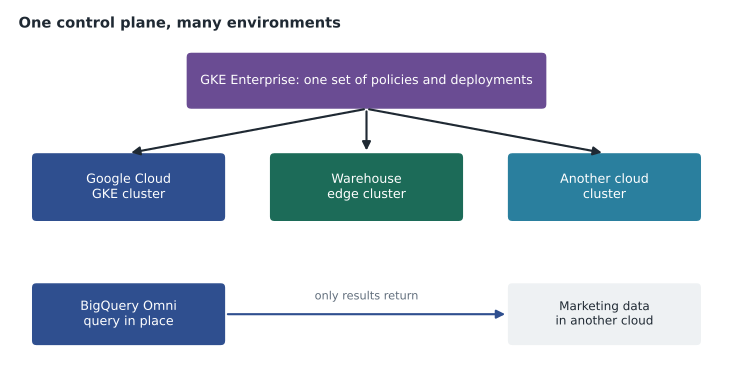
Containers are portable by design, and Kubernetes runs in every major cloud and on premises. That portability makes containers the natural foundation for hybrid and multicloud applications. GKE Enterprise, which earlier Google materials called Anthos, extends Google Kubernetes Engine into a platform for running and managing Kubernetes clusters across Google Cloud, on-premises data centres and other public clouds. It provides a single place to see all clusters, apply the same configuration and security policies to all of them, manage service-to-service traffic, and deploy applications in a consistent way wherever they run.
The exam describes this as a single control plane: one set of tools and policies rather than one per environment. For Birchline, it means the order API can run on GKE in Google Cloud while a small cluster in each warehouse runs the services that talk to the scanners, all managed by the same team with the same tools, the same security rules and the same deployment process. If Birchline ever needed to run the order API in another provider's cloud as a fallback, the same packaging and policies would apply there too.
Data and analytics across clouds
Applications are only half the story; data is often scattered too. BigQuery Omni lets analysts use BigQuery to query data stored in other public clouds without first copying it into Google Cloud. The query runs close to where the data lives, and only the results return. Ravi's team can join the marketing feed stored in the other provider's storage with Birchline's sales data in BigQuery, from one interface, without building and paying for a copying pipeline. Looker also works across sources, connecting to databases in many clouds and on premises and presenting governed metrics in one place.
For operational databases, AlloyDB Omni is a downloadable edition of AlloyDB that runs wherever the customer chooses: in its own data centre, at the edge, on a laptop for development or in other clouds. It gives teams the same PostgreSQL-compatible database in every environment, so an application can move between them without changing databases. Cloud SQL, which the exam guide also lists in this context, uses standard engines such as MySQL and PostgreSQL, so data and skills transfer easily to and from other environments that use the same engines.
| Product | What it does across environments |
|---|---|
| Cloud VPN | Encrypted connection over the internet between networks |
| Cloud Interconnect | Private, high-bandwidth connection to Google's network |
| GKE Enterprise | Runs and manages Kubernetes clusters across clouds and on premises with one set of policies |
| BigQuery Omni | Queries data stored in other clouds without copying it |
| AlloyDB Omni | The same PostgreSQL-compatible database on premises, at the edge or in other clouds |
| Cloud SQL | Standard database engines that are portable to other environments |
| Looker | Governed analytics over data in many clouds and databases |
Openness as a strategy
Behind these products sits a strategy the exam guide stresses: openness and interoperability. Kubernetes and the container formats are open standards; Apache Spark, PostgreSQL and MySQL are open source; open data formats can be read by many tools. Building on them keeps an organization's options open. Farah's guiding rule for Birchline's architects is that any service built from now on should use open standards where a good option exists, so that moving it later would be a project, not a rewrite. Openness does not mean avoiding managed services, which bring large benefits; it means choosing managed services that use open interfaces where the choice exists, and knowing which dependencies are deliberate.
Common mistakes
MistakeAssuming hybrid is only a temporary step on the way to full cloud.
InsteadSome workloads, such as store tills and warehouse systems, may stay on site permanently for good reasons.
MistakeManaging each environment with its own separate tools.
InsteadAim for one control plane and common policies, for example with GKE Enterprise.
MistakeCopying large datasets between clouds by default.
InsteadConsider querying data where it lives with BigQuery Omni, which avoids transfer time and cost.
MistakeUsing a VPN for every connection regardless of size.
InsteadUse Cloud Interconnect for large, steady or performance-sensitive traffic.
Deciding what runs where
With so many options, Birchline needed a simple way to decide where each workload belongs. Farah's placement guide asks four questions in order. First, must it be close to something physical? If a workload controls or reads local equipment and must keep working when the internet link fails, it runs at the edge, in the store or warehouse, managed centrally. Second, is there a rule about where its data lives or who controls the facility? If so, the workload goes where the rule allows, which for most of Birchline's customer data means Google Cloud regions in Canada. Third, is there a clearly better service elsewhere? If another provider's product is genuinely the best fit, and the team accepts the extra management work, multicloud is a reasonable choice for that workload. Fourth, if none of those apply, the default is Birchline's primary Google Cloud region, because a single main platform keeps skills, security and costs simpler.
The guide also asks the reverse question every year: does anything still running on premises or in a second cloud have a reason to stay? Reasons change. A vendor may release a cloud version of the warehouse software, or a contract may end. Hybrid and multicloud are healthiest when every exception has an owner and a reason that is reviewed, rather than when systems stay where they are simply because nobody has looked.
Keeping security and cost consistent
Teresa's biggest worry about running across several environments is inconsistency: a firewall rule applied in Google Cloud but forgotten in the warehouse cluster, or a staff member who leaves but keeps an account in the second cloud. Her rules are that identities come from one central directory for every environment, that policies are written once and applied everywhere through tools such as GKE Enterprise, and that logs from every environment flow to one place where the security team can see them. Lesson 9 returns to these ideas.
Dana's worry is cost visibility. Bills from several providers, each with its own units and discounts, are hard to compare. Birchline's answer is to bring every bill into BigQuery, tag every workload with the same labels for team and cost centre, and review spending across all environments in one monthly meeting, a practice lesson 11 calls FinOps.
Worked problem
Joining marketing and sales data
Ravi needs to combine the marketing campaign data stored in another provider's cloud with Birchline's sales data in BigQuery each week. The marketing data is large and changes daily. What should he propose?
Show solution
- Copying the data every day would take time, cost transfer fees and risk using stale data.
- BigQuery Omni can query the data where it lives in the other cloud and return only the results.
- Looker can then present the combined campaign and sales metrics using the governed definitions.
Answer: Use BigQuery Omni to query the marketing data in place and join it with sales data, and present the results in Looker, avoiding a daily copy.
Summary and key terms
- Organizations choose hybrid and multicloud for gradual migration, systems that must stay on site, regulation and data residency, best-fit services, resilience, avoiding lock-in and existing investments.
- The challenges are inconsistent tools, security gaps, data movement and visibility, and the answer is consistency.
- Cloud VPN and Cloud Interconnect connect environments.
- GKE Enterprise provides a single control plane for Kubernetes across clouds and on premises.
- BigQuery Omni queries data in other clouds in place, AlloyDB Omni runs the same database anywhere, and Cloud SQL and Looker use portable engines and sources.
- Openness and interoperability keep options open.
- Hybrid cloud
- On-premises or private infrastructure combined with a public cloud.
- Multicloud
- Using more than one public cloud provider.
- Edge
- Computing placed close to where data is created or used, such as a store or warehouse.
- Cloud VPN
- An encrypted connection over the internet between a network and Google Cloud.
- Cloud Interconnect
- A private, high-bandwidth connection to Google's network.
- GKE Enterprise
- A platform for managing Kubernetes clusters across environments with one control plane.
- BigQuery Omni
- BigQuery querying data stored in other public clouds without copying it.
- AlloyDB Omni
- An edition of AlloyDB that runs on premises, at the edge or in other clouds.
Practice problems
Work each problem on paper first, then reveal the answer to check.
Give two reasons a workload might stay on premises permanently.
Show answer
It needs very low latency to local equipment, or regulation or contracts require it to stay in a controlled facility.
What does a single control plane provide in a hybrid environment?
Show answer
One set of tools and policies to manage applications in every environment, instead of separate tools for each.
When is Cloud Interconnect a better choice than Cloud VPN?
Show answer
For large, steady or performance-sensitive traffic, because it is private and offers more bandwidth.
Lesson quiz · 5 questions
Score 60% or more to complete this lesson.
Create a free account to save your progress, take quizzes and earn a certificate.