
GCP-102 · Lesson 11 of 12 · 19 min
Cloud operations, reliability and FinOps
▶ Video coming soon A video version of this lesson is on the way.
The first Google Cloud bill to reach Dana Leclair's desk was a surprise, and not a pleasant one. It was higher than the forecast, and nobody could immediately explain why. The cause turned out to be simple: a test environment for the order API, built for a load test in September, had been left running at full size for six weeks after the test ended. In the old data centre, an idle server cost nothing extra once it was bought. In the cloud, idle resources keep billing. The same week, the online shop had a twenty-minute slowdown on a Saturday afternoon that the team only learned about from customer complaints. Farah used both events to start the conversation this lesson is about: how organizations run cloud systems reliably at scale, and how they keep cloud spending under control.
Financial governance in the cloud
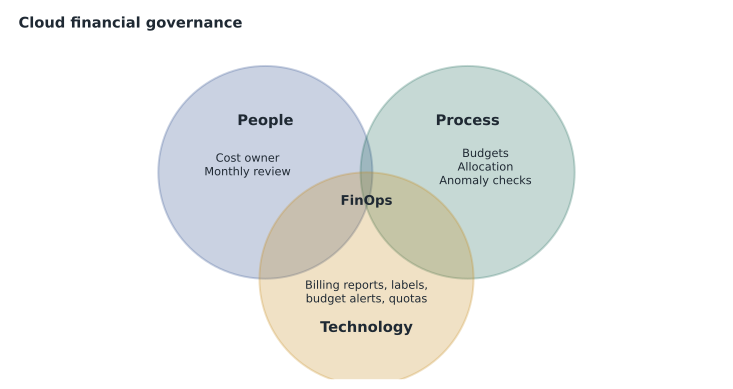
Lesson 1 described the shift from capital expenditure to operating expenditure and the use of total cost of ownership to compare options. The shift brings a new challenge. When anyone with the right permissions can create resources in minutes, spending is spread across many teams and changes daily, and the old approach of approving a hardware purchase once every five years no longer controls it. Cloud financial governance is the set of practices that keeps cloud spending visible, accountable and aligned with business value. The discipline that brings finance, technology and business teams together to manage cloud spending is widely called FinOps.
Google's exam guide frames financial governance around people, process and technology. People: someone must own cloud costs, finance and engineering must talk regularly, and teams must understand that their choices drive the bill. Process: budgets are set and reviewed, costs are allocated to the teams and products that cause them, anomalies are investigated and savings opportunities are acted on. Technology: the tools that make costs visible and enforce limits. At Birchline, Dana now chairs a monthly FinOps review with Farah, Ravi and the product owners, where each team explains its spending and its plans, and the agreed actions are recorded.
Tools for controlling cost
Several Google Cloud features support financial governance. The resource hierarchy from GCP-101 (organization, folders, projects and resources) is the foundation, because it lets costs and access be grouped by team, product or environment. Birchline's Production, Non-production, Shared services and Sandbox folders mean Dana can see at a glance how much development and testing cost compared with production. Labels attached to resources add detail, such as the cost centre or the product a resource belongs to.
Budgets and budget alerts set an expected amount for a billing account, project or folder and send notifications when actual or forecast spending crosses thresholds, such as half, ninety and one hundred units in every hundred of the budget. Alerts can also trigger automated actions, for example notifying a chat channel or shutting down a sandbox. Quotas cap how much of a resource a project can use, such as the number of processors, which prevents runaway usage from mistakes or misuse; quota policies are a guardrail rather than a budget, because they limit quantities rather than money. Cloud Billing reports show spending over time by project, service, label and location, and the billing export to BigQuery that Birchline set up in GCP-101 allows detailed analysis of every line on the bill.
Google also offers ways to pay less for the same work. Committed use discounts reduce prices in exchange for committing to a level of usage for one or three years, which suits steady workloads such as the production database. Spot VMs, from lesson 6, use spare capacity at a deep discount for interruptible work. Dynamic Workload Scheduler helps organizations obtain scarce resources, particularly GPUs and TPUs for AI work, by queuing jobs until capacity is available or reserving it for a set future period, which can lower costs for flexible AI training jobs. And the simplest savings come from rightsizing, matching each resource's size to what it actually uses, and switching off what nobody uses, like the forgotten test environment.
| Tool | What it controls | Birchline use |
|---|---|---|
| Resource hierarchy and labels | How costs are grouped and allocated | Costs per folder, product and cost centre |
| Budgets and alerts | Notifications when spending crosses thresholds | Alerts to product owners at half, 90 and 100 units of every 100 budgeted |
| Quotas | Maximum resource quantities | Low processor quotas in sandbox projects |
| Cloud Billing reports and export | Visibility and analysis | Monthly FinOps review in Looker over BigQuery |
| Committed use discounts | Lower prices for steady use | The production database and core VMs |
| Spot VMs and Dynamic Workload Scheduler | Lower prices for flexible work | Nightly batch jobs and AI training runs |
# Budget alerts for the Non-production folder (invented monthly figures, in dollars).
budget = 18000
thresholds = [0.5, 0.9, 1.0]
spend_by_day = {5: 4100, 10: 9300, 15: 14800, 20: 17400, 25: 19200}
alerted = set()
for day, spend in spend_by_day.items():
    for t in thresholds:
        if spend >= budget * t and t not in alerted:
            alerted.add(t)
print(f"Day {day:2}: spend {spend:,} reached {round(t * 100)} units of every 100 budgeted -> alert owners")Day 10: spend 9,300 reached 50 units of every 100 budgeted -> alert owners Day 20: spend 17,400 reached 90 units of every 100 budgeted -> alert owners Day 25: spend 19,200 reached 100 units of every 100 budgeted -> alert owners
What this code does
Spending reported every five days is compared with three alert levels: half, nine tenths and all of the monthly budget. The first time spending passes each level, the program records it and prints an alert. The output shows alerts on days 10, 20 and 25 as the folder heads past its budget.
The alert on day 15 is the one that matters: spending had passed ninety units in every hundred of the budget halfway through the month. Had that alert existed in October, the forgotten load-test environment would have been found within days instead of weeks.
Operational excellence and reliability
Operational excellence is the ability to run systems effectively, improve them continuously and deliver business value reliably. Reliability is the ability of a system to perform its intended function correctly and consistently over time. High availability is a design goal in which a service remains accessible even when parts of it fail. In the cloud, these are achieved through resilience techniques. Redundancy means running more than one copy of each important component, such as instances in several zones. Replication means keeping copies of data in more than one place, such as a database replica in a second zone or region. Scalable infrastructure adds capacity when demand grows so the system does not fall over under load. And backups let data be restored after deletion, corruption or ransomware, provided they are kept separate from the systems they protect and restores are tested regularly.
Birchline's design for the online shop applies all four. The Cloud Run services run in a region with multiple zones, the Cloud SQL database has a standby in a second zone that takes over automatically if the first fails, backups are copied to the second region, and autoscaling handles the holiday peak. The old data centre had none of these, which is why a single failed disk controller took the shop offline for four hours in 2024.
Observability and the four golden signals
You cannot run what you cannot see. Observability is the ability to understand what is happening inside a system from the data it produces. Google Cloud's observability tools, often grouped as Google Cloud Observability and previously called the operations suite, include Cloud Monitoring, which collects metrics, draws dashboards and sends alerts; Cloud Logging, which collects and searches logs; Cloud Trace, which follows a single request across many services to show where time is spent; Cloud Profiler, which shows which parts of the code use the most processing and memory; and Error Reporting, which groups application errors so teams can see what is failing and how often.
Google's site reliability engineers popularized four golden signals for monitoring any user-facing service. Latency is how long requests take. Traffic is how much demand the service is handling, such as requests per second. Errors is the rate of requests that fail. Saturation is how full the service is, such as how close processors or database connections are to their limits. Watching these four would have caught Birchline's Saturday slowdown: latency rose and saturation of the database connections hit its limit twenty minutes before the first customer complaint.
| Signal | Question it answers | Shop example |
|---|---|---|
| Latency | How long do requests take? | Checkout page load time |
| Traffic | How much demand is there? | Requests per second to the order API |
| Errors | How many requests fail? | Failed checkouts per minute |
| Saturation | How close to full is it? | Database connections in use out of the maximum |
DevOps, SRE and service levels
DevOps, introduced in lesson 7, brings development and operations together and automates delivery. Site reliability engineering (SRE) is Google's approach to running reliable services by applying software engineering to operations. SRE teams automate repetitive work, measure reliability carefully and balance it against the speed of change. Three terms are central. A service level indicator (SLI) is a measurement of some aspect of service, such as the proportion of checkout requests that succeed within two seconds. A service level objective (SLO) is the target for that measurement, such as 99.9 out of every 100 checkout requests succeeding within two seconds over a month. A service level agreement (SLA) is a formal commitment to customers, usually with financial penalties if it is missed; Google publishes SLAs for its services, and an organization's internal SLOs are normally stricter than any SLA it offers.
The gap between an SLO and perfection is the error budget: the amount of unreliability the business has agreed to accept. If the shop's SLO allows one failure in every thousand checkout requests, then a month with 600,000 checkouts has a budget of 600 failures. While budget remains, teams can release changes quickly. When it runs out, releases slow down and effort shifts to reliability. The idea turns arguments between developers who want speed and operators who want stability into a shared, measurable decision.
# Error budget for the checkout SLO: 999 successes in every 1,000 requests.
slo_good_per_1000 = 999
requests = 600_000
budget = requests * (1000 - slo_good_per_1000) // 1000
failures_so_far = 410
print("Allowed failures this month:", budget)
print("Used so far:", failures_so_far, "-", round(failures_so_far * 100 / budget), "units of every 100 in the budget")
print("Remaining:", budget - failures_so_far)Allowed failures this month: 600 Used so far: 410 - 68 units of every 100 in the budget Remaining: 190
What this code does
The checkout objective of 999 successes in every 1,000 requests means 1 failure per 1,000 is allowed, so 600,000 requests give an error budget of 600 failures. The program compares that with the 410 failures so far. It shows about 68 of every 100 units of the budget used and 190 failures remaining.
Sustainability was part of earlier versions of the Cloud Digital Leader exam and remains a reason some organizations choose a provider: Google publishes its carbon-free energy goals and offers carbon footprint reporting for customers' cloud usage. The exam guide launched in August 2026 no longer lists it as a separate topic, but Dana's board still asks about it, and efficient operations that switch off idle resources reduce both cost and emissions.
Common mistakes
MistakeTreating the cloud bill as IT's problem alone.
InsteadPractise FinOps: finance, technology and product owners share responsibility and review spending together.
MistakeSetting a budget without alerts.
InsteadConfigure budget alerts at several thresholds and act on them quickly.
MistakeWaiting for customers to report problems.
InsteadMonitor the four golden signals and alert on SLO risks before customers notice.
MistakeAiming for perfect reliability.
InsteadSet an SLO the business needs and use the error budget to balance reliability with speed.
When something goes wrong
Even well-designed systems fail sometimes, and how an organization responds matters as much as how it prevents failures. Birchline adopted a simple incident process borrowed from SRE practice. When an alert fires or a customer reports a problem, one person takes the role of incident commander, coordinating the response rather than fixing things personally, while others investigate and a third person keeps the business informed. The first goal is to restore service, for example by rolling back a recent change or moving traffic to healthy instances, and only then to find the root cause.
After every significant incident the team writes a postmortem: what happened, how it was detected, what the impact was, what was done and what will change to prevent a repeat. Birchline's postmortems are blameless, meaning they focus on how systems and processes allowed the problem rather than on who made a mistake. Farah's argument to the committee was practical: people who fear blame hide problems, and hidden problems come back larger. The postmortem for the Saturday slowdown led to three changes: an alert on database connection saturation, a larger connection pool for the order API and a load test before every major sale.
Worked problem
Catching the next slowdown and the next surprise bill
Dana and Jules want to avoid a repeat of October: an unexpected bill and a slowdown discovered through complaints. What should Farah put in place?
Show solution
- Budgets with alerts at several thresholds for every folder, sent to the owning teams, plus labels so every resource has an owner.
- Quotas in sandbox and test projects so forgotten resources cannot grow without limit.
- Cloud Monitoring dashboards and alerts on the four golden signals for the shop, especially latency and saturation.
- An SLO for checkout with an error budget, reviewed weekly, so reliability problems are caught early and prioritized.
Answer: Budget alerts, labels and quotas for cost control, and golden-signal monitoring with SLOs and error budgets for reliability.
Summary and key terms
- Cloud financial governance keeps spending visible and accountable through people, process and technology, a practice known as FinOps.
- The resource hierarchy and labels allocate costs; budgets and alerts warn of overspending; quotas cap resource quantities; billing reports and the BigQuery export provide visibility; committed use discounts, Spot VMs, Dynamic Workload Scheduler and rightsizing reduce cost.
- Reliability comes from redundancy, replication, scalable infrastructure and tested backups.
- Observability tools include Cloud Monitoring, Logging, Trace, Profiler and Error Reporting, and the four golden signals are latency, traffic, errors and saturation.
- SRE uses SLIs, SLOs, SLAs and error budgets to balance reliability and speed.
- FinOps
- The practice of finance, technology and business teams managing cloud spending together.
- Budget alert
- A notification when actual or forecast spending crosses a threshold.
- Quota
- A limit on how much of a resource a project can use.
- Committed use discount
- A lower price in exchange for committing to steady usage.
- Redundancy
- Running more than one copy of important components.
- Golden signals
- Latency, traffic, errors and saturation.
- SLO
- Service level objective: a target for a service level indicator.
- Error budget
- The amount of unreliability an SLO allows.
Practice problems
Work each problem on paper first, then reveal the answer to check.
What is the difference between a budget alert and a quota?
Show answer
A budget alert warns when spending crosses a money threshold; a quota caps the quantity of a resource that can be used.
Name the four golden signals.
Show answer
Latency, traffic, errors and saturation.
How does an SLO differ from an SLA?
Show answer
An SLO is an internal target; an SLA is a formal commitment to customers, usually with penalties.
Lesson quiz · 5 questions
Score 60% or more to complete this lesson.
Create a free account to save your progress, take quizzes and earn a certificate.