
GCP-102 · Lesson 4 of 12 · 19 min
Google Cloud data and analytics products for decision makers
▶ Video coming soon A video version of this lesson is on the way.
With the ideas from lesson 3 in hand, Ravi and Owen sat down to choose where each of Birchline's data sets would live in Google Cloud. Ravi had a page of requirements: the online shop's catalogue and orders, the store inventory records, the forty terabytes of product photos and old file shares, the sales history now trapped in the ageing SQL Server warehouse, and the click and search events from the website that marketing wanted to watch as they happened. Google Cloud offers many data products, and the Cloud Digital Leader exam expects you to match each one to the kind of data and the kind of job it suits. You will not be asked to configure them, but you will be given a business scenario and asked which product fits.
This lesson walks through the main storage and database products, BigQuery, the tools that make data useful to people across an organization, and the products that move data in real time. It ends with the paths organizations follow when they move existing databases into the cloud.
Relational, non-relational and object storage
Three kinds of storage underpin everything else. A relational database stores data in tables with defined columns and relationships between them, and is queried with SQL (Structured Query Language). Relational databases are strong at keeping data consistent, which is why they hold orders, payments and inventory: an order must never be half recorded. A non-relational or NoSQL database stores data in other shapes, such as documents, key-value pairs or wide columns, and trades some of the relational model's rules for flexibility or enormous scale. Object storage keeps whole files, called objects, each with a name and metadata, in containers called buckets. It does not understand what is inside a file; it simply stores it durably and serves it when asked. Photos, videos, backups, exported files and data lake contents all live naturally in object storage.
Cloud Storage and its storage classes
Cloud Storage is Google Cloud's object storage service. It is designed for very high durability, stores objects in a chosen location (a region, a dual-region or a multi-region) and can hold anything from a few bytes to many terabytes per object. Birchline's product photo library and its old file shares are moving there, and Cloud Storage will also act as the landing zone of Birchline's data lake.
Cloud Storage offers storage classes that trade storage price against access cost. Standard suits data that is used often, such as product photos served to the website every minute. Nearline suits data accessed about once a month or less, Coldline data accessed about once a quarter or less, and Archive data accessed less than once a year, such as records kept for legal reasons. The colder the class, the cheaper it is to store a gigabyte and the more it costs to read it back, and the colder classes also have minimum storage durations: 30 days for Nearline, 90 days for Coldline and 365 days for Archive. Autoclass is an option that moves each object between classes automatically based on how often it is actually read, which suits buckets where access patterns are hard to predict.
| Class | Suits data accessed | Minimum storage duration | Birchline use |
|---|---|---|---|
| Standard | Frequently | None | Product photos served to the shop |
| Nearline | About once a month or less | 30 days | Monthly report exports |
| Coldline | About once a quarter or less | 90 days | Quarterly backup copies |
| Archive | Less than once a year | 365 days | Seven-year financial records |
| Autoclass (option) | Unpredictably | Managed automatically | Old file shares nobody has sorted yet |
# Which class is cheapest for one terabyte read back a given number of times a year?
# Relative prices are invented for illustration; real prices vary by location.
classes = {"Standard": (20, 0), "Nearline": (10, 10), "Coldline": (4, 20), "Archive": (1.2, 50)}
# (storage cost per TB per month, retrieval cost per TB read)
for reads_per_year in (0, 2, 12, 52):
    cost = {name: 12 * store + reads_per_year * read for name, (store, read) in classes.items()}
    best = min(cost, key=cost.get)
print(f"read {reads_per_year:2} times a year -> cheapest: {best:8} ({cost[best]:.0f} units)")read 0 times a year -> cheapest: Archive (14 units) read 2 times a year -> cheapest: Coldline (88 units) read 12 times a year -> cheapest: Standard (240 units) read 52 times a year -> cheapest: Standard (240 units)
What this code does
Each storage class has an invented monthly cost per terabyte and a cost each time the data is read. For several numbers of reads per year, the program adds a year of storage to the reading costs and picks the cheapest class. Rarely read data is cheapest in Archive, while data read every month is cheapest in Standard.
The pattern in the output is the point, not the invented numbers: rarely read data belongs in a cold class, and frequently read data quickly becomes more expensive in a cold class than in Standard. Autoclass exists because people are bad at predicting which pattern a given file will follow.
Databases for applications
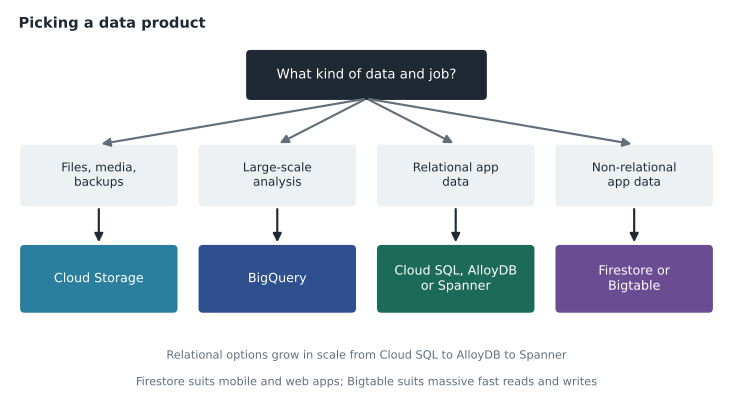
Google Cloud offers several managed databases, and each is aimed at a different job. Cloud SQL is a fully managed relational database service for MySQL, PostgreSQL and SQL Server. Google handles installation, patching, backups and replication, and the customer gets a familiar database engine. It suits most ordinary business applications, and it is where the online shop's MySQL catalogue database is going. AlloyDB is a PostgreSQL-compatible database built by Google for demanding workloads that need higher performance and the ability to run analytical queries on live operational data. Spanner is a relational database that scales horizontally across many servers and even many regions while keeping strong consistency, which suits global systems such as banking, gaming and large retail that cannot tolerate conflicting records. Bigtable is a NoSQL wide-column database built for huge volumes of data written and read at high speed, such as sensor readings, financial ticks or user activity. Firestore is a NoSQL document database designed for mobile and web applications, with real-time updates and offline support.
| Product | Type | Typical fit |
|---|---|---|
| Cloud SQL | Relational (MySQL, PostgreSQL, SQL Server) | Standard business applications moving from existing databases |
| AlloyDB | Relational, PostgreSQL-compatible | Demanding PostgreSQL workloads and analytics on live data |
| Spanner | Relational, globally scalable | Very large systems needing strong consistency across regions |
| Bigtable | NoSQL wide-column | Massive volumes of fast reads and writes, such as time series |
| Firestore | NoSQL document | Mobile and web apps with real-time sync |
| Cloud Storage | Object storage | Files, media, backups and data lake contents |
| BigQuery | Serverless data warehouse | Analysis of large structured and semi-structured data |
Owen asked why Birchline would not simply use Spanner for everything if it scales so well. Farah's answer was cost and fit. Spanner solves a problem Birchline does not have: its shop serves one country and does not need a single database spread across continents. Cloud SQL runs the existing MySQL schema with little change, and the team already knows MySQL. Choosing the simplest product that meets the need is a principle the exam rewards.
BigQuery
BigQuery is Google Cloud's serverless, fully managed data warehouse. Customers load or stream data into it, or point it at files in Cloud Storage, and query it with standard SQL. There are no servers to size or manage: BigQuery spreads each query across as much computing power as it needs and separates storage from compute, so an organization pays to store data and pays for the queries it runs, either per amount of data scanned or through reserved capacity. Queries over billions of rows that took Birchline's old warehouse all night can return in seconds.
For decision makers, BigQuery's benefits are speed, scale without hardware planning, built-in features such as machine learning with SQL (BigQuery ML, covered in lesson 5) and geospatial analysis, and the ability to share data securely across teams and even with partners without copying it. Ravi's first project is to load five years of sales history into BigQuery and give the buying team a dataset they can query directly. The billing export Farah set up in GCP-101 also lands in BigQuery, so Dana's finance team will analyse cloud costs with the same tool.
Making data useful: Looker and self-service analytics
Data in a warehouse helps only the people who can query it. Looker is Google Cloud's business intelligence platform. It sits on top of BigQuery and other databases and provides dashboards, reports and exploration tools for people who do not write SQL. Its central feature is a semantic layer: a shared model where the data team defines business terms once, such as what counts as net sales, gross margin or an active customer, so that every dashboard and every user gets the same answer. Looker can also embed charts in other applications and send data into the tools people already use, such as spreadsheets, chat and email.
This is what the exam means by democratizing data: making trusted data available to people across the organization so that decisions do not wait for a specialist. Birchline's regional managers will get a Looker dashboard showing yesterday's sales, stock levels and returns for their stores, built on the definitions the data governance group agreed in lesson 3. When a manager asks a new question, they can explore the same governed data rather than requesting a new report.
Real-time data: Pub/Sub, Dataflow and Spark
Batch processing handles data in large chunks on a schedule, such as loading yesterday's sales overnight. Streaming handles each event as it arrives. Real-time streaming analytics lets a business react in seconds: spotting a surge in searches for rain jackets as a storm approaches, or detecting a payment fraud pattern while the fraudster is still trying cards.
Pub/Sub is Google Cloud's global messaging service. Applications publish messages, such as "item added to basket" or "sale completed at store 17", to a topic, and any number of other systems subscribe to receive them. It decouples the systems that produce events from the systems that use them, so a new analytics job can start listening without changing the online shop. Dataflow is a fully managed service for processing data in streams and batches. It reads messages from Pub/Sub or files from Cloud Storage, cleans, transforms and joins them, and writes the results to BigQuery or elsewhere, scaling automatically. For organizations that already use the open-source Apache Spark and Hadoop tools, Google offers a managed service for Apache Spark so they can run those familiar jobs without managing the clusters themselves.
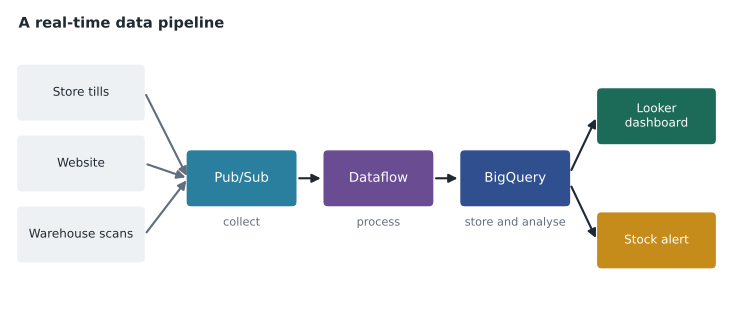
Birchline's plan connects the pieces from lesson 3's data supply chain. Store tills and the website publish events to Pub/Sub (collection), Dataflow maps product codes and removes duplicates (processing), BigQuery holds the results (storage), Looker dashboards and queries provide insight (analysis), and a simple rule sends regional managers a stock transfer suggestion each morning (activation).
Moving existing databases
Most organizations do not start with empty databases. They have systems running today that must move with minimal disruption. The exam guide expects you to know the general paths. The simplest is to move the same database engine to a managed service, such as MySQL to Cloud SQL for MySQL, which keeps the application unchanged. Google's Database Migration Service helps by copying data continuously from the source to the target so that the final switch takes minutes rather than a weekend. A larger step is to modernize to a different engine, such as from a commercial database to PostgreSQL on AlloyDB, which can cut licence costs and open up new features but requires changes to the application. The most ambitious is to redesign the data model for a different kind of database, such as Spanner or Firestore, when the business needs something the old design cannot provide.
Birchline is taking the simple path first for the shop (MySQL to Cloud SQL) and the analytical path for the warehouse (SQL Server data loaded into BigQuery, with reports rebuilt in Looker). The store inventory system's database stays with the vendor's application on Compute Engine for now, a choice lesson 6 explains.
Common mistakes
MistakeChoosing the most powerful product rather than the simplest that fits.
InsteadMatch the product to the data and the job; Cloud SQL is often the right answer for an ordinary application.
MistakeStoring frequently read files in Archive to save money.
InsteadCold classes have retrieval costs and minimum durations; use Standard or Autoclass for active data.
MistakeBuilding a dashboard for every new question.
InsteadUse Looker's shared definitions so people can explore governed data themselves.
MistakeRunning heavy reports on the shop's live database.
InsteadSend analytical work to BigQuery so the application stays fast.
Worked problem
Matching products to Birchline's needs
Ravi lists four needs: product photos served to the website; five years of sales history for analysts; live click events from the shop; and the shop's product catalogue in MySQL. Which Google Cloud product fits each?
Show solution
- Photos are files that are read often, so Cloud Storage in the Standard class fits.
- Large analytical queries over history point to BigQuery.
- Live events need a messaging service to collect them and a processing service to clean them: Pub/Sub and Dataflow, feeding BigQuery.
- An existing MySQL application database fits Cloud SQL for MySQL with the least change.
Answer: Cloud Storage for photos, BigQuery for sales history, Pub/Sub and Dataflow for click events, and Cloud SQL for the catalogue.
Summary and key terms
- Relational databases keep structured data consistent and are queried with SQL; NoSQL databases offer flexibility or scale; object storage keeps whole files.
- Cloud Storage classes run from Standard to Nearline, Coldline and Archive, with Autoclass moving objects automatically.
- Cloud SQL, AlloyDB and Spanner are relational options of increasing scale; Bigtable and Firestore are NoSQL.
- BigQuery is a serverless data warehouse.
- Looker provides governed self-service analytics.
- Pub/Sub and Dataflow carry and process data in real time.
- Database migrations range from moving the same engine to redesigning the data model.
- Object storage
- Storage for whole files with names and metadata, kept in buckets.
- Autoclass
- A Cloud Storage option that moves objects between classes based on access.
- Cloud SQL
- Managed MySQL, PostgreSQL and SQL Server.
- Spanner
- A relational database that scales across regions with strong consistency.
- BigQuery
- Google Cloud's serverless data warehouse, queried with SQL.
- Looker
- A business intelligence platform with a shared semantic layer.
- Pub/Sub
- A messaging service where publishers send events to topics and subscribers receive them.
- Dataflow
- A managed service for processing streaming and batch data.
Practice problems
Work each problem on paper first, then reveal the answer to check.
Why does Cloud Storage Archive cost more than Standard for files read every week?
Show answer
Archive has retrieval charges and a minimum storage duration, which outweigh its lower storage price when data is read often.
What does Looker's semantic layer give an organization?
Show answer
Shared definitions of business terms, so every dashboard and user gets the same answer.
Which two products would you use to collect and process website events in real time?
Show answer
Pub/Sub to collect the events and Dataflow to process them.
Lesson quiz · 5 questions
Score 60% or more to complete this lesson.
Create a free account to save your progress, take quizzes and earn a certificate.