
GCP-101 · Lesson 8 of 12 · 19 min
Storage options: Cloud Storage and persistent disks
▶ Video coming soon A video version of this lesson is on the way.
Birchline's storage array holds about 40 TB, and when Owen sorts it he finds three very different kinds of data. There are the disks that the servers boot from and run their databases on. There are the shared folders the head office uses for documents. And there is the photo library: hundreds of thousands of product images, some uploaded this morning and some untouched since 2012, plus seven years of scanned invoices that the auditors insist on keeping. "Three kinds of data, three kinds of storage," Farah says. "In the old room it was all one box. In Google Cloud we pick what suits each."
Google Cloud groups storage into object storage, which keeps whole files with metadata and is reached over HTTP, block storage, which provides disks attached to virtual machines, and file storage, which provides shared network file systems. Databases, the subject of lesson 9, are a fourth category for structured data. This lesson focuses on Cloud Storage for objects and persistent disks for blocks, with a brief look at file storage.
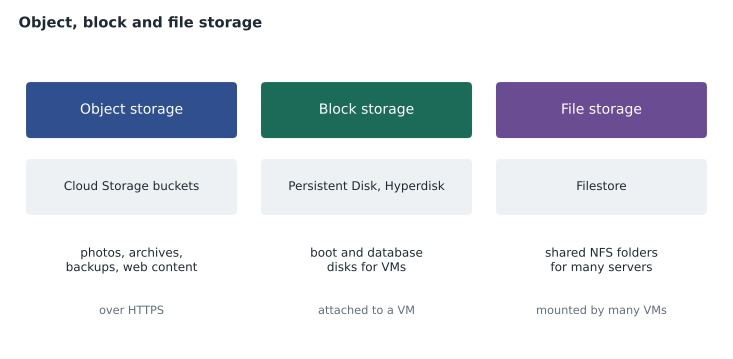
Cloud Storage: buckets and objects
Cloud Storage is Google Cloud's object storage service. Data is stored as objects, each an immutable file such as a JPEG, a PDF, a video or a backup archive, together with its metadata. Objects live in buckets, containers that belong to a project. Bucket names are globally unique across all of Google Cloud, much like project IDs, so Birchline prefixes its bucket names with bl-. Inside a bucket, object names can include slashes, such as photos/2026/boots/hiker-02.jpg, which tools display as folders even though the storage itself is flat.
Cloud Storage scales without any capacity planning: a bucket can hold one object or billions, and individual objects can be up to 5 TiB. It is reached over HTTPS through the console, gcloud storage, client libraries or the JSON and XML APIs, which makes it the natural home for content served to the web, for data lakes that analytics tools read, for backups and for archives. It is not a disk: an application cannot edit the middle of an object in place, and to change one it writes a new version.
gcloud storage buckets create gs://bl-photos-prod --location=northamerica-northeast2 --uniform-bucket-level-access
gcloud storage cp hiker-02.jpg gs://bl-photos-prod/photos/2026/boots/
gcloud storage ls --long gs://bl-photos-prod/photos/2026/boots/
Bucket locations
Every bucket has a location type, chosen when it is created, which affects availability, latency and price.
| Location type | Where data is stored | Good for |
|---|---|---|
| Region | One region, redundant across zones | Data used mainly by systems in that region, such as Toronto-based processing; lowest cost |
| Dual-region | Two specific regions | Data needing region-level resilience with a known pair of locations, for example for residency |
| Multi-region | A large area such as US, EU or Asia | Content served to users across a continent with maximum availability |
Because Canadian customer data must stay in Canada, Birchline uses a dual-region bucket made of Toronto and Montréal for its most important files, rather than a US or global multi-region. Most other buckets are regional, in the same region as the systems that use them.
Google publishes availability SLAs that differ by location type and storage class. For the Standard class in November 2026, Owen found 99.95 for multi-region and dual-region buckets and 99.9 for regional buckets, each measured in minutes out of every hundred. Higher redundancy costs more, so the choice depends on how much an hour without the data would cost.
Storage classes
Each object has a storage class that sets its price and access pattern. All classes have the same fast access when data is read; what differs is the monthly storage price, the charge to retrieve data, and the minimum time an object is billed for.
| Class | Minimum storage duration | Best for |
|---|---|---|
| Standard | None | Frequently accessed data: website images, active datasets |
| Nearline | 30 days | Data read about once a month or less, such as recent backups |
| Coldline | 90 days | Data read about once a quarter or less, such as disaster recovery copies |
| Archive | 365 days | Data kept for years and rarely read, such as records kept for audit or legal reasons |
Colder classes have lower storage prices but charge for retrieval, and deleting or changing an object before its minimum duration still bills the remainder. Owen models the photo library with illustrative prices to see how the trade-off works.
tb = 40
gb = tb * 1024
# illustrative monthly prices per GB stored, and per GB retrieved (not current list prices)
classes = {"Standard": (0.023, 0.0), "Nearline": (0.013, 0.01),
           "Coldline": (0.006, 0.02), "Archive": (0.0025, 0.05)}
read_share = 0.02   # about 2 GB read for every 100 GB stored each month
for name, (store, retrieve) in classes.items():
    monthly = gb * store + gb * read_share * retrieve
print(f"{name:9} about {monthly:8.0f} a month")Standard about 942 a month Nearline about 541 a month Coldline about 262 a month Archive about 143 a month
What this code does
For 40 TB of data, the program estimates a monthly bill in each storage class by adding the storage charge and the charge for reading back a small share of the data. The prices are illustrative, not current list prices. Colder classes cost much less to store but more to read, so the cheapest choice depends on how often the data is used.
For data that is almost never read, the colder classes cost a fraction of Standard. But if a team kept reading Archive data every day, retrieval charges would overtake the savings. The right class follows how the data is actually used.
Managing objects over time
Birchline's data does not stay hot forever. New product photos are viewed constantly for a season and then rarely. Cloud Storage offers two ways to follow that pattern automatically.
- Object Lifecycle Management applies rules to a bucket: for example, move objects to Nearline 60 days after creation, to Archive after a year, and delete them after eight years. Rules can also delete old object versions or unfinished uploads.
- Autoclass moves each object between classes by itself according to how often it is accessed, without the team writing rules. It suits buckets with unpredictable access patterns.
Three other bucket settings protect data. Object Versioning keeps previous versions when objects are overwritten or deleted, which saves people from mistakes. Retention policies stop objects being deleted before a set age, and a retention policy can be locked so that no one, including project owners, can shorten it; the invoice archive uses a locked seven-year policy for the auditors. Soft delete keeps deleted objects recoverable for a period by default.
Controlling access to buckets
Access to Cloud Storage uses IAM. Birchline enables uniform bucket-level access on every bucket, which means permissions are set only with IAM at the bucket level rather than object by object with older access control lists, so access is easy to understand and audit. An organization policy also enforces public access prevention, so no bucket can be made public by accident. The one exception is the bucket of public product images, which is served to the website through the load balancer and Cloud CDN rather than opened to allUsers.
When someone outside Birchline needs a file, such as a supplier downloading a purchase order, a signed URL gives time-limited access to one object without granting any IAM role. The link expires after the time chosen, minutes or days, and then stops working.
Block storage: Persistent Disk and Hyperdisk
Virtual machines need disks that behave like hard drives: a boot disk for the operating system, and data disks for databases and applications that read and write small blocks constantly. Google Cloud provides these as network block storage. They are not physically inside the VM's host; they are reached over Google's network, which means they survive a VM being stopped, can be resized while in use, and can be detached and attached to another VM.
Persistent Disk comes in several types, from standard disks on hard drives for low-cost bulk data, through balanced disks on SSDs for most workloads, to SSD persistent disks for high performance. Hyperdisk is the newer generation, on which performance can be tuned separately from capacity, and it is required by some newer machine series. Disks are zonal by default, living in the same zone as their VM; regional disks replicate synchronously to a second zone so that a VM can be restarted there if its zone fails.
Local SSD is different: physical solid-state storage attached to the host itself. It is very fast, but its data is lost when the VM stops or the host fails, so it is only for temporary data such as caches and scratch space.
| Block storage | Survives VM stop? | Typical use |
|---|---|---|
| Persistent Disk (standard, balanced, SSD) | Yes | Boot disks, application and database disks |
| Hyperdisk | Yes | Disks needing tuned performance, newer machine series |
| Regional Persistent Disk | Yes, and survives a zone failure | Highly available databases on VMs |
| Local SSD | No | Caches, temporary scratch data |
Snapshots are point-in-time backups of disks, stored incrementally in Cloud Storage-backed storage and usable to create new disks, including in another region. Birchline schedules snapshots of every VM disk each night with a snapshot schedule, and keeps them for 30 days. Images are disk templates used to create boot disks for many VMs, such as a hardened company Linux image.
File storage
Some applications expect a shared folder that many servers mount at once, using the NFS protocol. Filestore provides managed NFS file shares for Compute Engine and GKE. Birchline's old design software, which several rendering servers read from at once, will use a Filestore share. The head office's document folders, by contrast, are moving to Google Drive in Workspace, because they are documents for people rather than files for servers.
Common mistakes
MistakeUsing a VM disk to store files for a website.
InsteadStore web content in Cloud Storage and serve it through a load balancer and Cloud CDN.
MistakePutting rarely read archives in Standard storage.
InsteadUse lifecycle rules or Autoclass to move them to Nearline, Coldline or Archive.
MistakeReading Archive-class data every day.
InsteadRetrieval charges will exceed the savings; keep frequently read data in Standard.
MistakeStoring a database on Local SSD for speed.
InsteadLocal SSD data is lost when the VM stops; use Persistent Disk or Hyperdisk, or a managed database.
Moving 40 terabytes
Knowing where data should live is half the job; getting it there is the other half. Owen's first instinct is to copy the photo library over the office internet connection, until Farah has him do the arithmetic. At a sustained 500 megabits per second, 40 TB takes more than a week of continuous transfer, and the office connection is also carrying the stores' traffic during the day.
tb = 40
bits = tb * 1e12 * 8
for mbps in [100, 500, 1000, 10000]:
    seconds = bits / (mbps * 1e6)
print(f"{mbps:>6} Mbps: about {seconds / 86400:5.1f} days of continuous transfer")100 Mbps: about 37.0 days of continuous transfer 500 Mbps: about 7.4 days of continuous transfer 1000 Mbps: about 3.7 days of continuous transfer 10000 Mbps: about 0.4 days of continuous transfer
What this code does
The size of the 40 TB library is converted to bits and divided by the network speed to find how long a full transfer would take. The program repeats this for four link speeds and reports the time in days. At 100 Mbps the move takes over a month, while at 10 Gbps it takes less than half a day.
Google Cloud offers several ways to move data in. For small amounts, gcloud storage cp is enough, and it uploads in parallel. Storage Transfer Service moves large amounts from other clouds, from HTTP sources or from on-premises file systems through agents, on a schedule, and verifies what it copied. For very large datasets or slow connections, Transfer Appliance is a high-capacity storage device that Google ships to the customer, who fills it locally and ships it back for upload. Birchline chooses Storage Transfer Service with on-premises agents running over nights and weekends, so the copy finishes within two weeks without slowing the stores.
Farah also has Owen plan the cutover, not just the copy. The bulk transfer runs first while the old storage is still in use; then a final, much smaller incremental run picks up files added since; and only then does the website switch to the new bucket. Checking file counts and checksums after each run is part of the plan, so that no one discovers a missing folder of boot photos the week before a sale.
Worked problem
Designing the photo library
Birchline has 40 TB of product photos. New photos are read heavily for about two months, then rarely. Photos must be deleted eight years after upload. The library must stay in the company's chosen jurisdiction and survive a region outage. Design the bucket.
Show solution
- Location: a dual-region bucket using the two chosen regions, which keeps data in the jurisdiction and survives a region outage.
- Class: start objects in Standard, because new photos are read heavily.
- Lifecycle: move objects to Nearline after 60 days, to Coldline or Archive after a year, and delete them after eight years; or enable Autoclass with a deletion rule.
- Access: uniform bucket-level access, public access prevention, and delivery to shoppers through the load balancer and Cloud CDN.
Answer: A dual-region bucket with lifecycle rules (or Autoclass), uniform access and CDN delivery.
Summary and key terms
- Google Cloud offers object, block and file storage.
- Cloud Storage keeps objects in globally named buckets, located in a region, dual-region or multi-region, with Standard, Nearline, Coldline and Archive classes that trade storage price against retrieval charges and minimum durations of 0, 30, 90 and 365 days.
- Lifecycle rules and Autoclass move objects between classes; versioning, retention policies and soft delete protect them; uniform bucket-level access, public access prevention and signed URLs control access.
- Persistent Disk and Hyperdisk are network block storage for VMs, zonal or regional, backed up with snapshots; Local SSD is fast but temporary.
- Filestore provides managed NFS shares.
- Object storage
- Storage of whole files with metadata, reached over HTTP, such as Cloud Storage.
- Bucket
- A Cloud Storage container for objects, with a globally unique name.
- Storage class
- Standard, Nearline, Coldline or Archive, setting price and minimum duration.
- Lifecycle rule
- A bucket rule that changes the class of or deletes objects by age or condition.
- Autoclass
- A feature that moves objects between classes automatically based on access.
- Signed URL
- A link giving time-limited access to one object without an IAM grant.
- Persistent Disk
- Network block storage for Compute Engine VMs.
- Local SSD
- Fast storage attached to the host, whose data is lost when the VM stops.
- Snapshot
- A point-in-time, incremental backup of a disk.
- Filestore
- Managed NFS file shares.
Practice problems
Work each problem on paper first, then reveal the answer to check.
Which storage class suits a disaster recovery copy read once a quarter?
Show answer
Coldline (90-day minimum).
What happens to Local SSD data when the VM is stopped?
Show answer
It is lost.
How can a supplier download one file without an IAM role?
Show answer
With a signed URL that expires after a set time.
Lesson quiz · 5 questions
Score 60% or more to complete this lesson.
Create a free account to save your progress, take quizzes and earn a certificate.