
GCP-101 · Lesson 3 of 12 · 19 min
The resource hierarchy: organization, folders and projects
▶ Video coming soon A video version of this lesson is on the way.
In the old data centre, Owen knew who owned each server because he had written it on a label. In Google Cloud, Birchline may soon have thousands of resources: virtual machines, buckets, databases, service accounts, firewall rules. Labels on a rack will not scale. "We need a filing system before we create anything important," Farah says. "Google Cloud gives us one, and if we set it up well now, access, policy and billing will mostly look after themselves."
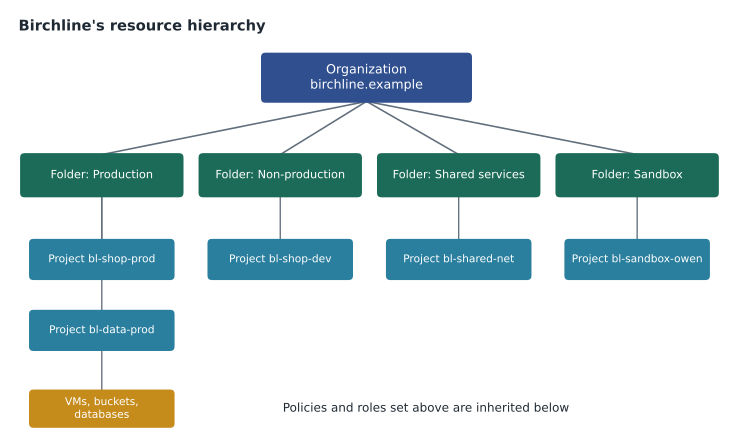
That filing system is the resource hierarchy. It has four levels: the organization at the top, folders in the middle, projects below them and resources at the bottom. Every Google Cloud resource sits somewhere in this tree, and settings applied higher up flow down to everything beneath. This lesson explains each level and shows how Birchline designed its tree.
Resources
A resource is anything you create and pay for or manage in Google Cloud: a Compute Engine virtual machine, a Cloud Storage bucket, a Cloud SQL instance, a Pub/Sub topic, a BigQuery dataset. Every resource belongs to exactly one project. A resource cannot float on its own, and it cannot belong to two projects at once. This single rule makes ownership, access and cost easy to trace: find the project and you have found who pays, who has access and which policies apply.
Projects
A project is the basic container for resources and the level at which most work happens. Projects group resources that share a purpose, such as the production version of the online shop or the data warehouse. A project is also where APIs are enabled, quotas are tracked and billing is attached. Two different projects are isolated by default: a person with access to one has no access to the other unless someone grants it.
Every project has three identifiers, and Owen learns to tell them apart because exam questions like to mix them up.
| Identifier | Example | Chosen by | Can it change? |
|---|---|---|---|
| Project name | Birchline Shop Production | You | Yes, at any time; it is only a display label |
| Project ID | bl-shop-prod | You, at creation (Google suggests one) | No; it is permanent and globally unique |
| Project number | 416820035871 (example) | Google, automatically | No |
The project ID matters most. It appears in commands, API calls, resource names and some URLs, and it must be unique across all of Google Cloud, not just within Birchline. Once a project is deleted its ID cannot be reused. Farah therefore set a naming standard before anyone created a project: a short company prefix, the system, and the environment, such as bl-shop-prod, bl-shop-dev and bl-data-prod.
Deleting a project is deliberately cautious. When a project is shut down, its resources stop serving and billing stops for most of them, but the project is kept in a pending-deletion state for about 30 days, during which an owner can restore it. After that, the project and its data are permanently deleted. Birchline also uses liens, a project-level safeguard, on its most important production projects so that they cannot be deleted until the lien is removed.
gcloud projects create bl-sandbox-owen --name="Owen sandbox" --folder=FOLDER_ID
gcloud config set project bl-sandbox-owen
gcloud projects describe bl-sandbox-owen
Folders
Folders group projects, and they can contain other folders, so an organization can mirror its departments, environments or teams. Folders are optional, but almost every organization with more than a handful of projects uses them, because they let administrators apply access and policy once to a whole group of projects instead of project by project.
Birchline chose to organize first by environment rather than by department. Farah's reasoning: the strictest rules, such as who may change production and which regions are allowed, depend on whether something is production, not on which team owns it. So the top-level folders are Production, Non-production, Shared services (networking, logging and security tooling used by everyone) and Sandbox (personal experiment projects with tight budgets). Teams own projects within those folders. Many organizations make a different choice, organizing by business unit first, and both work; what matters is a clear, consistent rule.
The organization
The organization resource is the root of the hierarchy. It represents the company as a whole, here birchline.example, and is created automatically when a company sets up Cloud Identity or Google Workspace for its domain and someone first uses Google Cloud with an account from that domain. Without an organization, projects belong to individual users, which is common for hobby accounts but risky for a business: if the employee who created a project leaves, so might control of it.
The organization gives Birchline central control. Its administrators can see every project, set policies that no project can override, and recover projects if an owner leaves. Two roles matter here. The Organization Administrator manages the hierarchy and access at the top. The Billing Account Administrator manages how the bills are paid. Google recommends keeping these powerful roles to a small number of people and never using them for everyday work.
Inheritance: how settings flow down
The hierarchy is powerful because of inheritance. Access granted at the organization or a folder applies to every project and resource beneath it. If Teresa's security team is given the Security Reviewer role on the organization, they can review security settings in every project, including projects created next year, without anyone remembering to add them.
For Identity and Access Management, inheritance is additive. A person's effective permissions on a resource are the union of everything granted at the resource, its project, every folder above it and the organization. A permission granted high up cannot be taken away by a narrower grant lower down; a project owner cannot remove a role that the organization granted. Google Cloud also offers deny policies for exceptions that must hold everywhere, which lesson 4 introduces. The practical rule Farah teaches is simple: grant broad access as high as it is truly needed and no higher.
Organization policies
IAM decides who may act. Organization policies decide what may be done at all, regardless of who asks. They are rules, called constraints, set on the organization, a folder or a project, and inherited downward like IAM. Organization policies are central to governance because they turn decisions from a slide deck into settings the platform enforces.
| Constraint (examples) | What it does | Why Birchline uses it |
|---|---|---|
| Resource location restriction | Limits the regions where resources can be created | Keeps customer data in Canadian regions |
| Disable service account key creation | Stops people creating downloadable service account keys | Leaked keys are a common cause of breaches |
| Domain restricted sharing | Allows IAM grants only to identities in approved domains | Stops anyone granting access to personal Gmail accounts |
| Restrict external IP addresses on VMs | Blocks or limits public IP addresses on virtual machines | Production VMs sit behind load balancers, not on the open internet |
| Require OS Login | Makes SSH access to VMs use IAM identities | Access to servers is tied to named people and logged |
Teresa set the location constraint on the Production and Non-production folders first. Within an hour, a developer tried to create a test database in a European region for a quick experiment, and the request was refused with a clear message naming the policy. "That is the point," Farah says. "The rule works even when people forget it." The Sandbox folder has a slightly looser set of policies so that people can learn, but it still cannot hold customer data, and its projects have small budgets.
gcloud resource-manager org-policies describe gcp.resourceLocations --folder=FOLDER_ID
gcloud resource-manager folders list --organization=ORGANIZATION_ID
Labels and tags
The hierarchy answers who owns a resource and which rules apply. Two further tools add detail. Labels are key-value pairs, such as team=ecommerce or cost-centre=4120, attached to individual resources. They do not change behaviour, but they appear in billing exports, so finance can see costs by team, environment or product across projects. Tags are a separate, more controlled kind of key-value pair defined centrally at the organization or project level; they can be used in policies, for example to apply firewall rules or organization policy conditions only to resources with a particular tag.
Birchline requires four labels on every resource: env, team, system and cost-centre. Ravi, the data lead, loads the billing export into BigQuery each month and builds a cost report by label for Dana. Unlabelled resources show up on that report as a single embarrassing line, which turns out to be a very effective reminder.
Designing a hierarchy that lasts
Farah gives Owen the checklist she used for Birchline.
- Create the organization through Cloud Identity or Workspace before building anything serious, so no project depends on a personal account.
- Separate production from everything else at the folder level, so the strictest policies and the narrowest access apply to production automatically.
- Use one project per application per environment, so that access, quotas and costs for the shop's production system are never mixed with development.
- Keep shared infrastructure, such as networking and central logging, in its own projects under a shared-services folder.
- Write naming and labelling standards down before the first project, because project IDs never change.
- Grant roles to groups, not to individuals, at the highest level where they are truly needed.
Common mistakes
MistakePutting development and production resources in the same project.
InsteadUse separate projects so access, quotas, budgets and mistakes stay contained.
MistakeExpecting a project-level grant to remove access given at the folder.
InsteadIAM grants are additive down the tree; use a deny policy or remove the grant where it was made.
MistakeChoosing a project ID like my-project-1 and planning to rename it later.
InsteadProject IDs are permanent and globally unique. Plan the naming standard first.
MistakeRelying on training alone to keep data in the right region.
InsteadSet a resource location organization policy so the platform enforces the rule.
Finding and moving things in the hierarchy
A hierarchy is only useful if people can see what is in it. The Resource Manager API and the console's resource picker show the tree of folders and projects that a person has permission to see. For a fuller picture, Cloud Asset Inventory keeps a searchable record of resources and IAM policies across the whole organization, including a history of how they changed. Teresa uses it every Monday to answer questions such as which buckets allow public access, or which projects have no owner from the platform team, without opening each project by hand.
Projects can be moved between folders, and between organizations, with the right permissions. Moving a project changes which inherited policies and roles apply to it straight away, which can be exactly what is wanted, such as when a pilot graduates from Sandbox to Production, or a surprise if someone forgets. Birchline treats a move into the Production folder as a change that needs approval, because the project immediately picks up production policies, production access for the operations team and production budget alerts.
Owen also learns why Farah dislikes very deep trees. Each extra level of folders makes it harder to work out where a permission came from. Google allows folders to be nested up to ten levels deep, but most organizations need two or three. Birchline's rule is no more than three levels below the organization, and every folder must have a documented owner and purpose.
Worked problem
Where should a role be granted?
Teresa's security team needs read-only access to security settings across all current and future Birchline projects. The shop team needs to deploy to the two shop projects only. Where should each grant be made?
Show solution
- The security team's need covers everything, including projects not yet created, so grant their role on the organization, where inheritance reaches every project.
- The shop team's need covers two projects only. Granting at the Production folder would also give them access to the data and inventory projects.
- Grant the shop team's role on bl-shop-prod and bl-shop-dev directly, or put both projects in a dedicated shop folder and grant it there.
Answer: Security reviewers at the organization; the shop team on the shop projects (or a shop-only folder). Each grant sits as high as needed and no higher.
By Friday, Owen has his own sandbox project, bl-sandbox-owen, under the Sandbox folder, with a small budget and the four required labels. He tries to create a virtual machine in a region outside the allowed list just to see what happens, and smiles when the organization policy refuses it.
Summary and key terms
- Google Cloud's resource hierarchy has four levels: the organization, optional folders, projects and resources.
- Every resource belongs to exactly one project, the unit for APIs, quotas, billing and isolation.
- Projects have a changeable name, a permanent globally unique ID and a Google-assigned number.
- The organization comes from Cloud Identity or Workspace and gives central control.
- IAM grants and organization policies set high in the tree are inherited by everything below; IAM inheritance is additive.
- Organization policy constraints enforce rules such as allowed locations.
- Labels support cost reporting, and tags can drive policy.
- Resource hierarchy
- The tree of organization, folders, projects and resources.
- Organization
- The root node representing a company, created through Cloud Identity or Google Workspace.
- Folder
- A grouping of projects and other folders.
- Project
- The basic container for resources, APIs, quotas and billing.
- Project ID
- A permanent, globally unique identifier chosen when a project is created.
- Inheritance
- The flow of IAM grants and policies from higher levels to everything below.
- Organization policy
- A rule, built from a constraint, that limits what can be done in part of the hierarchy.
- Label
- A key-value pair on a resource, used mainly for grouping and cost reporting.
- Lien
- A safeguard that prevents a project from being deleted until it is removed.
Practice problems
Work each problem on paper first, then reveal the answer to check.
Which project identifier can be changed after creation?
Show answer
Only the project name.
A role granted on a folder gives access to which resources?
Show answer
Every project and resource inside that folder, including subfolders and projects added later.
What is the difference between IAM and organization policies?
Show answer
IAM controls who can act on resources; organization policies restrict what configurations are allowed at all, whoever acts.
Lesson quiz · 5 questions
Score 60% or more to complete this lesson.
Create a free account to save your progress, take quizzes and earn a certificate.