
GCP-101 · Lesson 7 of 12 · 19 min
Compute options: Compute Engine, GKE, Cloud Run and Cloud Run functions
▶ Video coming soon A video version of this lesson is on the way.
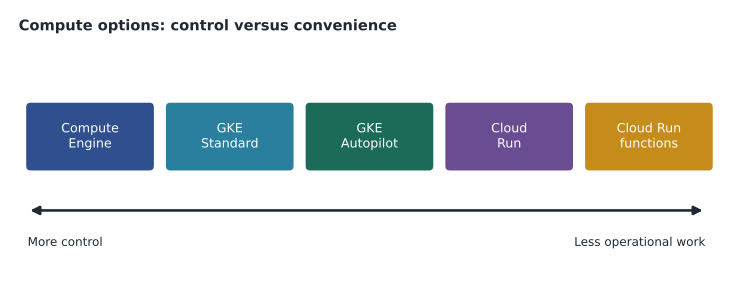
Birchline runs about thirty applications, and Owen has a spreadsheet listing every one: what it does, what language it is written in, what operating system it needs and how busy it gets. Farah adds one more column, headed Where it will run. "Google Cloud gives us several ways to run code," she says. "They trade control against convenience. The skill is matching each application to the simplest option that meets its needs."
This lesson covers the four compute options that Google Cloud exams return to most often: Compute Engine for virtual machines, Google Kubernetes Engine (GKE) for containers managed with Kubernetes, Cloud Run for containers without servers to manage, and Cloud Run functions for small pieces of code triggered by events. App Engine, an older platform service, appears briefly at the end.
Compute Engine: virtual machines
Compute Engine provides virtual machines (VMs) that run on Google's infrastructure. Each VM has a machine type that sets its vCPUs and memory, a boot disk made from an image such as Debian, Ubuntu, Rocky Linux or Windows Server, optional extra disks, and one or more network interfaces. The customer controls the operating system completely: it can install any software, change any setting and run any language. That makes Compute Engine the natural home for applications that need a particular operating system, licensed software, or long-running processes that were built for servers.
Machine types come in families, each suited to a kind of work. Names change as Google introduces new generations, so Owen learns the families rather than memorizing every series.
| Family | Suited to | Example series |
|---|---|---|
| General-purpose | Web servers, application servers, small and medium databases, development | E2 (cost-optimized), N2, N4, C3, C4 |
| Compute-optimized | CPU-heavy work such as gaming servers, encoding and scientific computing | C2, H3 |
| Memory-optimized | Very large in-memory databases and analytics | M2, M3 |
| Accelerator-optimized | Machine learning training and inference, graphics | A2, A3, G2 (with GPUs) |
Predefined machine types such as e2-standard-4 (4 vCPUs, 16 GB of memory) cover most needs. Some series also allow custom machine types with a chosen number of vCPUs and amount of memory, which avoids paying for resources an application does not use. Compute Engine bills by the second after a short minimum, and lesson 5's discounts apply: sustained use for eligible series, committed use for steady loads and Spot VMs for interruptible work.
Managed instance groups and autoscaling
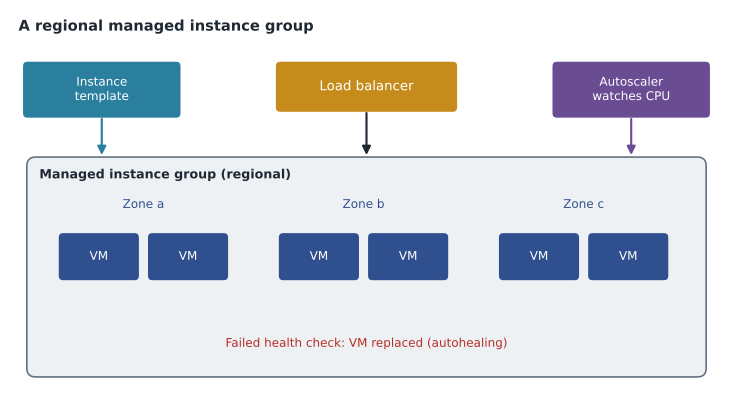
A single VM is zonal and has no automatic way to grow, so production systems on Compute Engine usually use a managed instance group (MIG). A MIG creates identical VMs from an instance template and manages them as one unit. It can autoscale, adding VMs when load rises and removing them when it falls, based on CPU use, load balancer traffic or a custom metric. It can autoheal, replacing a VM that fails a health check. And a regional MIG spreads its VMs across zones, so the group survives a zone failure. Put a load balancer in front, and an application on plain VMs becomes elastic and highly available.
Birchline's inventory application will move to Compute Engine first, almost unchanged, because it depends on a specific Linux version and a vendor agent. Moving an application to VMs with minimal changes is called lift and shift or rehosting; it is quick, and it leaves room to modernize later.
Containers and Kubernetes
A container packages an application with its libraries and settings into one image that runs the same way anywhere a container runtime exists, from a laptop to a data centre. Containers start in seconds, use resources efficiently, and remove the "it worked on my machine" problem. Unlike a VM, a container shares the host's operating system kernel, so it is much lighter.
Running a few containers is easy; running hundreds across many machines, keeping them healthy, rolling out new versions and connecting them to each other is not. Kubernetes is the open-source system for that job. It originated at Google, inspired by Google's internal cluster manager, and is now maintained by the Cloud Native Computing Foundation. Kubernetes runs containers in pods on a cluster of machines called nodes, restarts failed pods, scales them, and routes traffic to them through services.
Google Kubernetes Engine
Google Kubernetes Engine (GKE) is Google Cloud's managed Kubernetes service. Google runs the Kubernetes control plane, upgrades it, and integrates the cluster with Google Cloud networking, load balancing, IAM, logging and monitoring. GKE offers two modes of operation.
- In Standard mode, the customer manages the nodes: it chooses machine types, sizes node pools and pays for the VMs whether pods fill them or not. Standard suits teams that need fine control or special node configurations.
- In Autopilot mode, Google manages the nodes as well. The customer deploys workloads and pays for the CPU, memory and storage the pods request, while Google provisions, secures and scales the underlying machines. Google recommends Autopilot for most new workloads, because it removes most node management.
GKE suits organizations that already use Kubernetes, that run many services needing consistent deployment and networking, or that want the same container platform on premises and in other clouds. It is powerful, but even Autopilot asks teams to learn Kubernetes concepts and tools. Birchline does not need that yet; Farah keeps GKE in mind for a possible future platform for many internal services.
Cloud Run: serverless containers
Cloud Run runs containers without any cluster or servers to manage. The team builds a container image, or lets Cloud Run build one from source code, and deploys it as a service. Cloud Run gives the service an HTTPS address, starts container instances when requests arrive, scales them out as traffic grows and scales back, by default down to zero, when traffic stops. Billing follows use: by default, the CPU and memory an instance uses while handling requests, plus a small per-request charge. Cloud Run also offers jobs, which run a container to completion for tasks such as a nightly import, rather than serving requests.
Each Cloud Run instance can handle several requests at once; the default maximum concurrency is 80 requests per instance, and it can be changed. That matters for planning. Owen estimates how many instances the shop's API might need at its busiest moment with a quick calculation.
import math
peak_requests_per_second = 1200
avg_seconds_per_request = 0.25     # each request takes about 250 ms
concurrency = 80                   # requests one instance handles at once

in_flight = peak_requests_per_second * avg_seconds_per_request
instances = math.ceil(in_flight / concurrency)
print("requests in flight at peak:", in_flight)
print("instances needed (about):", instances)requests in flight at peak: 300.0 instances needed (about): 4
What this code does
The number of requests being handled at the same moment is the request rate times how long each request takes, here 300 at the peak. Dividing by how many requests one instance can handle at once and rounding up gives the instances needed. The answer, about 4, is a starting point for setting autoscaling limits.
Three hundred requests in flight at once, divided among instances that each handle up to 80, means about four instances at the peak, and zero in the middle of the night if no one is shopping. In practice the team sets a small minimum number of instances so the first shopper of the morning does not wait for a cold start, the brief delay while a new instance starts.
Cloud Run suits stateless web applications and APIs, which describes most new software Birchline writes. The returns portal and the shop's order API are going straight to Cloud Run. Applications that need to keep data in local memory between requests, or that need specific hardware or operating system changes, fit it less well.
Cloud Run functions: event-driven code
Cloud Run functions, known until 2024 as Cloud Functions, run a single function, a small piece of code written in a supported language such as Python, Node.js, Go or Java, in response to an event or an HTTP request. The developer writes only the function; Google builds and runs it on Cloud Run infrastructure. Events can come from many sources through Eventarc, such as a file arriving in a Cloud Storage bucket, a message on a Pub/Sub topic or a change in Firestore.
Birchline's first function is small and satisfying: when a supplier uploads a product photo to a bucket, a function creates thumbnails in three sizes and records them in the catalogue. No server waits around for photos; the function runs only when one arrives, and costs nothing when none do.
App Engine
App Engine is Google Cloud's original platform-as-a-service offering, which runs web applications written in supported languages without managing servers. It is still supported and runs many existing applications, in a standard environment that scales quickly, including to zero, and a flexible environment based on containers. For new applications Google generally points customers to Cloud Run, which offers similar convenience with standard containers. Owen expects to see App Engine in exam questions and in older systems, but Birchline has no plans for it.
Choosing a compute option
Farah's rule is to start from the most managed option that fits and move toward more control only when there is a reason.
| If the workload… | Consider | Why |
|---|---|---|
| Needs a specific OS, kernel setting, licensed software or long-running server process | Compute Engine (with a MIG for production) | Full control of the machine |
| Is a set of many containerized services that need Kubernetes features or portability | GKE (Autopilot first) | Managed Kubernetes |
| Is a stateless web app, API or containerized job | Cloud Run | No servers, scales to zero, pay for use |
| Is a small piece of code reacting to an event | Cloud Run functions | Write only the function; runs on demand |
| Is an existing App Engine application | Keep on App Engine, or move to Cloud Run when modernizing | Avoid unnecessary migration |
Common mistakes
MistakePutting a new stateless API on VMs because that is what the team knows.
InsteadStart with Cloud Run; move to VMs or GKE only if the API needs something Cloud Run cannot provide.
MistakeChoosing GKE Standard for a small team's first containers.
InsteadPrefer Cloud Run or GKE Autopilot unless node-level control is needed.
MistakeRunning a production web tier on one VM.
InsteadUse a regional managed instance group behind a load balancer.
MistakeExpecting a Cloud Run instance to keep data in memory forever.
InsteadCloud Run instances can be stopped at any time; store state in a database or Cloud Storage.
Where containers come from
Every option except Compute Engine runs containers, so Owen needs to know where container images live. Images are built from a recipe file, usually a Dockerfile, either on a developer's machine or, more often, by Cloud Build, Google Cloud's managed build service, when code is pushed to a repository. Finished images are stored in Artifact Registry, a private registry inside a Birchline project that also scans images for known vulnerabilities. Cloud Run and GKE pull images from Artifact Registry when they start new instances.
Farah stresses that the image is the unit of release. The team never changes a running container by hand; it builds a new image with a new version tag, deploys it, and can roll back to the previous image in seconds if something goes wrong. Cloud Run keeps each deployment as a numbered revision and can split traffic between revisions, for example sending one request in ten to the new version first and watching for errors before sending the rest.
Batch and scheduled work has its own tools. Cloud Scheduler triggers a job, function or HTTP endpoint on a timetable, like a cloud version of cron. Batch runs large numbers of compute tasks on VMs that it creates and removes automatically. Birchline's nightly inventory reconciliation will run as a Cloud Run job started by Cloud Scheduler at two in the morning.
Worked problem
Placing three Birchline workloads
Place each workload: (a) the inventory system, which needs a specific Linux release and a vendor monitoring agent; (b) the new Python returns portal, packaged as a container; (c) code that resizes photos when they are uploaded.
Show solution
- (a) needs control of the operating system, so Compute Engine, in a regional managed instance group for availability.
- (b) is a stateless containerized web app, so Cloud Run, with a small minimum instance count to avoid cold starts.
- (c) reacts to an event in Cloud Storage, so a Cloud Run function triggered through Eventarc.
Answer: Compute Engine, Cloud Run and Cloud Run functions.
Owen fills in the Where it will run column. Eleven applications go to Cloud Run, eight to Compute Engine for now, five become SaaS subscriptions, four are retired, and two need more thought. Nothing goes to GKE yet, and Farah is happy with that: the simplest option that works is usually the right one.
Summary and key terms
- Compute Engine provides virtual machines with full control of the operating system, in machine families for general, compute-heavy, memory-heavy and accelerated work; managed instance groups add templates, autoscaling, autohealing and multi-zone spread.
- Containers package applications portably, and Kubernetes orchestrates them; GKE is managed Kubernetes in Standard mode (customer manages nodes) or Autopilot mode (Google manages nodes).
- Cloud Run runs stateless containers as services or jobs, scaling to zero and billing for use.
- Cloud Run functions run single functions triggered by events or HTTP.
- App Engine is an older PaaS.
- Choose the most managed option that fits.
- Compute Engine
- Google Cloud's virtual machine service.
- Machine type
- The vCPU and memory configuration of a VM.
- Managed instance group
- A group of identical VMs created from a template, with autoscaling and autohealing.
- Container
- A packaged application with its dependencies that runs consistently on any container runtime.
- Kubernetes
- Open-source software for running and managing containers across a cluster.
- GKE Autopilot
- A GKE mode in which Google manages the nodes and billing follows pod requests.
- Cloud Run
- A serverless platform that runs containers as services or jobs.
- Concurrency
- The number of requests one Cloud Run instance handles at the same time.
- Cloud Run functions
- Event-driven functions, formerly Cloud Functions.
- Lift and shift
- Moving an application to cloud VMs with few or no changes.
Practice problems
Work each problem on paper first, then reveal the answer to check.
What does a regional managed instance group add over a single VM?
Show answer
Identical VMs across zones, automatic replacement of failed VMs and scaling with load.
What is the main difference between GKE Standard and Autopilot?
Show answer
In Standard the customer manages nodes; in Autopilot Google manages them and billing follows pod resource requests.
Why might a team set a minimum instance count on Cloud Run?
Show answer
To avoid cold-start delays for the first requests after a quiet period.
Lesson quiz · 5 questions
Score 60% or more to complete this lesson.
Create a free account to save your progress, take quizzes and earn a certificate.