
GCP-101 · Lesson 1 of 12 · 18 min
What cloud computing is and how Google Cloud is organized
▶ Video coming soon A video version of this lesson is on the way.
Owen Mitchell has looked after Birchline Outfitters' servers for eight years. He knows the leased room behind the Toronto warehouse by heart: the two racks, the humming storage array, the backup tapes that a courier collects every Friday, and the air conditioner that failed one July and took the online shop down for most of a Saturday. The hardware lease ends in late 2027, and Birchline's leadership has decided not to renew it. Instead, the company will move its systems to Google Cloud. Owen has been moved onto the migration team, and Farah Qureshi, the cloud architect Birchline hired last year, has offered to teach him the platform from the ground up.
"Before we talk about any product," Farah says on their first morning, "I want you to be able to explain what the cloud actually is to someone in the warehouse. If you can do that, the rest is details." This course follows Owen through those first weeks. It covers the building blocks that every Google Cloud certification assumes: where Google Cloud runs, how resources are organized and paid for, who is allowed to do what, and the main families of compute, storage, database, networking and operations services. GCP-102 then takes the business view tested on the Cloud Digital Leader exam, and GCP-190 prepares for the exam itself.
What cloud computing means
Cloud computing is the delivery of computing resources such as servers, storage, databases, networking, analytics and software over a network, on demand, with payment based on use. The resources run in a provider's data centres rather than in the customer's own building. The customer asks for what it needs through a web console, a command-line tool or an API, and the provider's systems set it up in seconds or minutes instead of the weeks it takes to order, rack and cable a physical server.
The most widely quoted definition comes from the US National Institute of Standards and Technology (NIST), which lists five essential characteristics. Cloud certification exams, including Google's, keep returning to them, so they are worth knowing by name.
| Characteristic | What it means | Birchline example |
|---|---|---|
| On-demand self-service | Customers provision resources themselves, without asking a person at the provider | Owen creates a test server from the console in two minutes |
| Broad network access | Resources are reached over the network from many kinds of device | Store managers open the scheduling app from phones and laptops |
| Resource pooling | The provider serves many customers from shared hardware, assigning capacity as needed | Birchline never knows or cares which physical machine runs its database |
| Rapid elasticity | Capacity grows and shrinks quickly, often automatically | The shop adds web servers for the Boxing Day sale and removes them afterwards |
| Measured service | Use is metered, reported and billed | Dana, the CFO, sees exactly what each project cost last month |
Owen compares this with the old way. When Birchline needed a new server in 2019, he wrote a business case, waited for a quote, waited for delivery, racked the machine, installed an operating system and patched it. The process took seven weeks, and the server was sized for the busiest day Birchline expected over five years, so it sat mostly idle for the other 364 days a year. In the cloud, the same capacity is a request away, and it can be sized for today and changed tomorrow.
Why organizations move to the cloud
Farah lists the reasons Birchline's leadership gave for the move, and Owen notices that only some of them are about technology. Cost is part of it: instead of buying equipment up front, a capital expenditure (CapEx), Birchline will pay monthly for what it uses, an operating expenditure (OpEx). That shift frees cash and makes spending follow the business, but it does not automatically make computing cheaper. Agility matters more to the e-commerce team: Jules Baptiste, who manages the online shop, wants to try new features in days rather than quarters. Reliability matters to everyone who remembers the air conditioner. And the data team wants analytics and AI tools that would be impractical to build and run in a back room.
There are trade-offs too, and Farah insists on naming them. Monthly bills can grow quietly if no one watches them. Staff need new skills. Some responsibilities move to the provider, but many stay with the customer, and confusion about which is which causes real incidents. Lesson 5 covers billing, and GCP-102 looks closely at the shared responsibility model and at cost management.
Service models: IaaS, PaaS and SaaS
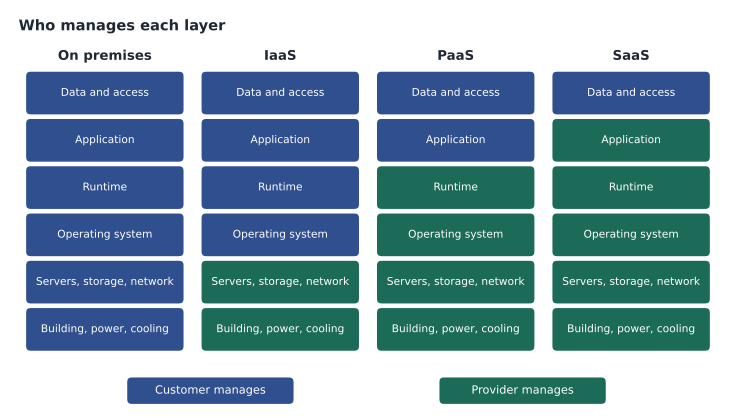
Cloud services are usually grouped into three service models, according to how much of the stack the provider manages. The models are a spectrum rather than three boxes, and many Google Cloud products sit somewhere in between, but the vocabulary is essential.
With infrastructure as a service (IaaS), the provider supplies virtual machines, disks and networks, and the customer manages everything from the operating system upward: patches, software, configuration and data. Compute Engine, Google Cloud's virtual machine service, is the classic example. IaaS gives the most control and is the easiest destination for an existing application, because the application can run much as it did on the old server.
With platform as a service (PaaS), the provider also runs the operating system and the runtime. The customer supplies code or a container and configuration, and the platform handles servers, scaling and patching. Cloud Run, App Engine and managed databases such as Cloud SQL belong here. PaaS removes routine work but asks the customer to fit the platform's way of doing things.
With software as a service (SaaS), the customer simply uses finished software over the internet. Google Workspace (Gmail, Docs, Drive and Meet) is Google's SaaS offering for productivity. Birchline already uses a SaaS payroll system and a SaaS point-of-sale vendor; the customer manages users and data, and the provider manages everything else.
| Layer | On premises | IaaS | PaaS | SaaS |
|---|---|---|---|---|
| Data and access | Customer | Customer | Customer | Customer |
| Application | Customer | Customer | Customer | Provider |
| Runtime and middleware | Customer | Customer | Provider | Provider |
| Operating system | Customer | Customer | Provider | Provider |
| Virtualization, servers, storage, network | Customer | Provider | Provider | Provider |
| Data centre building and power | Customer | Provider | Provider | Provider |
Farah adds a fourth term that Owen will meet constantly: serverless. Serverless services such as Cloud Run, Cloud Run functions and BigQuery have no servers for the customer to size or manage at all. The service scales automatically, often down to zero when idle, and charges for work actually done. Serverless is not a fourth service model so much as a style of PaaS in which capacity planning disappears.
Deployment models
Separately from service models, organizations choose deployment models. A public cloud such as Google Cloud is owned and operated by a provider and shared, securely isolated, among many customers. A private cloud is cloud-style infrastructure dedicated to one organization, often in its own data centre. Hybrid cloud combines on-premises or private infrastructure with public cloud, connected so that workloads and data can move between them. Multicloud means using more than one public cloud provider, for example Google Cloud for analytics and another provider for a legacy application.
Birchline will be hybrid for at least a year. The stores keep local equipment for their tills, the warehouses keep their scanners and label printers, and some systems will move later than others. Google Cloud supports hybrid and multicloud with networking options covered in lesson 10 and with management tools that GCP-102 introduces.
How Google Cloud is organized
Google Cloud is the public cloud platform that runs on the same global infrastructure Google built for Search, YouTube and Gmail. It offers well over a hundred products, which can feel overwhelming, so Farah gives Owen four ideas to hang everything on.
- Location. Every resource lives somewhere: in a zone, in a region, in several regions or globally. Lesson 2 explains these locations.
- Hierarchy. Every resource belongs to a project, projects can be grouped into folders, and folders sit under an organization. Lesson 3 covers this hierarchy, which controls access, policy and billing.
- Identity. Every action is taken by a principal, such as a person, a group or a service account, and is allowed or denied by Identity and Access Management (lesson 4).
- Billing. Every project is linked to a billing account that pays for what the project uses (lesson 5).
With those four ideas in place, the product catalogue becomes a set of families. Compute runs code: virtual machines, containers and serverless services. Storage keeps objects and disks. Databases keep structured data. Networking connects everything. Data analytics and AI turn data into insight and predictions. Operations tools monitor, log and help troubleshoot. Security and identity services protect all of it. This course tours compute, storage, databases, networking and operations; GCP-102 takes up data, AI and security at the business level.
The shared responsibility model in brief
In any cloud, security and reliability are shared. Google is responsible for the security of the cloud: the physical data centres, the hardware, the global network, and the software that runs its services. The customer is responsible for security in the cloud: who has access, how resources are configured, the data that is stored and the applications that are deployed. How much falls on each side depends on the service model. On a Compute Engine virtual machine, Birchline patches the operating system; on Cloud Run, Google does.
Google sometimes describes its approach as shared fate rather than just shared responsibility, meaning that it also provides secure defaults, blueprints and guidance to help customers configure things well. The principle does not change, though: a project that grants everyone owner access, or a storage bucket made public by mistake, is the customer's problem, and no provider can fix a setting it was told to apply. Teresa Okonjo, Birchline's information security manager, makes Owen promise to remember that sentence.
Data residency and compliance
Because Google Cloud resources live in specific locations, customers can choose where their data is stored. For Birchline this matters. Its customers are Canadian, and its privacy obligations under PIPEDA, and under Quebec's Law 25 for shoppers in Quebec, make leadership want customer data kept in Canada. Google Cloud has two Canadian regions, Montréal and Toronto, so the shop's databases can stay in the country.
Choosing a location is only part of compliance. Google publishes certifications and audit reports for its services, but each customer must still configure access, retention and logging to meet its own obligations. Lesson 3 shows how organization policies can stop anyone from creating resources outside approved locations.
Common mistakes
MistakeThinking the cloud is automatically cheaper.
InsteadThe cloud changes spending from up-front purchases to pay-as-you-go. It saves money only when resources are sized well and switched off when not needed.
MistakeAssuming the provider is responsible for everything once systems move.
InsteadThe provider secures the infrastructure; the customer still controls access, configuration and data.
MistakeTreating IaaS, PaaS and SaaS as product names.
InsteadThey describe how much the provider manages. One provider offers all three, and some products sit between them.
MistakeEquating hybrid cloud with multicloud.
InsteadHybrid mixes on-premises or private infrastructure with public cloud; multicloud uses more than one public provider.
Worked problem
Matching workloads to service models
Birchline has three systems to move: an old inventory application that must run on a specific Linux version, a new returns web app the team is writing in Python, and email for 1,100 staff. Which service model suits each?
Show solution
- The inventory application depends on a particular operating system and configuration, so it needs a virtual machine the team controls: IaaS on Compute Engine.
- The returns app is new code packaged as a container, so a platform that runs containers without servers to manage fits: PaaS or serverless on Cloud Run.
- Email is a commodity service that no retailer gains by running itself: SaaS such as Google Workspace.
Answer: Inventory on IaaS, the returns app on a serverless platform, and email as SaaS. Each choice trades control for less operational work.
The rest of the course goes layer by layer. Owen's notebook already has a first page headed Location, Hierarchy, Identity, Billing, with a column for each product family underneath. By the end of lesson 12 he expects to fill every column and to be able to explain each choice to Dana, Jules and Teresa in plain words.
Summary and key terms
- Cloud computing delivers servers, storage, databases, networking and software on demand over a network, metered and paid for by use.
- NIST's five characteristics are on-demand self-service, broad network access, resource pooling, rapid elasticity and measured service.
- IaaS, PaaS and SaaS describe how much the provider manages; serverless services remove capacity planning entirely.
- Public, private, hybrid and multicloud are deployment models.
- Google Cloud organizes everything by location, the resource hierarchy, identity and billing.
- Google secures the cloud itself, while customers secure their access, configuration and data in it.
- Cloud computing
- On-demand, metered access to computing resources delivered over a network.
- CapEx and OpEx
- Up-front capital spending on equipment versus ongoing operating spending on services.
- IaaS
- Infrastructure as a service: the provider supplies virtual machines, disks and networks.
- PaaS
- Platform as a service: the provider also runs the operating system and runtime.
- SaaS
- Software as a service: finished applications delivered over the internet.
- Serverless
- Services with no servers for the customer to manage, scaling automatically and billed for use.
- Hybrid cloud
- A combination of on-premises or private infrastructure with public cloud.
- Multicloud
- Use of more than one public cloud provider.
- Shared responsibility
- The division of security and operational duties between provider and customer.
Practice problems
Work each problem on paper first, then reveal the answer to check.
A server bought for five years of growth sits mostly idle. Which cloud characteristic addresses this?
Show answer
Rapid elasticity: capacity can be sized for today and grown or shrunk as demand changes.
On Compute Engine, who patches the guest operating system?
Show answer
The customer. On IaaS the provider manages the hardware and virtualization layer, and the customer manages the operating system upward.
Birchline keeps store tills on site and runs its shop in Google Cloud. Which deployment model is that?
Show answer
Hybrid cloud.
Lesson quiz · 5 questions
Score 60% or more to complete this lesson.
Create a free account to save your progress, take quizzes and earn a certificate.