
DCT-330 · Lesson 7 of 12 · 19 min
Tickets, SLAs and escalation
Everything the operations team does starts and ends in a ticket. A customer's request, an alarm that needs a repair, a planned maintenance task, a change to the facility: each is a ticket with a number, an owner, a priority, a due time and a record of what was done. Tickets are how work is not forgotten, how customers see progress, and how the site proves later what happened. This lesson covers the kinds of tickets, the service level agreements that set their deadlines, and the escalation rules that make sure the right person gets involved in time.
Stonebridge's ticketing follows the service management ideas taught in the ITIL courses (ITIL-140 covers incident management and the service desk, ITIL-141 change enablement), adapted to a facility. This lesson stays with what a technician needs on shift.
Kinds of tickets
Stonebridge's ticketing system has five main ticket types, each with its own workflow:
- Incident: something is broken or not working as it should, or might be: a CRAH failed, a customer reports a hot rack, a leak alarm. The goal is to restore normal service quickly.
- Service request: a customer or internal team asks for something routine: remote hands, a cross-connect, a visitor access, a delivery. Lesson 8 covers these.
- Change: a planned modification to the facility or its systems, from adding a tap-off box to updating BMS firmware. Lessons 9 and 10 cover changes.
- Maintenance work order: planned preventive or corrective maintenance, generated from the maintenance schedule (DCT-340).
- Problem: an investigation into the underlying cause of one or more incidents, such as why a new generator starter failed after one test. Problems are owned by engineers and usually lead to changes.
Tickets link to each other. The CRAH-A07 alarm in lesson 1 became an incident; fixing it needed a replacement actuator, which became a maintenance work order; because two actuators of the same model had failed that quarter, the engineers opened a problem ticket; its outcome was a change to replace all eight remaining actuators of that model. Following the links shows the whole story.
What a good ticket contains
A ticket is read by people who were not there: the next shift, the engineer called in, the customer, the auditor. It should let any of them understand the situation without asking. Every Stonebridge ticket has structured fields: type, priority, location (from the DCIM hierarchy), affected customer, assets, assigned group and person, and times opened, responded, resolved and closed. The free-text description and work notes should answer what, where, when, what has been done, and what happens next.
| Weak ticket text | Strong ticket text |
|---|---|
| Hot rack in Hall A | Customer Bayview reports high inlet temps in A-31-03 (their sensors 28 to 29 °C at top). Facility sensor A-31-03 top inlet 27.4 °C, minor alarm since 13:40. CRAH-A09 in the row is running; A07 out of service (see INC-20417). |
| Fixed | Loose blanking panel at U30 to U34 replaced (5 panels), hot air recirculation stopped. Inlet top fell to 24.1 °C by 15:05. Customer informed 15:10, agreed to close. |
| Customer wants cross-connect | Corvid AI requests 4 x singlemode cross-connect from D-3-07 patch panel PP2 ports 13 to 16 to MMR carrier C, panel 4, ports 21 to 24. Authorized by Carmen Ortiz (on contact list). Requested completion within 2 business days. |
Customer-visible tickets need extra care. Work notes may be visible to the customer through the portal; internal notes are not. Opinions, guesses about causes and comments about other customers never go in customer-visible notes.
Priority
Incidents are given a priority from their impact and urgency. Impact asks how much is affected: one device, one rack, a customer, a hall, the site. Urgency asks how fast it will get worse: is the load at risk now, has redundancy been lost, or is it a minor degradation? Stonebridge combines the two into four incident priorities, P1 to P4.
| Priority | Typical examples | Respond within | Restore or workaround target |
|---|---|---|---|
| P1 | Customer load lost; both feeds to a rack lost; leak in a hall; fire system activation | 15 minutes, on site immediately | As fast as possible; continuous work |
| P2 | Redundancy lost on a critical system; a customer's rack on one feed; CDU failed | 30 minutes | 4 hours |
| P3 | Degraded but redundant; a CRAH failed in an N+3 hall; minor temperature alarm | 4 hours | 2 business days |
| P4 | Cosmetic or informational; a label missing; a door closer slow | 1 business day | 10 business days |
Alarm priority (lesson 3) and ticket priority are related but not the same. A major alarm usually becomes a P2 incident, but the desk sets the ticket priority from the actual impact: the CRAH-A07 alarm was major, but because Hall A had N+3 cooling and inlets were normal, the incident was P3.
Service level agreements
A service level agreement (SLA) is a commitment, usually in a customer's contract, about how fast and how well something will be done. Data centre SLAs commonly cover: power and cooling availability (for example, 100 % power availability to racks with both feeds connected); environmental limits (inlet temperature and humidity within a stated range); response times for incidents and requests; and completion times for routine requests such as cross-connects. Breaking an SLA can mean service credits to the customer, and repeated breaches damage trust more than money.
Internally, the same idea appears as operational level agreements between teams, such as how fast the mechanical contractor must attend a P2 call. Both kinds of target are built into the ticketing system as timers: each ticket shows how long is left before its response or resolution deadline, and turns amber and then red as the deadline approaches. Timers pause in defined states, such as 'waiting for customer', so that a customer who does not answer does not cause a breach.
# SLA tracker: which open tickets are close to, or past, their deadline?
from datetime import datetime, timedelta
now = datetime(2027, 3, 10, 16, 0)
targets = {"P1": timedelta(hours=1), "P2": timedelta(hours=4), "P3": timedelta(days=2), "P4": timedelta(days=10)}
tickets = [  # (number, priority, opened, paused time, status)
    ("INC-20417", "P3", datetime(2027, 3, 9, 2, 7), timedelta(0), "open"),
    ("INC-20433", "P2", datetime(2027, 3, 10, 13, 10), timedelta(minutes=20), "open"),
    ("REQ-88120", "P3", datetime(2027, 3, 8, 9, 0), timedelta(hours=6), "waiting for customer"),
    ("INC-20436", "P2", datetime(2027, 3, 10, 11, 45), timedelta(0), "open"),
]
for num, pri, opened, paused, status in tickets:
    used = now - opened - paused
    left = targets[pri] - used
    share = used / targets[pri]
    state = "BREACHED" if left < timedelta(0) else ("at risk" if share > 0.75 else "ok")
print(f"{num} {pri} {status:21s} used {share * 100:5.1f} % of target -> {state}")INC-20417 P3 open used 78.9 % of target -> at risk INC-20433 P2 open used 62.5 % of target -> ok REQ-88120 P3 waiting for customer used 102.1 % of target -> BREACHED INC-20436 P2 open used 106.2 % of target -> BREACHED
INC-20436 has breached its four-hour target, INC-20433 is close, and REQ-88120's paused time keeps it within target. At 16:00, Dmitri sees the list on the wall and asks the obvious question: why did nobody escalate INC-20436 before it breached? The answer, a contractor delayed in traffic who did not call, led to a rule that the desk calls any P2 contractor who has not arrived by half the target time.
Escalation
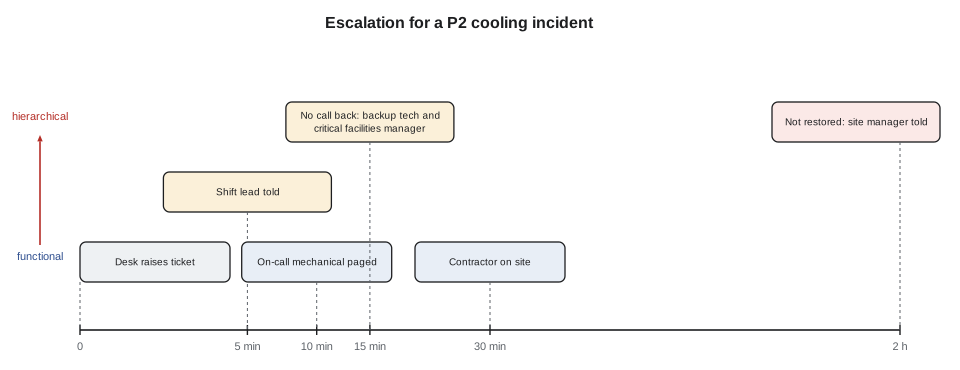
Escalation means bringing in more help or more authority when a ticket needs it. There are two directions:
- Functional escalation passes the work to a team with more skill or the right tools: from the desk to the critical facilities technician, to the electrical engineer, to the UPS vendor.
- Hierarchical escalation informs or involves people with more authority: the shift lead, the site manager, the operations director, and for the most serious events the company's executives and the customer's account team.
Escalation is triggered by priority (a P1 always goes straight to the shift lead and the on-call engineer), by time (a ticket that will breach its target), by repetition (the third failure of the same kind in a month), or by judgement ('this looks wrong and I am not sure'). Stonebridge's escalation matrix sets out, for each type of system and priority, who to call and in what order, with phone numbers kept current by the shift leads.
# Escalation matrix lookup for the desk
matrix = {
    ("electrical", "P1"): ["shift lead", "on-call electrical engineer", "critical facilities manager", "site manager"],
    ("electrical", "P2"): ["shift lead", "on-call electrical engineer", "critical facilities manager"],
    ("cooling", "P2"): ["shift lead", "on-call mechanical technician", "backup mechanical technician", "mechanical contractor"],
    ("cooling", "P3"): ["on-call mechanical technician (next morning unless worsening)"],
    ("security", "P1"): ["security desk", "shift lead", "security manager", "police if required"],
}
def who_to_call(system, priority, minutes_without_answer=0):
    chain = matrix.get((system, priority), ["shift lead"])
    step = min(minutes_without_answer // 15, len(chain) - 1)   # move up the chain every 15 minutes
    return chain[: step + 1]

print("Cooling P2, just raised      :", who_to_call("cooling", "P2"))
print("Cooling P2, 20 min no answer :", who_to_call("cooling", "P2", 20))
print("Electrical P1 :", who_to_call("electrical", "P1"))Cooling P2, just raised : ['shift lead'] Cooling P2, 20 min no answer : ['shift lead', 'on-call mechanical technician'] Electrical P1 : ['shift lead']
On call
At night and on weekends, most engineering staff are on call: available by phone and able to reach the site within a set time, often 30 to 60 minutes. The on-call rota is in the ticketing system and on the desk wall. The desk's duties are to call promptly, give a clear briefing (lesson 4), confirm that the person has accepted the call, and record the times: paged, called back, arrived. If an on-call person does not respond within the set time, the desk moves to the next name in the matrix without waiting longer. Respecting the on-call person's time matters too: the desk calls for anything that needs them, but saves non-urgent questions for the morning and puts them in the ticket.
Closing tickets
A ticket is resolved when the work is done and the service is restored, and closed when the requester has confirmed or a set time has passed without objection. Before resolving, the technician checks three things: is the original problem really gone (the inlet temperature is back to normal, not just the alarm cleared); are the records updated (DCIM, drawings, labels); and has the customer been told in their own terms? A resolution note should say what was found, what was done and how it was confirmed.
Closed tickets are data. Monthly reports show how many incidents of each kind occurred, how fast they were responded to and resolved, how many SLAs were met, and which assets keep appearing. The repeat-failure report is where problem tickets usually start.
Worked problem
A hot-rack call
At 13:55, Bayview's IT manager phones: their own sensors show 28 to 29 °C at the top of rack A-31-03. Walk through the ticket.
Show solution
- Jamal opens an incident, location A-31-03, customer Bayview, and records the caller, their readings and the time.
- He checks the facility sensor: top inlet 27.4 °C, minor alarm since 13:40; the row's other racks are normal; Hall A cooling is at N+2 with CRAH-A07 still out (INC-20417).
- Impact: one rack, still within the customer's SLA range of 18 to 27 °C at the facility sensor but at its edge; urgency: rising slowly. He sets P3 and links INC-20417.
- He walks to the rack. Five blanking panels are missing at the top front, left out after Bayview's own technician removed a server last week. Hot air is recirculating over the top.
- With the customer's permission, he fits five blanking panels from the cage's spares (DCT-130), watches the inlet fall to 24.1 °C over an hour, records it, and resolves the ticket with a note and photos.
- Bayview agrees to close. He adds an internal note suggesting a reminder to the customer about blanking after removals.
Answer: The ticket shows the call, the evidence, the cause, the fix, the confirmation and the customer's agreement, all within two hours.
Common mistakes
MistakeWriting 'fixed' as the resolution.
InsteadSay what was found, what was done and how it was confirmed.
MistakeSetting ticket priority from the alarm priority alone.
InsteadSet it from actual impact and urgency.
MistakeWaiting quietly while a contractor is late.
InsteadCall at half the target time and escalate before the breach.
MistakePutting guesses about causes in customer-visible notes.
InsteadKeep customer notes factual; use internal notes for working theories.
MistakeResolving when the alarm clears.
InsteadConfirm the condition itself is back to normal and the records are updated.
Summary and key terms
- Every piece of work is a ticket: incidents, service requests, changes, maintenance work orders and problems, linked together.
- A good ticket lets someone who was not there understand what, where, when, what was done and what next.
- Incident priority comes from impact and urgency; Stonebridge uses P1 to P4 with response and restore targets.
- SLAs set customer commitments; ticket timers track them and pause in defined waiting states.
- Escalation is functional (more skill) or hierarchical (more authority), triggered by priority, time, repetition or judgement.
- Tickets are resolved only when the condition is fixed, confirmed and recorded; closed tickets feed monthly reports.
- Incident
- An unplanned interruption or reduction in the quality of a service, or a failure that could cause one.
- Service request
- A request for something routine, such as remote hands or a cross-connect.
- SLA
- Service level agreement: a commitment about how fast or how well a service is delivered.
- Functional escalation
- Passing work to a team with more skill or the right tools.
- Hierarchical escalation
- Informing or involving people with more authority.
- On call
- Available outside working hours to respond to calls within a set time.
Practice problems
Work each problem on paper first, then reveal the answer to check.
A P2 ticket has a four-hour restore target and was opened at 11:45. At 14:30 it is still open. What should the desk do?
Show answer
It has used about 69 % of its time; check the contractor's arrival and escalate before 15:45.
What is the difference between functional and hierarchical escalation?
Show answer
Functional brings more skill; hierarchical brings more authority.
A CRAH fails in an N+3 hall with normal inlets. Which ticket priority fits best?
Show answer
P3: degraded but redundant.
Name three things to check before resolving a ticket.
Show answer
The condition is really fixed, records are updated, the customer has been told.
Lesson quiz · 5 questions
Score 60% or more to complete this lesson.
Create a free account to save your progress, take quizzes and earn a certificate.