
DCT-330 · Lesson 5 of 12 · 20 min
DCIM: assets, connections and floor maps
The BMS and EPMS know what each sensor and meter reads. They do not know that rack A-31-03 belongs to Bayview Credit Union, that its B side is fed from branch 2-17 on PDU-B2-05, or that the storage array in U14 is due for decommissioning next month. That knowledge lives in the data centre infrastructure management system, DCIM. This lesson explains what DCIM holds, how it is organized, how technicians keep it right, and why a DCIM record that does not match the floor is worse than no record at all.
What DCIM is for
DCIM is a model of the facility. It records what is installed, where, what it is connected to, and how much space, power, cooling and network capacity it uses. Around that model it offers tools: floor maps and rack elevations, power and network connection tracing, capacity reports, change and work order tracking, and dashboards that combine the model with live readings from the BMS and EPMS. Stonebridge's DCIM is the system of record for assets: if DCIM and a spreadsheet disagree, DCIM is assumed right until checked, which is exactly why it must be kept right.
Different teams use it differently:
- Technicians use it to find things: which rack, which U, which breaker, which patch panel port, and to record installs, moves and removals (DCT-130).
- The desk uses its dashboards to see readings against assets: which customer's racks are warm, which branch circuits are near their limits.
- Capacity planners use it to decide where new customers and equipment can go (lesson 6).
- Account managers use it to produce customer reports of space and power.
- Engineers use it to trace the effect of maintenance: if UPS-B2 goes to bypass, which racks are on its downstream path?
The asset hierarchy
DCIM organizes everything in a hierarchy of locations, the same one used in DCT-130's labelling scheme: site, building, hall, row, rack, U position. Each asset sits at one place in the hierarchy: a server in rack A-31-03 at U22, a floor PDU on the wall of Hall A, a CRAH at the end of row 17. Each asset has a record with its make, model, serial number, owner, status (planned, installed, in service, decommissioned), installation date and, where relevant, its rated power, weight and heat output from a model library.
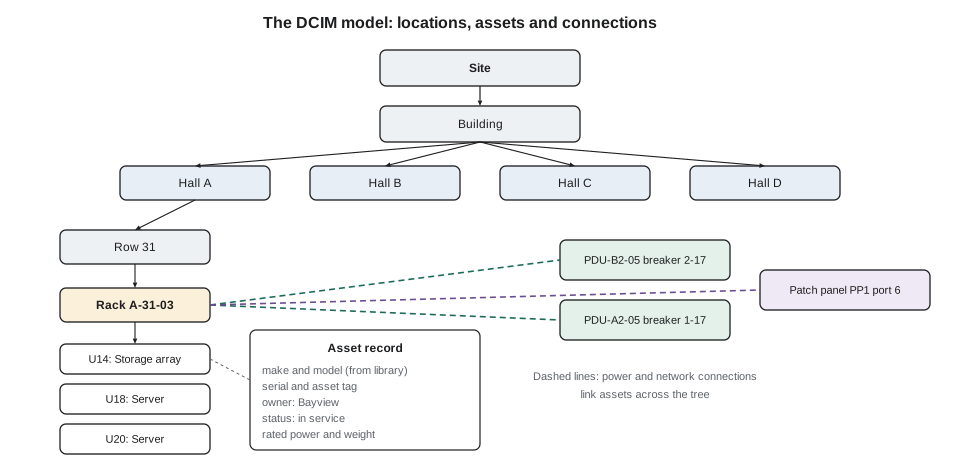
The model library is the part most people never see. It holds a template for each make and model of equipment: its height in U, depth, weight, nameplate power, number and type of power inlets, network ports and front-to-back airflow. When a technician adds a server to DCIM, the template fills in most of the details. A wrong template, such as a server recorded as 1U when it is 2U, or with one power supply when it has two, spreads errors to every rack it is used in.
Connections
A list of assets is an inventory; connections make it a model. DCIM records how assets connect, for power and for network:
- Power connections trace the whole chain: utility, switchgear, UPS, floor PDU, branch breaker, rack PDU, outlet, and the device's power supply. With them, DCIM can answer 'what is downstream of this breaker?' and 'is this server really dual-fed from two different UPS systems?'
- Network connections trace the cabling: device port, patch panel, trunk, cassette, cross-connect, switch port, as covered in DCT-210.
Connection data is what makes DCIM valuable during maintenance and incidents. Before UPS-B2's maintenance in DCT-220 lesson 11, the DCIM trace listed every rack fed from it and flagged three devices that were single-corded on the B side, so their owners could be warned. After the DCT-220 storm, the trace confirmed which racks had been on the Hall D generator block that ran at N.
Connection data is also the hardest to keep right, because it changes with every patch, every move and every new server, and because many of those changes are made by customers in their own cages. Stonebridge records every change it makes through a work order that updates DCIM, and audits customer cages against DCIM when customers allow it.
Status and lifecycle
Each asset moves through a lifecycle, and DCIM's status field follows it: planned (space and power reserved), received (in the shipping area), installed (racked but not in service), in service, decommissioning, and removed. Reserved and planned assets matter as much as installed ones: a rack position reserved for Corvid AI's next pod is not free, even though it is empty. Lesson 6 shows how reservations feed capacity figures.
The lifecycle ties DCIM to the work done in DCT-130: the receiving check, the install, the labelling, and the decommissioning with its chain of custody. Each of those steps ends with a DCIM update, and a ticket is not closed until its DCIM update is done.
Live data on the model
DCIM reads selected points from the BMS and EPMS and attaches them to assets: each rack's inlet temperature and humidity sensors, each branch circuit's current, each rack PDU's outlet readings, each CRAH's supply and return. This is what turns floor maps into heat maps and rack elevations into power displays. On Jamal's desk the hall thermal maps are DCIM views, coloured by the latest inlet temperature, and the branch current reports are DCIM reports built on EPMS data.
The link has two failure modes. If a sensor is attached to the wrong rack in DCIM, the map shows heat in the wrong place. If a point's connection to DCIM breaks, the map shows the last value, or a blank, and the problem looks like a quiet rack. When Jamal moved rack A-22-09's loose sensor (lesson 3) back to its correct position, he also checked that DCIM had the sensor against A-22-09 and not its neighbour.
Data quality
Every DCIM is wrong somewhere. The question is how wrong and whether anyone knows. Studies and audits commonly find that unmanaged asset records drift quickly away from reality: servers removed but still listed, devices installed without records, power connections recorded on the wrong outlet. Stonebridge measures its DCIM accuracy by audit: each month, the desk picks a sample of racks and a technician checks every device, U position, serial number and power connection in them against DCIM. The target is 98 % of fields correct; anything below 95 % in one hall triggers a full audit of that hall.
# Monthly DCIM accuracy audit: compare a sample of racks on the floor with DCIM
dcim = {  # (rack, U): (model, serial, power feeds)
    ("A-31-03", 14): ("Storage array S8", "SN48812", "A17/B17"),
    ("A-31-03", 18): ("Server 2U-G4", "SN51120", "A17/B17"),
    ("A-31-03", 20): ("Server 2U-G4", "SN51121", "A17/B17"),
    ("A-31-03", 22): ("Server 2U-G4", "SN51122", "A17/B17"),
    ("A-17-04", 30): ("Switch 1U-48", "SN30077", "A09/B09"),
}
floor = {
    ("A-31-03", 14): ("Storage array S8", "SN48812", "A17/B17"),
    ("A-31-03", 18): ("Server 2U-G4", "SN51120", "A17/B17"),
    ("A-31-03", 20): ("Server 2U-G4", "SN51199", "A17/B17"),   # replaced under RMA
    ("A-31-03", 24): ("Server 2U-G4", "SN51122", "A17/B17"),   # moved two U up
    ("A-17-04", 30): ("Switch 1U-48", "SN30077", "A09 only"),  # one feed
    ("A-17-04", 40): ("Patch panel 1U", "-", "-"),             # not in DCIM
}
fields = errors = 0
for key in sorted(set(dcim) | set(floor)):
    d, f = dcim.get(key), floor.get(key)
    if d is None: print(f"{key}: on the floor, missing from DCIM: {f[0]}"); errors += 3; fields += 3; continue
    if f is None: print(f"{key}: in DCIM, not found on the floor: {d[0]}"); errors += 3; fields += 3; continue
    for name, a, b in zip(("model", "serial", "power"), d, f):
        fields += 1
        if a != b: errors += 1; print(f"{key}: {name} differs, DCIM {a} vs floor {b}")
print(f"Accuracy: {(fields - errors) / fields * 100:.0f} % of {fields} fields")('A-17-04', 30): power differs, DCIM A09/B09 vs floor A09 only
('A-17-04', 40): on the floor, missing from DCIM: Patch panel 1U
('A-31-03', 20): serial differs, DCIM SN51121 vs floor SN51199
('A-31-03', 22): in DCIM, not found on the floor: Server 2U-G4
('A-31-03', 24): on the floor, missing from DCIM: Server 2U-G4
Accuracy: 48 % of 21 fieldsEach finding has a story. The serial number differs because a server was replaced under a returns process (DCT-310) and the swap was not recorded. The 'missing' server at U22 has moved to U24, so it appears twice as an error. The switch shows one feed because its second power supply has failed or been unplugged, which is a real fault, not a records error, and goes to a ticket. The patch panel was added by the customer. The accuracy figure is low because the sample is small and contains several problems; each one becomes a correction or a ticket.
Who may change DCIM
Because DCIM is the system of record, changes to it are controlled. At Stonebridge, technicians may update assets and connections as part of a work order for work they have done; capacity planners manage reservations; the DCIM administrator manages model libraries, user accounts and the links to the BMS and EPMS. Every change is logged with the user, the time and the ticket number. 'Fixing' a record without a ticket, even when the record is obviously wrong, is not allowed: the correction must say why, so that the cause of the error can be found.
Worked problem
Tracing a breaker before maintenance
An electrician plans to replace branch breaker 2-17 on PDU-B2-05 tomorrow. The work order asks the desk to confirm what will lose its B-side power. How does Jamal answer?
Show solution
- He opens PDU-B2-05 in DCIM and traces breaker 2-17 downstream: it feeds the B-side receptacle of rack A-31-03.
- The trace continues through the rack's B-side rack PDU to its outlets and the devices plugged into them: the storage array and three servers, all dual-corded with their A sides on PDU-A2-05 breaker 1-17.
- He checks the live data: both rack PDUs are reading current, so both sides are actually carrying load as recorded.
- Because the audit sample last month found a moved server in this rack, he asks Roz to walk the rack and confirm every device has both cords connected before the work.
- Roz finds all four devices dual-corded. Jamal records the trace in the work order and notifies Bayview's contact that their B side will be off for about 30 minutes, with their A side carrying the full load.
Answer: The trace took ten minutes. The walk-down took another ten and turned 'DCIM says' into 'we checked'.
Floor maps and impact reports in daily use
The floor map is the part of DCIM most technicians open first. A good map shows each hall to scale with rows, racks, cooling units, floor grilles, columns and fire exits in their real positions, and each rack can be shaded by a chosen measure: power drawn against its budget, inlet temperature from the nearest sensors, space used, or customer. Jamal asks new technicians to learn the map before they learn the hall. When a ticket says rack C-14-07, the map gives the walking route, the nearest grille and the nearest emergency stop before anyone leaves the desk.
The second daily use is the impact report. Before any maintenance on a shared piece of infrastructure, the planner asks DCIM which assets sit downstream of it. For a planned transfer of PDU-A2-05 to bypass, the report lists every branch circuit, every rack fed from those branches, the customer who owns each rack, and whether each rack has a second feed from the B side that will carry the load. Racks with only one feed, or with both feeds traced back to the same PDU by mistake, are flagged in red. Those flags turn into phone calls and change notices days before the work, not surprises during it.
An impact report is only as good as the connections behind it. In the spring audit at Stonebridge, Anjali found three racks in Hall B whose B feeds had been moved to a new PDU during a busy week without anyone updating DCIM. An impact report run before the audit would have shown those racks as safe for work on the old PDU, when in fact both of their feeds were on the same side. The fix was simple, and it became a rule: no power move is closed in the ticket system until the DCIM connection has been updated and a second person has checked it against the label at the rack.
Finally, the map and reports are what customers see. Account managers send Bayview a monthly extract showing their racks, their measured draw against their contracted power, and any open requests. If the model is wrong, the customer notices first, and trust in every other report drops with it.
Common mistakes
MistakeTrusting DCIM blindly before maintenance.
InsteadUse DCIM to plan, then confirm on the floor, especially for racks with recent changes.
MistakeTreating an empty but reserved position as free.
InsteadReservations are capacity in use; check the asset status.
MistakeCorrecting a DCIM record without a ticket.
InsteadRecord every change with a reason, so the cause of the error can be found.
MistakeAdding a server with the wrong model template.
InsteadCheck the template's height, inlets and power before using it; wrong templates spread errors.
MistakeClosing an install ticket before updating DCIM.
InsteadThe DCIM update is part of the work; the ticket stays open until it is done.
Summary and key terms
- DCIM is the model of the facility: assets, locations, connections, status and capacity, with live data from the BMS and EPMS.
- Assets sit in a location hierarchy (site, building, hall, row, rack, U) and use model templates for their details.
- Power and network connections let DCIM trace what is downstream of any breaker or port.
- Asset status follows the lifecycle from planned to removed; reservations count as capacity in use.
- DCIM accuracy is measured by regular audits against the floor, and every correction goes through a ticket.
- Technicians update DCIM as part of the work they do; the record is part of the job.
- DCIM
- Data centre infrastructure management: the software model of a facility's assets, connections and capacity.
- System of record
- The source treated as authoritative for a type of information.
- Model library
- Templates holding the physical and electrical details of each make and model of equipment.
- Connection trace
- Following recorded power or network connections upstream or downstream from an asset.
- Reservation
- Space, power or ports set aside in DCIM for planned equipment.
- DCIM audit
- A check of a sample of DCIM records against what is actually installed.
Practice problems
Work each problem on paper first, then reveal the answer to check.
What can DCIM tell you that the BMS cannot?
Show answer
Who owns an asset, where it is, what it is connected to and how much capacity it uses.
Why does a wrong model template matter?
Show answer
Every asset added with it gets the wrong height, inlets or power, spreading errors.
An audit finds a switch with one feed where DCIM shows two. Is that a records error?
Show answer
Probably a real fault (a failed or unplugged power supply); ticket it.
Why must a DCIM correction have a ticket?
Show answer
So the reason and cause of the error are recorded and can be fixed.
Lesson quiz · 5 questions
Score 60% or more to complete this lesson.
Create a free account to save your progress, take quizzes and earn a certificate.