
DCT-320 · Lesson 9 of 12 · 20 min
AI networks: InfiniBand and RoCE Ethernet
Hall D's networks look like the others from the aisle: switches in cabinets, trunks in trays, optics in cages. They behave very differently. Corvid's backend fabric connects thousands of GPUs that work on one training job together and exchange data with each other many times a second, directly from one GPU's memory into another's. A single lost packet or a single slow link holds up every GPU in the job. DCT-210 Lesson 3 showed how the fabric is cabled, rail by rail. This lesson explains what runs over it, at the level a technician needs to understand Corvid's tickets and to see why Hall D's rules are stricter than anywhere else on the campus.
Why AI traffic is different
Ordinary data centre traffic is many small conversations that start and stop at random. A training job's traffic is a few enormous transfers that every GPU starts at the same moment, at full speed, and the job cannot continue until the last one finishes. That has three consequences. The network must not be oversubscribed, because every GPU sends at once. Packets must not be dropped, because recovering a dropped packet takes far longer than sending it. And every link must perform the same, because the slowest one sets the pace for all.
To move data fast enough, AI networks use RDMA, remote direct memory access. With RDMA, a network card can read or write the memory of a GPU or server at the other end directly, without the processors at either end copying the data or handling each packet. RDMA gives very low delay and frees the processors, but it expects a network that does not drop packets. Two network technologies provide that today: InfiniBand, and Ethernet configured for RDMA, known as RoCE.
InfiniBand
InfiniBand is a network technology designed from the start for high-performance computing. It has its own switches, its own cables and optics, which look much like Ethernet's, and its own way of running the network. Speeds are named by generation: HDR at 200 Gb/s per port, NDR at 400 Gb/s and XDR at 800 Gb/s. A current-generation InfiniBand switch such as NVIDIA's Quantum-X800 offers 144 ports of 800 Gb/s through 72 twin-port OSFP cages, so one switch can connect a large part of a pod.
InfiniBand is lossless by design: a sender may only transmit when the receiver has told it there is buffer space waiting, so packets are not dropped for lack of room. It is managed centrally by a subnet manager, software running on a switch or a server, which discovers every device and link, assigns addresses and calculates the paths. When a technician replaces a cable or a switch in an InfiniBand fabric, the subnet manager notices the change and recalculates. The owner's engineers watch the subnet manager's view of the fabric, not individual switch configurations.
RoCE: RDMA over Ethernet
RoCE, RDMA over Converged Ethernet, carries RDMA traffic over ordinary Ethernet switches. The current version, RoCEv2, runs inside routed IP packets, so it works across a routed spine-leaf fabric like the ones in Lesson 6. Ethernet was not designed to be lossless, so RoCE networks add two mechanisms. Priority flow control, PFC, lets a switch tell its neighbour to pause one class of traffic for a moment when its buffers are filling, instead of dropping packets. Explicit congestion notification, ECN, lets a switch mark packets when it is getting congested, so the senders slow down before buffers fill.
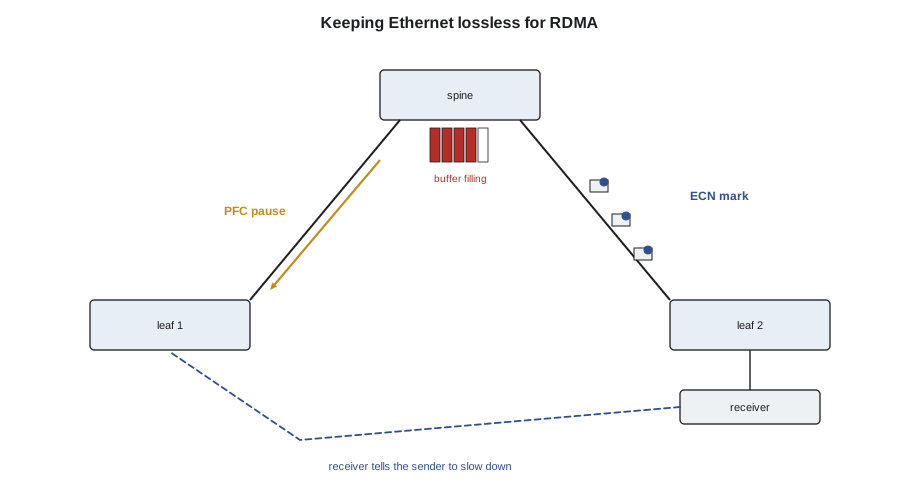
Corvid's backend fabric in Hall D is RoCE on 800 Gb/s Ethernet, and its frontend and storage networks are ordinary Ethernet. Many clusters use InfiniBand for the backend instead. The industry is also building on Ethernet's side: the Ultra Ethernet Consortium, a group of chip, switch and cloud companies, published its first full specification, Ultra Ethernet 1.0, in June 2025, defining a new transport for AI and high-performance traffic over Ethernet. Jamal does not need to know the protocols in detail. He needs to know that the fabric is lossless by design, that it is tuned as a whole, and that a single link with errors damages the whole job, not just its own traffic.
Scale-up and scale-out
DCT-210 described the four networks of an AI hall. Inside each integrated rack, GPUs are joined by a scale-up network, a very fast copper backplane, such as NVIDIA's NVLink, that lets every GPU in the rack share memory with the others; it never leaves the rack and is serviced as part of the rack. The backend, or scale-out, fabric joins racks: each GPU has its own network card, often 400 or 800 Gb/s, cabled to a leaf on its rail. The frontend network reaches storage and the outside world. The management network reaches every controller. A technician's tickets in Hall D almost always concern the scale-out fabric or the management network.
Link health matters more
In an ordinary network, a link with a few errors an hour is a minor fault to fix when convenient; ECMP and retransmission hide it. In an AI backend fabric it is urgent. RDMA traffic that hits errors is retransmitted, and while it waits the whole job waits. Corvid's monitoring therefore watches every backend link's error counters and optic readings, and raises a ticket for a link whose corrected FEC errors rise, long before it fails outright. Its acceptance rule for a new or repaired backend link, which Jamal applies in Lesson 12, is: optic readings within warnings on every lane, received power within a narrow window of the others, no uncorrected FEC errors, and corrected errors below a set rate over a soak period.
# Expected received power from the far end's transmit power and the link loss
tx_dbm = [1.3, 1.2, 1.4, 1.1, 1.3, 1.2, 1.4, 1.3]       # far-end transmit power per lane
link_loss_db = 0.9                                     # measured loss of this link (trunk, cassettes, cords)
rx_low_warn = -8.4                                     # optic's low warning threshold
measured_rx = [0.5, 0.2, 0.6, 0.3, -3.6, 0.4, 0.6, 0.4]
for lane, (tx, rx) in enumerate(zip(tx_dbm, measured_rx), 1):
    expected = tx - link_loss_db
    gap = expected - rx
    flag = "ok" if gap < 1.5 else f"{gap:.1f} dB more loss than expected"
print(f"lane {lane}: expected {expected:+.1f} dBm, measured {rx:+.1f} dBm, margin to warning {rx - rx_low_warn:.1f} dB -> {flag}")lane 1: expected +0.4 dBm, measured +0.5 dBm, margin to warning 8.9 dB -> ok lane 2: expected +0.3 dBm, measured +0.2 dBm, margin to warning 8.6 dB -> ok lane 3: expected +0.5 dBm, measured +0.6 dBm, margin to warning 9.0 dB -> ok lane 4: expected +0.2 dBm, measured +0.3 dBm, margin to warning 8.7 dB -> ok lane 5: expected +0.4 dBm, measured -3.6 dBm, margin to warning 4.8 dB -> 4.0 dB more loss than expected lane 6: expected +0.3 dBm, measured +0.4 dBm, margin to warning 8.8 dB -> ok lane 7: expected +0.5 dBm, measured +0.6 dBm, margin to warning 9.0 dB -> ok lane 8: expected +0.4 dBm, measured +0.4 dBm, margin to warning 8.8 dB -> ok
Lane 5 is still well above its warning threshold, so the optic would report nothing unusual, but it receives about 4 dB less than expected from the link's measured loss. In Corvid's fabric that is a ticket: something in lane 5's path, most often a contaminated connector, is wasting light and will cause errors as the optic ages or the connector collects more dust.
# Report the health of a pod's backend links from a monitoring export (illustrative)
links = [  # (link, uncorrected FEC, corrected FEC per s, lowest-lane Rx dBm, lane spread dB)
    ("d3-05-gpu03-nic1", 0, 12, -0.4, 0.6), ("d3-05-gpu03-nic2", 0, 9, -0.2, 0.5),
    ("d3-07-gpu14-nic2", 0, 4100, -3.9, 4.4), ("d3-08-gpu01-nic4", 3, 98000, -7.9, 8.2),
    ("d3-09-gpu11-nic1", 0, 15, -0.6, 0.7),
]
for name, unc, corr, low, spread in links:
    if unc > 0:
        verdict = "drain now: uncorrected errors"
    elif corr > 1000 or spread > 2.0:
        verdict = "ticket: degrading"
    else:
        verdict = "healthy"
print(f"{name:17} uncorr {unc:<3} corr/s {corr:<6} low Rx {low:+.1f} spread {spread:.1f} -> {verdict}")d3-05-gpu03-nic1 uncorr 0 corr/s 12 low Rx -0.4 spread 0.6 -> healthy d3-05-gpu03-nic2 uncorr 0 corr/s 9 low Rx -0.2 spread 0.5 -> healthy d3-07-gpu14-nic2 uncorr 0 corr/s 4100 low Rx -3.9 spread 4.4 -> ticket: degrading d3-08-gpu01-nic4 uncorr 3 corr/s 98000 low Rx -7.9 spread 8.2 -> drain now: uncorrected errors d3-09-gpu11-nic1 uncorr 0 corr/s 15 low Rx -0.6 spread 0.7 -> healthy
Working in Hall D
Hall D's rules follow from all this. Backend links are touched only under a ticket from Corvid, with the affected GPUs drained from their jobs first, as Lesson 6 described for fabric links. Every connector is inspected and the image recorded. Optics come only from Corvid's approved, tested stock. Cables are never re-routed or tied tighter to tidy a bundle without a ticket, because a tight bend can cost a decibel in a fibre without breaking it. And every repaired link is soaked and checked against the acceptance rule before it is handed back. None of this is complicated; it is the same practice as everywhere else, applied without exceptions.
Worked problem
One slow link in a thousand
Carmen Ortiz reports that a training job across racks D-3-05 to D-3-08 is running about 15 percent slower than it should. Corvid's monitoring shows one backend link with corrected FEC errors far higher than the others.
Show solution
- The link is d3-08-gpu01-nic4 to the rail 4 leaf. Its optic readings show seven lanes near 0 dBm and lane 6 at about −6 dBm.
- Carmen drains GPU 1 of tray 1 in D-3-08 from the job. Jamal disconnects the cord at the server, inspects the server-side connector and the optic's port: clean.
- At the cassette in the row D-4 network cabinet he inspects the cord's other end: a fibre end face in position 6 shows a dust particle in the core zone.
- He cleans and re-inspects it, records the image and reconnects. Lane 6 now reads near 0 dBm and corrected errors fall to the level of the other links. After a soak period Carmen returns the GPU to the job, which runs at full speed again.
Answer: One dirty fibre in one of thousands of links slowed every GPU in the job. The fix took twenty minutes once the monitoring pointed to the link.
Cabling an InfiniBand or RoCE fabric is the same job
For all their differences at the protocol level, InfiniBand and RoCE fabrics are cabled with the same kinds of optics, cables, trunks and cassettes as any other high-speed network, and the same rules apply: the right optic type from the approved list, inspection of every connector, polarity checked, labels at both ends, port map followed exactly. What differs is the tolerance. A fabric in which a few errors on one link slow a whole cluster leaves no room for an uninspected connector or a cord bent too tightly behind a door. Many AI operators also test every new backend link at full speed before accepting it, running traffic across the fabric for hours and checking every port's error counters, and a link that shows any errors in that burn-in is reworked before the cluster goes into service.
GPU servers and their network ports
In a typical GPU server or compute tray, each GPU has its own network card for the backend fabric, plus one or two cards for the frontend network and a 1 Gb/s port for the baseboard controller. The backend cards are usually numbered to match the GPUs, which is how the rail-optimized cabling of DCT-210 Lesson 3 can send GPU 1's card to rail 1 and so on. Corvid's trays label each card's port with its rail, and the port map gives, for every card, the leaf and port it must reach. A cable on the wrong card works electrically but lands on the wrong rail, which slows the job as DCT-210 described. Jamal checks every backend connection against the map by the label at both ends, and Carmen checks it again by the fabric's own view of which card is on which leaf port.
The GPUs themselves also report on their network links. A training job's software can show, for each GPU, how fast its exchanges are completing, and a single slow GPU is often the first sign of a degraded link. Corvid's engineers use this to find links that are failing slowly, then raise a ticket for Stonebridge to inspect the path.
Common mistakes
MistakeTreating a few errors on a backend link as minor.
InsteadIn an AI fabric, errors on one link slow the whole job; raise or work the ticket.
MistakeWorking on a backend link before its GPUs are drained.
InsteadWait for the owner to drain them.
MistakeTightening ties on backend bundles to tidy them.
InsteadDo not re-route or tighten without a ticket; bends cost light.
MistakeJudging a lane healthy only because it is above its warning threshold.
InsteadCompare it with the other lanes and the expected value.
MistakeAssuming InfiniBand and Ethernet optics are interchangeable.
InsteadUse the optic type and coding on the owner's approved list.
Summary and key terms
- AI training traffic is synchronized, heavy and intolerant of loss; the slowest link sets the pace.
- RDMA moves data directly between memories and needs a lossless network.
- InfiniBand is lossless by design and managed by a subnet manager; XDR runs at 800 Gb/s per port.
- RoCEv2 carries RDMA over routed Ethernet, using PFC and ECN to avoid drops.
- Ultra Ethernet 1.0, published in June 2025, defines a new Ethernet transport for AI.
- Backend links are drained before work, inspected at every connector and soaked before handover.
- RDMA
- Remote direct memory access: reading or writing another machine's memory without its processor.
- InfiniBand
- A lossless high-performance network technology with its own switches and management.
- Subnet manager
- The software that discovers and routes an InfiniBand fabric.
- RoCE
- RDMA over Converged Ethernet; RoCEv2 runs over routed IP networks.
- PFC
- Priority flow control, which pauses one class of traffic instead of dropping it.
- ECN
- Explicit congestion notification, which marks packets to make senders slow down.
Practice problems
Work each problem on paper first, then reveal the answer to check.
Why does one link with errors slow a whole training job?
Show answer
Every GPU waits for the slowest exchange to finish.
What does PFC do?
Show answer
It tells a neighbour to pause one class of traffic briefly instead of dropping packets.
What manages the paths in an InfiniBand fabric?
Show answer
The subnet manager.
A lane receives 4 dB less than the link's measured loss predicts but is above its warning threshold. Is it healthy?
Show answer
No; something in that lane's path is losing light and should be investigated.
Lesson quiz · 5 questions
Score 60% or more to complete this lesson.
Create a free account to save your progress, take quizzes and earn a certificate.