
DCT-320 · Lesson 1 of 12 · 20 min
The data centre network from a technician's view
Jamal Pierce starts his networking term at Stonebridge Data with a question Roz Kerr has heard from every new technician: whose network is it? On the YUL-2 campus in Beauharnois there are dozens of networks in the same buildings. The cloud provider in Halls B and C runs its own fabric. Corvid AI runs a backend training fabric, a frontend network and a management network in Hall D. Forty enterprise customers in Hall A each run their own switches inside their cages. Stonebridge itself runs a small network of its own for the building systems, the security cameras and the out-of-band management of its equipment. Almost none of it belongs to the technician who will touch it, and that is the first thing a data centre technician has to understand about networking.
This course is about networking from the floor. Jamal will not design networks or write switch configurations; the customers' network engineers and Stonebridge's own network team in the operations centre do that. He will install and replace switches, routers and firewalls, plug in optics and cables, turn up ports, read lights and counters, connect consoles, and gather the evidence that lets an engineer two hundred kilometres away decide what is wrong. To do that well he needs to understand what the devices do, how the traffic moves through them and what the numbers on a screen mean. The basics of Ethernet, IP addresses and subnets were covered for installers in LVT-220; this course builds on them for the data centre and refers back where it can.
Who owns what
Every network on the campus has an owner, and the owner decides what may be changed. Stonebridge's network team, led from the operations centre by network engineer Elif Demir, owns the campus management network, the building systems network and the meet-me room cross-connect plant. The cloud provider owns everything inside Halls B and C past the demarcation panels. Corvid owns its three networks in Hall D. Each enterprise customer owns the switches in its cage. Carriers own their fibre up to the panel in the entrance room where they hand over to Stonebridge.
The line between one owner and the next is the demarcation point, usually a specific panel and port. On one side, the work belongs to one owner and its tickets; on the other, to the next. When a carrier circuit fails, the demarcation point is where the carrier, Stonebridge and the customer each test to prove which side the fault is on. A technician who knows the demarcation points can answer the most useful question in any network ticket: whose problem is this, and who must approve the fix?
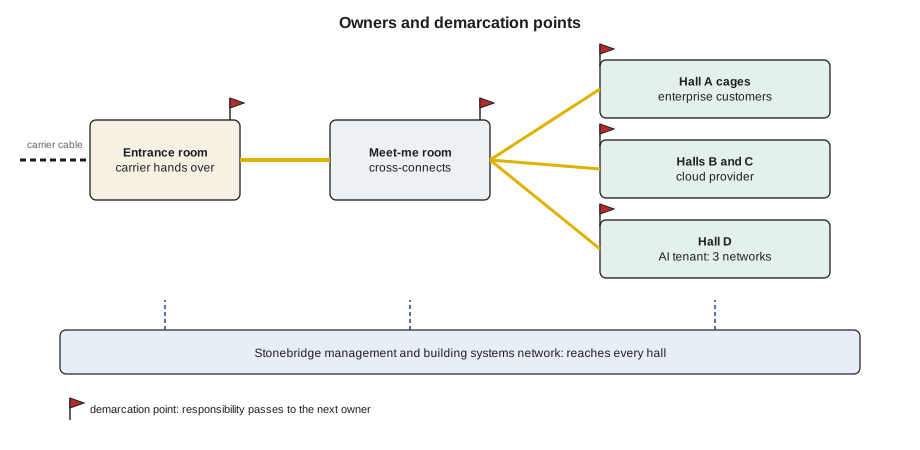
Owning a network is not the same as owning the hardware it runs on. The cloud provider owns its switches, but Stonebridge's technicians may be asked to replace a failed power supply in one under a remote hands ticket. In that case the provider owns the work and the decision; the technician supplies the hands, the eyes and the care. The ticket says exactly what may be touched, and anything outside it needs a new instruction from the owner.
What a technician does on the network
Most network tasks on the floor fall into a handful of kinds. Jamal will meet them all in this course.
- Install and remove devices: rack a new switch, connect its power, management and console, and later remove it under a decommissioning ticket.
- Replace failed parts: power supplies, fan trays, optics and line cards that can be swapped while the device runs.
- Turn up ports: plug in an optic and a cord to the port the work order names, check the link comes up at the right speed and report what the switch sees.
- Gather evidence: read the lights, take photographs, read counters and optic diagnostics from a console when the owner asks, and pass them on accurately.
- Move and trace cables: follow a link from port to port, check labels against the port map and fix records.
- Provide console access: connect a console server or a laptop to a device that has lost its network connection so the owner's engineer can recover it.
What the technician does not do matters as much. He does not change a configuration, reboot a device, shut a port or move a cable that is not in the ticket. A switch port that looks unused may be a standby link that only carries traffic when another fails; unplugging it removes the protection without any alarm. Roz's rule is short: if it is not in the ticket, it is not your cable.
The layers in one page
Network engineers describe networks in layers. The full models have seven layers, but on the floor three or four are enough to keep a fault in its place.
| Layer | What lives there | What a technician checks |
|---|---|---|
| 1 Physical | Cables, optics, connectors, light and electrical signals | Lights, seating, cleanliness, optic power readings, the right cable in the right port |
| 2 Data link | Ethernet frames, MAC addresses, switches, VLANs, link aggregation | Link up at the right speed, the right VLAN on the port, neighbour discovery shows the expected device |
| 3 Network | IP addresses, subnets, routers, routing protocols | Whether a device can reach its gateway; whether a routing session is up (read only) |
| 4 and up | Transport, applications, the customer's services | Usually nothing; that is the owner's work |
The value of the layers is in the order of troubleshooting. Most faults a technician can fix are at layer 1: a dirty connector, an optic not fully seated, a cord in the wrong port, a pinched cable. A configuration mistake at layer 2 or 3 looks, from the floor, like a link that is up but not working, and the technician's job is to prove that layer 1 is good and hand the evidence to the engineer. Jamal will practise this habit throughout the course: start at the bottom, and prove each layer before blaming the next.
Remote hands and network tickets
Most of Jamal's network work arrives as a remote hands ticket from a customer or as a work order from Stonebridge's own network team. Lesson 11 of DCT-110 explained the remote hands request; network tickets add a few details that a good requester includes and a good technician asks for when they are missing: the device name and its location to the U, the exact port names at both ends, the optic type expected, whether the port is live, the contact who can see the switch while the work is done, and what success looks like.
# Check a network remote hands ticket for the details a technician needs before starting
ticket = {
    "id": "RH-51307",
    "owner": "Corvid AI",
    "device": "d4-leaf-r2-03",
    "location": "D-4-02 U31",
    "port_a": "Ethernet1/17",
    "port_b": "d3-07-gpu14-nic2",
    "optic": "800G-DR8 OSFP",
    "live": True,
    "contact": "",
    "success": "link up at 800G, no errors after 15 min",
}
needed = ["device", "location", "port_a", "port_b", "optic", "live", "contact", "success"]
missing = [k for k in needed if ticket.get(k) in ("", None)]
print("Ticket", ticket["id"], "for", ticket["owner"])
if missing:
    print("Ask the requester for:", ", ".join(missing))
else:
    print("All details present; plan the work")
if ticket["live"]:
print("Live port: confirm the contact is watching before plugging or unplugging anything")Ticket RH-51307 for Corvid AI Ask the requester for: contact Live port: confirm the contact is watching before plugging or unplugging anything
The missing contact matters most. On a live port, the person who can see the switch must be on the phone or in the chat while the technician works, so that a mistake is caught in seconds rather than at the next shift change.
Working on live networks
Data centre networks are always live. Even a new switch in an empty rack is usually connected to the management network within minutes of power-on, and most work happens beside cables that carry other customers' traffic. Three habits protect them.
First, touch one cable at a time and only the cable in the ticket. Bundles are combed apart gently rather than pulled, and a cord being removed is traced by hand from end to end, not identified by colour or by guessing from its neighbours. Second, read the label at both ends before plugging or unplugging, and read it aloud to the contact on a live job. Third, never look into an optic or a connector: lasers in data centre optics are invisible, and many are strong enough to hurt an eye at close range. Optical safety and cleaning were covered in DCT-210 and LVT-210; this course adds the habits of handling the optics themselves in Lesson 8.
Worked problem
The cable that looked unused
A Hall A customer asks for a new cord from its switch port 23 to a new server. Port 23 already has a cord in it, with no link light, and the cord is unlabelled at the switch end.
Show solution
- Jamal does not unplug the cord. He traces it by hand through the vertical manager to its far end: it runs to a second switch in the same cabinet.
- He photographs both ends and asks the customer's contact, M. Leblanc, about the cord.
- The contact checks the switch configuration: port 23 is a standby link between the two switches, dark because the primary link is healthy.
- The customer updates the work order to use port 25. Jamal installs the new cord there, labels the standby cord at both ends, and notes the labelling in the ticket.
Answer: A dark port is not an empty port. The trace took ten minutes and avoided removing the customer's backup link.
A day of network tickets
To show how the pieces fit, Roz walks Jamal through a typical day shift's network tickets on the campus. At 07:30 the night shift hands over two open items: a Hall A customer waiting for a cross-connect to a carrier, and a Corvid link that flapped twice overnight and is being watched. At 08:15 the cloud provider asks for a failed optic in a Hall C leaf to be replaced; the provider's engineer drains the link, and the job takes twenty minutes. At 09:40 an enterprise customer asks for a server's cord to be moved from one switch port to another, with its engineer on the phone. At 11:00 Stonebridge's own network team asks for a console cable to be checked on a building systems switch that its engineers cannot reach. After lunch Corvid asks for evidence on a link with rising errors: photographs, optic readings from both ends and an inspection of every connector in the path. And at 15:30 a carrier technician arrives to test a new circuit to the demarcation panel in the entrance room, and Jamal escorts him and connects the test cord the work order names.
Not one of these tickets asks Jamal to decide anything about how a network should work. Every one asks him to do a physical task precisely, to observe carefully and to report accurately. That is the job, and the rest of the course gives him the understanding to do it well: what each device is, what the link he is touching carries, what the lights and numbers mean, and what his change will do to the traffic.
Words engineers use
Network engineers have their own vocabulary, and a technician who knows it understands tickets faster and asks better questions. A few words come up constantly. A port is a socket on a device; an interface is the switch's name for a port, such as Ethernet1/17. A link is the connection between two ports, and it is up when both ends see a signal and agree on how to talk. Upstream means towards the core of the network and downstream towards the servers. A drain moves traffic off a link or a device before work, as Lesson 6 explains. A flap is a link going down and coming back up. And a maintenance window is the agreed time in which planned work may be done; outside it, only emergency work proceeds, and only with the owner's agreement.
Common mistakes
MistakeTreating every network on the campus as Stonebridge's.
InsteadFind the owner and the demarcation point before touching anything.
MistakeUnplugging a cord because its port shows no light.
InsteadTrace it end to end and ask the owner; dark links are often standby links.
MistakeStarting work on a live port without anyone watching the switch.
InsteadHave the owner's contact on the line for live work.
MistakeBlaming the configuration before checking the physical layer.
InsteadProve layer 1 first: seating, cleanliness, the right port, the optic readings.
MistakeLooking into an optic to see whether it is lit.
InsteadNever look into an optic or connector; use the switch, a power meter or a viewer with a filter.
Summary and key terms
- Most networks in a colocation campus belong to customers; Stonebridge owns its management, building and cross-connect networks.
- Demarcation points are the panels where responsibility passes from one owner to the next.
- Technicians install, replace, turn up, trace and gather evidence; they do not change configurations.
- Troubleshoot from the physical layer up, proving each layer before blaming the next.
- A network ticket needs the device, location, ports at both ends, optic type, whether it is live, a contact and a success test.
- On live networks, touch one cable at a time, read labels at both ends and never look into an optic.
- Demarcation point
- The panel or port where responsibility passes from one network owner to another.
- Remote hands
- Work done by the site's technicians on a customer's equipment under the customer's instruction.
- Layer 1
- The physical layer: cables, optics, connectors and signals.
- Standby link
- A link that carries traffic only when another link fails.
- Operations centre
- The room from which Stonebridge's engineers monitor the campus and its networks.
Practice problems
Work each problem on paper first, then reveal the answer to check.
A cloud provider asks Stonebridge to replace a fan tray in one of its spine switches. Who owns the decision to do it now?
Show answer
The cloud provider; Stonebridge supplies the hands under the ticket.
Why is a port with no link light not necessarily free?
Show answer
It may be a standby link, a port waiting for a server, or reserved in the owner's design.
A link is up but traffic does not pass. Which layer does the technician prove first?
Show answer
Layer 1, then hand the evidence to the engineer for layers 2 and 3.
Name three details a network ticket should give besides the device name.
Show answer
Any of: location to the U, port names at both ends, optic type, whether it is live, a contact, the success test.
Lesson quiz · 5 questions
Score 60% or more to complete this lesson.
Create a free account to save your progress, take quizzes and earn a certificate.