
DCT-320 · Lesson 11 of 12 · 20 min
Troubleshooting connectivity: lights, counters and optics diagnostics
Most network tickets that reach the floor say some version of the same thing: a link is down, a link is up but slow, or a link keeps dropping. The owner's engineer can see the switch's view; the technician can see, touch and test the physical link. Good troubleshooting puts those two views together quickly. This lesson gives Jamal a method, the readings that matter, and the habits that keep a fault hunt from turning into a second fault.
A method
Elif Demir teaches every new technician the same order, from the bottom of the layers up. Each step either finds the fault or proves a layer good so the next can be checked.
- Confirm the target: the device, the port names at both ends, the optic type and whether the link is live, from the ticket and the labels.
- Look: link and activity lights, the optic seated and latched, the cord clicked in at both ends, no tight bends, no crushed cable under a door or cover.
- Read the switch's view at both ends, through the engineer or the console: link state, speed, FEC, error counters, optic readings.
- Change one thing at a time and recheck after each: clean and reinspect, reseat, swap the cord, swap the optic, move to a known-good port, only as the ticket and the owner allow.
- Record what was found, what was changed and the readings after the fix.
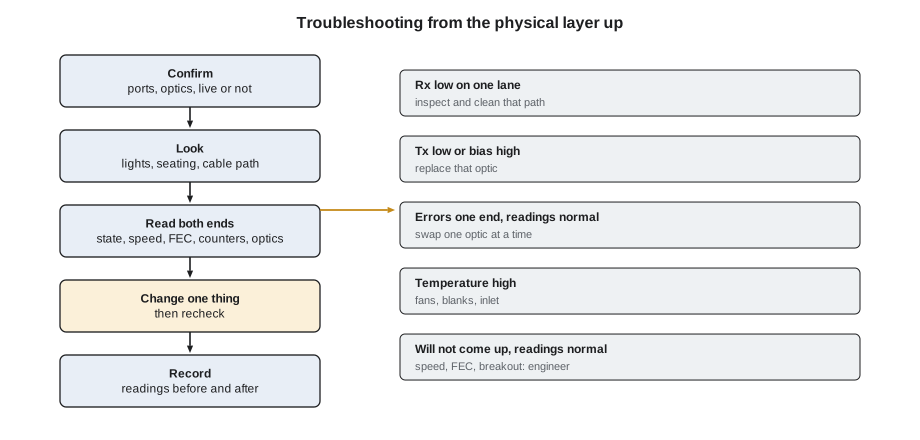
Changing one thing at a time is the rule most often broken. A technician who reseats the optic, cleans the connector and swaps the cord all at once may fix the link without knowing which step fixed it, and if the link fails again a week later nobody knows what to replace. Worse, a technician who swaps several parts on a live link may introduce a second fault while removing the first.
Lights
Port lights are the quickest reading and the least precise. On most switches, a steady green light means the link is up, a flashing light means traffic, amber means a fault or a lower speed than the port's maximum, and no light means no link. The exact meaning varies by maker and is printed in the switch's guide; Stonebridge keeps the light charts for the common switches in each hall's network room. Lights tell a technician which port to look at, but a green light does not mean a link is healthy: a link can be up with errors, at the wrong speed, or to the wrong place.
Speed, FEC and auto-negotiation
A link comes up only when both ends agree on how to talk: speed, lane count, FEC mode and, on copper, whether to negotiate. Optical links in data centres usually run fixed speeds, configured at both ends. If one end of a 100 Gb/s link expects one FEC type and the other expects a different one, or none, the light may flicker but the link never comes up, even with perfect optics and fibre. The same happens when one end has been configured as a breakout and the other has not. These are configuration faults, but technicians meet them after physical work: a replacement switch or line card with a default configuration, or a new optic type that needs a different FEC mode.
# Compare both ends of each link for speed, FEC and breakout settings
links = [
    ("b2-leaf-17 Eth1/51", {"speed": 400, "fec": "RS544", "breakout": "none"},
     "b2-spine-03 Eth3/12", {"speed": 400, "fec": "RS544", "breakout": "none"}),
    ("A-31-03-SW1 Eth1/49", {"speed": 100, "fec": "RS528", "breakout": "none"},
     "A-MDA-02-AG1 Eth2/7", {"speed": 100, "fec": "off", "breakout": "none"}),
    ("d4-leaf-r2-03 Eth1/9", {"speed": 800, "fec": "RS544", "breakout": "2x400"},
     "d3-07 tray14 nic2", {"speed": 800, "fec": "RS544", "breakout": "none"}),
]
for a, sa, b, sb in links:
    diffs = [f"{k}: {sa[k]} vs {sb[k]}" for k in sa if sa[k] != sb[k]]
print(f"{a} <-> {b}: " + ("settings match" if not diffs else "MISMATCH " + "; ".join(diffs)))b2-leaf-17 Eth1/51 <-> b2-spine-03 Eth3/12: settings match A-31-03-SW1 Eth1/49 <-> A-MDA-02-AG1 Eth2/7: MISMATCH fec: RS528 vs off d4-leaf-r2-03 Eth1/9 <-> d3-07 tray14 nic2: MISMATCH breakout: 2x400 vs none
The second link will stay down until the engineer sets the same FEC mode at both ends; the third has been configured as a breakout at the leaf but not at the server. A technician who sees a link refusing to come up after a perfect physical check asks the engineer to compare exactly these settings, and says what was changed physically, so the engineer knows where to look.
Error counters
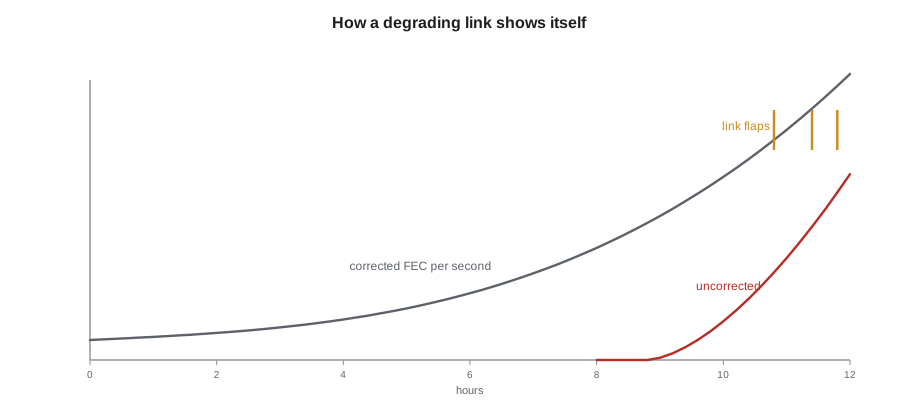
Every switch port counts what it has sent and received, and what went wrong. The counters that matter most on the floor are input errors and CRC or FCS errors, frames that arrived damaged and were thrown away, as Lesson 3 explained; FEC corrected and uncorrected counts on fast links; and link flaps, the number of times the link has gone down and up. Counters only ever go up, from the last time they were cleared, so a single reading means little. The useful measure is the change between two readings a known time apart.
# Rate of change of error counters between two readings taken ten minutes apart
before = {"crc": 1204, "fec_corrected": 3_918_220, "fec_uncorrected": 0, "flaps": 7, "rx_frames": 81_220_440_118}
after  = {"crc": 1216, "fec_corrected": 4_402_910, "fec_uncorrected": 0, "flaps": 9, "rx_frames": 81_884_102_570}
minutes = 10
d = {k: after[k] - before[k] for k in before}
print(f"In {minutes} min: {d['rx_frames']:,} frames received, {d['crc']} CRC errors "
      f"(1 in {d['rx_frames'] // max(d['crc'], 1):,})")
print(f"FEC corrected {d['fec_corrected'] / (minutes * 60):,.0f} per second, uncorrected {d['fec_uncorrected']}")
print(f"Link flaps: {d['flaps']} in {minutes} min = {d['flaps'] * 60 / minutes:.0f} per hour")
if d["fec_uncorrected"] > 0 or d["crc"] > 0:
    print("Errors are getting through FEC: physical-layer fault, investigate now")
if d["flaps"] > 0:
print("The link is flapping: check seating, cleanliness and the optic readings at both ends")In 10 min: 663,662,452 frames received, 12 CRC errors (1 in 55,305,204) FEC corrected 808 per second, uncorrected 0 Link flaps: 2 in 10 min = 12 per hour Errors are getting through FEC: physical-layer fault, investigate now The link is flapping: check seating, cleanliness and the optic readings at both ends
Corrected FEC errors are normal at a low level on fast links; FEC exists to correct them. A rising corrected count means the link's margin is shrinking. Uncorrected errors and CRC errors mean the FEC can no longer keep up and damaged frames are reaching the switch; on a fabric link that is enough for the engineer to drain it. Flaps mean the link is losing its signal altogether, briefly, again and again. Each kind of reading points in a direction.
Reading both ends
Errors are counted by the receiver. CRC errors on the receiving port at end A say that damaged frames arrived from B, so the fault is in the path from B's transmitter to A's receiver: B's optic, the fibres in that direction, or A's optic. The optic readings narrow it down: if B's transmit power is normal and A's received power on one lane is low, the loss is in the fibre path between them, and inspection and cleaning come first. If A's received power is normal but errors continue, A's receiver or B's transmitter may be faulty, and swapping one optic at a time, with the owner's agreement, tells which.
| What the readings show | Most likely cause | First action |
|---|---|---|
| Rx low on one lane, Tx normal at the far end | Dirty or damaged connector or fibre in that lane's path | Inspect and clean both ends of that path |
| Rx low on all lanes | Wrong optic type, a bad patch cord or a long or dirty path | Check optic types, inspect, test the cord |
| Tx low or bias high on one optic | Failing transmitter | Replace that optic under the ticket |
| Errors at one end only, readings normal | Marginal receiver or transmitter | Swap one optic at a time |
| Temperature high | Airflow, missing blanks, hot inlet | Check fans, blanks and inlet |
| Link will not come up, readings normal | Speed, FEC or breakout mismatch | Hand the comparison to the engineer |
Swap tests
When the readings do not point clearly, swapping known-good parts in one at a time finds the faulty part. The order usually follows cost and risk: clean first, then the patch cord, then the optic at one end, then at the other, and only then the port, by moving the link to a spare port if the owner allows it. Each swap is followed by the same readings as before, over long enough to judge, and the result is written down. A part that moved the fault when it moved is the faulty part; a fault that stayed with the port after the optic and cord changed is in the switch, which is a matter for the owner.
Removed parts are bagged and labelled as suspect, never returned to a spares box. A suspect optic in a spares box is the next technician's mystery fault.
Writing it up
A troubleshooting ticket is worth only what it records. Jamal's write-up always includes the readings before, every change in order, the readings after, the time the fix was confirmed and what was removed. For example: Eth1/41 lane 5 Rx −8.9 dBm, others about 0.5 dBm. Inspected cassette side: contamination on fibre 5. Cleaned, reinspected, image saved. Lane 5 Rx +0.4 dBm. Corrected FEC fell from about 800,000 to 1,200 per second over 30 minutes; no uncorrected errors; no flaps. No parts replaced. The engineer can close the case with confidence, and if the link fails again next month, the next technician knows what was done.
Worked problem
A link that failed twice
A Hall B leaf-to-spine link begins flapping a week after a cassette was replaced. The cloud provider's engineer drains it and sends readings: at the spine, lane 2 Rx is −7.1 dBm; all other lanes about 0 dBm; at the leaf, all lanes normal.
Show solution
- The fault is in the direction from the leaf to the spine, lane 2. Jamal inspects the trunk leg at the new cassette: clean. He inspects the cassette's front port and the cord: the cord's end face shows a scratch across fibre 2.
- He replaces only the cord with a new tested one, inspected at both ends, and asks for readings: lane 2 Rx now −0.2 dBm.
- Over a 30-minute soak, corrected FEC is at the level of the other spine links and there are no flaps. The engineer undrains the link.
- Jamal bags the scratched cord as suspect, notes that it had been reused from the old cassette during the earlier job, and adds to the ticket that cords removed during cassette swaps must be replaced, not reused.
Answer: One change, made after the readings pointed at one lane in one direction, fixed the link. The write-up turned a repeat fault into a rule.
Loopback tests and test equipment
Some faults need more than the switch's own view. A loopback plug, a short connector that joins an optic's transmitter to its own receiver, lets a technician test one end of a link in isolation: if the port comes up looped back, the optic and the port are working and the fault is in the cabling or the far end. Loopback plugs must match the optic's connector and fibre type, and for single-mode optics with strong transmitters, the plug may need an attenuator so the receiver is not overloaded. They are used only with the owner's agreement, because a looped port can confuse some network designs.
For the cabling between ends, the tests of DCT-210 Lesson 11 and LVT-210 apply: a light source and power meter measure the path's loss against its budget, and an OTDR locates where along the path the loss occurs. A technician who has shown with a loopback that both ends' optics and ports are healthy, and with a power meter that the path's loss is within budget, has proved the physical layer completely, and the remaining fault, if there is one, belongs to the engineer.
Common mistakes
MistakeChanging several parts at once.
InsteadChange one thing, recheck, then decide on the next.
MistakeReading a counter once and judging it.
InsteadUse the change between two readings a known time apart.
MistakeTreating a green light as proof of a healthy link.
InsteadRead speed, errors and optic levels.
MistakeBlaming the optic at the end that reports the errors.
InsteadErrors are counted by the receiver; the fault may be anywhere on the path from the far transmitter.
MistakePutting removed parts back into spares.
InsteadBag and label them as suspect.
Summary and key terms
- Work from the physical layer up, proving each layer before the next.
- Change one thing at a time and recheck after each change.
- Lights show which port to look at; they do not prove a link is healthy.
- A link that will not come up after a good physical check may have a speed, FEC or breakout mismatch.
- Rising corrected FEC means shrinking margin; uncorrected and CRC errors mean the link is failing.
- Record readings before, every change, and readings after.
- Link flap
- A link going down and coming back up.
- CRC error
- A frame that arrived damaged and was discarded.
- Corrected FEC
- Bit errors that forward error correction repaired.
- Uncorrected FEC
- Errors too many for FEC to repair.
- Swap test
- Replacing parts with known-good ones one at a time to find the faulty one.
- Soak
- Watching a repaired link for a set time before handing it back.
Practice problems
Work each problem on paper first, then reveal the answer to check.
Errors are counted at the spine's receiver. Which direction of the link do you investigate?
Show answer
From the leaf's transmitter to the spine's receiver.
Corrected FEC rose from 3.9 million to 4.4 million in ten minutes. Is that a problem?
Show answer
It is about 800 per second; compare with healthy links and watch the trend; uncorrected errors would be the urgent sign.
A new link stays down; both optics' readings are normal. What do you ask the engineer to compare?
Show answer
Speed, FEC mode and breakout settings at both ends.
What do you do with an optic removed during a swap test?
Show answer
Bag and label it as suspect; never return it to spares.
Lesson quiz · 5 questions
Score 60% or more to complete this lesson.
Create a free account to save your progress, take quizzes and earn a certificate.