
DCT-320 · Lesson 10 of 12 · 20 min
Out-of-band management and console access
Networks are managed over networks, which raises an awkward question: how does an engineer reach a switch whose network is broken? The answer in every data centre is a second, separate path to every device, the out-of-band management network, and behind that a third, the serial console, which works even when a device has no network configuration at all. Jamal installs and maintains both. When a customer's switch locks up at three in the morning, the console cable he connected six months earlier is what lets its engineer recover it from home, and the label he put on it is what lets the night technician find it.
In-band and out-of-band
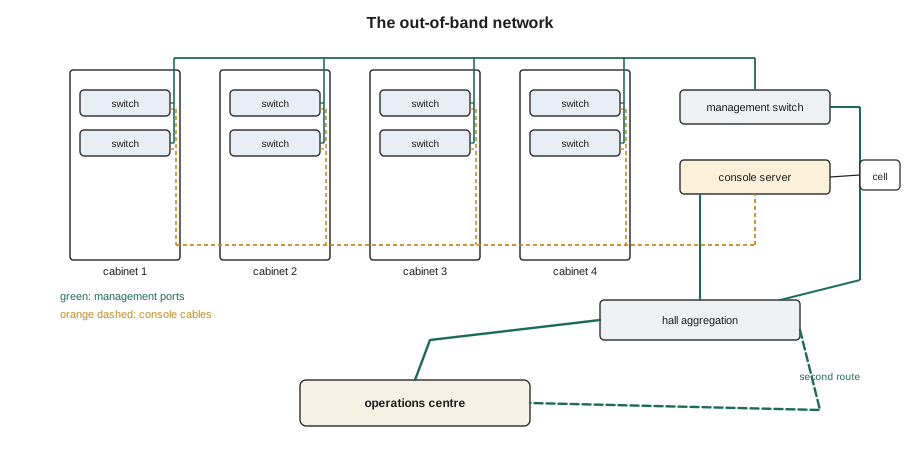
In-band management uses the production network itself: an engineer connects to a switch's address over the same links that carry customer traffic. It is convenient and fails exactly when it is most needed, because a fault that breaks the network also breaks the engineer's access to it. Out-of-band management uses a separate network that carries nothing but management traffic, built from separate switches, separate cabling and, ideally, a separate internet or carrier connection to the operations centre. Every switch, router, firewall, power strip, console server and server controller has a dedicated management port, usually a 1 Gb/s copper port marked MGMT, which is cabled into this network.
At Stonebridge, each hall has its own management switches, usually one per row or one in each network cabinet, cabled back to an aggregation switch in the hall's network room and from there to the operations centre over two separate routes. Customers in Hall A often bring their own out-of-band networks inside their cages; the cloud provider and Corvid run their own as well, cabled by Stonebridge to their designs. The baseboard management controllers of servers, which DCT-310 covers, live on these networks too.
The serial console
Below the management network is the serial console: a low-speed serial connection directly to a device's operating system. The console works from the moment the device starts booting, before it has loaded its configuration, and it keeps working when the device's network configuration is wrong or empty. It is how a new switch is first configured, how a device stuck in a failed upgrade is recovered, and how an engineer reads the messages a device prints when it crashes.
Console ports come in a few kinds. Most network devices use an RJ45 socket wired for serial, not for Ethernet, labelled CONSOLE; some newer devices use USB-C or micro-USB; older ones use a nine-pin connector. The RJ45 console wiring follows a convention that is not the same as Ethernet's, and connecting a console port to a console server sometimes needs a rolled cable or an adapter in which the pins are reversed. The serial settings must match at both ends: on most devices 9,600 bits per second, 8 data bits, no parity, 1 stop bit and no flow control, written 9600 8N1, though some newer switches default to 115,200. A console that shows nothing or shows garbage is usually set to the wrong speed.
Plugging a console cable into an Ethernet port, or an Ethernet cord into a console port, does no harm, but it does not work, and on a crowded switch the two sockets look alike. The labels on the device and on the cable matter.
Console servers
Rather than carrying a laptop to every device, data centres install console servers: appliances with 16, 32 or 48 serial ports, each cabled to the console port of one device in the same or a nearby cabinet. An engineer connects to the console server over the out-of-band network and then to any of its serial ports, reaching the device's console from anywhere. Most console servers also have a cellular modem or a second network connection, so that even if the whole out-of-band network fails, the consoles can still be reached.
Each console server port is named after the device it reaches, and the mapping must be exactly right: an engineer who types commands into what she thinks is the console of leaf 3 and is really on leaf 4 can do serious damage. That makes the console mapping one of the records a technician must keep perfect. When a device is moved, replaced or removed, its console cable and the console server's port name are part of the job.
# Audit console server ports against the records and the devices actually cabled
records = {   # console server port -> device recorded
    "cs-d4-02:01": "d4-leaf-r1-01", "cs-d4-02:02": "d4-leaf-r1-02", "cs-d4-02:03": "d4-leaf-r2-01",
    "cs-d4-02:04": "d4-leaf-r2-02", "cs-d4-02:05": "d4-spine-01", "cs-d4-02:06": "",
}
seen = {      # what each port actually shows when connected (device prompt), from the walk-round
    "cs-d4-02:01": "d4-leaf-r1-01", "cs-d4-02:02": "d4-leaf-r1-02", "cs-d4-02:03": "d4-leaf-r2-02",
    "cs-d4-02:04": "d4-leaf-r2-01", "cs-d4-02:05": "(no output)", "cs-d4-02:06": "d4-spine-02",
}
for port in records:
    rec, act = records[port], seen[port]
    if rec == act:
        status = "ok"
    elif act == "(no output)":
        status = "no response: check cable, settings and device power"
    elif rec == "":
        status = f"unrecorded device {act}: add to records"
    else:
        status = f"records say {rec}, port reaches {act}: SWAPPED or wrong record"
print(f"{port} {status}")cs-d4-02:01 ok cs-d4-02:02 ok cs-d4-02:03 records say d4-leaf-r2-01, port reaches d4-leaf-r2-02: SWAPPED or wrong record cs-d4-02:04 records say d4-leaf-r2-02, port reaches d4-leaf-r2-01: SWAPPED or wrong record cs-d4-02:05 no response: check cable, settings and device power cs-d4-02:06 unrecorded device d4-spine-02: add to records
Ports 3 and 4 have been swapped, probably when two console cables were reconnected after a switch replacement. Until it is fixed, an engineer working on one leaf's console would be on the other's. Jamal corrects the cables, not the records, because the records follow the design, and then repeats the check.
Security of management access
Out-of-band networks and consoles are the master keys to every device, so they are protected more strictly than anything else. Several rules apply on the floor, and they are the same in every hall.
- Never leave a laptop or any device connected to a console or management port unattended, and never connect a personal device to a management network.
- Never record passwords on labels, cabinet doors or tickets; engineers use named accounts and the owner's password vault, not shared logins.
- Report any device that still uses its factory password or any console that accepts commands without a login; that is a finding for the owner, not something to use.
- Do not connect the management network to the production network or the internet, even temporarily to download a file; the separation is the protection.
- Make changes only under change control, with the ticket number recorded, so every connection to a console has an owner and a reason.
Most console servers log every session and every keystroke, and Stonebridge reviews the logs. That protects technicians as much as customers: if something changes on a device, the log shows who was connected and what was typed.
Connecting a new device
When Jamal racks a new switch, the management and console connections go in before the data ports. He plugs the management port into the port the design names on the management switch and labels both ends. He connects the console port to the named port on the console server, through an adapter if the design says so, and labels both ends. He tells the engineer, who connects to the console and watches the device boot. Only when the engineer has configured the device and confirmed it is reachable over the management network does he connect the data ports. If the console shows nothing, he checks the cable type, the adapter, the port on the console server and the serial speed before suspecting the device.
# Check a new device's management and console connections before handing it to the engineer
device = {"name": "d4-leaf-r3-01", "mgmt_port": "d4-mgmt-02:Gi1/0/14", "console": "cs-d4-02:09",
          "mgmt_link": "up 1000 full", "console_output": "boot loader banner", "serial": "9600 8N1",
          "labels": {"mgmt": True, "console": True}, "data_ports_connected": 0}
checks = [
    ("management link up at 1 Gb/s", device["mgmt_link"].startswith("up 1000")),
    ("console shows the boot output", device["console_output"] != ""),
    ("console settings 9600 8N1 (or as the maker states)", device["serial"] in ("9600 8N1", "115200 8N1")),
    ("both management cables labelled", device["labels"]["mgmt"]),
    ("both console cables labelled", device["labels"]["console"]),
    ("data ports left empty until asked", device["data_ports_connected"] == 0),
]
for text, ok in checks:
    print(("ok   " if ok else "FAIL ") + text)
print("Hand over to the engineer" if all(ok for _, ok in checks) else "Fix the failures first")ok management link up at 1 Gb/s ok console shows the boot output ok console settings 9600 8N1 (or as the maker states) ok both management cables labelled ok both console cables labelled ok data ports left empty until asked Hand over to the engineer
Worked problem
A switch that only the console could save
At 03:10 the cloud provider's engineer reports that a firmware upgrade on b2-leaf-22 has failed and the switch is stuck in its boot loader. It has no network access at all. The engineer asks for console access.
Show solution
- Dmitri Volkov, the shift lead, checks the console record: cs-b2-03 port 22. The engineer tries it and sees nothing.
- Jamal, on the night shift, goes to the cabinet. The console cable is present but plugged into the switch's management port, the socket beside the console port; both are RJ45.
- He photographs it, tells the engineer, and moves the cable to the port labelled CONSOLE.
- The engineer now sees the boot loader, loads the previous firmware and the switch returns. Jamal raises a finding for the original installation and checks the other consoles in the row: all correct.
Answer: The cable had been in the wrong socket since the switch was installed, unnoticed because nobody had needed the console. Checking console output at installation is the only way to know it works.
Console cabling in practice
Console cables are low-speed and short, but they are easy to get wrong and hard to test until they are needed. At Stonebridge, every network cabinet has its console server ports pre-cabled to the positions where devices will go, labelled with the console server name and port number at both ends. When a device is installed, its console port is connected to the cable for its position, and the console server's port is renamed after the device. The engineer then connects to the console and confirms the device's prompt or boot output. That test, at installation, is the only proof the console works, because otherwise nobody will try it until the night something has failed.
Adapters are a frequent problem. Different makers wire RJ45 console ports differently, and the console server's ports may be wired another way again, so the design calls for a straight cable, a rolled cable or a specific adapter for each device type. Stonebridge keeps a small chart of which adapter each common device needs, and a stock of the adapters themselves, clearly bagged. A technician who connects the wrong cable type sees nothing on the console, and the fix is to change the adapter, not to suspect the device.
# Choose the console cable or adapter for each device from the site's chart (illustrative)
chart = {"switch maker A": "rolled RJ45", "switch maker B": "straight RJ45", "firewall maker C": "straight RJ45 + adapter C",
         "console over USB-C": "USB-C to console server USB port"}
devices = [("d4-leaf-r3-01", "switch maker A"), ("d4-fw-01", "firewall maker C"), ("b2-leaf-30", "console over USB-C")]
for name, kind in devices:
print(f"{name:14} {kind:20} -> use {chart.get(kind, 'ask the network team')}")d4-leaf-r3-01 switch maker A -> use rolled RJ45 d4-fw-01 firewall maker C -> use straight RJ45 + adapter C b2-leaf-30 console over USB-C -> use USB-C to console server USB port
Physical security of management equipment
Console servers and management switches are usually mounted in network cabinets with locked doors, and the cabinets that hold Stonebridge's own management equipment are locked separately from customer cabinets. Access is logged by the security system, as DCT-110 Lesson 9 described. A technician who finds a management cabinet door unlocked or open, or a cable plugged into a management switch that is not on the record, reports it to Stonebridge's network team and the security desk at once. The out-of-band network is built so that it is hard to reach from outside; the floor is where it is easiest to reach, so the floor is where the protection starts.
Common mistakes
MistakeConnecting a device's data ports before its management and console.
InsteadConnect management and console first so the engineer can configure and watch it.
MistakeAssuming a blank console means a dead device.
InsteadCheck the socket, cable type, adapter, console server port and serial speed.
MistakePlugging the console cable into the management socket.
InsteadRead the socket label; they often look identical.
MistakeCorrecting console records to match swapped cables.
InsteadFix the cables to match the design, then recheck.
MistakeLeaving a laptop connected to a console port.
InsteadNever leave management access unattended; disconnect and log off.
Summary and key terms
- In-band management uses the production network and fails with it; out-of-band uses a separate network.
- Every device has a management port cabled to the out-of-band network.
- The serial console works before configuration and when the network is broken.
- Common console settings are 9600 8N1; RJ45 console ports often need a rolled cable or adapter.
- Console servers give remote access to many consoles; their port mapping must be exactly right.
- Management access is protected: no unattended connections, no passwords on labels, no bridging to production.
- Out-of-band management
- Managing devices over a network separate from the production network.
- Management port
- A device's dedicated port for the out-of-band network.
- Serial console
- A low-speed serial connection directly to a device's operating system.
- Console server
- An appliance giving remote access to many devices' serial consoles.
- 9600 8N1
- 9,600 bits per second, 8 data bits, no parity, 1 stop bit.
- Rolled cable
- A cable whose pins are reversed end to end, used for some console connections.
Practice problems
Work each problem on paper first, then reveal the answer to check.
Why is in-band management not enough on its own?
Show answer
A fault that breaks the network also breaks access to manage it.
A console shows unreadable characters. What setting do you check first?
Show answer
The serial speed at both ends.
Why must console server port names be exactly right?
Show answer
An engineer could type commands into the wrong device.
You find a switch that accepts console commands without a login. What do you do?
Show answer
Report it to the owner as a finding; do not use it.
Lesson quiz · 5 questions
Score 60% or more to complete this lesson.
Create a free account to save your progress, take quizzes and earn a certificate.