
DCT-210 · Lesson 4 of 12 · 19 min
Copper in the data centre: DACs, AECs and Category 6A
Copper has not disappeared from the data centre; it has moved. Ten years ago most server links in Hall A were Category 6A twisted pair running to the row's access switch. Today the fastest copper links are short, thick cables with a transceiver-shaped plug moulded on each end, joining a server to the switch in the same rack, and twisted pair carries mostly management traffic. Nadia takes Jamal through the copper he will handle and, just as important, the copper he should expect to replace with fibre.
Category 6A twisted pair
Category 6A cabling, which LVT-120 and LVT-130 covered in detail, is the standard twisted-pair cable in the data centre. It supports 10GBASE-T to 100 m (328 ft) and is recommended for new installations because it also carries Power over Ethernet without excessive heating. At Stonebridge it is used for:
- Management networks: the baseboard management controllers of servers, the management ports of switches and storage, and the console servers in each network row.
- Facility systems: rack power strips, sensors, door controllers, cameras and the building management system.
- Enterprise customers in Hall A who still connect servers at 1 or 10 Gb/s over twisted pair.
The horizontal Category 6A from each Hall A HDA to the cabinets in its row was installed and certified as permanent links when the hall was built. Technicians add and move the patch cords at each end, exactly as in an office building, and the termination and testing practice from LVT-130 applies without change. What is different is the density: a Hall A HDA cabinet has six 48-port panels, nearly three hundred ports, and its managers fill quickly. Lesson 10 is about keeping them usable.
Category 8 twisted pair, which supports 25 and 40 Gb/s to about 30 m (98 ft), was designed for data centres but has seen little use, because direct-attach cables and fibre took over that space. Jamal may see it on a test bench but probably not in a hall.
Direct-attach copper cables
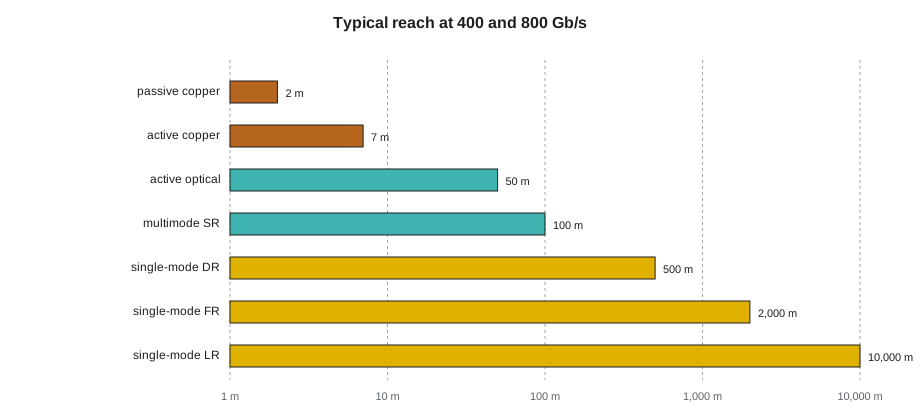
A direct-attach copper cable, a DAC, is a length of twinaxial copper cable with a plug on each end shaped like an optical transceiver: SFP28, QSFP28, QSFP-DD or OSFP, depending on the speed. It plugs straight into a switch or network card port. There is no laser and no light, so it uses almost no power and costs a fraction of two transceivers and a fibre cord. A passive DAC has nothing in its plugs but the connections and a small identification chip, and its reach shrinks as the speed per lane rises: several metres at 25 Gb/s per lane, two or three metres at 50 Gb/s per lane, and around two metres at 100 Gb/s per lane, which is what 400 and 800 Gb/s links use.
Two metres is enough to reach from a server to the switch at the top of the same rack, which is exactly how the cloud provider in Halls B and C cables its servers: every server in a cabinet connects to the cabinet's leaf switch with a DAC, and only the leaf's uplinks leave the cabinet on fibre. Inside Corvid's integrated racks in Hall D, the scale-up network runs over copper built into the rack itself, and some short frontend links use DACs as well.
DACs come with a few handling rules. They are thick and stiff, so their bend radius is large, often 30 mm (1.2 in) or more for the thinnest and much more for 800 Gb/s cables; a DAC forced round a tight corner damages its conductors. They are heavy, so a bundle of DACs needs support near the switch so that it does not hang on the ports. And they are made in fixed lengths, so there is no trimming: the rack elevation and the cord length must be planned together, as Lesson 9 shows.
Active copper cables
An active electrical cable, an AEC, adds a small chip in each plug that cleans up and re-times the signal. That roughly triples the reach of copper at the same speed, to about 7 m (23 ft) at 100 Gb/s per lane, while using far less power than optical transceivers and keeping copper's reliability. AECs are thinner than passive DACs of the same speed, which makes them easier to route. They are common for links that run from a rack to its neighbour, or across a cabinet pair, and some AI network designs use them between GPU trays and the leaf switches in the same row. An AEC needs power from the port, a watt or a few watts per end, and it must match what the switch supports: a technician cannot assume that any cable that fits will work, and the ticket names the part number.
Between DACs and AECs there is also a class sometimes called active copper or ACC, with simpler signal boosting. The names vary between makers, which is another reason to install exactly the part on the ticket.
Active optical cables
An active optical cable, an AOC, looks like a DAC but has optical transceivers built into its plugs and fibre between them. It reaches tens of metres, up to about 100 m (328 ft) for some types, and is light and thin. It is a single sealed unit: the fibre cannot be cleaned or inspected, and if any part fails, the whole cable is replaced. AOCs are popular for links of 5 to 30 m (16 to 98 ft) where structured fibre would be overkill, for example between adjacent rows in a cage. They do not fit the structured plant, because they cannot pass through a patch panel, so Stonebridge allows them only inside a customer's own space.
Choosing by reach
The choice of medium for a link is made by the network designer, but Nadia wants Jamal to be able to check it, because a ticket that asks for a 3 m (10 ft) DAC between cabinets five apart is wrong before anyone unpacks it.
# Which medium fits a 400G or 800G link of a given length? (typical reaches)
media = [("passive copper DAC", 2), ("active copper AEC", 7), ("active optical AOC", 30),
         ("multimode SR transceivers", 50), ("single-mode DR transceivers", 500), ("single-mode FR transceivers", 2000)]
links = [("server to leaf, same rack", 1.5), ("leaf to leaf pair, next rack", 3.5),
         ("cage row to row", 18), ("hall row to network row", 60), ("hall to campus MDA", 420)]
for name, length in links:
    ok = [m for m, reach in media if length <= reach]
print(f"{name:30} {length:6.1f} m -> {ok[0]}")server to leaf, same rack 1.5 m -> passive copper DAC leaf to leaf pair, next rack 3.5 m -> active copper AEC cage row to row 18.0 m -> active optical AOC hall row to network row 60.0 m -> single-mode DR transceivers hall to campus MDA 420.0 m -> single-mode DR transceivers
The code picks the first, cheapest medium that reaches. A designer weighs other things too: power, which favours copper; the need to pass through panels, which rules out DACs and AOCs for structured links; and future upgrades, which favour single-mode fibre. Where the cloud provider's design says DAC, it is because the server and leaf are in the same rack; where Corvid's says single-mode, it is because the link goes through Hall D's structured plant to a network row.
Power and heat
Copper links use less power than optical links, which is one reason designers like them. A pair of 800 Gb/s optical transceivers can draw around 15 to 30 W between them, a passive DAC almost nothing, an AEC a few watts. In a rack with seventy-two backend links that difference adds up to more than a kilowatt.
# Power drawn by a rack's 72 backend links with different media (illustrative watts per link)
links = 72
watts = {"two optical transceivers": 30.0, "active copper cable": 10.0, "passive copper cable": 0.2}
for medium, w in watts.items():
    total = links * w
print(f"{medium:26} {total:7.1f} W = {total * 3.412:6.0f} BTU/h of heat")two optical transceivers 2160.0 W = 7370 BTU/h of heat active copper cable 720.0 W = 2457 BTU/h of heat passive copper cable 14.4 W = 49 BTU/h of heat
This is why some AI designs keep as many links on copper as the reach allows, and why the integrated racks join their GPUs on a copper backplane. For a technician, the heat matters in a different way: transceivers run hot, and a cord or cable bundle that blocks a switch's airflow can push its optics to their temperature limit.
Copper in a busy rack
Nadia's rules for copper cables in the halls:
- Install the exact part on the ticket: DAC, AEC or AOC, length, connector type and maker. Similar-looking cables are often not interchangeable.
- Respect the bend radius, especially near the plug, where the cable is most fragile.
- Support the weight of DAC bundles so that they do not hang on the ports.
- Seat each plug until it clicks, then pull gently on the plug body, not the cable, to check it is latched; remove it with the pull tab.
- Route copper on the side of the cabinet the design says, and keep twisted pair away from power cords, as DCT-130 described.
- Coil spare length neatly in the manager, never in a tight loop at the back of the switch.
Worked problem
A DAC that worked on the bench but not in the rack
A Hall B ticket asks Jamal to replace a failed server-to-leaf DAC. He installs a new cable of the right length, but the link will not come up, though a spare cable from the same box tested fine on the bench switch.
Show solution
- He checks the ticket: it names a 400G QSFP-DD passive DAC, part number ending -2M. The box on the cart says -2M as well, but the label on the cable itself reads -2A.
- He compares the datasheets: the -2A is an active cable that needs a firmware setting the cloud provider's leaf switches do not have enabled.
- He removes it, fetches a passive -2M cable from stores, inspects the label on the cable itself, and installs it. The link comes up at 400 Gb/s.
- He reports the mislabelled box to Tomás Reyes in receiving, who quarantines the rest of the shipment.
Answer: Similar copper cables are not always interchangeable. The label on the cable, not on the box, is what counts.
Copper and the management network
Every Hall D rack has a small management switch near the top, connected by Category 6A to a management cabinet at the end of the row. It carries the baseboard management controllers of the compute trays, the rack's coolant distribution and leak sensors, the power shelves and the rack's own controller. These links are slow, 1 Gb/s, but they are the ones Corvid's engineers and Stonebridge's facilities team use when something goes wrong, so they are cabled and labelled as carefully as the backend. Management cabling is kept physically separate from the backend and frontend fabrics, in its own pathway, so that work on one never disturbs the other and so that a fault that takes down the fabrics leaves the management network running.
Copper also carries the facility side of the hall: the rack power strips' network ports in Hall A, the cameras and card readers that Ike's team manages, and the building management system's controllers. Those links belong to Stonebridge, are cabled from the hall's building systems cabinets rather than from customer HDAs, and are recorded in their own part of the port map.
Copper cables are also where most of the weight in a cloud cabinet comes from. A leaf switch with forty-eight DACs to its servers carries several kilograms of cable on its front, and the cables must be dressed to each side so that the switch can still be removed without unplugging half the cabinet. The cloud provider's cabling standard shows exactly how its DACs are bundled and which manager they use, and Stonebridge technicians working in Halls B and C follow it to the letter.
Common mistakes
MistakeUsing a DAC to join cabinets several racks apart.
InsteadPassive DACs reach about two metres at 100 Gb/s per lane; use an AEC or fibre.
MistakeRouting an AOC through a structured patch panel.
InsteadAOCs are sealed point-to-point cables; they cannot pass through panels.
MistakeBending a DAC tightly behind a switch to make it fit.
InsteadRespect its bend radius and choose the planned length.
MistakeAssuming any cable with the right plug will work.
InsteadInstall the exact part number; active and passive cables differ.
MistakeLeaving a heavy DAC bundle hanging on the switch ports.
InsteadSupport it in the manager near the switch.
Summary and key terms
- Category 6A carries management, facility systems and lower-speed enterprise links, to 100 m (328 ft).
- Passive DACs are cheap and use almost no power but reach only about two metres at 100 Gb/s per lane.
- AECs re-time the signal and reach about 7 m (23 ft); AOCs reach tens of metres but are sealed units.
- Structured links through panels must be fibre; DACs and AOCs are point-to-point.
- Copper saves power, which matters when a rack has dozens of high-speed links.
- Install the exact part, respect bend radius and support the weight.
- DAC
- Direct-attach copper cable: twinax with transceiver-style plugs, passive.
- AEC
- Active electrical cable: copper with re-timing chips in the plugs.
- AOC
- Active optical cable: transceivers and fibre sealed in one assembly.
- Twinax
- Shielded cable with two inner conductors per pair, used in DACs.
- Category 6A
- Twisted-pair cable rated to 500 MHz, supporting 10GBASE-T to 100 m (328 ft).
- QSFP-DD and OSFP
- Port and plug formats for 400 and 800 Gb/s links.
Practice problems
Work each problem on paper first, then reveal the answer to check.
Why does the cloud provider use DACs from servers to leaves?
Show answer
The leaf is in the same rack, within copper reach, and DACs are cheap and use little power.
What is the main limit of an AOC in a structured plant?
Show answer
It cannot pass through a patch panel and cannot be cleaned or repaired.
A link of 6 m (20 ft) at 800 Gb/s: passive DAC or AEC?
Show answer
An AEC; a passive DAC does not reach.
Where should you read a cable's part number?
Show answer
On the cable itself, not only on the box.
Lesson quiz · 5 questions
Score 60% or more to complete this lesson.
Create a free account to save your progress, take quizzes and earn a certificate.