
DCT-210 · Lesson 10 of 12 · 19 min
Cable management: overhead tray, ladder and vertical managers
Nadia judges a technician's work by looking at the back of a cabinet. If she can see every port, follow any cord from end to end with a finger, slide a server out on its rails without disturbing anything, and feel the exhaust air leave freely, the work is good. If the back of the cabinet is a curtain of loops, the work is not finished, however well the links test. This lesson is about the pathways and hardware that hold cables in a data centre, from the trays above the rows down to the managers beside each panel, and the habits that keep them usable for years.
Pathways above the rows
Stonebridge's halls run their cabling overhead. Hall A was built with a raised floor and originally ran copper under it, but under-floor cabling blocks the cooling air, is hard to reach and collects dust, so since 2016 all new cabling in Hall A has gone overhead and the old under-floor cable is removed as it is retired. Halls B, C and D were built on slab with no raised floor at all.
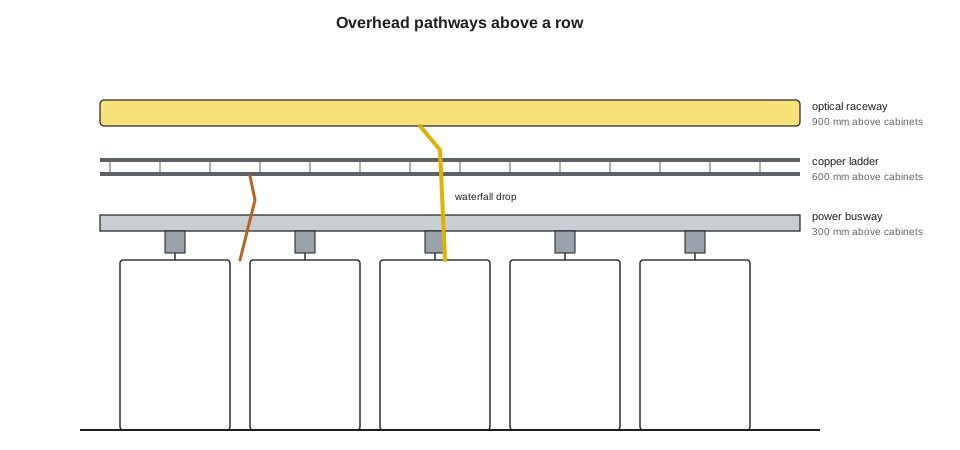
Above each row, the pathways are stacked in layers, each with its own job, kept a set distance apart:
- Lowest, nearest the cabinets: the power busway in Halls B, C and D, installed and maintained by electricians.
- Above it: copper cabling on a ladder rack or wire-basket tray, for twisted pair and management cables.
- Highest or alongside: a fibre raceway, a smooth, enclosed plastic duct, often yellow, with fittings that keep fibre at a safe bend radius, for patch cords and small cables.
- For trunks and high-count cables, a separate wire-basket or solid-bottom tray, sometimes called the fibre runway.
Separating the layers keeps power away from data cables, lets each trade work on its own layer, and stops heavy copper from crushing fibre. Where pathways cross, they cross at right angles, and drops from the trays to the cabinets go through waterfall fittings that support the cable as it bends down.
Tray fill
Every tray has a limit to how much cable it should hold. Overfilled trays crush the cables at the bottom, sag between supports, block access and make it impossible to remove dead cable. Standards and the National and Canadian electrical codes set limits for some tray types; data centre designers usually plan to a much lower fill than the maximum, so that the trays can take growth. Stonebridge plans new trays to 25 % fill at handover and never allows them above 50 % in service. Fill is the cross-sectional area of the cables divided by the usable area of the tray.
# Tray fill: how full will this tray be after adding the new cables?
import math
tray_w, tray_d = 600, 100               # usable width and depth
existing = [(6.1, 220), (12.0, 36)]      # (cable diameter, count) already in the tray
new = [(11.5, 64)]                        # new trunks for the pod
def area(cables):
    return sum(math.pi * (d / 2) ** 2 * n for d, n in cables)
usable = tray_w * tray_d
before = area(existing) / usable
after = (area(existing) + area(new)) / usable
print(f"Fill before {before:.0%}, after {after:.0%}")
print("OK" if after <= 0.50 else "Over 50 %: use another tray or remove dead cable first")Fill before 18%, after 29% OK
The code works in whatever units the dimensions are given in, because fill is a ratio. The result, close to 30 %, means the tray can take the pod's trunks with room for growth. A result over 50 % would mean the trunks go in another tray or old cable comes out first.
Weight
Trays and their supports are rated for a load per unit length and a span between supports. Copper cable is heavy, fibre light, but hundreds of trunks add up. A technician does not calculate support loads, which is the designer's job, but should know that adding a large bundle to a tray that already sags is a problem to report, not to solve by tying the tray to something nearby.
# Weight per length of a tray's cables, against its rated load (illustrative cable weights)
cables = [("Cat 6A", 0.06, 220), ("144-strand trunk", 0.17, 36), ("new 144-strand trunks", 0.17, 64)]
rated = 75
total = sum(w * n for _, w, n in cables)
for name, w, n in cables:
    print(f"{name:22} {n:4} x {w} = {w * n:6.1f} kg/m")
print(f"Total {total:.1f} kg/m against a rated {rated} kg/m ({total / rated:.0%})")Cat 6A 220 x 0.06 = 13.2 kg/m 144-strand trunk 36 x 0.17 = 6.1 kg/m new 144-strand trunks 64 x 0.17 = 10.9 kg/m Total 30.2 kg/m against a rated 75 kg/m (40%)
Supporting cable
Between the tray and the cabinet, and inside the cabinet, cable must be supported so that its own weight does not pull on the connectors. The rules from LVT-120 apply: support at regular intervals, no sharp edges, no crushing. Data centre practice adds a few:
- Use hook-and-loop straps, never plastic cable ties, on data cables. Straps are snug, not tight: a strap that dents the cable jacket is too tight.
- Do not strap fibre and copper together in the same bundle. Keep fibre on top or alongside, never under copper.
- Lay trunks in the tray; do not pull them along it past live cable.
- Keep bundles to the sizes the design allows. Very large copper bundles heat up, especially if they carry Power over Ethernet.
- Leave slack in the tray, not in the cabinet: a service loop for a trunk belongs in a loop holder in the tray or the top of the network cabinet, not coiled on the floor.
Inside the cabinet
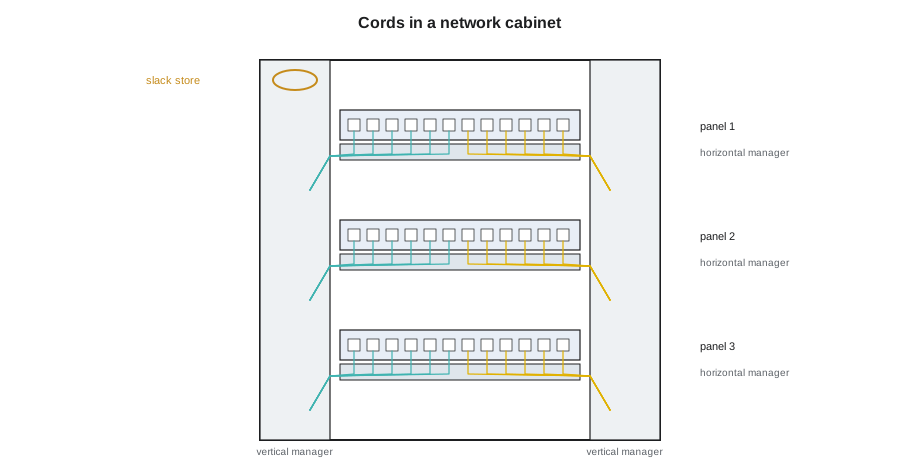
Most of the cable management a technician does is inside cabinets. Network cabinets in Halls B, C and D have wide vertical managers on both sides, finger-style horizontal managers above and below each panel, and slack storage at the top. Jamal learns Nadia's checklist for a neat cabinet:
- Each cord leaves its port straight, turns into the nearest horizontal manager and then into the vertical manager on its own side, without crossing the front of other ports.
- Cords run vertically in the manager to the level of their far port, then turn out through the horizontal manager to it.
- Cord lengths are chosen to the route, as Lesson 9 described, so that only a small service loop is left.
- Fibre cords stay inside their bend radius at every turn. Managers with radius fingers help; pulling a cord tight around a sharp corner does not.
- Nothing blocks the front or rear of the equipment: no cords across fan outlets, no loops in front of other ports, no cables over the blanking panels.
- In equipment cabinets, data cables run on the side opposite the power cords where the design allows, as DCT-130 described.
Removing dead cable
Abandoned cable, cords and trunks that no longer connect anything, is the silent enemy of a data centre. It fills trays and managers, hides live cables and, in many jurisdictions, is a fire load that codes require to be removed or tagged for future use. Stonebridge removes cable when the link it served is decommissioned: cords at once, as Lesson 9 described, and trunks at a planned time, because pulling a trunk out of a full tray can disturb live cables. Removing a trunk is done under a ticket with a method of procedure, with the trunk cut into short sections in the tray if necessary so that it does not drag across others.
Worked problem
A tray that could not take the pod
When planning the Hall D pod installation, Jamal is asked to check that the tray from row D-3 to the network row D-4 can take the new trunks. His fill calculation shows 44 % after the trunks are added, inside the 50 % limit.
Show solution
- He walks the tray route to check it against the drawing. Above cabinet D-3-02, the tray holds a bundle of old copper cables that are not on the drawing.
- He photographs it and estimates the extra area: it would take the fill to about 58 %.
- He reports it. Nadia finds that the copper was temporary cabling from the hall's commissioning in 2026, never removed.
- The old copper is removed under a ticket before the trunks go in. The tray's fill after the installation is 41 %.
Answer: A calculation is only as good as the drawing it starts from. Walking the route found cable the records did not show.
Fibre slack and storage
Optical cords and trunks need a little slack at each end so that equipment can be moved and connectors replaced without the cable pulling tight, but too much slack fills the managers. Network cabinets in the newer halls have slack spools or storage trays at the top, sized so that the stored loops stay well above the cable's minimum bend radius. Trunks have their slack stored in the tray in a loose figure-eight or in a loop holder at the cabinet, never coiled tightly or tied in a knot. Patch cords should not need slack storage at all if their lengths were chosen from the route, which is why Lesson 9's length calculation matters so much in a busy cabinet.
Pathways in Hall A's raised floor
Hall A still has some live cabling under its raised floor from before the 2016 change. Technicians who must work there follow the facilities team's rules for lifting floor tiles: only one or two tiles open at a time in a row, a barrier around the opening, the tile lifter used rather than fingers, and the tiles replaced before leaving. Under-floor cable must not be pulled while live equipment depends on it; when a run under the floor is retired, it is cut at both ends and removed in sections, so that it does not drag across the cooling air paths or other cables. Each under-floor cable removed opens a little more of the floor void to cooling air, which is one reason the facilities team likes the work.
Labels in the pathways
Trunks and bundles in trays are labelled at both ends and at every change of direction, and the trays themselves carry labels at intervals showing their identifier and what they carry, so that a technician standing in an aisle can tell which tray holds which hall's backbone without a drawing. In Halls B, C and D the tray labels are colour-coded: yellow for single-mode backbone, aqua for multimode, blue for copper, and red for life-safety systems, which no cabling technician may disturb.
Checking a cabinet before you leave
Before closing any ticket that touched cabling, Nadia expects a technician to stand back and check the cabinet as a whole, not just the cords he moved. The questions are always the same. Can every port that the ticket touched be seen and read? Does every new cord follow the managers on its own side and keep its bend radius at every turn? Is there any slack left hanging below a panel or across the front of the equipment? Are the blanking panels and the cabinet doors back in place, so that the cooling airflow DCT-130 described is undisturbed? Are the labels on both ends of every new cord facing outward where the next technician will look for them? A photograph of the finished cabinet goes into the ticket, and Nadia reviews a sample of them every week with the crew, praising the neat ones by name and quietly sending the others back to be redressed.
- A cabinet that passes the check can be worked on by the next technician without anyone needing to explain what was done.
Common mistakes
MistakeRunning new data cable under a raised floor in Hall A.
InsteadAll new cabling goes overhead; under-floor cable blocks cooling air.
MistakeFilling a tray past 50 %.
InsteadUse another tray or remove dead cable first.
MistakeStrapping fibre under copper in one bundle.
InsteadKeep fibre in its own raceway or on top, never crushed under copper.
MistakeLeaving trunk slack coiled on the cabinet floor.
InsteadStore service loops in the tray or the slack holders.
MistakeLeaving abandoned cords and trunks in place.
InsteadRemove them under a ticket and update the records.
Summary and key terms
- Overhead pathways are layered: power busway, copper ladder, fibre raceway and trunk tray.
- Pathways cross at right angles, and waterfalls support cable where it drops to cabinets.
- Stonebridge plans trays to 25 % fill and never allows more than 50 %; fill is cable area over tray area.
- Support cable with hook-and-loop straps, keep fibre away from heavy copper, and respect bend radius.
- In cabinets, cords go straight into the horizontal manager, then the vertical manager on their side.
- Remove abandoned cable under a ticket.
- Ladder rack
- An open overhead tray shaped like a ladder, used for copper cable.
- Fibre raceway
- An enclosed plastic duct with radius-controlled fittings for fibre.
- Waterfall
- A curved fitting that supports cable as it drops from a tray.
- Tray fill
- The cross-sectional area of the cables divided by the usable area of the tray.
- Vertical manager
- A channel beside panels that carries cords up and down a cabinet.
- Abandoned cable
- Cable that no longer connects anything and should be removed.
Practice problems
Work each problem on paper first, then reveal the answer to check.
Why does all new cabling in Hall A go overhead?
Show answer
Under-floor cabling blocks cooling air and is hard to reach and maintain.
A tray's fill would reach 58 % with new trunks. What happens?
Show answer
The trunks go elsewhere, or dead cable is removed first.
Why are fibre and copper kept in separate pathways?
Show answer
Heavy copper can crush fibre, and each can be worked on separately.
Where should a trunk's service loop be stored?
Show answer
In a loop holder in the tray or the top of the network cabinet.
Lesson quiz · 5 questions
Score 60% or more to complete this lesson.
Create a free account to save your progress, take quizzes and earn a certificate.