
DCT-130 · Lesson 8 of 12 · 19 min
Power at the rack: PDUs, A/B feeds and cord management
Data centre technicians do not work on switchgear, UPS systems or the electrical panels that feed the halls; qualified electricians and the critical facilities team do. But nearly every installation ends with a technician plugging power cords into rack power strips, and that small act decides whether a customer's server keeps running through a power maintenance or falls over the moment one side goes down. Roz takes Jamal to the rear of a Hall A cabinet with a flashlight and a clamp meter and spends a morning on the last two metres of the power chain.
From the PDU to the rack strip
In Hall A, each row of cabinets is served by floor-standing power distribution units, PDUs, at the ends of the rows. Each PDU holds a transformer and a panel of breakers. From each breaker, a whip, a flexible cable with a locking connector on its end, runs under the raised floor to a cabinet, where it connects to a rack power strip. Each cabinet gets two whips, one from a PDU on the A side of the power system and one from a PDU on the B side. In Halls B, C and D, overhead busway replaces the floor PDUs and whips: a tap-off box clipped into the busway above each cabinet feeds its power strip through a short cable.
The equipment inside the cabinet that most people call a PDU is properly a rack PDU, or rack power strip, to distinguish it from the floor PDU. Stonebridge's tickets say strip or rack PDU for the one in the cabinet and PDU for the one at the end of the row, and Jamal learns to be precise.
Rack power strips
Rack power strips come in several kinds, and the label on each tells a technician what it is:
- Basic strips simply distribute power to their outlets through a breaker or fuse.
- Metered strips display the total current, and often each phase's current, on a small screen and report it over the network to DCIM.
- Monitored or outlet-metered strips report the current on each outlet.
- Switched strips let authorized users turn individual outlets on and off remotely, which is useful for restarting a hung device without a site visit.
Strips are rated for a voltage, a current and a number of phases, and have outlets of particular types. Data centre equipment mostly uses the IEC connector family rather than household plugs: C13 outlets on the strip take the C14 plug on a standard server power cord, and the larger C19 outlets take C20 plugs for higher-power devices. Strips also have internal breakers protecting groups of outlets, and those breakers are lower in rating than the strip's input, which is one more limit to respect.
Three phases and balancing
Most rack strips in Stonebridge's halls are fed with three-phase power. A three-phase strip divides its outlets into groups, one for each phase or pair of phases, usually marked by colour bands or labels. The load on the three phases should be roughly equal, because an unbalanced strip reaches its limit on one phase while the others still have room, and because unbalance upsets the PDU and transformer upstream. When Jamal plugs in new equipment he looks at the strip's phase readings and chooses outlets on the least-loaded phase, as long as the ticket allows it.
# Balance a three-phase rack strip: which phase should the new server go on?
strip_limit_per_phase = 16.0     # amperes, internal breaker per outlet group
loads = {"L1": 7.8, "L2": 5.1, "L3": 6.4}   # measured amperes per phase group, this strip
new_server = 1.6                 # measured or maximum current of the new server on this strip
best = min(loads, key=loads.get)
print("Before:", ", ".join(f"{p} {a:.1f} A" for p, a in loads.items()))
loads[best] += new_server
print(f"Plug the new server into a {best} outlet")
print("After: ", ", ".join(f"{p} {a:.1f} A" for p, a in loads.items()))
spread = max(loads.values()) - min(loads.values())
print(f"Spread between phases: {spread:.1f} A  ({'balanced enough' if spread <= 3 else 'rebalance at the next visit'})")
for p, a in loads.items():
    if a > 0.8 * strip_limit_per_phase:
print(f" {p} is above 80 % of its outlet breaker")Before: L1 7.8 A, L2 5.1 A, L3 6.4 A Plug the new server into a L2 outlet After: L1 7.8 A, L2 6.7 A, L3 6.4 A Spread between phases: 1.4 A (balanced enough)
The code chooses the least-loaded phase and checks the spread. Real strips also have a limit for the whole strip, and the redundancy rule from Lesson 7 still applies: the A strip and the B strip together must be able to fall back onto one strip without exceeding it.
The A/B rule in practice
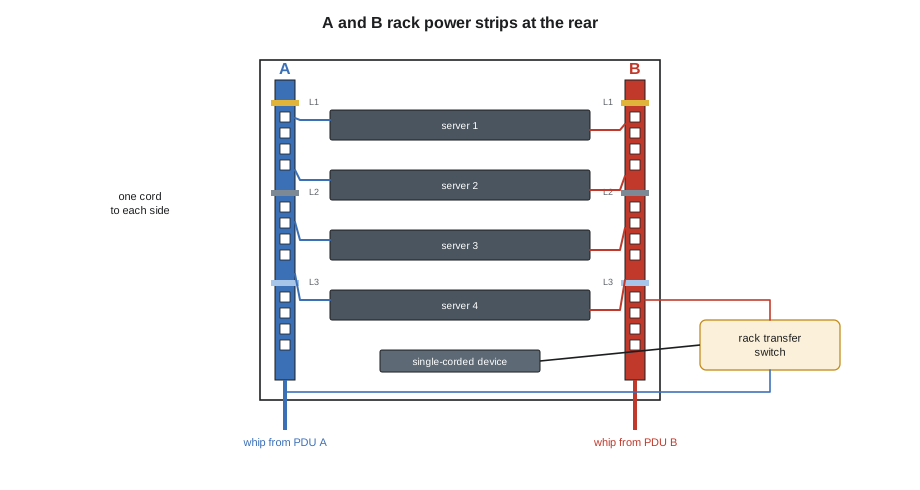
The most important power rule for a technician, which Jamal met in his first course, is that every dual-corded device gets one cord on the A strip and one on the B strip. Doing that reliably in a crowded cabinet takes discipline:
- Identify the strips before plugging anything. A strips at Stonebridge are labelled and colour-coded blue, B strips red, and so are their whips and the power cords that go to them.
- Use cords of the right colour: blue cords to A, red cords to B. Colour-coded cords make a mistake visible at a glance.
- Plug the device's power supply 1 into A and power supply 2 into B, or whatever the customer's standard says, consistently across the cabinet.
- Check each cord is fully seated and, where the strip or cord has retention, locked. Locking C13 cords and outlet retention clips stop cords from being pulled out when someone works nearby.
- Trace each cord with a finger from the device to the strip before leaving.
Some equipment has only one power supply. A single-corded device has no redundancy of its own, so the customer chooses: accept that the device goes down when its side is maintained, or install a small rack automatic transfer switch, a box fed from both the A and B strips that switches its outlets to the other side when one fails. Stonebridge does not let technicians plug single-corded critical devices into one side without a recorded decision from the customer.
Reading the strip
Metered strips give a technician a quick check on every visit. Roz has Jamal read the strips in the cabinets he works in, before and after the work, and compare the readings with what DCIM expects. A strip reading much higher than planned means the equipment draws more than its records say, or something unrecorded is plugged in. A reading of zero on a strip that should be loaded can mean a whip has been disconnected or a strip breaker has tripped, and the cabinet has silently lost its redundancy. Either is reported straight away.
A clamp meter around a single power cord gives the current of one device when the strip cannot. Clamp meters are safe to use on cords because they do not need any connection to the conductors, but they are used on one cord at a time: clamped around a whole cord, the meter reads the current in the cord's live conductor, but clamped around two conductors carrying current in opposite directions it reads nearly zero.
Cord management
Power cords are the cables most likely to be pulled out by accident, and the ones whose failure matters most. Good cord management keeps them where they belong:
- Use cords of the right length. A 2 m (6 ft) cord where 0.6 m (2 ft) would do leaves a loop that snags, blocks exhaust and gets confused with its neighbours.
- Route cords along the side of the cabinet where their strip is: A cords to the A side, B cords to the B side, without crossing the cabinet's centre.
- Keep power cords separate from network cables where possible, crossing them at right angles rather than bundling them together.
- Secure cords to the cable managers with hook-and-loop straps, never with tight plastic cable ties that crush insulation and must be cut to change anything.
- Leave the server's service loop, the slack that lets it slide out on its rails, without the cord pulling out of the strip.
- Keep cords clear of fan exhausts and away from the rear door's latch and hinges.
What technicians must never do
Roz is firm on a few rules, each of which she has seen broken with consequences. Never plug a power strip into another power strip. Never plug a device into a strip in a different cabinet, a different cage or another customer's equipment. Never change a whip, open a strip's housing or reset a strip's breaker without the facilities team's knowledge, because a tripped breaker is a symptom and resetting it may hide an overload that will trip it again on the other side during maintenance. And never unplug a cord to see what goes off. If the ticket says to unplug a device, the device is identified by its label and the cord traced to it before the plug comes out.
Worked problem
A cabinet that would not survive maintenance
Before a planned maintenance on Hall A's B-side PDUs, the shift lead, Dmitri Volkov, asks technicians to check every cabinet in rows 30 to 32. In cabinet A-31-04, Jamal finds that the A strip reads 9.4 A and the B strip 0.3 A, though the cabinet has six dual-corded servers.
Show solution
- Look at the rear: all six servers have both cords plugged into the A strip, and nothing into B.
- Do not move any cords on his own initiative; the cabinet belongs to the customer and the servers are running.
- Report it to Dmitri and open a ticket for the customer, with photographs: if the A side is lost, all six servers go down; and during the B-side maintenance the cabinet is unaffected, but the customer has no redundancy at all.
- The customer asks Stonebridge to move one cord of each server to the B strip under a ticket. Jamal does it one server at a time, checking that each server shows both power supplies healthy before moving to the next.
Answer: The cabinet now has its redundancy back. The customer's own engineer had installed the servers in a hurry. The B-side maintenance goes ahead with no customer impact.
Power cords and their ratings
Power cords look alike and are not interchangeable. Each cord is rated for a current, marked on its jacket, and the rating must be at least the current the device can draw. A cord for a high-power GPU server is thicker than one for a small switch, and using the thin one is a fire risk. Cords also come with different connector combinations, C14 to C13 being the most common, C20 to C19 for higher-power devices and C20 to C13 for some adapters. Stonebridge buys colour-coded cords in a few standard lengths and ratings, stocks them in the build room by colour and length, and does not allow household extension cords or plug adapters anywhere in the halls.
Some customers bring their own cords, which is allowed as long as they are rated for the equipment and the strip and carry the marks of a recognized testing laboratory. Cords that are damaged, kinked or have loose connectors are discarded, not taped. Roz keeps a box in the build room for bad cords, and empties it into the recycling bin, never back onto the shelf.
Common mistakes
MistakeCalling the rack power strip and the floor PDU by the same name on a ticket.
InsteadSay strip or rack PDU in the cabinet, PDU at the end of the row.
MistakePlugging both cords of a server into one strip.
InsteadOne cord to A and one to B, traced by hand before leaving.
MistakeLoading one phase of a strip heavily while the others are light.
InsteadUse the least-loaded phase group and watch the spread.
MistakeResetting a tripped strip breaker without telling anyone.
InsteadReport it; the trip is a symptom of an overload or fault.
MistakeBundling power cords tightly with network cables in plastic ties.
InsteadKeep them separate, crossing at right angles, with hook-and-loop straps.
Summary and key terms
- Floor PDUs or busway feed each cabinet's A and B rack power strips through whips or tap-offs.
- Rack strips may be basic, metered, outlet-monitored or switched; know which you have.
- C13 and C19 outlets take C14 and C20 plugs; strips have internal breakers on outlet groups.
- Balance load across the three phases of a strip.
- One cord to A and one to B, colour-coded and traced; single-corded devices need a recorded decision or a transfer switch.
- Read the strips before and after work and report anything unexpected.
- Rack PDU
- The power strip inside a cabinet; also called a rack power strip.
- Whip
- A flexible cable with a locking connector that feeds a rack strip from a floor PDU.
- Tap-off box
- A plug-in unit that takes power from overhead busway for one cabinet.
- C13 and C19
- Common IEC outlet types on rack strips, taking C14 and C20 plugs.
- Phase balancing
- Spreading load evenly across the three phases of a strip.
- Rack transfer switch
- A small automatic switch that feeds a single-corded device from either the A or B strip.
Practice problems
Work each problem on paper first, then reveal the answer to check.
What plug does a C13 outlet take?
Show answer
A C14 plug, the standard server power cord.
A strip reads 0 A on a cabinet full of running dual-corded servers. What might it mean?
Show answer
Its whip is disconnected or its breaker has tripped, or all the cords are on the other strip; the cabinet has lost redundancy and it must be reported.
Why are A cords blue and B cords red at Stonebridge?
Show answer
So that a cord on the wrong side is visible at a glance.
Why should a technician not reset a tripped strip breaker on their own?
Show answer
The trip shows an overload or fault; resetting it may hide a problem that will cause an outage later.
Lesson quiz · 5 questions
Score 60% or more to complete this lesson.
Create a free account to save your progress, take quizzes and earn a certificate.