
DCT-130 · Lesson 2 of 12 · 20 min
Rack units, sizes and load ratings
Every piece of rack-mounted equipment is described by a few numbers: how many rack units tall it is, how deep it is, how much it weighs and how much power it draws. Every cabinet is described by matching numbers: how many units it has, how deep its usable space is and how much weight it is rated to carry, standing still and moving. A technician who reads those numbers correctly avoids most of the mistakes that damage equipment and floors. Roz uses an empty cabinet in the build room and a tape measure to teach Jamal the first two, and the manufacturers' data sheets to teach the third.
The rack unit
The rack unit, written U or RU, is the standard height for rack-mounted equipment. One rack unit is exactly 44.45 mm (1.75 in). A server described as 1U is just under that height, so that two 1U servers can sit one above the other without touching. A 2U server is just under 88.9 mm (3.5 in), a 4U server just under 177.8 mm (7 in), and so on. A 42U cabinet therefore has about 1.87 m (73.5 in) of mounting space between its top and bottom units.
The width of standard equipment is set by the same standard, EIA-310, often called the 19-inch standard. The front panel of a rack-mounted device, including its mounting ears, is 482.6 mm (19 in) wide, and the opening between the mounting rails is about 450 mm (17.75 in), so the body of the device slides between the rails and the ears rest on their front faces. Almost every server, switch, storage shelf and patch panel in a data centre follows this standard, which is why equipment from different makers fits the same cabinet.
The hole pattern
The mounting rails are punched with holes in a repeating pattern of three per rack unit. The holes are not evenly spaced. Within each unit, the spacing is 15.875 mm (5/8 in), 15.875 mm (5/8 in), then 12.7 mm (1/2 in) to the first hole of the next unit. The uneven spacing is how technicians find unit boundaries: the boundary lies in the middle of the close pair of holes. Most cabinets print the unit numbers on the rails, counting from 1 at the bottom, which makes life easier, but a technician must still be able to find a boundary by the hole pattern when the numbers are worn or missing.
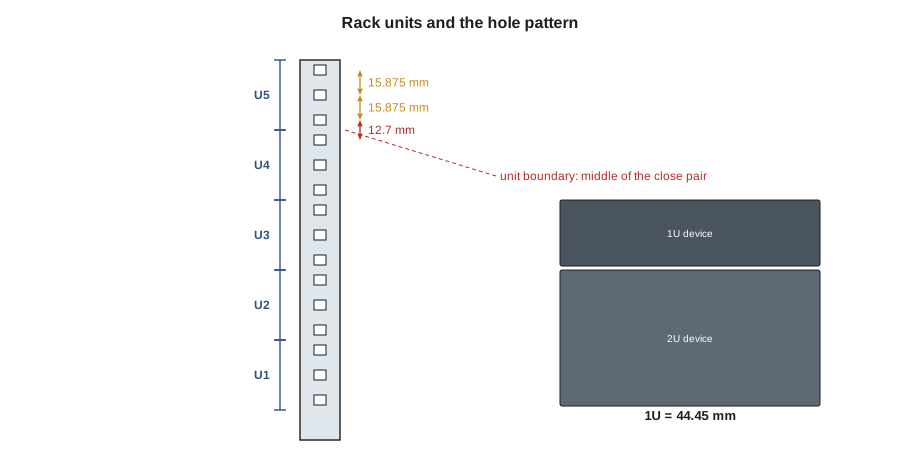
Most data centre cabinets have square holes, into which cage nuts or tool-less rail clips fit. Some older racks and many network racks have round threaded holes, into which screws go directly. Lesson 5 covers the hardware for both.
Counting units correctly
Rack positions are given by the lowest unit a device occupies. A 2U server in positions 20 and 21 is said to be at U20. Stonebridge's tickets and its data centre infrastructure management system, DCIM, both use that convention, but some customers count from the top or give the top unit. Jamal learns to read the convention on every ticket before he picks up a screwdriver.
# Convert between rack units and height, and find a device's units
U = 44.45                  # one rack unit, mm
cabinet_units = 42
print(f"42U cabinet: {cabinet_units * U:.0f} mm of mounting space")
devices = [("switch-1", 1, 42), ("server-a", 2, 20), ("array-1", 4, 10)]  # name, height in U, lowest unit
for name, height, low in devices:
    top = low + height - 1
print(f"{name:9s} {height}U at U{low}: occupies U{low} to U{top}, about {height * U:.0f} mm tall")42U cabinet: 1867 mm of mounting space switch-1 1U at U42: occupies U42 to U42, about 44 mm tall server-a 2U at U20: occupies U20 to U21, about 89 mm tall array-1 4U at U10: occupies U10 to U13, about 178 mm tall
Depth: the number that causes most problems
Equipment is getting deeper. A typical 1U server a few years ago was about 700 mm (28 in) deep; many current servers are 800 to 900 mm (32 to 35 in) deep and GPU servers often more. Depth matters in three ways:
- The device must fit between the front and rear rails, which are set to a depth range. Rails can usually be moved, but moving them in a loaded cabinet means taking equipment out.
- There must be room behind the device for power cords, network cables and their bend radius. Fibre and high-speed copper cables can be damaged if bent tighter than their minimum radius.
- The rear power strips and cable managers take space at the back. A device that fits on paper may hit the power strip's outlets when installed.
Roz's rule is to allow at least 150 mm (6 in) behind the deepest device for cables and cords, more for heavy cable bundles. She shows Jamal a cabinet in Hall A where a deep server was forced in against a power strip: the server's power supplies had pressed against the strip's outlets until one cord worked loose. Nobody noticed until a maintenance on the other side dropped the server.
Weight
The weight of rack equipment has grown with its power. A 1U web server might weigh 15 kg (33 lb); a 2U storage server 30 kg (66 lb); a fully populated 4U storage shelf 45 kg (100 lb) or more; a GPU server in the 8U to 10U range 100 to 150 kg (220 to 330 lb). An integrated AI rack such as the GB200 NVL72 racks in Hall D weighs roughly 1,360 kg (3,000 lb) before its coolant is filled. Weight decides how many people a lift needs, whether a lift device is required, how a cabinet may be moved and whether the floor can carry it. Lifting itself is covered in DCT-120; this course applies the limits.
Cabinet load ratings
Cabinet manufacturers give several load ratings, and they are not interchangeable. Roz has Jamal read three data sheets and find each of these:
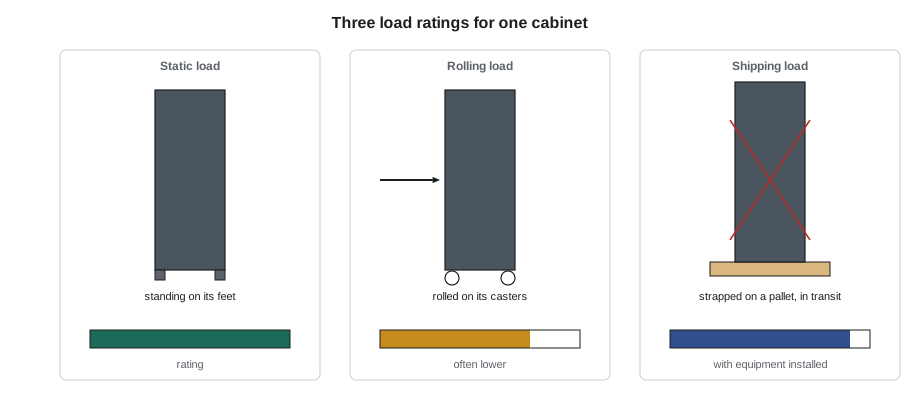
- Static load rating: the weight the cabinet can carry standing still on its levelling feet, with the load distributed through the rails. Common ratings today are around 1,360 kg (3,000 lb); older cabinets may be half that. Many enclosures are listed against UL 2416 for this rating.
- Rolling load rating: the weight the cabinet can carry while being rolled on its casters across a floor. It may be the same as the static rating or lower, and it depends on the casters fitted.
- Dynamic or shipping load rating: the weight the cabinet can carry while being shipped and handled with equipment installed. This matters for integrated racks, which travel full.
Some manufacturers also give a rating per pair of rails or per unit, and some give separate ratings for seismic installations. The rule is simple: use the rating for what is happening. A cabinet being rolled down a corridor is governed by its rolling rating, not its static rating.
Adding it up
The installed weight of a cabinet is the cabinet's own weight plus every device, every power strip, every cable and every cable manager. Cables are easy to forget and are not light: a cabinet with several hundred copper cables can carry 50 kg (110 lb) or more of cable. The installed weight must stay below the cabinet's static rating, and when the cabinet is to be moved loaded, below the rolling rating too. Stonebridge records equipment weights in DCIM, so that the cabinet's running total is visible, and plans with a margin: Roz aims to keep cabinets at or below 80 % of their static rating, so that a future addition does not take them over.
# Installed weight of a cabinet against its ratings
static_rating = 1360    # kg
rolling_rating = 1020  # kg
cabinet_empty = 160
items = {  # item: (quantity, mass each in kg)
    "1U servers": (16, 17),
    "2U servers": (6, 32),
    "4U storage shelf": (2, 48),
    "Top-of-rack switches": (2, 9),
    "Rack power strips": (2, 8),
    "Cables and managers": (1, 55),
}
installed = cabinet_empty + sum(q * m for q, m in items.values())
print(f"Installed weight: {installed:,.0f} kg")
print(f"Static use:  {100 * installed / static_rating:.0f} % of rating")
print(f"Rolling use: {100 * installed / rolling_rating:.0f} % of rating")
print("Planning limit (80 % of static):", "OK" if installed <= 0.8 * static_rating else "OVER")
print("Safe to roll loaded:", "yes" if installed <= rolling_rating else "no - unload or use the static position")Installed weight: 809 kg Static use: 59 % of rating Rolling use: 79 % of rating Planning limit (80 % of static): OK Safe to roll loaded: yes
The cabinet in the code is comfortably inside its static rating, and also inside its rolling rating. That is not always so. A fully loaded cabinet that must be moved, for example to a new cage, may have to be partly unloaded first, even though it sits safely where it is.
Power density
The other number on the data sheet that matters for a cabinet is power. A cabinet's power density is its total power draw, in kilowatts, and it drives the power strips, the circuits and the cooling the cabinet needs. In Hall A, cabinets are planned for about 6 kW; a cabinet full of modern servers can draw three or four times that. Equipment data sheets give a maximum power for each device, which is usually well above what it draws in normal use, and a measured or typical figure. Lesson 7 shows how to plan with both, and Lesson 8 how to read the power strips.
Other rack standards
Not every rack follows EIA-310. The Open Compute Project's Open Rack design, now in its third version, uses a wider 533 mm (21 in) equipment opening and its own unit, the OpenU, of 48 mm (1.89 in). Open Racks carry power to the equipment on a vertical busbar at the rear, fed from power shelves, instead of through individual power cords. Hyperscale operators and some AI systems use Open Rack, and its equipment does not fit a standard 19-inch cabinet. Some telecommunications equipment uses other widths, such as 584 mm (23 in) racks in older central offices. A technician who finds an unfamiliar rack checks its documentation before assuming any of the numbers in this lesson.
Worked problem
Will it fit?
A customer asks Stonebridge to install a new 2U GPU server in their Hall A cabinet. The data sheet gives a depth of 900 mm (35.4 in) and a weight of 38 kg (84 lb). The cabinet has rails set to 950 mm (37.4 in) apart front to rear, 1,050 mm (41.3 in) of usable depth to the rear door, a static rating of 1,000 kg (2,200 lb) and a DCIM total of 790 kg (1,740 lb). Units U30 and U31 are free.
Show solution
- Height: 2U needed, U30 and U31 free. Fits.
- Rails: the server is shorter than the rail spacing, so its rails will reach both posts. Fits.
- Depth to the door: 1,050 - 900 = 150 mm (41.3 - 35.4 = 5.9 in) behind the server. That is at the minimum, so the cords and cables must be routed carefully.
- Weight: 790 + 38 = 828 kg (1,740 + 84 = 1,824 lb), which is 83 % of the rating, over Stonebridge's 80 % planning figure.
Answer: The server fits physically, but the weight goes over the planning limit and the depth is at the minimum. Jamal does not refuse the job; he writes both points on the ticket and asks the customer to confirm, suggesting that an old server due for removal could come out at the same visit. The customer agrees.
Reading a data sheet
Every number in this lesson comes from somewhere, and for equipment that somewhere is the manufacturer's data sheet or installation guide. Roz has Jamal pull the data sheet for each model before he stages it, and find five figures: height in rack units, depth, weight as shipped and as configured, maximum power, and the rail kit's supported post spacing. Data sheets often give a weight for the base model and a separate figure for a fully configured one; the configured figure is the one that matters. They also give operating temperature and humidity limits, airflow direction and sometimes the airflow volume, which Lesson 9 uses. Where a customer's equipment has no data sheet, because it is old or custom, Jamal weighs it on the build room scale and measures it, and records the measured figures in DCIM with a note saying so.
Cabinet data sheets deserve the same care. Two cabinets that look identical can carry very different ratings, because one has a heavier frame or different casters. Stonebridge keeps the data sheet for every cabinet model on the campus in DCIM, linked from each cabinet's record, so that nobody has to guess which model they are looking at.
Common mistakes
MistakeCounting rack units from the top when the ticket counts from the bottom.
InsteadRead the convention; Stonebridge counts from the bottom and gives the lowest unit.
MistakeFinding unit boundaries by eye.
InsteadUse the hole pattern: the boundary is in the middle of the close pair.
MistakeChecking only that a device fits between the rails.
InsteadCheck the room behind it for cords and cables too.
MistakeUsing the static rating to decide whether a loaded cabinet can be rolled.
InsteadRolling is governed by the rolling rating, which may be lower.
MistakeForgetting cables when adding up weight.
InsteadInclude cables, managers and power strips in the total.
Summary and key terms
- One rack unit is 44.45 mm (1.75 in); equipment is just under its nominal height.
- The EIA-310 standard sets the 19-inch width and the hole pattern of three holes per unit.
- Positions are given by the lowest unit a device occupies, counted from the bottom at Stonebridge.
- Allow room behind deep equipment for cords and cables.
- Static, rolling and shipping ratings differ; use the one that matches the situation.
- Keep installed weight at or below a planning margin of the static rating, including cables.
- Rack unit (U)
- The standard height for rack equipment, 44.45 mm (1.75 in).
- EIA-310
- The standard that defines 19-inch racks, rack units and the hole pattern.
- Static load rating
- The weight a cabinet can carry standing on its feet.
- Rolling load rating
- The weight a cabinet can carry while being rolled on its casters.
- Open Rack
- The Open Compute Project rack design, with a wider opening, the OpenU and a rear power busbar.
- Power density
- The power drawn by a cabinet, in kilowatts.
Practice problems
Work each problem on paper first, then reveal the answer to check.
How tall is a 4U device, nominally?
Show answer
Four rack units, about 177.8 mm (7 in).
A 2U server occupies units 14 and 15. What position is it at?
Show answer
U14, the lowest unit it occupies.
A loaded cabinet weighs 1,100 kg (2,400 lb). Its static rating is 1,360 kg (3,000 lb) and its rolling rating 1,020 kg (2,250 lb). May it be rolled loaded?
Show answer
No; it is over the rolling rating, so it must be partly unloaded first.
Why do Open Rack servers not fit a standard cabinet?
Show answer
Open Rack uses a wider opening and a different unit height.
Lesson quiz · 5 questions
Score 60% or more to complete this lesson.
Create a free account to save your progress, take quizzes and earn a certificate.