
DCT-130 · Lesson 10 of 12 · 19 min
Labelling and asset tracking
Two years from now, a technician Jamal has never met will open a cabinet he installed today, at three in the morning, with a customer on the phone and an outage in progress. Whether that technician can find the right server, the right cable and the right power cord in seconds, or has to trace them by hand while the outage goes on, depends almost entirely on the labels Jamal leaves behind and the records he keeps. Roz calls labelling the part of the job you do for people you will never meet. This lesson covers how Stonebridge labels equipment, cables and cords, and how it tracks every asset from the dock to its removal.
Why labels matter
In a hall with thousands of servers that look alike, a label is often the only way to tell them apart from the front. Labels let a technician:
- confirm that a device is the one named on a ticket before touching it;
- find both ends of a cable without tracing it through a bundle;
- tell which power cord goes to which device and strip, so that the right one is unplugged;
- match the physical cabinet to the DCIM record and spot differences;
- hand over work cleanly between shifts and between Stonebridge and customers.
Most outages caused by technicians come from working on the wrong thing: the wrong server, the wrong port, the wrong cord. Good labels prevent those mistakes, and Stonebridge treats a missing or wrong label as a defect to be fixed, not a cosmetic issue.
Identifiers: a name for every location
Stonebridge follows the approach of the ANSI/TIA-606 administration standard, which gives every space, cabinet and connection a unique identifier built from its location. The campus, hall, row and cabinet make up a cabinet identifier, and the rack unit is added for a device position. The campus codes are YUL-2 and IAD-3, so a cabinet in Hall A, row 31, position 3 is labelled:
YUL2-A-31-03, and the device at U20 in it is YUL2-A-31-03-U20.
The same scheme names the cabinet's power strips, adding A or B, and its patch panel ports, adding the panel and port number. Because the identifier says where something is, a technician reading a label on a cable end knows where the other end should be, and a label found on a device that does not match its location shows at once that something was moved without being recorded.
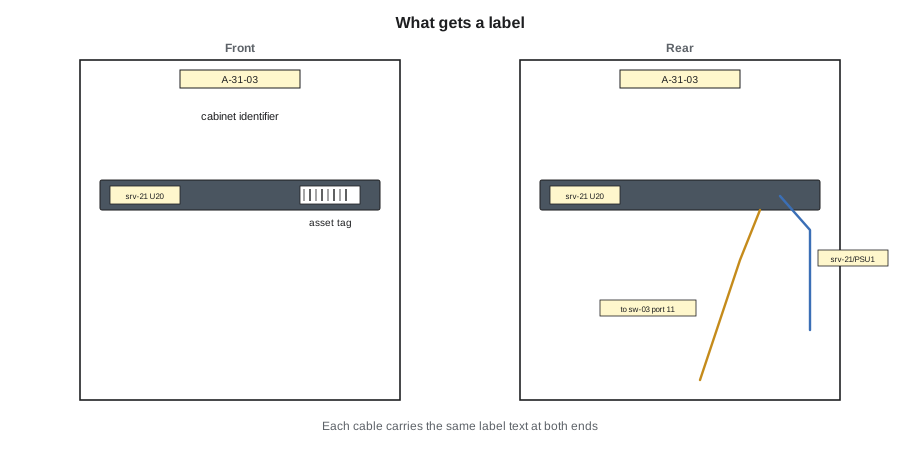
What gets labelled
Roz gives Jamal the list he must check on every installation:
- Cabinets: front and rear, at the top, with the cabinet identifier. Cages carry their own identifier on the door.
- Devices: front and rear, with the device name given by the customer and the cabinet and U position. The rear label matters as much as the front, because most work at the back is cabling and power.
- Power cords: a flag label near each end, giving the device and the power supply at one end and the strip and outlet at the other.
- Network cables: a flag label near each end giving the near and far locations and ports, so that either end tells you where the other end is.
- Patch panels: each port, and the panel itself.
- Power strips: A or B, the cabinet, and the PDU and breaker that feed them.
Labels are printed, not handwritten: Stonebridge's technicians carry label printers with the identifier formats stored, and the printers use durable self-laminating labels for cables and polyester labels for devices. Handwriting fades, smudges and is misread.
Rules for good labels
- Labels go where they can be read without moving anything: on the cable within easy reach of the connector, on the device where it is visible with the door open.
- Labels must not block vents, ports, indicator lights or serial number plates.
- Each cable end shows the same information, so that the cable can be identified from either end.
- Customer names never appear on labels visible to other people in a shared hall; device names are the customer's own codes. This is a security practice: a label saying "bank payment server" tells anyone passing what is valuable.
- Old labels are removed when equipment is moved or cables are re-patched. A wrong label is worse than no label.
Asset tags
As well as location labels, every device Stonebridge tracks carries an asset tag: a durable label with a unique number and a barcode, sometimes with an RFID chip as well, that stays with the device for its whole life wherever it goes. The asset tag is applied at receiving, as Lesson 3 described, and links the physical device to its record in DCIM. Customers often apply their own asset tags too; Stonebridge's tag does not replace them, and technicians never remove a customer's tag.
The difference between the two kinds of label is simple. The location label says where the device is now, and changes if it moves. The asset tag says which device it is, and never changes.
# Generate the labels for a new installation
site, hall, row, cab = "YUL2", "A", 31, 3
cabinet = f"{site}-{hall}-{row:02d}-{cab:02d}"
devices = [("srv-bcu-21", 20, "SB-104877"), ("srv-bcu-22", 21, "SB-104878"), ("sw-bcu-03", 22, "SB-104879")]
print("Cabinet:", cabinet)
for name, u, tag in devices:
    print(f"Device  {name:11s} {cabinet}-U{u:02d}   asset {tag}")
    for psu, strip in (("PSU1", "A"), ("PSU2", "B")):
        print(f"  cord  {name}/{psu}  <->  {cabinet}-{strip}")
links = [("srv-bcu-21", "eth1", "sw-bcu-03", 11), ("srv-bcu-22", "eth1", "sw-bcu-03", 12)]
for dev, port, sw, swport in links:
print(f" cable {dev}:{port} <-> {sw}:{swport:02d} (same text at both ends)")Cabinet: YUL2-A-31-03 Device srv-bcu-21 YUL2-A-31-03-U20 asset SB-104877 cord srv-bcu-21/PSU1 <-> YUL2-A-31-03-A cord srv-bcu-21/PSU2 <-> YUL2-A-31-03-B Device srv-bcu-22 YUL2-A-31-03-U21 asset SB-104878 cord srv-bcu-22/PSU1 <-> YUL2-A-31-03-A cord srv-bcu-22/PSU2 <-> YUL2-A-31-03-B Device sw-bcu-03 YUL2-A-31-03-U22 asset SB-104879 cord sw-bcu-03/PSU1 <-> YUL2-A-31-03-A cord sw-bcu-03/PSU2 <-> YUL2-A-31-03-B cable srv-bcu-21:eth1 <-> sw-bcu-03:11 (same text at both ends) cable srv-bcu-22:eth1 <-> sw-bcu-03:12 (same text at both ends)
Records: DCIM
Labels are half of the system; records are the other half. Stonebridge's DCIM holds, for every asset:
- its asset tag, serial number, make and model;
- its customer and its location: cabinet and U position;
- its weight and power ratings;
- its power connections: which strip and outlet each supply is on;
- its network connections, at least to the patch panel or switch port;
- its history: when it was received, installed, moved, serviced and removed, with the ticket for each.
Every ticket that changes anything in a cabinet ends with the technician updating DCIM, and the ticket cannot be closed until the update is done. Stonebridge also runs regular audits, in which technicians walk a hall with handheld scanners, scan every asset tag and cabinet label, and the system compares what was scanned with what the records say. Differences go to the shift lead and then to the customer.
# Audit: compare scanned asset tags with DCIM records for one cabinet
dcim = {"SB-104877": "U20", "SB-104878": "U21", "SB-104879": "U22", "SB-100412": "U10"}
scanned = {"SB-104877": "U20", "SB-104878": "U21", "SB-104879": "U22", "SB-104880": "U30"}
for tag, u in dcim.items():
    if tag not in scanned:
        print(f"In DCIM but not found: {tag} recorded at {u}  -> removed without a record?")
    elif scanned[tag] != u:
        print(f"Moved: {tag} recorded at {u}, found at {scanned[tag]}")
for tag, u in scanned.items():
    if tag not in dcim:
        print(f"Found but not in DCIM: {tag} at {u}  -> installed without a record?")
print(f"Matched {sum(1 for t in dcim if scanned.get(t) == dcim[t])} of {len(dcim)} records")In DCIM but not found: SB-100412 recorded at U10 -> removed without a record? Found but not in DCIM: SB-104880 at U30 -> installed without a record? Matched 3 of 4 records
Labelling during changes
Labels must stay true as things change. When a cable is re-patched, its labels are reprinted. When a server is moved to a new position, its location labels are replaced and DCIM is updated, while its asset tag stays. When equipment is removed, its labels go with it, the cords and cables that served it are removed or relabelled as spare, and the cabinet label stays. Roz has a simple test: if someone looked at only the labels in this cabinet, without the records, would they be right?
Worked problem
A label that lies
During an audit in Hall A, Jamal scans the asset tag on a server at U18 of cabinet A-22-06 and gets SB-099315, recorded in DCIM at U18 of cabinet A-22-08. The server's front location label also says A-22-08-U18.
Show solution
- Do not touch the server; it is running and belongs to a customer.
- Check the next cabinet: A-22-08 U18 is empty, with no blanking panel.
- Record the difference in the audit with photographs of both cabinets and both labels.
- Fit a blanking panel in the empty U18 of A-22-08 under the audit ticket.
- Report to the shift lead, who opens a ticket for the customer.
Answer: The customer's engineer had moved the server two cabinets along months earlier and kept the old label. The customer confirms the move, the record is corrected and the location label is replaced. If the label had been trusted during an incident, a technician would have looked for the server in the wrong cabinet.
Labelling power
Power labels deserve extra care because a wrong one can take down the wrong equipment. At Stonebridge, each rack strip carries a label naming its cabinet, its side and the floor PDU and breaker that feed it, for example the A strip of cabinet A-31-03 fed from PDU A-07, breaker 14. The matching breaker in the PDU carries the cabinet identifier. With these labels, a facilities technician who must open breaker 14 knows exactly which cabinet loses its A side, and a data centre technician who finds a dead strip knows which breaker to ask about. Busway tap-off boxes in the newer halls carry the same kind of label.
Labels on power cords at the device end name the device and the power supply, so that when a customer asks for power supply 2 of a server to be unplugged, the right cord can be found without tracing. Jamal finds this particularly useful in dense cabinets, where dozens of cords run in parallel down each side.
Network patch records
Network cabling between cabinets usually runs through patch panels, so that a connection from a server to a distant switch is made of several pieces: a patch cord to a panel, a permanent cable to another panel, and another patch cord. Stonebridge records each piece in DCIM as part of a circuit, so that the whole path can be traced from either end on a screen before anyone opens a cabinet. Cross-connects between customers and carriers, in the meet-me rooms, are recorded the same way and carry the cross-connect order number on their labels. DCT-210 covers cabling in detail; for this course, the rule is that every connection a technician makes or changes is recorded and labelled at both ends before the ticket closes.
Barcodes, RFID and scanning
Asset tags carry barcodes that a handheld scanner reads in a second, which is why audits that once took a week of reading serial numbers by flashlight now take a day. Some sites add RFID tags, which can be read at a distance without a line of sight, so that a reader at a hall door can record equipment moving in and out. Stonebridge uses barcodes for asset tags and has RFID only on high-value Hall D equipment. Whatever the technology, the scanner is only as good as the tag: tags are applied where they can be scanned with the equipment installed, usually on the front, and a tag that has come loose is replaced and the record updated, never left in a drawer.
Common mistakes
MistakeHandwriting labels in a hurry.
InsteadPrint labels in the standard format.
MistakeLabelling only the front of a device.
InsteadLabel front and rear; most work happens at the rear.
MistakeLeaving an old label on a moved or re-patched cable.
InsteadRemove it and print a new one; a wrong label is worse than none.
MistakePutting a customer's name on a visible label.
InsteadUse the customer's own device codes.
MistakeClosing a ticket before updating DCIM.
InsteadUpdate the records first; the ticket cannot close without it.
Summary and key terms
- Labels prevent the most common technician error: working on the wrong thing.
- Identifiers follow the TIA-606 approach: site, hall, row, cabinet, unit, port.
- Label cabinets, devices front and rear, cords and cables at both ends, panels and strips.
- Asset tags identify a device for life; location labels say where it is now.
- DCIM records every asset's location, connections and history, and audits check it.
- Keep labels true through every change.
- TIA-606
- The ANSI/TIA standard for administering and labelling telecommunications infrastructure.
- Identifier
- A unique name for a space, cabinet, device position or port, built from its location.
- Asset tag
- A permanent label with a unique number and barcode that identifies a device for life.
- Flag label
- A label that wraps around a cable and sticks to itself, standing out like a flag.
- Audit
- A walk-through in which assets are scanned and compared with the records.
- DCIM
- Data centre infrastructure management: the system of record for assets, locations and connections.
Practice problems
Work each problem on paper first, then reveal the answer to check.
What does a location label tell you that an asset tag does not?
Show answer
Where the device is now; the asset tag says which device it is.
Why do both ends of a network cable carry the same label text?
Show answer
So that the cable and its far end can be identified from either end.
Why should customer names not appear on labels in a shared hall?
Show answer
They tell anyone passing what equipment is valuable.
An audit finds a tag in DCIM that is not in the cabinet. What might have happened?
Show answer
The device was removed or moved without the record being updated.
Lesson quiz · 5 questions
Score 60% or more to complete this lesson.
Create a free account to save your progress, take quizzes and earn a certificate.