
DCE-470 · Lesson 6 of 12 · 24 min
Planning and scheduling
A schedule is the project's model of time: what must be done, in what order, by whom, and how long it will take. On a data centre project, where every month of delay is costly and many activities depend on long equipment lead times and utility work, the schedule is the central tool for planning, coordinating, and later for proving the causes of delay. This lesson covers the work breakdown structure, schedule levels, the critical path method and float, the special features of data centre schedules (long-lead equipment, utility energization and commissioning), schedule compression, resource and short-interval planning, schedule updating and risk analysis, and the use of schedules in delay claims.
Work breakdown structure
Planning begins with a work breakdown structure (WBS): a hierarchical decomposition of the project scope into deliverables and work packages, small enough to estimate, schedule and assign. A data centre WBS might divide the project by phase or building, then by system (site, structure, electrical, mechanical, fire protection, controls, IT infrastructure), then by area or package. The WBS also provides the structure for cost estimates and earned value reporting (Lesson 7), linking schedule and cost. A WBS dictionary defines each element's scope, preventing gaps and overlaps between packages.
Schedule levels
Schedules are prepared at different levels of detail for different audiences:
- Level 1: a one-page summary of major phases and milestones for executives and investors.
- Level 2: a summary schedule showing major activities by area and phase, for project management.
- Level 3: the integrated project schedule, with all significant activities and logic links across design, procurement, construction and commissioning; the contract schedule on most projects.
- Level 4 and 5: detailed working schedules for trades and short-interval plans for crews, often prepared by the contractors.
All levels must be consistent: milestones in the Level 1 schedule should be driven by the logic in the Level 3 schedule, not set independently.
The critical path method
The critical path method (CPM) represents the project as a network of activities with durations and logical dependencies, most commonly finish-to-start (an activity cannot start until its predecessor finishes), with start-to-start and finish-to-finish links and lags used where activities overlap. A forward pass calculates each activity's early start (ES) and early finish (EF); a backward pass from the project end date calculates late start (LS) and late finish (LF). The difference between late and early start is the total float: how long an activity can be delayed without delaying the project. Activities with zero total float form the critical path, the longest path through the network, which determines the project duration. Free float is the delay possible without delaying any successor.
# Critical path method for a simplified data center schedule (durations in weeks)
acts = {  # name: (duration, predecessors)
    "Design":                  (16, []),
    "Permits":                 (20, ["Design"]),
    "Utility agreement":       (12, []),
    "Order transformers":      (100, ["Utility agreement"]),
    "Order generators":        (60, ["Design"]),
    "Site work":               (12, ["Permits"]),
    "Building shell":          (36, ["Site work"]),
    "MEP installation":        (30, ["Building shell", "Order generators"]),
    "Install transformers":    (6, ["Order transformers", "Building shell"]),
    "Energize":                (4, ["Install transformers"]),
    "Commissioning":           (12, ["MEP installation", "Energize"]),
}
ES, EF = {}, {}
for a, (d, pre) in acts.items():                      # forward pass (activities listed in order)
    ES[a] = max((EF[p] for p in pre), default=0); EF[a] = ES[a] + d
end = max(EF.values())
LS, LF = {}, {}
for a in reversed(list(acts)):                        # backward pass
    succ = [s for s, (_, pre) in acts.items() if a in pre]
    LF[a] = min((LS[s] for s in succ), default=end); LS[a] = LF[a] - acts[a][0]
print("activity".ljust(22), "  ES   EF   LS   LF float")
for a in acts:
    fl = LS[a] - ES[a]
    flag = "  critical" if fl == 0 else ""
    print(f"{a:22s} {ES[a]:4d} {EF[a]:4d} {LS[a]:4d} {LF[a]:4d} {fl:5d}{flag}")
print(f"project duration: {end} weeks")activity ES EF LS LF float Design 0 16 8 24 8 Permits 16 36 24 44 8 Utility agreement 0 12 0 12 0 critical Order transformers 12 112 12 112 0 critical Order generators 16 76 32 92 16 Site work 36 48 44 56 8 Building shell 48 84 56 92 8 MEP installation 84 114 92 122 8 Install transformers 112 118 112 118 0 critical Energize 118 122 118 122 0 critical Commissioning 122 134 122 134 0 critical project duration: 134 weeks
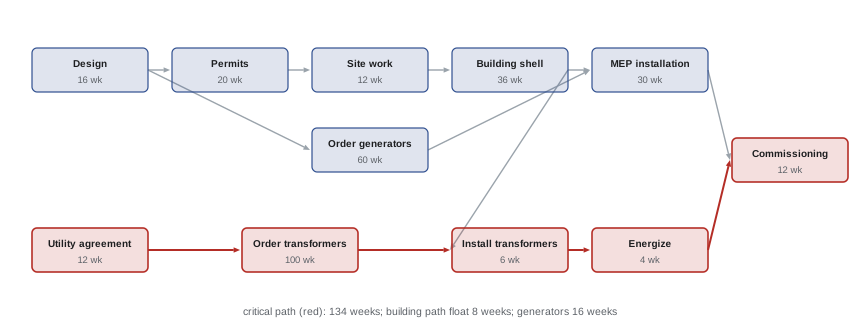
The critical path runs through the utility agreement, transformer manufacturing, transformer installation, energization and commissioning, for a total of 134 weeks. The entire building path, from design through permits, site work, shell and MEP installation, has 8 weeks of float, and generator procurement 16 weeks. This result is typical of current data centre projects: the building is not the constraint, power is. Accelerating the building would not finish the project any sooner; only shortening the utility agreement or transformer lead time, or finding a way to energize without the permanent transformers, would. Many teams discover this too late, after spending money on accelerating work that had float.
What drives data centre schedules
Several activities appear on or near the critical path of most data centre projects:
- Utility power: studies, agreements, substation design and construction, and transmission upgrades can take two to five years in constrained regions. Temporary or partial energization, interim generation, or phasing of load can bridge gaps.
- Long-lead equipment: in the mid-2020s, large power transformers have commonly had lead times of two to four years, medium-voltage switchgear and generators around one to two years, and UPS systems and chillers several months to a year, varying with market conditions (Lesson 8).
- Permits and approvals: zoning changes, environmental assessments and building permits (Lesson 11).
- Commissioning: the levels of commissioning (DCE-450), especially integrated systems testing, take weeks to months and cannot start until systems are complete. Compressing commissioning to recover earlier delays is a frequent and risky temptation.
- Owner decisions: approvals of design, equipment selections and tenant requirements must be scheduled as activities, not assumed.
Good schedules represent these explicitly, with realistic durations from suppliers and the utility, rather than as fixed milestones without logic.
Schedule compression
When the calculated finish date is later than required, the schedule can be compressed in two ways:
- Crashing: adding resources (more crews, overtime, extra shifts) to shorten critical activities, at extra cost. Crashing should target the critical activities with the lowest cost per week saved, and stops being effective when a new path becomes critical or when crowding reduces productivity.
- Fast-tracking: overlapping activities that were planned in sequence, such as starting foundations before the building design is complete, at the risk of rework.
Each compression changes the network: as the critical path shortens, other paths with little float may become critical, so the analysis must be repeated. For data centres, buying earlier manufacturing slots, splitting equipment orders between suppliers, using prefabricated modules, and phasing energization are often more effective than crashing site work.
Worked problem
Where to spend to save time
Using the schedule in the code example, the owner wants to finish 8 weeks earlier. Options are: (a) accelerate the building shell by 8 weeks for 2.5 million dollars; (b) pay a transformer manufacturer 1.8 million dollars to shorten delivery by 8 weeks; (c) shorten the utility agreement by 4 weeks with extra legal and engineering effort costing 0.3 million dollars. What should the owner do?
Show solution
- Option (a) acts on the building path, which has 8 weeks of float: the project finish does not change.
- Option (c) shortens the critical path by 4 weeks for 0.3 million dollars.
- Option (b) shortens it by 8 weeks; combined with (c), the transformer path would be 12 weeks shorter.
- After saving 8 weeks on the transformer path, the building path (which had 8 weeks of float) also becomes critical, so further savings would require accelerating both paths.
Answer: Do (c) for 4 weeks at 0.3 million, then buy 4 weeks of the transformer acceleration if it can be purchased in part, or all 8 weeks if not; reject (a). Total saving of 8 weeks at roughly 1.2 to 2.1 million dollars, while recognizing that both paths are now critical and any building delay will delay completion.
Resources and short-interval planning
A CPM schedule assumes resources are available; in reality, electricians, cranes, commissioning agents and testing equipment are limited. Resource loading shows how many workers of each trade each period requires; resource levelling shifts non-critical activities within their float to avoid peaks that the labour market cannot supply. Data centre projects can require hundreds of electricians at peak, and the availability of qualified trades in the region is a real constraint.
At the site level, many projects use lean construction techniques such as the Last Planner System: the master schedule sets milestones; phase pull-planning sessions with the trades work backward from each milestone; a six-week look-ahead identifies and removes constraints (missing information, materials, access, permits) before work is due; and weekly work plans commit crews to specific tasks, with the percentage of planned tasks completed tracked to improve reliability. Reliable short-term commitments are what make the long-term schedule achievable.
Updating and controlling the schedule
A schedule is a living document. At regular intervals, typically monthly for the contract schedule and weekly for working schedules, actual progress is recorded (actual start and finish dates, remaining durations), the schedule is recalculated, and the forecast completion date and critical path are reviewed. The original approved schedule is kept as the baseline for comparison. Common schedule quality checks include: every activity has predecessors and successors (no open ends), few hard constraints override logic, durations are realistic, float values are plausible, and the critical path is continuous from start to finish. Schedules full of constraints, missing logic or unrealistic durations produce misleading float and critical paths and are useless for delay analysis.
Schedule risk analysis
Single-value durations hide uncertainty. Schedule risk analysis, like the cost analysis of Lesson 5, assigns ranges to durations and models discrete risk events, then uses Monte Carlo simulation to estimate the probability of finishing by each date. It often reveals merge bias: where several paths converge on one activity (such as commissioning), the chance that at least one path is late is much higher than for any single path, so the probable finish is later than the deterministic CPM date. Schedule risk analysis supports realistic commitments to tenants and lenders, and shows where buffers are most valuable.
Schedules and delay claims
When delays occur, the schedule is the evidence. Time impact analysis inserts a fragment representing the delaying event into the schedule as it stood just before the event, and recalculates to show the effect on completion. Windows analysis divides the project into periods and examines how the critical path and completion date moved in each. Both require a sound baseline and regular, accurate updates; projects that let the schedule lapse find it nearly impossible to prove or defend delay claims. Contracts often require the contractor to submit updated schedules monthly and to show the impact of any claimed delay before an extension is granted.
Common mistakes
MistakeSetting milestones without logic in the schedule.
InsteadDrive milestones from a logic-linked Level 3 schedule.
MistakeAccelerating activities that have float.
InsteadSpend to shorten only critical activities, rechecking the path after each change.
MistakeTreating utility energization as a fixed date.
InsteadModel utility work with logic and realistic durations from the utility.
MistakeSqueezing commissioning to recover earlier delays.
InsteadProtect commissioning durations and recover time elsewhere.
MistakeLetting schedule updates lapse.
InsteadUpdate regularly against a baseline so delays can be analysed.
Summary and key terms
- A WBS decomposes scope into work packages and links schedule and cost.
- Schedules range from Level 1 summaries to Level 5 crew plans, which must be consistent.
- CPM forward and backward passes give early and late dates, float and the critical path.
- On data centres, utility power and transformers often form the critical path, not the building.
- Crash or fast-track only critical work, rechecking paths; equipment and energization strategies often save more.
- Resource levelling and lean short-interval planning make schedules achievable.
- Updated baselines and schedule risk analysis support forecasting and delay claims.
- WBS
- Work breakdown structure, a hierarchical decomposition of scope.
- CPM
- Critical path method of network scheduling.
- Total float
- The time an activity can slip without delaying the project.
- Free float
- The time an activity can slip without delaying any successor.
- Critical path
- The longest path through the network, with zero float.
- Crashing
- Adding resources to shorten critical activities.
- Fast-tracking
- Overlapping sequential activities.
- Baseline
- The approved original schedule used for comparison.
- Last Planner System
- A lean method of collaborative short-interval planning.
- Time impact analysis
- A method of showing the effect of a delay event on completion.
Practice problems
Work each problem on paper first, then reveal the answer to check.
What does a WBS provide besides a scope breakdown?
Show answer
A structure linking schedules, estimates and earned value reporting.
What level schedule is typically the contract schedule?
Show answer
Level 3.
How is total float calculated?
Show answer
Late start minus early start (or late finish minus early finish).
From the output, what is the project duration?
Show answer
134 weeks.
From the output, how much float does the building shell have?
Show answer
8 weeks.
Why would accelerating the building shell not help?
Show answer
It is not on the critical path.
What is the difference between crashing and fast-tracking?
Show answer
Crashing adds resources; fast-tracking overlaps activities.
What does resource levelling do?
Show answer
Shifts non-critical activities within float to smooth resource demand.
What is merge bias?
Show answer
Converging paths make the probable finish later than the deterministic date.
What does time impact analysis show?
Show answer
The effect of a specific delay event on the completion date.
Lesson quiz · 5 questions
Score 60% or more to complete this lesson.
Create a free account to save your progress, take quizzes and earn a certificate.