
DCE-200 · Lesson 2 of 12 · 31 min
Inside the white space: servers, storage and racks
A data centre exists to house IT equipment, and nearly every design decision follows from what that equipment needs: how much power each rack draws, how much heat it produces, how heavy it is, how it is cooled, how it connects to the network and how often it is replaced. Engineers who design the building rarely choose the servers, but they must understand them well enough to ask the right questions and to anticipate change, because a building lasts 20 to 30 years while the equipment inside is replaced every 3 to 6. This lesson opens the cabinets: the main kinds of IT equipment, how racks are arranged, the power and heat of conventional and AI workloads, and the numbers that turn a list of equipment into a design load.
The white space
The white space (also called the data hall, computer room or IT space) is the area that holds IT equipment. Its opposite, the grey space, holds the support systems: electrical rooms, UPS and battery rooms, mechanical plant, network entrance rooms, loading docks and offices. In a typical modern facility, the white space takes perhaps 30% to 50% of the gross floor area; high-density AI facilities have proportionally less white space and more grey space, because each square metre of white space needs more power and cooling equipment.
Within the white space, equipment is mounted in racks (or cabinets): standardized steel frames 600 mm or 800 mm wide, about 1,070 mm to 1,200 mm deep, and usually 42U to 52U tall, where one rack unit (U) is 44.45 mm (1.75 in). Racks are placed side by side in rows, with all equipment facing the same way so that cool air enters at the front and warm air leaves at the back. Rows face each other front to front and back to back, creating alternating cold and hot aisles (Lesson 5).
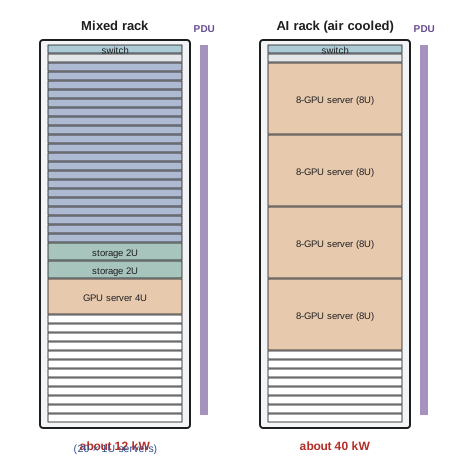
Servers
A server is a computer designed to run continuously in a rack. Its main parts are one or two processors (CPUs), memory (DRAM), storage drives, network interface cards, power supplies, and fans that pull air from front to back. Servers come in several forms:
- Rack servers: 1U or 2U general-purpose machines, the most common building block of enterprise and cloud data centres.
- Blade servers: thin servers that slide into a shared chassis providing power, cooling and networking.
- Multi-node and hyperscale servers: custom designs, often following Open Compute Project specifications, that share power supplies and fans across several nodes to reduce cost and energy.
- Accelerated servers: servers with graphics processing units (GPUs) or other accelerators for AI and high-performance computing, typically 4U to 10U with eight accelerators, or integrated into liquid-cooled rack-scale systems.
The power drawn by a server varies with its workload. Idle servers still draw a significant fraction of peak power (often 30% to 50% for older designs, less for modern ones), so lightly used servers waste energy; consolidating workloads onto fewer, busier servers through virtualization is one of the most effective ways to save energy in IT.
| Equipment | Typical power | Notes |
|---|---|---|
| 1U dual-socket server | 300 W to 800 W | General purpose, web, databases |
| 2U storage server | 400 W to 1,000 W | Many drives; weight up to 40 kg |
| Network switch (top of rack) | 200 W to 800 W | Higher for 400G and 800G switches |
| 8-GPU AI server (air cooled) | 6 kW to 12 kW | One server can fill a conventional rack's power budget |
| Liquid-cooled rack-scale AI system | 100 kW to over 130 kW per rack | Many GPUs linked as one system |
Storage and networking
Data is stored on hard disk drives (HDDs), which are cheap per terabyte but mechanical, and solid-state drives (SSDs), which are faster and use less power per operation. Storage is organized in arrays and distributed systems that keep several copies of data, often in different racks or buildings, so that a single failure loses nothing. Tape libraries remain in use for long-term archives because tape is cheap and draws no power when idle. Storage equipment is heavy: a fully loaded storage rack can exceed 1,500 kg, which matters for floor design (Lesson 9).
Networking connects servers to each other and to the outside world. In a common arrangement, each rack has a top-of-rack switch connected to aggregation or spine switches, which connect to routers and to the carriers and cloud providers outside (Lesson 7). AI training clusters add a separate high-bandwidth fabric connecting thousands of GPUs with very low latency, which requires large amounts of optical fibre and constrains how far apart racks can be.
Rack density
Rack density, the power drawn per rack, is the single most important number for a data centre designer. It determines the cooling method, the size of the electrical distribution, the floor loading and the layout. Densities have risen steadily:
- Traditional enterprise rooms: 3 kW to 6 kW per rack.
- Modern cloud and colocation halls: 8 kW to 20 kW per rack.
- Air-cooled AI and high-performance computing: 20 kW to 50 kW per rack, near the practical limit of air cooling.
- Liquid-cooled AI racks: 100 kW to over 130 kW per rack today, with vendors announcing designs of several hundred kilowatts per rack.
Because density is rising quickly, designers increasingly plan for a mix: lower-density air-cooled racks for storage and networking, and high-density liquid-cooled racks for accelerators, with infrastructure that can be adapted as the mix changes.
Worked problem
From a rack list to a hall load
A data hall will hold 200 racks of general-purpose servers at an average of 10 kW, 40 storage racks at 6 kW, 20 network racks at 4 kW, and 32 AI racks at 120 kW. What is the total IT load, and what share comes from the AI racks?
Show solution
- General purpose: \(200 \times 10 = 2000\) kW. Storage: \(40 \times 6 = 240\) kW. Network: \(20 \times 4 = 80\) kW.
- AI: \(32 \times 120 = 3840\) kW.
- Total: \(2000 + 240 + 80 + 3840 = 6160\) kW; AI share \(3840/6160 = 62\%\).
Answer: About 6.2 MW of IT load, of which 62% comes from just 32 of the 292 racks. The AI racks need liquid cooling, heavier floors and much larger power feeds per rack, so the hall effectively contains two different facilities. Designing the whole hall for 120 kW per rack would be wasteful; designing it all for 10 kW would make the AI racks impossible.
Nameplate, design and actual load
Equipment nameplates state the maximum power a power supply can deliver, not what the server actually draws. A server with two 1,600 W power supplies (one redundant) might be labeled 1,600 W but draw 600 W on average and 900 W at peak. Designing from nameplates alone would oversize the facility several times over. Designers therefore distinguish:
- Nameplate power: the rating of the power supply.
- Peak measured power: the maximum observed under heavy workloads, often 50% to 70% of nameplate for conventional servers but close to 100% for AI training.
- Average power: what determines energy use and cost.
The design IT load of a facility is set from the expected peak power of the planned equipment, with an allowance for growth. Because AI training runs keep thousands of GPUs at nearly full power in synchronized patterns, AI halls operate much closer to their design load than traditional halls, which reduces the safety margin that diversity used to provide and can produce rapid swings in power as training jobs start, pause and checkpoint.
Worked problem
Diversity in a conventional hall
A hall holds 4,000 servers with 750 W nameplate power supplies. Measurements show average draw of 320 W and peak of 430 W per server, and peaks do not all occur at once: the hall peak is 85% of the sum of individual peaks. What design IT load should be used, before growth allowance?
Show solution
- Sum of nameplates: \(4000 \times 0.75 = 3000\) kW.
- Sum of peaks: \(4000 \times 0.43 = 1720\) kW.
- Coincident peak: \(1720 \times 0.85 = 1462\) kW.
Answer: About 1.46 MW, less than half the 3 MW nameplate total. The ratio of the coincident peak to the sum of peaks (0.85) is the diversity factor. An AI training hall, where thousands of GPUs run flat out together, might have a diversity factor close to 1.
Heat from IT equipment
Essentially all electrical power drawn by IT equipment becomes heat in the room (Lesson 1). Each server's fans move air through it, and the temperature rise across the server depends on its power and airflow:
where \(\rho c_p\) for air is about 1.2 kJ/(m³·K). Servers typically raise air temperature by 10 K to 20 K. Fans adjust their speed to keep components cool, so the airflow a server needs changes with inlet temperature and load, and the cooling system must supply at least what the servers draw (Lesson 6).
Worked problem
Airflow through a server
A 1U server draws 600 W and its fans move 0.04 m³/s of air. What is the temperature rise across it? How much airflow would a 10 kW air-cooled GPU server need for a 15 K rise?
Show solution
- \(\Delta T = 600/(1200 \times 0.04) = 12.5\) K.
- GPU server: \(\dot{V} = 10000/(1200 \times 15) = 0.56\) m³/s (about 1,180 CFM).
Answer: A 12.5 K rise for the 1U server. The GPU server needs about 14 times as much air, which explains why air-cooled AI servers are loud, tall (to fit large fans and heat sinks) and limited in how many fit in a rack.
Power supplies and rack power
Each server converts AC (or, in some designs, DC) to the low voltages its components need using one or more power supply units (PSUs). Most servers have two PSUs fed from separate power paths (an A feed and a B feed), so that either path can fail or be maintained without stopping the server. Rack power distribution units (PDUs), long power strips mounted vertically at the back of the rack, deliver power to each device and often measure current per outlet for monitoring.
In North America, racks are commonly fed at 208 V (from 208Y/120 V panels) or, increasingly, at 415Y/240 V, which lets a single three-phase circuit deliver more power. In Canada, 600 V distribution feeds transformers near the white space that produce these rack voltages.
Hyperscale designs often replace individual server PSUs with a shared power shelf in each rack that produces a DC bus at about 48 V to 54 V, distributed along a busbar to all servers. This reduces conversion stages and copper and suits high-density AI racks.
Worked problem
Rack feed capacity
A rack is fed by two 3-phase 415 V, 32 A circuits (A and B feeds). Electrical codes and good practice limit continuous load to 80% of the circuit rating. What is the maximum rack load if either feed must be able to carry the whole rack alone?
Show solution
- One circuit: \(S = \sqrt{3} \times 415 \times 32 = 23.0\) kVA.
- At 80%: \(23.0 \times 0.8 = 18.4\) kVA; with power factor near 1, about 18.4 kW.
Answer: About 18 kW, because each feed must carry the full rack if the other fails. Two feeds do not double capacity; they provide redundancy. A 120 kW AI rack needs several much larger circuits or a busway connection, which is why AI racks change electrical design inside the white space.
Refresh cycles and flexibility
Servers are typically replaced every 3 to 6 years, network equipment every 5 to 7, while the building, electrical and mechanical systems last 15 to 30 years. Each generation of IT equipment tends to draw more power per rack, and the arrival of AI accelerators has accelerated this trend sharply. Facility designers therefore build in flexibility: spare capacity in electrical rooms, space and connections for adding liquid cooling, structural floors that can take heavier racks, and modular blocks that can be upgraded independently. Retrofitting an existing air-cooled hall for high-density liquid-cooled racks is possible but costly, and many older facilities cannot support the newest AI systems at all.
Equipment arrives in large volumes: a single AI cluster may require thousands of servers delivered, unpacked, installed, cabled and tested in weeks. Loading docks, freight elevators, staging rooms where packaging is removed (to keep combustible cardboard out of the data hall), and corridors wide and strong enough for loaded racks are part of the design.
Common mistakes
MistakeDesigning from nameplate power ratings.
InsteadUse measured or expected peak power and diversity; AI halls need lower diversity assumptions.
MistakeAssuming two rack feeds double the available power.
InsteadEach feed must carry the full rack alone; two feeds provide redundancy.
MistakeDesigning a whole hall for the average rack.
InsteadPlan zones for different densities, especially AI racks.
MistakeIgnoring rack weight.
InsteadCheck floor loading; storage and AI racks can exceed 1,500 kg.
MistakeAssuming the building will outlive only one equipment generation.
InsteadExpect several refresh cycles and build in flexibility.
Summary and key terms
- The white space holds IT equipment in standard racks arranged in hot and cold aisles.
- Servers, storage and network equipment have different power, weight and cooling needs.
- Rack density drives cooling method, electrical design and layout; AI racks exceed 100 kW.
- Design load comes from expected peak power and diversity, not nameplate ratings.
- Server airflow sets temperature rise: ΔT = P/(ρ c_p V̇).
- Dual A and B feeds provide redundancy; each must carry the full rack.
- Buildings outlast several IT refresh cycles, so designs must stay flexible.
- White space
- The area of a data centre that holds IT equipment.
- Grey space
- Support areas housing electrical, mechanical and other systems.
- Rack unit (U)
- A standard height of 44.45 mm (1.75 in) for rack-mounted equipment.
- Rack density
- The power drawn per rack, usually in kilowatts.
- Nameplate power
- The rated output of a device's power supply.
- Diversity factor
- The ratio of coincident peak load to the sum of individual peaks.
- Accelerator
- A processor such as a GPU specialized for AI or parallel computing.
- Rack PDU
- A power strip distributing power to devices in a rack.
- A and B feeds
- Two independent power paths to IT equipment.
- Refresh cycle
- The interval at which IT equipment is replaced.
Practice problems
Work each problem on paper first, then reveal the answer to check.
How tall is a 42U rack's mounting space?
Show answer
42 × 44.45 mm = 1.87 m.
What is the difference between white space and grey space?
Show answer
White space holds IT equipment; grey space holds support systems.
150 racks at 8 kW and 10 AI racks at 100 kW. Total IT load?
Show answer
1,200 + 1,000 = 2,200 kW.
Why do idle servers matter for energy?
Show answer
They still draw a large fraction of peak power.
2,000 servers with 450 W peak and a diversity factor of 0.8. Coincident peak?
Show answer
720 kW.
Why do AI halls have diversity factors near 1?
Show answer
Thousands of GPUs run at full power together during training.
A 400 W server with 0.025 m³/s airflow. Temperature rise?
Show answer
400/(1200 × 0.025) = 13.3 K.
One 3-phase 208 V, 30 A circuit at 80%. Usable kVA?
Show answer
√3 × 208 × 30 × 0.8 = 8.6 kVA.
Why remove packaging before equipment enters the data hall?
Show answer
To keep combustible material and dust out.
Give two ways designers keep a facility flexible for future IT.
Show answer
Spare electrical capacity, provisions for liquid cooling, stronger floors, modular blocks.
Lesson quiz · 5 questions
Score 60% or more to complete this lesson.
Create a free account to save your progress, take quizzes and earn a certificate.