
CSCO-111 · Lesson 8 of 12 · 26 min
Wireless standards and channels
▶ Video coming soon A video version of this lesson is on the way.
Every Saturday morning, Northfield Community Centre runs a children's coding club, and every Saturday morning the front desk calls Brightline to say the Wi-Fi is 'terrible'. On a weekday the same network works fine. Dev and Jordan visit on a Saturday with a laptop running a Wi-Fi analyser. The screen tells the story at once: the centre's two access points are both on channel 6 in the 2.4 gigahertz band, the café next door has an access point on channel 4, and thirty children's tablets, most of which support only 2.4 gigahertz, are all trying to talk at the same time. The access points' 5 gigahertz radios are almost idle. Nothing is broken. The radio space is simply crowded and badly arranged.
Wireless networks are now the main way most people connect. The CCST Networking exam expects you to know the IEEE 802.11 standards and their generation names, the frequency bands and channels, channel widths, the terms used for wireless networks, how signal strength is measured, and what causes interference. This lesson covers those topics. Wireless security settings are covered in CSCO-112.
Wi-Fi and the 802.11 standards
Wireless local networks are defined by the IEEE 802.11 family of standards. The Wi-Fi Alliance, an industry group, tests products for compatibility and gives each generation a simple name. Each new standard has raised speeds and improved how devices share the airwaves, and each remains compatible with older devices in the same band, although a network with many old devices runs slower for everyone.
| Standard | Wi-Fi name | Year (approx.) | Bands | Maximum theoretical rate |
|---|---|---|---|---|
| 802.11b | None | 1999 | 2.4 GHz | 11 Mb/s |
| 802.11a | None | 1999 | 5 GHz | 54 Mb/s |
| 802.11g | None | 2003 | 2.4 GHz | 54 Mb/s |
| 802.11n | Wi-Fi 4 | 2009 | 2.4 and 5 GHz | 600 Mb/s |
| 802.11ac | Wi-Fi 5 | 2013 | 5 GHz | About 3.5 to 6.9 Gb/s |
| 802.11ax | Wi-Fi 6 and 6E | 2019 to 2021 | 2.4, 5 and (6E) 6 GHz | About 9.6 Gb/s |
| 802.11be | Wi-Fi 7 | 2024 | 2.4, 5 and 6 GHz | About 46 Gb/s |
The maximum rates in the table are the highest a standard allows with the widest channels, the most antennas and ideal conditions. Real throughput is typically half of the connected rate or less, because Wi-Fi shares the medium, adds overhead, and retries lost frames. A laptop showing a link rate of 866 megabits per second might transfer files at 400. For the exam, know which standards use which bands and which generation name goes with which standard.
Several technologies explain the jumps in speed. Multiple-input, multiple-output, MIMO, introduced with 802.11n, uses several antennas to send several streams of data at once. Wi-Fi 5 added multi-user MIMO, so an access point can send to several clients at the same time. Wi-Fi 6 added OFDMA, which divides a channel into smaller pieces so that many devices sending small amounts of data can share it efficiently, a big help in crowded places like the Saturday coding club. Wi-Fi 6 also improved battery life for phones and sensors. Wi-Fi 7 adds wider channels and the ability for a device to use more than one band at once.
Frequency bands
Wi-Fi uses three unlicensed radio bands, regulated in Canada by Innovation, Science and Economic Development Canada. The 2.4 gigahertz band has the longest range and passes through walls best, but it is narrow, crowded and shared with Bluetooth, cordless phones and microwave ovens. The 5 gigahertz band has many more channels and less interference, but shorter range and weaker penetration through walls. The 6 gigahertz band, opened for Wi-Fi in the early 2020s, adds a large amount of clean spectrum that only Wi-Fi 6E and Wi-Fi 7 devices can use, with range somewhat shorter than 5 gigahertz.
Higher frequencies lose strength faster with distance and through obstacles. A practical rule is that 2.4 gigahertz covers the widest area, 5 gigahertz gives the best balance for most offices, and 6 gigahertz gives the most capacity close to the access point. Modern access points have radios for two or three bands at once, and band steering encourages capable devices to use the higher bands, leaving 2.4 gigahertz for older devices and those far from the access point.
Channels in the 2.4 GHz band
Each band is divided into channels. In the 2.4 gigahertz band, channels are numbered 1 to 13 internationally, with channels 1 to 11 used in Canada and the United States. Their centre frequencies are only 5 megahertz apart, but each Wi-Fi channel is about 20 megahertz wide, so neighbouring channels overlap heavily. Only three channels in North America do not overlap: 1, 6 and 11. Access points near each other should use these three channels in a pattern so that no two neighbours share a channel. Using channels in between, such as 4 like the café next to Northfield, makes things worse, because the access point then interferes with both channel 1 and channel 6 networks.
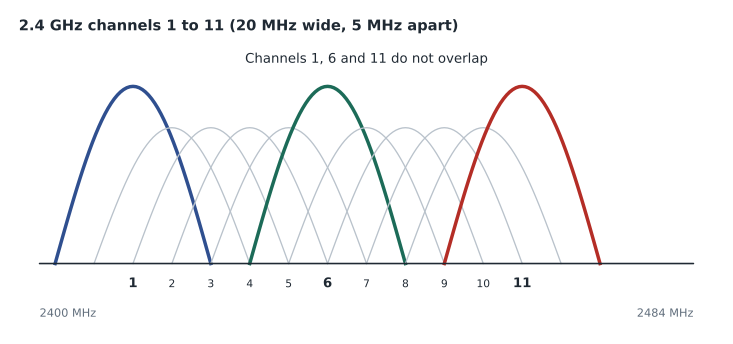
Wider channels are not practical at 2.4 gigahertz. A 40 megahertz channel there uses almost half the band, overlapping two of the three clean channels, and should usually be avoided in offices. Most networks use 20 megahertz channels at 2.4 gigahertz.
Channels in the 5 and 6 GHz bands
The 5 gigahertz band has many more channels, typically around 25 non-overlapping 20 megahertz channels depending on the country and equipment. They are grouped into blocks often referred to by their channel numbers, such as 36 to 48 and 149 to 165. Some channels in the middle of the band share frequencies with weather and military radar, so access points using them must listen for radar and move away if they hear it, a feature called dynamic frequency selection, DFS. A sudden, brief Wi-Fi drop at the same time every day can be an access point leaving a DFS channel.
In the 5 and 6 gigahertz bands, adjacent 20 megahertz channels can be bonded into wider channels of 40, 80 or 160 megahertz, and Wi-Fi 7 allows 320 megahertz channels in the 6 gigahertz band. Wider channels carry more data but leave fewer separate channels to share between neighbouring access points, and they pick up more noise. In a busy office with many access points, 20 or 40 megahertz channels often give better total performance than 80, because more access points can work without overlapping. In a home with one access point, 80 megahertz gives the best speed.
| Band | Non-overlapping 20 MHz channels | Common widths | Range and penetration | Notes |
|---|---|---|---|---|
| 2.4 GHz | 3 in North America (1, 6, 11) | 20 MHz | Longest | Crowded; shared with Bluetooth and microwaves |
| 5 GHz | About 25, varies by country | 20, 40, 80, 160 MHz | Medium | Some channels need DFS radar detection |
| 6 GHz | Up to 59 | 20 to 160 MHz; 320 MHz with Wi-Fi 7 | Shorter | Wi-Fi 6E and 7 devices only; requires WPA3 |
Wireless network terms
A few terms appear in exam questions and in every access point's settings. The SSID, service set identifier, is the network name users see, such as Northfield-Public. The BSSID is the MAC address of an access point's radio for that SSID; one SSID served by many access points has many BSSIDs. A basic service set, BSS, is one access point and its clients. An extended service set, ESS, is several access points sharing the same SSID and settings, so that a device can roam from one to another as it moves. Infrastructure mode, with access points, is how almost all business networks work; ad hoc mode connects devices directly to each other without an access point and is rarely used.
Wi-Fi devices share the channel using CSMA/CA, carrier sense multiple access with collision avoidance. Because a radio cannot listen while it transmits, devices cannot detect collisions as old Ethernet did. Instead, each device listens to check that the channel is clear, waits a random short time, and transmits; the receiver sends an acknowledgement, and if none arrives the sender tries again. Only one device can transmit on a channel at a time in any area, which is why many slow or distant devices on one channel slow everyone down.
Some deployments use wireless mesh, where access points connect to each other by radio instead of cables, passing traffic back to the one access point that is wired. Mesh is common in homes and in places where cables are hard to run, but each wireless hop uses airtime, so mesh networks are slower than wired ones. Business networks usually cable every access point and use mesh only for difficult locations.
Measuring signal strength
Wireless signal strength is measured in dBm, decibels relative to one milliwatt. Zero dBm is one milliwatt. Every increase of 10 dB multiplies the power by ten, and every increase of 3 dB roughly doubles it, so 20 dBm is 100 milliwatts and 23 dBm is about 200. Received signals are tiny fractions of a milliwatt, so they are negative numbers: −30 dBm is an extremely strong signal right next to an access point, −67 dBm is a common target for reliable voice and video, −70 dBm is adequate for browsing, and below about −80 dBm connections become unreliable. Remember that a number closer to zero is stronger: −55 is better than −75.
Signal strength alone is not enough. What matters is how far the signal stands above the background noise, the signal-to-noise ratio, SNR, also in decibels. A signal of −65 dBm with noise at −95 dBm has an SNR of 30 dB, which is good. The same signal with noise at −75 dBm, perhaps beside a microwave oven, has an SNR of only 10 dB and will perform poorly. Many access points and analysers also report RSSI, a received signal strength indicator, but its scale varies between vendors, so dBm is the better measure to compare.
import math

def dbm_to_mw(dbm):
    return 10 ** (dbm / 10)

def mw_to_dbm(mw):
    return 10 * math.log10(mw)

for dbm in [20, 23, 17, 0, -30, -67]:
    print(f'{dbm:>4} dBm = {dbm_to_mw(dbm):.6g} mW')
print('100 mW =', round(mw_to_dbm(100), 1), 'dBm')
signal, noise = -65, -95
print('SNR:', signal - noise, 'dB')20 dBm = 100 mW 23 dBm = 199.526 mW 17 dBm = 50.1187 mW 0 dBm = 1 mW -30 dBm = 0.001 mW -67 dBm = 1.99526e-07 mW 100 mW = 20.0 dBm SNR: 30 dB
What weakens and disrupts Wi-Fi
Radio signals weaken with distance and when they pass through or reflect off objects, a loss called attenuation. Drywall and wood cause modest loss, glass more, and brick, concrete and metal much more. Water absorbs 2.4 and 5 gigahertz signals well, which is why people, aquariums and even full shelves of bottled drinks reduce coverage. Metal surfaces such as filing cabinets, elevator shafts and foil-backed insulation reflect signals, causing multipath, where copies of the signal arrive at slightly different times. Modern Wi-Fi uses multipath to its advantage with MIMO, but strong reflections can still cause problems.
Interference comes from two sources. Co-channel interference comes from other Wi-Fi networks on the same channel, which must take turns with yours. Adjacent-channel interference comes from networks on overlapping channels, such as channel 4 beside channel 6, and is worse because the radios cannot decode each other and simply see noise. Non-Wi-Fi interference comes from microwave ovens, some cordless phones and baby monitors, Bluetooth devices, wireless video senders and poorly shielded equipment. A spectrum analyser can show these, while an ordinary Wi-Fi analyser shows only other Wi-Fi networks.
Site surveys and placement
Before installing or changing a wireless network, technicians carry out a site survey. A predictive survey uses floor plans and software to estimate coverage. A passive survey walks the site with a laptop or tablet recording signal strength from existing access points. An active survey connects to the network while walking and measures throughput, loss and roaming. The results are shown as heat maps, coloured floor plans that make weak areas obvious. Access points are usually mounted on ceilings, in the centre of the area they serve, and away from metal objects, with enough overlap between them for devices to roam smoothly.
Other wireless technologies
Wi-Fi is not the only wireless medium a technician meets. Bluetooth connects headsets, keyboards and other personal devices over short distances in the 2.4 gigahertz band, forming a personal area network. Cellular networks, using 4G LTE and 5G, provide mobile internet and are increasingly used as a backup internet link for small offices, through a cellular router or a failover module. Fixed wireless and satellite services provide internet access in rural areas, including low-earth-orbit satellite services that have become common in remote parts of Canada. Near-field communication, NFC, works only over a few centimetres and is used for card payments and badge readers. Each appears in the endpoints and media types domain of the exam.
Worked problem
Choosing channels
Northfield has two access points in the hall and gym and one in the new lab, all close enough to hear each other on 2.4 gigahertz. Which 2.4 gigahertz channels should they use?
Show solution
- In North America, the non-overlapping 2.4 gigahertz channels are 1, 6 and 11.
- Three access points that can hear each other should each use a different one.
- Assign channel 1 to the hall, 6 to the gym and 11 to the lab, or another arrangement that keeps them different.
- Use 20 megahertz channels at 2.4 gigahertz, and move capable devices to 5 gigahertz with band steering.
Answer: Put the three access points on channels 1, 6 and 11, one each, with 20 megahertz widths.
Worked problem
Reading signal and noise
Jordan measures −72 dBm from the gym access point at the far corner, with a noise floor of −92 dBm. Is the signal adequate for browsing, and what is the SNR?
Show solution
- −72 dBm is weaker than the −67 dBm voice target but close to the −70 dBm level adequate for browsing.
- SNR is signal minus noise: −72 − (−92) = 20 dB.
- 20 dB is usable for basic browsing but marginal for video calls.
- Moving the access point or adding another would improve the corner.
Answer: The signal is marginal: about adequate for browsing, with an SNR of 20 dB.
Dev and Jordan move one access point to channel 1, the other to channel 11, turn on band steering, and narrow the 5 gigahertz channels to 40 megahertz so that the planned lab access point can use a separate channel. The following Saturday, the front desk does not call. The next lesson looks at the devices, wired and wireless, that tie a network together.
Common mistakes
MistakeUsing 2.4 GHz channels other than 1, 6 and 11 in North America.
InsteadIn-between channels overlap two clean channels and cause adjacent-channel interference.
MistakeAssuming wider channels are always faster.
InsteadIn busy areas, wider channels mean fewer separate channels and more interference.
MistakeReading −80 dBm as stronger than −60 dBm.
InsteadValues closer to zero are stronger; −60 is a hundred times stronger than −80.
MistakeExpecting the maximum theoretical rate in practice.
InsteadReal throughput is usually half the link rate or less.
MistakeThinking one SSID means one access point.
InsteadAn ESS can use many access points, each with its own BSSID.
Summary and key terms
- Wi-Fi follows IEEE 802.11: n is Wi-Fi 4, ac is Wi-Fi 5, ax is Wi-Fi 6 and 6E, be is Wi-Fi 7.
- 2.4 GHz has the longest range but only three clean channels in North America: 1, 6 and 11.
- 5 GHz has many more channels, some needing DFS; 6 GHz adds clean spectrum for Wi-Fi 6E and 7.
- Channels can be bonded to 40, 80, 160 or 320 MHz, trading capacity for the number of separate channels.
- SSID is the network name, BSSID an access point radio's MAC address, ESS a group of access points sharing an SSID.
- Wi-Fi shares airtime with CSMA/CA; signal strength is in dBm, and SNR matters as much as strength.
- Walls, water and metal weaken signals; other networks and devices cause interference; surveys find the problems.
- SSID
- Service set identifier, the name of a wireless network.
- BSSID
- The MAC address of an access point radio serving an SSID.
- ESS
- Extended service set: several access points with the same SSID, allowing roaming.
- Channel width
- The amount of spectrum a channel uses, such as 20 or 80 MHz.
- DFS
- Dynamic frequency selection, required on 5 GHz channels shared with radar.
- dBm
- Power in decibels relative to one milliwatt.
- SNR
- Signal-to-noise ratio, the difference between signal and noise in decibels.
- CSMA/CA
- Carrier sense multiple access with collision avoidance, Wi-Fi's way of sharing a channel.
- Site survey
- A study of coverage and interference before or after installing Wi-Fi.
Practice problems
Work each problem on paper first, then reveal the answer to check.
What is the Wi-Fi name for 802.11ax?
Show answer
Wi-Fi 6, or Wi-Fi 6E in the 6 GHz band.
Which 2.4 GHz channels do not overlap in North America?
Show answer
1, 6 and 11.
Which band can only Wi-Fi 6E and Wi-Fi 7 devices use?
Show answer
6 GHz.
How many milliwatts is 20 dBm?
Show answer
100 milliwatts.
A signal is −60 dBm and the noise is −90 dBm. What is the SNR?
Show answer
30 dB.
What is a BSSID?
Show answer
The MAC address of an access point radio for a particular SSID.
Name two common sources of non-Wi-Fi interference at 2.4 GHz.
Show answer
Microwave ovens and Bluetooth devices, among others.
Lesson quiz · 5 questions
Score 60% or more to complete this lesson.
Create a free account to save your progress, take quizzes and earn a certificate.