
CSCO-111 · Lesson 4 of 12 · 25 min
IPv4 addressing and subnet masks
▶ Video coming soon A video version of this lesson is on the way.
When Kettle & Crumb signed the lease on its third shop, Owen Larkin asked Dev for an address plan before the furniture arrived. Dev opened a spreadsheet with a column for every network the bakery already had: the office, the first shop's point-of-sale terminals, the second shop's terminals and tablets, the guest Wi-Fi. Each row had an address, a mask, a gateway and a range for automatic assignment. Jordan, looking over Dev's shoulder, recognized the numbers from the ipconfig screens on the help desk but admitted that the masks still looked like magic. Dev said that by the end of the week the magic would be arithmetic.
IPv4 addresses are the most common thing a network technician reads. This lesson explains how an IPv4 address and its subnet mask work together, how to convert between decimal and binary, how to find the network and broadcast addresses and the number of usable hosts, how hosts decide whether a destination is local, and which address ranges are reserved for special uses. Lesson 5 builds on this to divide networks into subnets.
An IPv4 address is 32 bits
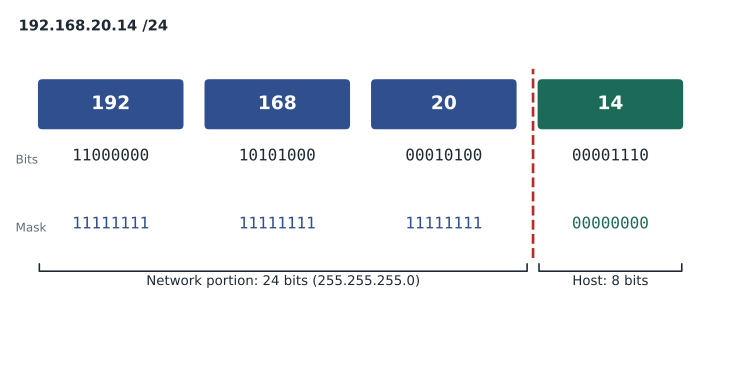
An IPv4 address is a 32-bit number. Because long strings of ones and zeros are hard to read, it is written in dotted-decimal notation: the 32 bits are split into four groups of eight bits, called octets, and each octet is written as a decimal number from 0 to 255, with dots between them. The address 192.168.20.14 is four octets: 192, 168, 20 and 14. In binary it is 11000000.10101000.00010100.00001110.
Converting an octet between decimal and binary uses the place values of the eight bits, from left to right: 128, 64, 32, 16, 8, 4, 2 and 1. To convert 168 to binary, ask whether each place value fits into what is left: 128 fits, leaving 40; 64 does not; 32 fits, leaving 8; 16 does not; 8 fits, leaving 0; the rest are 0. The bits are 10101000. To convert binary to decimal, add the place values of the 1 bits: 00010100 is 16 + 4 = 20. With practice, technicians memorize the common values, especially those used in masks: 128, 192, 224, 240, 248, 252, 254 and 255.
| Binary | Decimal | Binary | Decimal |
|---|---|---|---|
| 10000000 | 128 | 11111000 | 248 |
| 11000000 | 192 | 11111100 | 252 |
| 11100000 | 224 | 11111110 | 254 |
| 11110000 | 240 | 11111111 | 255 |
Network and host portions
Every IPv4 address has two parts. The network portion, on the left, identifies the network the host is on; every host on the same network has the same network portion. The host portion, on the right, identifies the individual device on that network. Unlike a telephone number, the boundary between the two parts is not fixed. It is set by the subnet mask.
A subnet mask is also 32 bits. It has a continuous run of 1 bits on the left, marking the network portion, followed by 0 bits on the right, marking the host portion. The mask 255.255.255.0 is 24 ones followed by 8 zeros, so the first three octets are the network and the last octet is the host. Because a mask is always a run of ones followed by zeros, it can be written more briefly as a prefix length: the number of 1 bits after a slash. 255.255.255.0 is /24, 255.255.0.0 is /16, and 255.255.255.192 is /26. This slash notation is called CIDR notation, after Classless Inter-Domain Routing.
Network address, broadcast address and hosts
Within each network, two addresses are reserved. The network address, also called the network ID, has all host bits set to 0; it names the network itself and cannot be given to a device. The broadcast address has all host bits set to 1; a packet sent to it reaches every host on that network. Every address between them is a usable host address. For 192.168.20.14/24, the network address is 192.168.20.0, the broadcast address is 192.168.20.255, and the usable hosts run from 192.168.20.1 to 192.168.20.254.
The number of usable hosts depends on how many host bits there are. With h host bits there are 2 to the power h addresses, and two are reserved, so the number of usable hosts is
A /24 has 8 host bits: 2 to the 8th is 256, and 256 minus 2 is 254 usable hosts. A /26 has 6 host bits: 64 addresses and 62 usable hosts. A /30, often used for links between two routers, has 2 host bits: 4 addresses and 2 usable hosts. A /31 is a special case allowed on point-to-point links, where both addresses can be used, and a /32 names a single host. The exam focuses on the general rule.
| Prefix | Mask | Host bits | Addresses | Usable hosts |
|---|---|---|---|---|
| /24 | 255.255.255.0 | 8 | 256 | 254 |
| /25 | 255.255.255.128 | 7 | 128 | 126 |
| /26 | 255.255.255.192 | 6 | 64 | 62 |
| /27 | 255.255.255.224 | 5 | 32 | 30 |
| /28 | 255.255.255.240 | 4 | 16 | 14 |
| /29 | 255.255.255.248 | 3 | 8 | 6 |
| /30 | 255.255.255.252 | 2 | 4 | 2 |
| /16 | 255.255.0.0 | 16 | 65,536 | 65,534 |
How a host decides whether a destination is local
Before sending a packet, a host compares the destination address with its own network. It does this with a bitwise AND: each bit of an address is combined with the matching bit of the mask, and the result is 1 only where both are 1. ANDing any address with its mask leaves the network portion and turns the host portion into zeros, giving the network address. If the host's own address and the destination address give the same network address with the host's mask, the destination is local, and the host sends the frame directly, after using ARP to find the destination's MAC address. If they differ, the destination is remote, and the host sends the frame to its default gateway, the router on its local network.
This is why every host needs three settings to communicate beyond its own network: an IP address, a subnet mask and a default gateway. It also needs at least one DNS server address to use names. If the mask is wrong, the host may think remote hosts are local, or local hosts are remote. If the gateway is wrong or missing, the host can reach its own network but nothing beyond. These are among the most common faults on small networks, and the ipconfig command on Windows, or ip addr and ip route on Linux, shows all of them.
C:\> ipconfig

Ethernet adapter Ethernet:

   Connection-specific DNS Suffix  . : kettle.lan
   IPv4 Address. . . . . . . . . . . : 192.168.30.27
   Subnet Mask . . . . . . . . . . . : 255.255.255.0
Default Gateway . . . . . . . . . : 192.168.30.1import ipaddress
host = ipaddress.ip_interface('192.168.30.27/24')
net = host.network
print('Network address: ', net.network_address)
print('Broadcast address:', net.broadcast_address)
print('Usable hosts: ', net.num_addresses - 2)
hosts = list(net.hosts())
print('First and last: ', hosts[0], '-', hosts[-1])
for dest in ['192.168.30.200', '192.168.31.5', '8.8.8.8']:
where = 'local' if ipaddress.ip_address(dest) in net else 'remote, send to gateway'
print(f'{dest:15} is {where}')Network address: 192.168.30.0 Broadcast address: 192.168.30.255 Usable hosts: 254 First and last: 192.168.30.1 - 192.168.30.254 192.168.30.200 is local 192.168.31.5 is remote, send to gateway 8.8.8.8 is remote, send to gateway
Try it yourself
Local or remote?
Write a function is_local(my_ip, mask, dest) that returns True when dest is on the same network as my_ip with the dotted-decimal mask, and False otherwise. Use ipaddress.ip_network(f'{my_ip}/{mask}', strict=False) or do the AND yourself.
import ipaddress

def is_local(my_ip, mask, dest):
    pass

print(is_local('10.20.4.15', '255.255.252.0', '10.20.7.200'))
Address classes, and why they still come up
In the early internet, the network portion of an address was fixed by its first few bits, in a scheme called classful addressing. Class A addresses had a first octet from 1 to 126 and a default mask of /8, giving a few huge networks. Class B addresses ran from 128 to 191 with a default /16. Class C addresses ran from 192 to 223 with a default /24, giving many small networks. Class D, from 224 to 239, is reserved for multicast, and class E, from 240 to 255, for experimental use. The first octet 127 was set aside for loopback.
Classful addressing wasted addresses: an organization that needed 300 addresses had to take a class B with 65,534. CIDR replaced it in the 1990s, allowing any prefix length. Classes no longer control routing, but the terms survive in everyday speech, in some device defaults, and in exam questions. When a question says 'a class C network', it means a /24 in the 192 to 223 range.
| Class | First octet | Default mask | Use |
|---|---|---|---|
| A | 1 to 126 | /8 (255.0.0.0) | Very large networks (historic) |
| B | 128 to 191 | /16 (255.255.0.0) | Medium networks (historic) |
| C | 192 to 223 | /24 (255.255.255.0) | Small networks (historic) |
| D | 224 to 239 | None | Multicast |
| E | 240 to 255 | None | Experimental |
Special and private address ranges
Several ranges are reserved for special purposes, and the exam expects you to recognize them. Private addresses, defined in RFC 1918, may be used freely inside any organization but are never routed on the public internet: 10.0.0.0/8, 172.16.0.0/12 (172.16.0.0 to 172.31.255.255), and 192.168.0.0/16. Nearly every home and small office uses private addresses inside, and a router performs network address translation, NAT, to share one public address for internet access. CSCO-112 covers NAT in detail.
Other reserved ranges appear in troubleshooting. The loopback range 127.0.0.0/8, usually 127.0.0.1, always refers to the local host itself; pinging it tests the host's own network software without touching the network. The link-local range 169.254.0.0/16 is used by automatic private IP addressing, APIPA: when a Windows or macOS computer is set to obtain an address automatically and no DHCP server answers, it picks an address in this range. A 169.254 address on a user's computer is therefore a strong sign that it cannot reach the DHCP server. The address 0.0.0.0 means 'this host' or 'any address', and 255.255.255.255 is the limited broadcast, sent to every host on the local network. Internet providers also use 100.64.0.0/10 for carrier-grade NAT between their own equipment and customers.
| Range | Purpose | What it tells a technician |
|---|---|---|
| 10.0.0.0/8 | Private | Internal address; needs NAT for internet access |
| 172.16.0.0/12 | Private | 172.16.x.x to 172.31.x.x only |
| 192.168.0.0/16 | Private | Common in homes and small offices |
| 127.0.0.0/8 | Loopback | Tests the host's own network stack |
| 169.254.0.0/16 | Link-local (APIPA) | The host did not get a DHCP address |
| 100.64.0.0/10 | Shared address space | Provider-side carrier-grade NAT |
| 224.0.0.0/4 | Multicast | Group traffic, not a host address |
Static and dynamic addresses
A host can get its address in two ways. A static address is typed in by a technician and never changes. Servers, printers, network devices and point-of-sale systems that other devices must find reliably often have static addresses, or DHCP reservations that always give them the same address. A dynamic address is assigned automatically by a DHCP server, which also hands out the mask, gateway and DNS servers. Most user devices get dynamic addresses. A good address plan reserves part of each subnet for static devices and the rest for the DHCP pool, so that the two never overlap. Overlapping static and dynamic ranges are a common cause of duplicate-address conflicts, which Windows reports with a message about an IP address conflict.
Worked problem
Finding network, broadcast and hosts
A label printer at Prairie Paws has the address 172.20.8.77 with the mask 255.255.255.0. What are its network address, broadcast address and usable host range, and is the address private?
Show solution
- The mask 255.255.255.0 is /24, so the first three octets are the network portion.
- Network address: set the host octet to 0, giving 172.20.8.0.
- Broadcast address: set the host octet to 255, giving 172.20.8.255.
- Usable hosts: 172.20.8.1 to 172.20.8.254, which is 254 hosts.
- 172.20 is within 172.16.0.0 to 172.31.255.255, so the address is private.
Answer: Network 172.20.8.0, broadcast 172.20.8.255, hosts 172.20.8.1 to 172.20.8.254; the address is private.
Worked problem
Spotting a configuration fault
A front-desk PC at Northfield Community Centre has the address 192.168.50.40, mask 255.255.0.0 and gateway 192.168.50.1. The rest of the network uses /24. It can reach the printer at 192.168.50.60 but not a server at 192.168.60.10 on another subnet. Why?
Show solution
- With the wrong /16 mask, the PC treats every 192.168.x.x address as local.
- To reach 192.168.60.10, the PC sends an ARP request on its own network instead of sending the packet to the gateway.
- No host on the local network owns 192.168.60.10, so the ARP request goes unanswered.
- The printer at 192.168.50.60 is genuinely local, so it still works.
Answer: The mask is wrong. The PC thinks the server is local and never uses the gateway. Setting the mask to 255.255.255.0 fixes it.
By Friday, Jordan can read Dev's spreadsheet without help. Each shop has its own /24 in the 192.168 range, the office has another, and the guest Wi-Fi has a range that the point-of-sale systems can never reach. For the third shop, Dev wants something more economical than another /24, and that means subnetting, the subject of the next lesson.
Common mistakes
MistakeGiving a host the network address or broadcast address.
InsteadThose two addresses are reserved; use only the addresses between them.
MistakeForgetting to subtract 2 when counting usable hosts.
InsteadUsable hosts are 2 to the power of the host bits, minus 2.
MistakeTreating 172.32.0.1 as private.
InsteadThe private 172 range is only 172.16.0.0 to 172.31.255.255.
MistakeIgnoring a 169.254 address.
InsteadIt means the host could not reach a DHCP server; check the link, VLAN and DHCP service.
MistakeAssuming the gateway is always .1.
InsteadThe gateway can be any usable address; read it from the configuration or documentation.
Summary and key terms
- An IPv4 address is 32 bits, written as four decimal octets.
- The subnet mask, or prefix length, divides the address into network and host portions.
- With all host bits 0 you get the network address; with all host bits 1, the broadcast address; usable hosts are 2 to the power h minus 2.
- A host ANDs addresses with its mask to decide whether a destination is local or should go to the default gateway.
- Hosts need an address, a mask, a gateway and DNS servers to work fully.
- Classful addressing is historic but its terms survive; CIDR allows any prefix length.
- Private ranges are 10/8, 172.16/12 and 192.168/16; 127/8 is loopback and 169.254/16 is APIPA.
- Octet
- One of the four 8-bit groups in an IPv4 address.
- Subnet mask
- A 32-bit value whose 1 bits mark the network portion of an address.
- Prefix length
- The number of 1 bits in the mask, written after a slash.
- Network address
- The first address of a network, with all host bits 0.
- Broadcast address
- The last address of a network, with all host bits 1.
- Default gateway
- The router address a host uses to reach other networks.
- RFC 1918
- The standard that defines the private IPv4 ranges.
- APIPA
- Automatic private IP addressing, which gives a host a 169.254 address when DHCP fails.
- CIDR
- Classless Inter-Domain Routing, which allows prefixes of any length.
Practice problems
Work each problem on paper first, then reveal the answer to check.
Convert 224 to binary.
Show answer
11100000.
What prefix length is 255.255.255.240?
Show answer
/28.
How many usable hosts does a /27 have?
Show answer
30.
What is the network address of 10.4.9.130/24?
Show answer
10.4.9.0.
Is 192.169.1.1 a private address?
Show answer
No; the private range is 192.168.0.0/16.
A laptop shows 169.254.12.7. What does that suggest?
Show answer
It could not obtain an address from a DHCP server.
Which three settings does a host need to reach other networks?
Show answer
An IP address, a subnet mask and a default gateway.
Lesson quiz · 5 questions
Score 60% or more to complete this lesson.
Create a free account to save your progress, take quizzes and earn a certificate.