
CSCO-111 · Lesson 7 of 12 · 28 min
Copper and fibre cabling
▶ Video coming soon A video version of this lesson is on the way.
Northfield Community Centre is getting a new computer lab in a room at the far end of the building, and the board has asked Brightline for a quote. Dev takes Jordan on the site visit. With a measuring wheel, they walk the route from the building's small network room, along the hallway ceiling, through the gym and into the new lab. The wheel reads 112 metres. Jordan points out that the lab needs twenty connections and asks how many cables they will need to pull. Dev says the real question is whether copper will work at all over that distance, and that the answer is the subject of this lesson.
Most network faults that technicians fix with their hands are at layer 1: a crushed cable, a loose connector, a fibre with a dirty end face, the wrong cable for the job. The CCST Networking exam expects you to know the common types of copper and fibre cable, their categories and distance limits, the connectors and wiring standards, Power over Ethernet basics, and the tools used to install and test them. Wireless media follows in lesson 8.
Twisted-pair copper
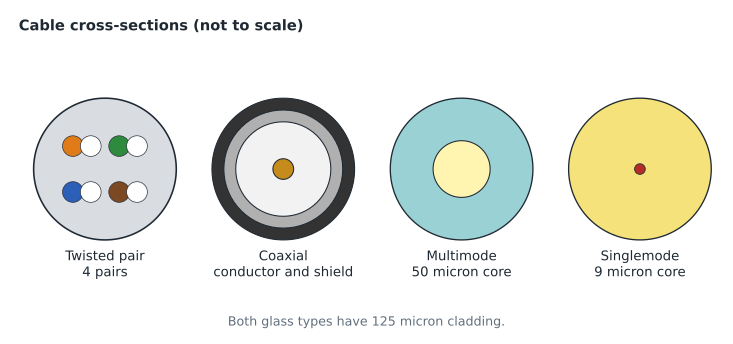
Almost every desk, phone, camera and access point in an office connects with twisted-pair copper cable. A standard Ethernet cable has eight copper wires arranged as four pairs, each pair twisted together. The twists matter: a signal is sent as equal and opposite voltages on the two wires of a pair, and interference picked up along the way affects both wires almost equally, so it cancels out at the receiver. The twists also reduce crosstalk, the leakage of signal from one pair into its neighbour. Tighter, more precise twists allow higher frequencies, which is the main difference between cable categories.
Unshielded twisted pair, UTP, has no metal shield and is the most common type. Shielded types add foil around each pair, around all four pairs, or both, and are named by their construction, such as F/UTP for an overall foil shield around unshielded pairs or S/FTP for a braid with foil-shielded pairs. Shielding helps in places with strong electrical noise, such as near motors or in factories, but it only works when the shield is properly bonded at both ends with shielded connectors and patch panels. A shielded cable installed carelessly can perform worse than UTP.
Cable categories
Twisted-pair cables are rated in categories. Each category is tested up to a maximum frequency and supports certain Ethernet speeds over a full-length channel. Category 5e, introduced around 2000, supports gigabit Ethernet and is still found in many buildings. Category 6 supports gigabit easily and 10 gigabit over shorter distances, up to about 55 metres in typical conditions. Category 6A, augmented category 6, supports 10 gigabit over the full 100 metres and is the usual choice for new installations, especially for access points and high-power PoE devices. Category 8 supports 25 and 40 gigabit, but only over 30 metres, and is used inside data centres. Older categories 3 and 5 should be replaced when found.
| Category | Tested to | Typical Ethernet use | Distance at top speed |
|---|---|---|---|
| Cat 5e | 100 MHz | 1 Gb/s (1000BASE-T) | 100 m |
| Cat 6 | 250 MHz | 1 Gb/s; 10 Gb/s on short runs | 100 m at 1 Gb/s; about 55 m at 10 Gb/s |
| Cat 6A | 500 MHz | 10 Gb/s (10GBASE-T) | 100 m |
| Cat 8 | 2,000 MHz | 25 or 40 Gb/s in data centres | 30 m |
A link is only as good as its weakest component. A category 6A cable terminated on category 5e jacks, or connected with an old patch cord, performs like category 5e. When upgrading, every part of the link must be rated for the new category: the cable, the jacks, the patch panel and the patch cords.
The 100-metre rule
Ethernet over twisted pair, from 10BASE-T up to 10GBASE-T, is designed for a channel of up to 100 metres. Cabling standards divide this into a permanent link of up to 90 metres, the cable in the walls and ceilings from the patch panel to the wall outlet, plus up to 10 metres of patch cords at the two ends. Beyond 100 metres, signals weaken and timing problems appear, and the link may fail to connect, connect at a lower speed, or produce errors. The names of Ethernet standards hint at their media: in 1000BASE-T, 1000 is the speed in megabits per second, BASE means baseband signalling, and T means twisted pair.
Back at Northfield, the 112-metre route is too long for copper from the network room. There are two solutions. One is to place a small switch in a cabinet near the lab and connect it to the network room with a cable that can run further, which in practice means fibre. The other is to find a shorter route. Dev's quote proposes a fibre link to a new wall cabinet in the lab, with short copper runs from that cabinet to each desk.
Connectors and wiring standards
Twisted-pair Ethernet uses an eight-position, eight-contact connector, almost always called RJ45. The order in which the eight wires are connected to the pins is set by one of two wiring standards, T568A and T568B. They differ only in that the orange and green pairs swap places. Either works, as long as both ends of a cable and the whole building use the same one. T568B is more common in North American commercial work, while T568A is required in some government and residential specifications.
| Pin | T568A | T568B |
|---|---|---|
| 1 | White-green | White-orange |
| 2 | Green | Orange |
| 3 | White-orange | White-green |
| 4 | Blue | Blue |
| 5 | White-blue | White-blue |
| 6 | Orange | Green |
| 7 | White-brown | White-brown |
| 8 | Brown | Brown |
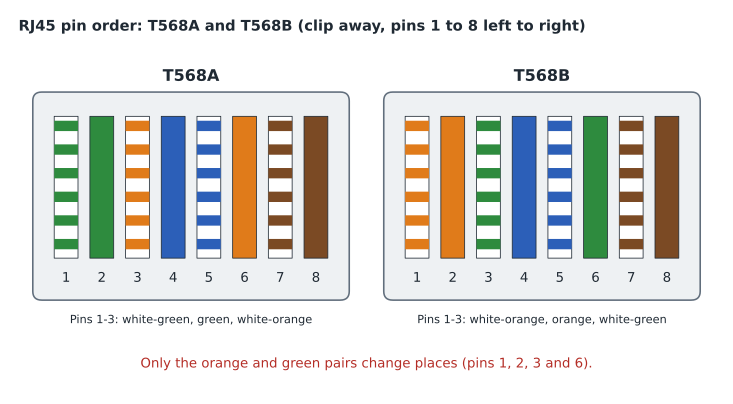
A cable wired with the same standard at both ends is a straight-through cable, used to connect a computer to a switch. A cable with T568A at one end and T568B at the other is a crossover cable. Crossovers were once needed to connect two devices of the same kind, such as two switches or two computers, because their transmit and receive pins line up. Nearly all modern equipment supports auto-MDIX, which detects the cable and swaps the pairs internally, so crossover cables are rarely needed today. Gigabit and faster Ethernet uses all four pairs in both directions, so every pin matters. A third type, the rollover or console cable, connects a computer's serial or USB port to the console port of a Cisco device for configuration; CSCO-112 covers it.
Jacket ratings
Cables that run through buildings must meet fire codes that limit how fast flame spreads along them and how much smoke they make. In air-handling spaces, such as ceilings used as return-air plenums, the most fire-resistant rating is required. In Canada, cables are marked with CSA flame test ratings: FT6 for plenum spaces and FT4 for vertical risers and general use. The cable jacket is printed with its rating, and using a lower-rated cable in a plenum is a code violation that an inspector will catch. Outdoor and direct-burial cables have jackets that resist water and sunlight.
Power over Ethernet
Power over Ethernet, PoE, sends electrical power along the same twisted-pair cable as the data. A switch or injector, called the power sourcing equipment, supplies the power, and the powered device, such as a phone, camera or access point, receives it. PoE saves running separate electrical circuits to every device on the ceiling or wall. Before supplying power, the switch detects whether a PoE device is connected, so plugging an ordinary laptop into a PoE port is safe.
Several IEEE standards define how much power is available. The original 802.3af, often called PoE, provides up to 15.4 watts at the switch port, of which about 12.95 watts reach the device after losses in the cable. 802.3at, PoE+, provides 30 watts at the port and about 25.5 at the device. 802.3bt, sometimes called PoE++ or 4-pair PoE, adds two higher types: Type 3 with 60 watts at the port and about 51 at the device, and Type 4 with up to 90 watts at the port and about 71.3 at the device. A switch also has a total power budget; a 24-port switch with a 370-watt budget cannot run 24 devices at 30 watts each. Technicians must check both the per-port class and the total budget.
| Standard | Common name | Power at switch port | Power at device |
|---|---|---|---|
| IEEE 802.3af | PoE (Type 1) | 15.4 W | 12.95 W |
| IEEE 802.3at | PoE+ (Type 2) | 30 W | 25.5 W |
| IEEE 802.3bt Type 3 | PoE++ / 4-pair | 60 W | 51 W |
| IEEE 802.3bt Type 4 | PoE++ / 4-pair | 90 W | 71.3 W |
Coaxial cable
Coaxial cable has a single copper centre conductor surrounded by insulation, a metal shield and an outer jacket. It was used by early Ethernet but today is mainly found carrying cable television and cable internet service into buildings. RG-6 is the common type for cable modems and satellite and TV connections, and RG-59 is an older, thinner type sometimes found with analogue security cameras. Coaxial cables for these uses end in threaded F-connectors; BNC connectors, with a bayonet twist lock, appear on older video and test equipment. Cable internet uses the DOCSIS standards, and the modem's coaxial connection is often the first thing to check when a small office's internet service fails.
Optical fibre
Optical fibre carries data as pulses of light through a thin glass core surrounded by cladding that reflects the light back into the core. Because it carries light rather than electricity, fibre is immune to electrical interference, does not create a shock or ground-loop path between buildings, is very hard to tap without detection, and can carry signals much further than copper. It is used for backbones between network rooms, links between buildings, internet provider connections and data centres.
There are two main kinds. Singlemode fibre has a very small core, about 9 microns across, surrounded by 125-micron cladding; light travels essentially in one path, so signals can go many kilometres. It is used with lasers at wavelengths of 1,310 and 1,550 nanometres. Multimode fibre has a larger core, 50 or 62.5 microns, so light travels in many paths that spread the pulses out over distance; links are limited to a few hundred metres at high speeds. Multimode is used with cheaper light sources at 850 nanometres and is graded OM1 to OM5. OM3 and OM4, with aqua jackets, are common in buildings today, OM5 has a lime-green jacket, and older OM1 and OM2 are usually orange. Singlemode jackets are usually yellow. These colours are conventions, so always check the printing on the jacket.
| Ethernet standard | Medium | Typical reach |
|---|---|---|
| 1000BASE-T | Cat 5e or better twisted pair | 100 m |
| 10GBASE-T | Cat 6A twisted pair | 100 m |
| 1000BASE-SX | Multimode fibre, 850 nm | About 550 m on OM2 or better |
| 1000BASE-LX | Singlemode fibre, 1,310 nm | About 5 to 10 km |
| 10GBASE-SR | Multimode fibre, 850 nm | About 300 m on OM3, 400 m on OM4 |
| 10GBASE-LR | Singlemode fibre, 1,310 nm | 10 km |
Fibre links need a transceiver at each end to turn electrical signals into light. Modern switches usually accept pluggable transceivers: SFP modules for 1 gigabit, SFP+ for 10 gigabit, and QSFP types for 40 gigabit and above. The module and the fibre must match: a multimode SR module will not work properly over singlemode fibre, and both ends of a link must use compatible modules. Most links use two fibres, one for each direction; some use a single fibre with two different wavelengths, called bidirectional or BiDi optics.
Fibre connectors and handling
Fibre connectors align the tiny cores of two fibres precisely. The LC connector, small with a push-and-click latch, is the most common today and is used on SFP modules. The SC connector, square with a push-pull latch, is common on older equipment and provider hand-offs. The ST connector, round with a bayonet twist, is found in older installations. MPO connectors carry 8, 12 or more fibres in one connector and are used in data centres. Connector end faces are polished flat, called UPC and usually blue, or at a slight angle, called APC and green. APC and UPC connectors must never be mated with each other, because the gap causes high loss and can damage the end faces.
Fibre must be handled carefully. Bending it more tightly than its minimum bend radius causes light to leak out and can crack the glass. Dirt on an end face is the most common cause of fibre faults; a single speck of dust on a 9-micron core can block much of the light, so connectors should be inspected with a fibre scope and cleaned before every connection. Never look into the end of a fibre or a transceiver port: the infrared light used is invisible but can damage eyes.
Installation and testing tools
Technicians use a small set of tools for copper. A crimper attaches RJ45 plugs to patch cords. A punch-down tool terminates cable on the back of jacks and patch panels. A cable tester checks that each wire connects to the right pin and finds opens, shorts and split pairs. A cable certifier, a more expensive instrument, measures performance against the category standard and produces a report for the building owner. A tone generator and probe trace an unlabelled cable through a ceiling or patch panel. A time-domain reflectometer, often built into certifiers and some switches, estimates the distance to a fault. A loopback plug tests a port by sending its own signal back to it.
Fibre has its own tools. A visual fault locator shines visible red light into a fibre to reveal breaks and tight bends. An optical light source and power meter measure the loss of a link in decibels. An optical time-domain reflectometer, OTDR, sends pulses down the fibre and shows a trace of connectors, splices and breaks along its length. A fibre scope and cleaning tools keep end faces clean. Fusion splicers, which weld fibres together, are usually used by specialist contractors.
Worked problem
Checking a copper run
A new security camera at Prairie Paws needs a cable from the network room. The route measures 84 metres, and the technician will use a 3-metre patch cord at the switch and a 2-metre cord at the camera. Is the channel within the limit, and is the permanent link within its limit?
Show solution
- The permanent link is the cable in the building: 84 metres, which is within the 90-metre limit.
- The channel adds the patch cords: 84 + 3 + 2 = 89 metres.
- 89 metres is within the 100-metre channel limit.
- Allow a few metres for slack and routing; the measured route plus slack must still be under 90 metres.
Answer: Both are within limits: an 84-metre permanent link and an 89-metre channel.
Worked problem
Checking a PoE budget
A switch with a 370-watt PoE budget will power 8 access points that each draw up to 25.5 watts at the device under 802.3at, and 10 phones that each need a Class 2 allocation of 7 watts at the port. Is the budget enough if the switch reserves 30 watts per access point port?
Show solution
- Access points: 8 × 30 = 240 watts reserved at the switch.
- Phones: 10 × 7 = 70 watts.
- Total reserved: 240 + 70 = 310 watts.
- 310 watts is less than the 370-watt budget, leaving 60 watts spare.
Answer: Yes. The devices need 310 watts of the 370-watt budget, leaving 60 watts.
Dev's quote for Northfield lists a pair of OM4 multimode fibres from the network room to the lab cabinet, SFP+ modules at each end, a small PoE switch in the cabinet, and twenty category 6A runs to the desks, each under 30 metres. Jordan adds the jacket rating for the gym ceiling, which is used for return air, and Dev nods. The next lesson takes the medium out of the walls entirely.
Common mistakes
MistakeRunning a copper link longer than 100 metres.
InsteadTwisted-pair Ethernet is limited to a 100-metre channel; use fibre or add a switch closer to the devices.
MistakeMixing T568A and T568B on a straight-through cable.
InsteadThat makes a crossover; wire both ends the same way.
MistakeUsing category 6 cable for 10 gigabit over a long run.
InsteadCategory 6 supports 10 gigabit only on short runs; use category 6A for full-length 10 gigabit.
MistakeConnecting an APC connector to a UPC connector.
InsteadTheir end faces are polished differently and must never be mated.
MistakeLooking into a fibre to see if it is lit.
InsteadInfrared light is invisible and can harm eyes; use a power meter or visual fault locator.
MistakeIgnoring the switch's total PoE budget.
InsteadCheck both the per-port class and the total budget before adding powered devices.
Summary and key terms
- Twisted pair cancels interference by sending opposite signals on twisted wires; UTP is common, shielded types need proper bonding.
- Cat 5e supports gigabit, Cat 6A supports 10 gigabit to 100 metres, and Cat 8 supports 25 or 40 gigabit to 30 metres.
- The twisted-pair channel limit is 100 metres: a 90-metre permanent link plus 10 metres of cords.
- RJ45 connectors are wired to T568A or T568B; auto-MDIX has made crossover cables rare.
- Plenum and riser spaces need fire-rated jackets.
- PoE delivers 15.4, 30, 60 or 90 watts at the port under 802.3af, at and bt; check the switch budget.
- Coax with F-connectors carries cable internet; fibre carries light and is immune to interference.
- Singlemode fibre (9-micron core) reaches kilometres; multimode (50 or 62.5 microns) reaches hundreds of metres.
- LC, SC, ST and MPO are common fibre connectors; keep end faces clean and never mix APC with UPC.
- UTP
- Unshielded twisted pair, the common copper network cable.
- Category
- A performance rating for twisted-pair cable and components, such as Cat 6A.
- Permanent link
- The installed cable from patch panel to outlet, up to 90 metres.
- Channel
- The full link including patch cords, up to 100 metres.
- T568B
- A common pin assignment standard for RJ45 connectors.
- Auto-MDIX
- A port feature that adapts to straight-through or crossover cables automatically.
- PoE
- Power over Ethernet, delivering power and data on the same cable.
- Singlemode fibre
- Fibre with a small core for long distances, used with lasers.
- Multimode fibre
- Fibre with a larger core for shorter distances, graded OM1 to OM5.
- SFP
- A small pluggable transceiver module for fibre or copper ports.
- OTDR
- Optical time-domain reflectometer, which shows events along a fibre.
Practice problems
Work each problem on paper first, then reveal the answer to check.
What is the maximum length of a twisted-pair Ethernet channel?
Show answer
100 metres.
Which category is the usual choice for 10 gigabit over 100 metres?
Show answer
Category 6A.
Which pairs differ between T568A and T568B?
Show answer
The orange and green pairs.
How much power does 802.3at provide at the switch port?
Show answer
30 watts.
Which fibre type has a 9-micron core?
Show answer
Singlemode.
What connector is used on most SFP modules?
Show answer
LC.
Which tool traces an unlabelled cable through a ceiling?
Show answer
A tone generator and probe.
Lesson quiz · 5 questions
Score 60% or more to complete this lesson.
Create a free account to save your progress, take quizzes and earn a certificate.