
CSCO-111 · Lesson 6 of 12 · 27 min
IPv6 addressing basics
▶ Video coming soon A video version of this lesson is on the way.
Riverside Family Law moved its internet service to a new provider in October. A week later, one of the paralegals sent Jordan a screenshot of her laptop's network details and asked whether something was wrong, because under the familiar IPv4 address there were now several long strings of letters and numbers with colons in them. Nothing was wrong. The new provider supports IPv6, the firm's router had started handing out IPv6 addresses automatically, and the laptops were using them alongside IPv4. Dev told Jordan that this is exactly how IPv6 arrives in most small offices: quietly, as a second set of addresses, long before anyone plans for it.
The CCST Networking exam expects technicians to recognize IPv6 addresses, write them correctly in short and long form, know the main address types, and understand how devices get their addresses. This lesson covers those basics. It also explains why IPv6 exists and how it lives side by side with IPv4.
Why IPv6 exists
IPv4's 32 bits allow about 4.3 billion addresses. That seemed generous in the 1980s, but the growth of the internet, phones and connected devices used up the free pool. The organizations that hand out addresses to providers ran out of new IPv4 blocks between 2011 and 2019, depending on the region. Private addressing and NAT have stretched IPv4 a long way, but they add complexity and break some applications. IPv6, standardized in the 1990s, uses 128-bit addresses, allowing roughly 3.4 times ten to the power 38 addresses, enough that every device can have its own globally unique address. IPv6 also simplifies some things, such as automatic configuration, and removes others, such as broadcasts.
Adoption has grown steadily. Large mobile networks and many home internet providers in Canada and the United States now give customers IPv6, and most major websites and cloud services support it. Measurements by large content providers show a large share of their users reaching them over IPv6. For a technician, the practical result is that IPv4 and IPv6 will run together for many years, and both must be understood.
Writing an IPv6 address
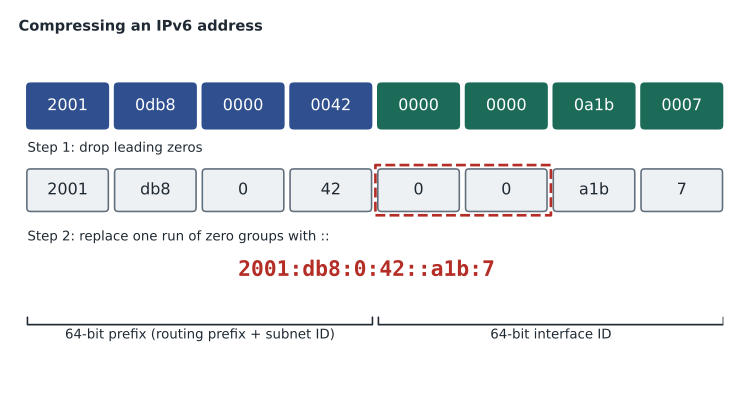
An IPv6 address is 128 bits, written as eight groups of 16 bits. Each group, often called a hextet, is written as four hexadecimal digits, and the groups are separated by colons. A full address looks like this: 2001:0db8:0000:0042:0000:0000:0a1b:0007. Hexadecimal digits run from 0 to 9 and a to f, and letter case does not matter, although lower case is recommended.
Two rules shorten addresses. First, leading zeros in any group can be dropped: 0db8 becomes db8, 0042 becomes 42, 0000 becomes 0, and 0007 becomes 7. Second, one run of consecutive all-zero groups can be replaced by a double colon. The double colon can appear only once in an address, because otherwise a reader could not tell how many groups each one replaces. Applying both rules, the example becomes 2001:db8:0:42::a1b:7. When there are two runs of zero groups of different lengths, the standard recommendation is to compress the longer one; when they are equal, compress the first.
To expand a compressed address, reverse the steps. Count the groups that are shown, subtract from eight to find how many zero groups the double colon stands for, write them in, and pad every group to four digits. In 2001:db8:0:42::a1b:7, six groups are shown, so the double colon stands for two groups of 0000.
import ipaddress

for text in ['2001:0db8:0000:0042:0000:0000:0a1b:0007', 'fe80::1a2b:3cff:fe4d:5e6f', '::1']:
    a = ipaddress.ip_address(text)
    print('compressed:', a.compressed)
    print('exploded:  ', a.exploded)
print()compressed: 2001:db8:0:42::a1b:7 exploded: 2001:0db8:0000:0042:0000:0000:0a1b:0007 compressed: fe80::1a2b:3cff:fe4d:5e6f exploded: fe80:0000:0000:0000:1a2b:3cff:fe4d:5e6f compressed: ::1 exploded: 0000:0000:0000:0000:0000:0000:0000:0001
Prefixes and the /64 rule
IPv6 uses the same slash notation as IPv4 to show how many bits are the network prefix. A provider might give a business a /48 or a /56, and the business divides that into subnets. On nearly every IPv6 subnet the prefix is /64: the first 64 bits identify the network and the last 64 bits, called the interface ID, identify the device. Automatic address configuration depends on this split, so using a prefix other than /64 on a normal LAN breaks it.
Subnetting in IPv6 is simpler than in IPv4 because the numbers are so large. With a /48, the 16 bits from bit 49 to bit 64 form the subnet ID, allowing 65,536 subnets of /64. With a /56, there are 8 subnet bits and 256 subnets. A small office will never run out. Because the subnet ID usually falls on group boundaries, planning is often just counting in hexadecimal: 2001:db8:aa:1::/64 for staff, 2001:db8:aa:2::/64 for guests, and so on. The 2001:db8::/32 range used in these examples is reserved for documentation and is never routed on the internet.
Types of IPv6 address
IPv6 has three kinds of address: unicast, for one interface; multicast, for a group; and anycast, a unicast address shared by several devices where traffic goes to the nearest one. There is no broadcast in IPv6; jobs that used broadcast in IPv4 use multicast instead. Within unicast there are several important types, each recognizable by its first digits.
Global unicast addresses are public, routable addresses, currently assigned from 2000::/3, so they begin with 2 or 3. Link-local addresses, in fe80::/10, usually beginning fe80, exist on every IPv6 interface automatically; they work only on the local link and are never routed. Routers use them as next-hop addresses, and neighbour discovery relies on them. Unique local addresses, fc00::/7, used in practice as fd00::/8, are IPv6's equivalent of private addresses, for internal use only. The loopback address is ::1, the equivalent of 127.0.0.1, and the unspecified address, ::, means no address yet, like 0.0.0.0. Multicast addresses begin with ff; for example, ff02::1 reaches all nodes on the local link and ff02::2 reaches all routers.
| Type | Prefix | Begins with | IPv4 equivalent | Notes |
|---|---|---|---|---|
| Global unicast | 2000::/3 | 2 or 3 | Public address | Routed on the internet |
| Link-local | fe80::/10 | fe80 | 169.254.0.0/16 (roughly) | On every interface; never routed |
| Unique local | fc00::/7 | fd (in practice) | RFC 1918 private | Internal use only |
| Loopback | ::1/128 | ::1 | 127.0.0.1 | The host itself |
| Unspecified | ::/128 | :: | 0.0.0.0 | No address yet |
| Multicast | ff00::/8 | ff | 224.0.0.0/4 | Replaces broadcast |
| Documentation | 2001:db8::/32 | 2001:db8 | 192.0.2.0/24 and others | For examples only |
Interface IDs: EUI-64 and random
The interface ID, the last 64 bits, can be set in several ways. A technician can type it in, as for a router or server. It can be assigned by a DHCPv6 server. Or the device can make one itself. The original automatic method, called modified EUI-64, builds the interface ID from the 48-bit MAC address: split the MAC address in half, insert ff:fe in the middle to make 64 bits, and flip the universal/local bit, the second-lowest bit of the first byte. The MAC address 1a:2b:3c:4d:5e:6f becomes the interface ID 182b:3cff:fe4d:5e6f, because 1a in binary is 00011010 and flipping the second-lowest bit gives 00011000, which is 18.
Because an EUI-64 interface ID reveals the device's MAC address and stays the same on every network, it can be used to track a device. Modern operating systems therefore usually generate random interface IDs for their global addresses, and many also create temporary addresses that change every day or so for outgoing connections. That is why the paralegal's laptop showed several IPv6 addresses at once: a link-local address, a stable global address and one or more temporary global addresses. A recognizable ff:fe in the middle of an interface ID is a sign that EUI-64 was used.
Try it yourself
Build an EUI-64 interface ID
Write a function eui64(mac) that takes a MAC address with colons, such as '1a:2b:3c:4d:5e:6f', and returns the modified EUI-64 interface ID as four lower-case groups of four hex digits separated by colons, such as '182b:3cff:fe4d:5e6f'. Insert ff fe in the middle and flip the second-lowest bit of the first byte (XOR it with 2).
def eui64(mac):
    b = [int(x, 16) for x in mac.split(':')]
    # flip the U/L bit, insert ff fe, then format as four groups
    pass

print(eui64('1a:2b:3c:4d:5e:6f'))
How devices get IPv6 addresses
IPv6 offers more ways to configure addresses than IPv4. Every interface first creates its own link-local address. It then listens for router advertisements, messages that routers send to the all-nodes multicast address, both regularly and when a device asks with a router solicitation. A router advertisement tells devices the network's prefix, the router's own link-local address to use as a default gateway, and flags saying how to configure the rest.
With stateless address autoconfiguration, SLAAC, the device simply combines the advertised /64 prefix with its own interface ID to form a global address; no server keeps a record. With stateful DHCPv6, a DHCPv6 server assigns addresses and records them, much like DHCP for IPv4. A common middle option is SLAAC for addresses plus stateless DHCPv6 for extra settings such as DNS servers, although router advertisements can also carry DNS server addresses directly. Small-office routers usually use SLAAC, which is why IPv6 can appear on a network without anyone setting it up.
Before using any new address, a device checks that no other device already has it, with a process called duplicate address detection. All of this uses the Neighbor Discovery Protocol, NDP, which is part of ICMPv6 and replaces IPv4's ARP. Instead of broadcasting 'who has this address?', a device sends a neighbour solicitation to a special multicast address derived from the target address, and the owner answers with a neighbour advertisement containing its MAC address. Because ICMPv6 carries these essential messages, blocking all ICMPv6 at a firewall breaks IPv6, unlike IPv4 where blocking ping is merely unhelpful.
| NDP message | Purpose | IPv4 equivalent |
|---|---|---|
| Router solicitation | A host asks routers to announce themselves | None (DHCP discovery is similar) |
| Router advertisement | A router announces the prefix, gateway and configuration flags | Gateway and part of DHCP |
| Neighbour solicitation | Find a neighbour's MAC address or check for duplicates | ARP request |
| Neighbour advertisement | Answer with a MAC address | ARP reply |
| Redirect | Tell a host about a better first hop | ICMP redirect |
Living with both: dual stack and transition
Most networks today run dual stack: every device has both an IPv4 and an IPv6 address, and applications use whichever works best, usually preferring IPv6 when both are available. Dual stack is simple to understand but means two sets of addresses, rules and records to maintain. Other transition methods exist for networks that cannot run both everywhere. Tunnelling carries IPv6 packets inside IPv4 packets across parts of a network that only support IPv4. Translation methods such as NAT64 let IPv6-only devices reach IPv4-only services. Mobile networks often give phones only IPv6 and translate at the edge. For the exam, know what dual stack, tunnelling and translation mean; for work, know that a problem affecting only one protocol, such as a website that fails over IPv6 but works over IPv4, is a real and fairly common fault.
C:\> ipconfig

Wireless LAN adapter Wi-Fi:

   IPv6 Address. . . . . . . . . . . : 2001:db8:5a:10:9c41:22e7:b3d0:41a5
   Temporary IPv6 Address. . . . . . : 2001:db8:5a:10:4d2f:8813:aa07:6e1c
   Link-local IPv6 Address . . . . . : fe80::9c41:22e7:b3d0:41a5
   IPv4 Address. . . . . . . . . . . : 192.168.5.37
   Subnet Mask . . . . . . . . . . . : 255.255.255.0
   Default Gateway . . . . . . . . . : fe80::1
                                       192.168.5.1
The IPv6 default gateway on that laptop is a link-local address, fe80::1, because routers advertise their link-local addresses as gateways. Windows also adds a zone number after link-local addresses to show which interface they belong to, since every interface has its own fe80 address; it is left out of the example above. To test the IPv6 stack, ping ::1; to test IPv6 connectivity to the internet, ping a well-known service by its IPv6 address or use ping -6 with a name.
Worked problem
Compressing an address
Compress 2001:0db8:0a00:0000:0000:0000:0000:0001.
Show solution
- Drop leading zeros in each group: 2001:db8:a00:0:0:0:0:1.
- Find the longest run of all-zero groups: groups four to seven, four groups.
- Replace that run with a double colon: 2001:db8:a00::1.
- Check: three groups before the double colon and one after make four, so the double colon stands for four zero groups.
Answer: 2001:db8:a00::1.
Worked problem
Identifying address types
The paralegal's laptop shows three addresses: fe80::9c41:22e7:b3d0:41a5, 2001:db8:5a:10:4d2f:8813:aa07:6e1c and fd12:3456:789a:1::25. What is each?
Show solution
- fe80 at the start means a link-local address, valid only on the local link.
- 2001:db8 is the documentation range used in this example in place of a real global unicast address, which would begin with 2 or 3 and be routable on the internet.
- fd at the start means a unique local address, used only inside the organization.
- The laptop can use the global address for the internet, the unique local address for internal services, and the link-local address for neighbour discovery and reaching the router.
Answer: Link-local, global unicast (shown with a documentation prefix) and unique local.
Jordan writes a reply to the paralegal explaining that the new addresses are normal and that her laptop is now using a newer version of the internet protocol alongside the old one. Dev reads it, approves, and suggests one change: replace 'newer version of the internet' with 'newer kind of address'. Users do not need to know about protocols, he says; they need to know nothing is broken. The next lesson returns to the physical layer and the cables that carry all these addresses.
Common mistakes
MistakeUsing the double colon twice in one address.
InsteadThe double colon may appear only once; otherwise the address is ambiguous.
MistakeDropping trailing zeros in a group.
InsteadOnly leading zeros can be dropped: 0a00 becomes a00, not a.
MistakeUsing a prefix other than /64 on a normal LAN.
InsteadSLAAC expects a /64; other lengths break automatic configuration.
MistakeLooking for the IPv6 broadcast address.
InsteadIPv6 has no broadcast; it uses multicast such as ff02::1.
MistakeBlocking all ICMPv6 at a firewall.
InsteadNeighbour and router discovery use ICMPv6; blocking it breaks IPv6.
Summary and key terms
- IPv6 addresses are 128 bits, written as eight groups of four hex digits separated by colons.
- Drop leading zeros in each group and replace one run of zero groups with a double colon.
- Normal subnets are /64: a 64-bit prefix and a 64-bit interface ID.
- Global unicast begins with 2 or 3, link-local with fe80, unique local with fd, multicast with ff; ::1 is loopback.
- Interface IDs can be manual, DHCPv6-assigned, EUI-64 from the MAC address, or random.
- Devices learn prefixes and gateways from router advertisements; SLAAC builds addresses without a server.
- NDP, part of ICMPv6, replaces ARP; dual stack runs IPv4 and IPv6 together.
- Hextet
- One 16-bit group of an IPv6 address, written as four hex digits.
- Global unicast
- A public, routable IPv6 address, currently from 2000::/3.
- Link-local address
- An fe80 address present on every IPv6 interface and valid only on the local link.
- Unique local address
- An internal-only IPv6 address in fc00::/7, usually beginning fd.
- Interface ID
- The last 64 bits of an IPv6 address on a /64 subnet.
- EUI-64
- A method of building an interface ID from a MAC address by inserting ff:fe and flipping the U/L bit.
- SLAAC
- Stateless address autoconfiguration, where a device builds its own address from an advertised prefix.
- NDP
- Neighbor Discovery Protocol, which replaces ARP and handles router discovery in IPv6.
- Dual stack
- Running IPv4 and IPv6 on the same devices at the same time.
Practice problems
Work each problem on paper first, then reveal the answer to check.
How many bits are in an IPv6 address?
Show answer
128.
Compress 2001:0db8:0000:0000:0000:0000:0000:00ff.
Show answer
2001:db8::ff.
What prefix is used on almost every IPv6 LAN?
Show answer
/64.
What does an address beginning fe80 indicate?
Show answer
A link-local address.
What is the IPv6 loopback address?
Show answer
::1.
Which IPv6 mechanism replaces ARP?
Show answer
Neighbor Discovery, using neighbour solicitations and advertisements.
What does a router advertisement provide?
Show answer
The prefix, the router's address as a gateway, and configuration flags.
Lesson quiz · 5 questions
Score 60% or more to complete this lesson.
Create a free account to save your progress, take quizzes and earn a certificate.