
CRE-410 · Lesson 8 of 12 · 28 min
Building an AI-assisted workflow
Individual AI tools save minutes. A well-designed workflow saves days, protects quality and keeps a team consistent. Without a workflow, AI use tends to become chaotic: different people use different tools, nobody knows which parts of a video were generated, errors slip through, subscriptions multiply and sponsors or platforms ask questions no one can answer. This lesson shows how to design an AI-assisted production workflow with standard operating procedures, quality gates, human review, records and regular evaluation.
Start with the workflow, not the tool
A common mistake is to start with an exciting new tool and look for ways to use it. A better approach is to map your current production process, find the steps that are slow, repetitive or error-prone, and then ask whether AI can help with those specific steps. CRE-401 introduced production pipelines and standard operating procedures (SOPs). An AI-assisted workflow is the same pipeline with AI tasks inserted at chosen points, each followed by a human check.
A typical long-form video pipeline has stages such as ideation, research, scripting, recording, editing, graphics, captions, review, publishing, repurposing and community follow-up. For each stage, write down the time it takes, who does it, what tools are used and what goes wrong most often. That map shows where AI is worth trying.
Choosing where AI fits
Not every task is a good candidate. A useful way to decide is to score each possible AI use on two dimensions: the value it adds (time saved, quality improved, new output enabled) and the risk it carries (chance of harmful errors, legal exposure, damage to audience trust).
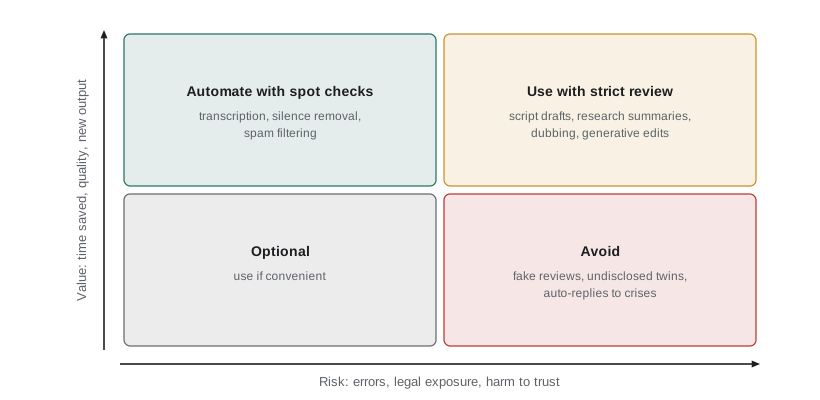
- High value, low risk: automate with spot checks. Examples: transcription, silence removal, chapter markers, comment spam filtering.
- High value, high risk: use with strict human review. Examples: research summaries, script drafts, dubbing, generative edits.
- Low value, low risk: optional; use if convenient.
- Low value, high risk: avoid. Examples: fabricated testimonials, undisclosed synthetic presenters, auto-replies to sensitive messages.
Quality gates
A quality gate is a checkpoint where work must meet defined criteria before moving on. In an AI-assisted workflow, gates follow the riskiest AI steps. Each gate should have a named owner, a short checklist and a clear rule for what happens if the work fails.
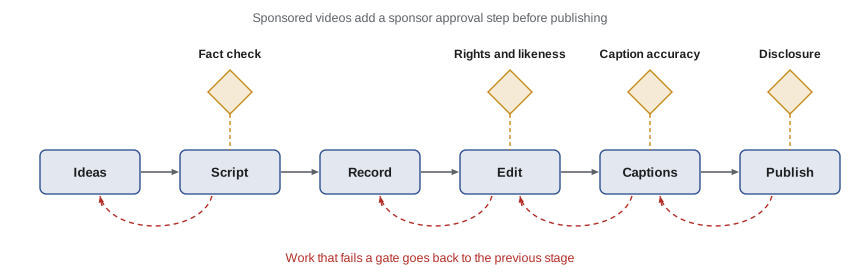
| Gate | Checks | Owner |
|---|---|---|
| Fact check | Every tagged claim verified and sourced; no invented quotes or citations | Writer or researcher |
| Rights and likeness | Music, images and footage licensed; no unconsented faces or voices; no protected characters | Editor or producer |
| Captions and translation | WER sample within target; names and numbers correct; native review for dubs | Editor or localization lead |
| Disclosure | Platform AI labels set where needed; sponsorship and AI disclosures present | Producer |
| Final review | Watched in full at normal speed; matches brand standards | Creator or editor-in-chief |
Writing an AI SOP
An SOP for an AI task describes exactly how the task is done so anyone on the team can repeat it consistently. A good AI SOP includes:
- Purpose: what the task achieves and when to use AI for it.
- Approved tools and settings, including account, plan and privacy settings.
- Inputs: what material to provide, and what must never be uploaded (for example, confidential contracts or personal data).
- Prompt templates or presets that have been tested.
- Review steps and acceptance criteria.
- Recording requirements: what to log about the AI use.
- Escalation: who to ask when something looks wrong.
Keep SOPs short and update them when tools change. A one-page SOP that people actually follow is better than a long manual nobody reads.
Keeping records of AI use
Records protect you. If a sponsor asks whether their ad used synthetic voices, if a platform questions a disclosure label, if a copyright dispute arises or if an error is discovered, you need to know what was generated, by which tool, with what input and who approved it. A simple AI use log for each project can record:
- The project and asset (for example, the thumbnail for episode 42).
- The tool, version or model where known, and the date.
- The prompt or settings used, and input files.
- What was generated, and how much human editing followed.
- Who reviewed and approved it, and any disclosure applied.
Records of human creative choices also help show that a work has enough human authorship to be protected by copyright, which lesson 10 explains. Content credentials, covered in lesson 9, can attach some of this information directly to files.
Measuring whether the workflow works
Evaluate AI changes like any other business decision. Track time per video, cost per video, error rates found at each gate, corrections after publishing, and audience metrics such as retention and satisfaction. Compare a period before and after the change, using similar types of videos.
Worked problem
Before and after an AI workflow
Over eight videos before introducing AI tools, a channel averaged 32 production hours per video at a blended cost of $50 an hour, plus $0 in AI tools, and published 1.5 corrections per video after release. Over eight videos after, it averaged 21 hours per video, $45 per video in AI tool costs, and 0.5 corrections per video. What is the change in cost per video, and what does the corrections figure suggest?
Show solution
- Cost before: 32 × $50 = $1,600 per video.
- Cost after: 21 × $50 + $45 = $1,095 per video.
- Saving: $1,600 − $1,095 = $505 per video, about 32 %.
- Corrections fell from 1.5 to 0.5 per video.
Answer: The workflow saves about $505 per video and, thanks to the new gates, errors reaching the audience fell by two-thirds.
Worked problem
Gate catch rate
In a month, the fact-check gate reviewed 180 claims and caught 27 errors. After publishing, viewers reported 3 further errors that the gate missed. What share of errors did the gate catch?
Show solution
- Total errors: 27 + 3 = 30.
- Catch rate: 27 ÷ 30 = 90 %.
Answer: The gate caught 90 % of errors. Reviewing the 3 missed errors may reveal a pattern, such as unchecked numbers in graphics, to add to the checklist.
Team roles and training
As AI becomes part of production, roles shift. Someone needs to own tool choices, subscriptions and data settings. Someone needs to maintain SOPs and train new team members. Reviewers need time budgeted for checks; if a schedule assumes AI makes everything instant, review is the first thing to be skipped. Make it clear that no one is penalized for flagging a problem or slowing down a release to fix it.
Train the team on the specific failure modes of each tool: invented facts in language models, mistranslated idioms in dubbing, artifacts in upscaling, distorted context in auto-clips. Short examples of real failures from your own projects are the most effective training material.
Vendor and tool management
Each AI vendor is a supplier with access to some of your data and assets. Keep a list of tools with their owner, cost, renewal date, data terms, whether your content is used for training, and the business account that holds the subscription, not a personal account that leaves with an employee. Review the list quarterly, cancel unused tools and re-check terms when vendors update them. Prefer tools that let you export your work in standard formats, so a vendor change or shutdown does not trap your projects.
An example AI SOP
Here is a short example SOP for one task, generating captions, written in the style a team might actually use:
- Purpose: produce accurate captions for every long video and clip.
- Tool: the team's approved transcription tool on the business account, with the channel glossary loaded and training on uploads switched off.
- Inputs: final audio mix only. Do not upload raw guest recordings that include off-the-record conversation.
- Steps: generate captions; run the glossary check; read through at normal speed while watching; fix names, numbers and speaker labels; check line length and timing; export as a caption file.
- Acceptance: a 200-word spot check shows WER under 3 %; all names and numbers correct.
- Record: log tool, date, WER spot-check result and reviewer initials in the project sheet.
- Escalation: if WER exceeds 5 %, or audio is unclear, flag to the producer before publishing.
A team might have a dozen such SOPs, each fitting on one page. Reviewing them every quarter keeps them aligned with changing tools.
When to say no to AI
A mature workflow includes decisions not to use AI. Teams often decide to keep certain work fully human: personal statements and apologies, sensitive interviews, content for or about children, health or legal advice, memorial or grief content, and investigative work where accuracy and source protection are paramount. Writing these exclusions into your SOPs and AI policy prevents pressure from deadlines or new tools from eroding them.
Worked problem
Gate cost versus correction cost
A fact-check gate takes 2 hours per video at $35 an hour. Without the gate, past experience suggests one serious correction every four videos, each costing about 6 hours of rework at $50 an hour plus an estimated $400 in lost sponsor goodwill. Over 12 videos, does the gate pay for itself?
Show solution
- Gate cost: 12 × 2 × $35 = $840.
- Corrections avoided: 12 ÷ 4 = 3.
- Correction cost avoided: 3 × (6 × $50 + $400) = 3 × $700 = $2,100.
- Net benefit: $2,100 − $840 = $1,260.
Answer: Yes. The gate saves about $1,260 over 12 videos, before counting the harder-to-measure value of audience trust.
Scaling the workflow as the team grows
A solo creator can run an AI workflow from a single checklist. A team of five or ten needs more structure. Common steps as teams grow include appointing one person as the owner of AI tools and policy, holding a short monthly review of AI incidents and near-misses, keeping a shared library of tested prompts and presets, and building AI questions into onboarding for new staff and freelancers. Clear ownership prevents the two most common failures: nobody noticing that a tool's terms have changed, and different team members applying different standards for review and disclosure.
It also helps to share what goes wrong. When a reviewer catches an invented statistic, a mistranslated joke or a clip that distorted a guest's meaning, add the example to a short internal file of failure cases. New team members learn faster from real examples than from general warnings, and the file shows which gates are doing the most work. Celebrate catches rather than treating them as embarrassing; a team that is rewarded for finding problems will find more of them before the audience does.
Common mistakes
MistakeAdopting tools before mapping the workflow.
InsteadMap stages, find slow or error-prone steps, then choose tools.
MistakeLetting AI output skip review when deadlines are tight.
InsteadBudget review time and make gates mandatory.
MistakeKeeping no record of what was generated.
InsteadLog tool, input, output, edits, approver and disclosure for each asset.
MistakeHolding subscriptions on personal accounts.
InsteadUse business accounts and a central tool register.
MistakeMeasuring only time saved.
InsteadTrack errors, corrections, costs and audience satisfaction too.
Summary and key terms
- Map the production workflow first, then add AI at slow, repetitive or error-prone steps.
- Score AI uses on value and risk: automate low-risk, high-value tasks; review high-risk ones; avoid low-value, high-risk ones.
- Quality gates with owners and checklists follow the riskiest AI steps.
- Short, current SOPs specify tools, inputs, prompts, review, records and escalation.
- AI use logs support sponsors, platforms, copyright claims and error tracing.
- Evaluate workflows on cost, time, errors caught and corrections after publishing.
- Manage vendors centrally, review data terms and keep work exportable.
- Workflow
- The sequence of steps used to produce content.
- Standard operating procedure (SOP)
- A written description of how a recurring task is done.
- Quality gate
- A checkpoint where work must meet criteria before moving on.
- Acceptance criteria
- The conditions work must meet to pass a review.
- AI use log
- A record of which AI tools were used, how and with what approval.
- Catch rate
- The share of errors found by a review before publishing.
- Blended cost
- An average hourly cost across different team members.
- Vendor
- A supplier of a tool or service.
- Tool register
- A list of tools with owners, costs, renewals and data terms.
- Escalation
- Passing a problem to someone with more authority or expertise.
Practice problems
Work each problem on paper first, then reveal the answer to check.
Where in the value-risk matrix does transcription belong?
Show answer
High value, low risk: automate with spot checks.
Where do fabricated testimonials belong?
Show answer
Low value, high risk: avoid (and they are unlawful).
Name three things an AI SOP should include.
Show answer
Purpose, approved tools, inputs, prompts, review, records, escalation.
Before: 30 hours at $40. After: 20 hours at $40 plus $60 of tools. Saving per video?
Show answer
$1,200 − $860 = $340.
A gate catches 45 errors and 5 slip through. Catch rate?
Show answer
90 %.
Why log AI use?
Show answer
For sponsors, platforms, disputes, copyright authorship and tracing errors.
Why keep subscriptions on business accounts?
Show answer
So access and assets stay when people leave.
What is the main risk of tight schedules in AI workflows?
Show answer
Review steps get skipped.
Give an example of a disclosure gate check.
Show answer
Platform AI labels and sponsorship disclosures are present.
Why prefer exportable tools?
Show answer
To avoid being trapped if a vendor changes or shuts down.
Lesson quiz · 5 questions
Score 60% or more to complete this lesson.
Create a free account to save your progress, take quizzes and earn a certificate.