
CRE-410 · Lesson 7 of 12 · 30 min
AI for analytics, community management and repurposing
Much of a creator's work happens after a video is published: reading analytics, replying to comments, moderating, cutting clips for other platforms, writing newsletters and planning what to make next. These tasks are repetitive, data-heavy and time-consuming, which makes them good candidates for AI assistance. This lesson covers three areas: understanding performance data, managing communities and turning one piece of content into many.
AI and analytics
Platforms provide dashboards full of numbers: impressions, click-through rate, average view duration, retention curves, traffic sources, audience demographics and revenue. Many now include AI summaries that explain changes in plain language or suggest what to try next. Outside tools can combine data from several platforms and answer questions such as “which topics brought the most new subscribers this quarter?”
AI analytics help most when they save you from manual spreadsheet work and point you toward questions worth investigating. They help least when they invent explanations. A model may say a video underperformed because the thumbnail was too dark when the real cause was a holiday weekend, a platform change or simple randomness. Treat AI explanations as hypotheses, and test them.
- Ask for patterns, then check them in the raw data.
- Compare like with like: videos of similar length, format and publishing time.
- Look at enough videos before drawing conclusions; one or two outliers can mislead.
- Be wary of advice that only maximizes clicks, which can erode trust and satisfaction.
Worked problem
Testing an AI explanation
An analytics assistant claims videos with faces in the thumbnail get higher CTR. The creator checks the last 40 videos: 24 with faces averaged 6.1 % CTR; 16 without faces averaged 5.2 %. But 18 of the 24 face thumbnails were on tutorial videos, which usually do better regardless. Within tutorials only, face thumbnails averaged 6.3 % and non-face 6.2 %. What should the creator conclude?
Show solution
- Overall gap: 6.1 − 5.2 = 0.9 percentage points.
- Within tutorials, the gap shrinks to 0.1 points.
- Most of the overall gap came from video type, not faces.
Answer: The face effect is much weaker than the AI suggested. Video type was a confounding factor. A proper thumbnail test on the same videos, as in lesson 4, would give a clearer answer.
AI in community management
Comments, messages and community posts can overwhelm a growing channel. AI tools now help to:
- Filter spam, scams and abusive comments automatically, often with adjustable strictness.
- Summarize thousands of comments into themes, frequent questions and sentiment.
- Suggest replies, translate comments and flag questions that deserve a personal answer.
- Detect impersonation accounts and scam links that pretend to be the creator.
- Route business enquiries, such as sponsorship requests, to the right inbox.
Moderation filters make mistakes in both directions. A filter that is too strict hides legitimate comments, including criticism the creator should hear. One that is too loose lets harassment through. CRE-350 covered precision and recall in moderation; the same trade-off applies to AI filters. Review held comments regularly, especially in the early weeks after changing settings.
AI-generated replies need the most care. Fans who believe they are talking with you may feel deceived if they discover replies were automated. Many creators use AI to draft or prioritize replies but send personal replies themselves, or clearly label automated responses, such as a pinned FAQ bot. Never let an automated system reply to sensitive messages about health, safety, grief or crisis; route those to a person and to appropriate resources.
| Community task | Good AI fit | Keep human |
|---|---|---|
| Spam and scam filtering | Yes, with regular review | Appeals and edge cases |
| Comment summaries and themes | Yes | Decisions about what to change |
| Translation of comments | Yes | Sensitive or ambiguous messages |
| Drafting routine replies | Drafts and FAQs | Sending personal replies |
| Crisis or safety messages | Detection only | All responses |
| Brand deal enquiries | Sorting and summarizing | Negotiation and decisions |
Comment summaries done well
Summarizing comments is one of the most useful and lowest-risk AI tasks. A summary can reveal recurring questions for a follow-up video, common confusion about a step in a tutorial, product issues for a sponsor report or emerging criticism. To make summaries reliable, ask the tool to quote example comments for each theme and to estimate how many comments each theme covers, then read a sample of the original comments yourself. Summaries can over-represent the loudest or most recent voices.
Worked problem
Sizing comment themes
An AI tool groups 2,400 comments into themes and estimates counts: 540 asking for a part two, 360 reporting an audio problem in the last third, 180 asking about the sponsor's discount code and 1,320 general praise and jokes. The creator reads a random sample of 120 comments and finds 30 part-two requests, 15 audio complaints, 9 sponsor questions and 66 general. Does the sample support the AI estimates?
Show solution
- AI shares: part two 540 ÷ 2,400 = 22.5 %; audio 15 %; sponsor 7.5 %; general 55 %.
- Sample shares: part two 30 ÷ 120 = 25 %; audio 12.5 %; sponsor 7.5 %; general 55 %.
- All shares are within a few points.
Answer: Yes. The sample broadly supports the AI summary, so the creator can act on it: plan a part two, fix the audio in future uploads, and pin the discount code.
Repurposing one piece of content into many
Repurposing turns a long piece of content into many shorter or different ones: clips for short-form video platforms, quote graphics, audiograms, newsletter issues, blog posts, podcast episodes and community posts. AI repurposing tools can find highlight moments, reframe horizontal video into vertical, add captions, write post copy and generate article drafts from transcripts.
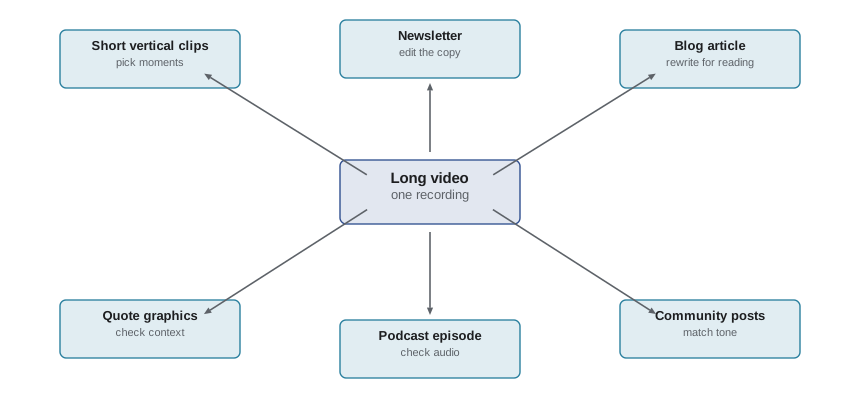
Repurposing works best with human selection. AI highlight finders tend to pick loud or emotional moments, which may not be the most useful or representative. Clips taken out of context can distort what you said, especially on controversial topics. Auto-reframing can cut off important visuals, such as a product or a chart. And text generated from transcripts often needs heavy editing to read well on the page.
Worked problem
Output per hour of repurposing
Without AI, a team spends 6 hours turning each long video into 5 clips, a newsletter and a blog post. With AI tools, the same outputs take 2.5 hours including review, and the team can afford to make 8 clips instead of 5. For 4 long videos a month, how many hours are saved, and how many extra clips are produced?
Show solution
- Hours without AI: 4 × 6 = 24. With AI: 4 × 2.5 = 10.
- Hours saved: 14 a month.
- Extra clips: 4 × (8 − 5) = 12 a month.
Answer: The team saves about 14 hours and produces 12 more clips a month, as long as the review step stays in place.
Search, titles and metadata
AI can suggest titles, descriptions, tags, chapters and keywords. Chapters generated from transcripts are a genuine time-saver and improve viewer navigation. Descriptions and titles should still be checked for accuracy and tone, and keyword stuffing, cramming in irrelevant search terms, can violate platform rules on misleading metadata. Titles must match the content, just as thumbnails must.
Privacy and platform rules for data tools
Third-party analytics and community tools often need access to your accounts. Grant only the permissions a tool needs, review connected apps regularly, and check where the tool stores data and whether it uses your audience's comments to train its models. Comments and messages contain personal information about your viewers. Platform terms usually restrict how you can collect and use data from their services, and privacy laws covered in lesson 10 apply to personal information you collect, such as email lists and survey responses.
Building a monthly AI-assisted review
Many creators find it helpful to run a monthly review that combines analytics and community insight. An AI-assisted version might work like this. First, export the month's analytics for all videos and clips into a spreadsheet. Second, ask an assistant to identify the top and bottom performers on watch time per impression, retention at 30 seconds and subscribers gained, and to suggest possible reasons. Third, ask a comment summarizer for the main themes on each top video, with example quotes. Fourth, the creator and team meet for 30 minutes to discuss which suggestions are worth testing, using their own knowledge of what happened that month. Fifth, they choose one or two experiments for the next month, such as a new hook style or a follow-up on a popular question.
The AI does the sorting and summarizing; the humans decide what matters and design fair tests. Keeping a simple log of experiments and results builds real knowledge about your audience over time, rather than chasing every AI suggestion.
Protecting your community from AI-driven scams
Comment sections are a favourite target for scam accounts, many now using AI to write convincing messages or generate profile pictures that copy the creator's. Common tactics include fake giveaway winners asking fans to message a number, investment pitches impersonating the creator, and phishing links disguised as sponsor offers. Use filters for phone numbers and suspicious links, block known impersonation patterns, pin a comment explaining that you will never ask fans for money or personal details by direct message, and report impersonating accounts promptly.
For creators with large or young audiences, scam protection is a duty of care. A single successful scam can cost a viewer real money and damage trust in the channel. CRE-350 discussed broader safety practices; the AI tools in this lesson can help detect scams at scale, but human review of reports remains essential.
Worked problem
Filter precision check
An AI filter holds 500 comments in a week. On review, 430 are genuine spam or scams and 70 are legitimate comments wrongly held. What is the filter's precision, and how many legitimate comments might be hidden over a month?
Show solution
- Precision: 430 ÷ 500 = 86 %.
- Wrongly held per week: 70. Per month (about 4.3 weeks): 70 × 4.3 ≈ 301.
Answer: Precision is 86 %, but about 300 legitimate comments a month would be hidden without review, a good reason to check held comments weekly.
Accessibility in repurposed content
Repurposed clips often lose accessibility features. Vertical clips need their own captions, positioned so they are not covered by platform buttons. Quote graphics need alternative text where platforms support it. Newsletters and blog posts generated from transcripts should use proper headings and descriptive links. AI tools can generate alternative text and captions quickly, but check them for accuracy, especially for charts, diagrams and on-screen text that carry important information. Accessible repurposing reaches more people and is increasingly expected by platforms, sponsors and audiences alike.
Common mistakes
MistakeAccepting AI explanations of performance as fact.
InsteadTreat them as hypotheses and check the raw data for confounding factors.
MistakeSetting moderation filters and never reviewing them.
InsteadReview held comments regularly and adjust strictness.
MistakeLetting AI send personal replies as if from the creator.
InsteadDraft with AI but reply personally, or clearly label automated responses.
MistakePosting AI-picked clips without checking context.
InsteadChoose highlights yourself and make sure clips do not distort meaning.
MistakeGranting analytics tools full account access.
InsteadGive minimal permissions and review connected apps regularly.
Summary and key terms
- AI analytics summarize data and suggest hypotheses, but explanations need checking against raw data.
- Confounding factors, such as video type, can create misleading patterns.
- AI helps filter spam, summarize comments, translate and route enquiries.
- Moderation filters trade off hiding too much against letting harm through, so review them.
- Automated replies risk deceiving fans; sensitive messages always need a person.
- Repurposing tools multiply output but need human selection to avoid distortion.
- Limit tool permissions and respect platform data rules and privacy law.
- Retention curve
- A graph showing what share of viewers are still watching at each moment.
- Confounding factor
- A hidden variable that creates a misleading association between two others.
- Sentiment analysis
- Automatically classifying text as positive, negative or neutral.
- Moderation filter
- A tool that holds or removes comments matching certain rules or patterns.
- Repurposing
- Turning one piece of content into several different formats.
- Highlight detection
- Automatically finding notable moments in long recordings.
- Auto-reframing
- Automatically cropping horizontal video to vertical or square formats.
- Chapters
- Time-stamped sections that let viewers jump within a video.
- Keyword stuffing
- Adding irrelevant search terms to metadata to game search.
- Connected app
- A third-party service granted access to an account.
Practice problems
Work each problem on paper first, then reveal the answer to check.
Why treat AI performance explanations as hypotheses?
Show answer
Models can invent causes; data may have confounding factors.
Give an example of a confounding factor in channel analytics.
Show answer
Video type, publishing date, holidays, platform changes.
An AI says 20 % of 1,000 comments ask for a sequel; a sample of 100 has 18. Supported?
Show answer
Yes, roughly.
Name two tasks AI should not handle alone in community management.
Show answer
Crisis messages, personal replies, appeals, negotiations.
Repurposing drops from 5 to 2 hours per video for 6 videos. Hours saved?
Show answer
18 hours.
Why can AI-picked clips be risky?
Show answer
They may distort context or miss key visuals.
What is keyword stuffing?
Show answer
Adding irrelevant search terms to metadata.
Why ask a summarizer to quote example comments?
Show answer
So you can verify each theme against real comments.
What should you check before connecting an analytics tool?
Show answer
Permissions, data storage and whether data trains models.
Why might a strict filter be harmful?
Show answer
It can hide legitimate comments and criticism.
Lesson quiz · 5 questions
Score 60% or more to complete this lesson.
Create a free account to save your progress, take quizzes and earn a certificate.