
CRE-410 · Lesson 3 of 12 · 28 min
AI in editing: cuts, captions, audio clean-up and upscaling
Editing is where AI has changed creators' daily work the most. Tasks that once took hours, such as removing silences, transcribing, captioning, cleaning noisy audio and finding the best moments in a long recording, can now be done in minutes. Editors still matter: pacing, story, humour and emotion depend on human judgment. But the mechanical layer of editing is increasingly automated, and creators who understand these tools can produce more, faster and often at higher technical quality.
This lesson walks through the main categories of AI editing tools, how to measure their quality, how to estimate whether they are worth the cost, and where they still fail.
Text-based editing and automatic rough cuts
Many editing applications now transcribe your footage automatically and let you edit the video by editing the transcript: delete a sentence in the text and the matching video disappears from the timeline. This is especially powerful for talking-head videos, podcasts, interviews and lectures. Related features include:
- Silence and filler removal: cutting pauses, "um", "uh" and false starts automatically, with a threshold you can adjust.
- Multicam switching: choosing the camera angle of whoever is speaking in a podcast or interview.
- Scene and shot detection: splitting long footage into shots and tagging them by content, faces or location.
- Best-take selection: flagging the clearest or most energetic take of a repeated line.
These tools produce a rough cut, not a finished edit. Automatic silence removal can make delivery feel breathless, cut off the natural pauses that help jokes land, or remove a meaningful hesitation. A good practice is to set conservative thresholds, then review the cut at normal speed before fine-tuning.
Captions and subtitles
Captions make content accessible to people who are Deaf or hard of hearing, help viewers who watch with the sound off, support language learners and improve search. Automatic speech recognition has become very accurate for clear speech in widely spoken languages, but errors rise with accents the model saw less often in training, background noise, overlapping speakers, technical vocabulary, names and code-switching between languages.
Accuracy is usually measured by word error rate (WER): the number of substitutions, deletions and insertions needed to turn the automatic transcript into a correct one, divided by the number of words in the correct transcript.
Here \(S\) is substitutions, \(D\) deletions, \(I\) insertions and \(N\) the number of words in the reference transcript. Lower is better. A WER of 5 % sounds small, but on a 1,500-word video it means about 75 wrong, missing or extra words, and a single wrong word in a name, number or medical term can change the meaning.
Worked problem
Calculating word error rate
A creator checks a 400-word section of automatic captions against a correct transcript. They find 14 substituted words, 6 missing words and 4 extra words. What is the WER, and roughly how many errors would a full 2,000-word video contain at the same rate?
Show solution
- Errors: 14 + 6 + 4 = 24.
- WER: 24 ÷ 400 = 0.06, or 6 %.
- Full video: 2,000 × 0.06 = 120 expected errors.
Answer: The WER is 6 %, implying about 120 errors in the full video, too many to publish without review.
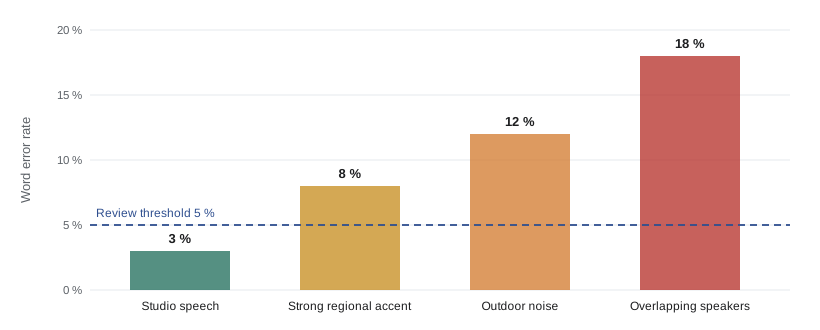
The figures in the chart are illustrative, but the pattern is consistent across tools: clean audio is the best way to improve automatic captions. Check every caption file before publishing, paying special attention to names, numbers, brand names and specialist terms, and add a custom vocabulary list if your tool supports one.
| Caption check | Why it matters |
|---|---|
| Names and brand names | Misspelled sponsor or guest names look careless and can offend |
| Numbers, dates and prices | Errors can mislead viewers about facts or offers |
| Speaker labels | Viewers need to know who is talking in multi-person content |
| Sound descriptions | Captions for Deaf viewers should note important music and sounds |
| Line length and timing | Captions must be readable at normal speed |
| Profanity and sensitive terms | Automatic tools may mishear words in embarrassing ways |
Audio clean-up
AI audio tools can remove background noise, reduce echo, balance levels, separate voices from music and even reconstruct speech that sounds as if it were recorded in a studio. These tools rescue recordings made in difficult conditions, such as a noisy street interview or a call recorded over a weak connection.
Their limits matter. Aggressive noise reduction can make voices sound robotic, watery or lisping. Some speech enhancement tools regenerate the voice rather than simply cleaning it, subtly changing its character or even the words if the original was unclear. For interviews, documentaries and journalism, keep the original recording and use enhancement conservatively so you do not alter what someone actually said. Lesson 11 returns to the ethics of altering recordings of real people.
Stem separation, splitting a mixed recording into vocals, drums, bass and other instruments, is also useful for remixing your own material or reducing music under speech. It does not give you the right to use someone else's music: separating the vocal track from a copyrighted song still uses that copyrighted recording.
Upscaling, frame interpolation and restoration
AI upscalers increase the resolution of images and video by predicting detail that was not captured. They can make old footage watchable on modern screens, clean up compressed clips and sharpen soft shots. Frame interpolation generates in-between frames to create smooth slow motion or convert between frame rates. Restoration tools remove scratches, stabilize shaky footage and add colour to black-and-white material.
Because these tools invent detail, they can create artifacts: waxy skin, strange textures, distorted text and faces that look slightly wrong. For archival, documentary or news footage, upscaling and adding colour change the historical record, so many organizations label restored footage and avoid presenting predicted detail as original. When you use them on your own footage for style, artifacts are an aesthetic issue; when you use them on footage of real events, they become a question of accuracy.
Generative editing tools
Newer tools go beyond cleaning and cutting to generate material inside an edit. Generative fill can extend a frame to a new aspect ratio, remove an object or person from a shot, replace a sky or add props. Some tools can change what a speaker appears to say by regenerating mouth movements to match new audio, which is useful for fixing a flubbed word or dubbing but also the basis of deepfakes.
These capabilities are where editing and synthetic media meet. Removing a stray coffee cup from a background is ordinary retouching. Removing a person from a protest crowd, changing a product's appearance in a review or altering what someone said is manipulation that platforms, advertising codes and audiences treat very differently. Lessons 9 and 11 cover when generative edits must be disclosed.
Does the tool pay for itself?
Before adding a tool, estimate the time it saves, the time it adds and what it costs. A simple monthly break-even calculation compares the value of time saved with the subscription fee:
where \(h_{\text{saved}}\) is hours of work removed, \(h_{\text{added}}\) is hours of new work such as reviewing and fixing, \(r\) is the hourly value of the time and \(c\) is the monthly cost.
Worked problem
Editor hours versus an AI editing suite
A channel pays a freelance editor $45 an hour. Each weekly video takes the editor 9 hours, including 3 hours on rough cuts, silence removal and captions. An AI editing suite costing $60 a month would cut that 3-hour block to 45 minutes, including review. Over a four-week month, what is the net benefit?
Show solution
- Hours saved per video: 3 − 0.75 = 2.25 hours.
- Hours saved per month: 2.25 × 4 = 9 hours.
- Value: 9 × $45 = $405.
- Net benefit: $405 − $60 = $345 a month.
Answer: About $345 a month. The editor can spend the freed time on story and pacing, or the channel can publish more without adding hours.
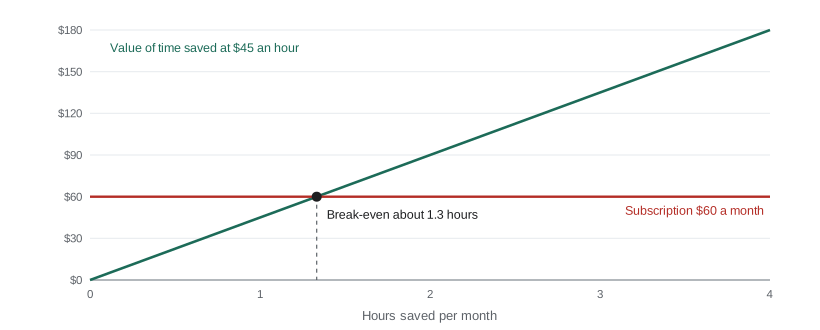
The break-even point here is low: \(60 \div 45 \approx 1.3\) hours a month. Most editing tools pass this test easily if they are actually used. The bigger risk is subscription sprawl: paying for many overlapping tools that each save a little but together cost a lot. Review subscriptions every quarter and cancel those that are not earning their place.
Working with editors in an AI workflow
AI tools change editors' jobs rather than simply replacing them. Editors increasingly act as supervisors of automated passes, quality controllers and story specialists. If you hire editors, discuss which tools they use, who pays for subscriptions, how project files and AI-generated assets are stored, and what quality checks are expected. Make sure contracts address ownership of edited material regardless of which tools were used. CRE-401 covered contracts and team structure; lesson 11 discusses the wider labour effects of AI on editing work.
Choosing and configuring editing tools
Before committing to an AI editing tool, test it on two or three of your own typical projects rather than relying on demonstrations. Note how accurate the transcript is for your voice and topics, how natural the automatic cuts feel, how easily you can override the AI's choices, and whether the tool exports project files your editor can open in their usual software. Tools that lock work inside their own format can create problems later.
Configuration matters as much as choice. Most tools let you set the silence threshold, the minimum pause length kept, which filler words to remove and whether to keep breaths. A custom vocabulary or glossary with your name, recurring guests, product names and specialist terms can cut caption errors sharply. Save these settings as presets so every project starts from the same baseline, and record them in your SOP so that new editors produce consistent results.
Finally, keep an eye on accessibility standards. Captions should be synchronized, complete and readable, with enough time on screen to be read comfortably. Many broadcasters and accessibility guidelines recommend roughly two lines per caption and limits on how quickly captions change. Automatic tools often create captions that are too long or flash by too quickly; adjust the defaults to suit your audience.
Worked problem
Custom vocabulary payoff
Before adding a custom vocabulary, a creator's captions averaged 7 % WER on 1,800-word videos. Afterwards, WER fell to 4 %. If each error takes 20 seconds to fix, how much review time is saved per video?
Show solution
- Errors before: 1,800 × 0.07 = 126. After: 1,800 × 0.04 = 72.
- Errors avoided: 54.
- Time saved: 54 × 20 = 1,080 seconds = 18 minutes.
Answer: About 18 minutes of review per video, or more than an hour a month for a weekly channel.
Common mistakes
MistakePublishing automatic captions without review.
InsteadCheck names, numbers, terms and timing before publishing.
MistakeUsing aggressive silence removal on every video.
InsteadSet conservative thresholds and review pacing at normal speed.
MistakeOver-processing interview audio until it changes the speaker.
InsteadKeep originals and enhance conservatively, especially for journalism.
MistakeTreating upscaled or colour-restored archive footage as original.
InsteadLabel restored footage and avoid presenting predicted detail as fact.
MistakeCollecting overlapping subscriptions.
InsteadReview tools quarterly and keep only those that clearly pay for themselves.
Summary and key terms
- Text-based editing, silence removal and multicam switching produce fast rough cuts that still need human review.
- Word error rate measures caption accuracy: substitutions, deletions and insertions divided by reference words.
- Caption errors rise with accents, noise, overlapping speakers and specialist terms; clean audio helps most.
- AI audio clean-up can rescue recordings but can also alter voices and words if overused.
- Upscaling and restoration invent detail, which matters for footage of real events.
- Generative editing can remove objects or change speech, crossing into manipulation that may need disclosure.
- Net benefit equals hours saved minus hours added, times hourly value, minus cost.
- Text-based editing
- Editing video by editing its automatically generated transcript.
- Rough cut
- An early assembly of an edit before fine-tuning.
- Word error rate (WER)
- Substitutions, deletions and insertions divided by the number of words in a correct transcript.
- Automatic speech recognition (ASR)
- Technology that converts speech into text.
- Speech enhancement
- AI processing that reduces noise and improves the clarity of recorded speech.
- Stem separation
- Splitting mixed audio into separate tracks such as vocals and instruments.
- Upscaling
- Increasing image or video resolution by predicting missing detail.
- Frame interpolation
- Generating in-between frames for smoother motion or new frame rates.
- Generative fill
- Using AI to add, remove or extend parts of an image or video frame.
- Subscription sprawl
- Accumulating many overlapping paid tools.
Practice problems
Work each problem on paper first, then reveal the answer to check.
A 500-word sample has 10 substitutions, 5 deletions and 5 insertions. WER?
Show answer
20 ÷ 500 = 4 %.
At 4 % WER, how many errors in a 3,000-word video?
Show answer
120.
Name three conditions that raise caption errors.
Show answer
Accents, background noise, overlapping speakers, technical terms, names.
Why keep original interview recordings?
Show answer
Enhancement can alter voices or words; originals preserve what was said.
A tool saves 5 hours and adds 1 hour a month; time is worth $30; it costs $40. Net benefit?
Show answer
(5 − 1) × $30 − $40 = $80.
Break-even hours for a $90 tool at $45 an hour?
Show answer
2 hours a month.
Does stem separation give you rights to a copyrighted song?
Show answer
No; you are still using the copyrighted recording.
Why can upscaling be a problem for archival footage?
Show answer
It invents detail, changing the historical record.
Give one risk of aggressive silence removal.
Show answer
Breathless pacing, lost comic timing, removed meaningful pauses.
What is subscription sprawl?
Show answer
Paying for many overlapping tools that together cost too much.
Lesson quiz · 5 questions
Score 60% or more to complete this lesson.
Create a free account to save your progress, take quizzes and earn a certificate.