
CRE-220 · Lesson 9 of 12 · 25 min
Improvising, unscripted and live delivery
Not everything can be scripted. Vlogs, reactions, live streams, panels, podcasts, interviews and on-the-spot event coverage all require speaking without a script, responding to what happens and thinking on your feet. Unscripted delivery is often where creators feel most natural and audiences feel most connected, but it is also where rambling, filler and awkward silences creep in. This lesson covers the value of unscripted content, preparing to improvise, structures for speaking off the cuff, the principles of improvisation, handling silence and losing your train of thought, live delivery and its pressures, responding to chat and comments in real time, recovering from technical problems, handling difficult moments live, and practising improvisation.
Why unscripted delivery matters
Unscripted delivery offers immediacy and authenticity: viewers see genuine reactions, spontaneous humour and real thinking. Live streams, in particular, build community through real-time interaction, and many creators find that their most loyal viewers come from live content. Unscripted segments are also efficient, requiring less writing time, and they suit formats where the creator's personality and expertise are the draw, such as commentary, Q&A and gaming. The trade-off is less control: ideas may be less organized, timing less predictable, and mistakes cannot be edited out live. Strong unscripted presenters are rarely truly unprepared; they have prepared knowledge, structure and techniques that let them improvise well.
Preparing to improvise
Preparation for unscripted content focuses on knowledge and structure rather than words. Useful preparation includes: knowing your subject well enough to talk about it from several angles; preparing a short list of key points, stories and examples you want to include; planning a clear opening and closing, since these are hardest to improvise well; anticipating likely questions and preparing brief answers; collecting a few stories and anecdotes from your story bank (Lesson 1) that you can draw on; and knowing the rough timing of segments. A one-page run sheet with the segments, key points and timings gives structure without scripting.
Structures for speaking off the cuff
Simple structures help organize thoughts quickly when speaking without notes:
- Point, reason, example, point (PREP): state your point, give a reason, offer an example or story, and restate the point. Useful for answering questions and giving opinions.
- Past, present, future: how things were, how they are now, and where they are going. Useful for updates and commentary.
- Problem, solution, benefit: the issue, what to do about it, and why it helps. Useful for advice.
- What, so what, now what: what happened, why it matters, and what to do next. Useful for reacting to news.
- Three points: limiting yourself to three key points makes improvised content easier to follow and remember.
Practising these structures until they are automatic lets you organize an answer in the second or two before you start speaking.
| Structure | Steps | Good for |
|---|---|---|
| PREP | Point, reason, example, point | Answers, opinions |
| Past, present, future | Then, now, next | Updates, trends |
| Problem, solution, benefit | Issue, fix, why it helps | Advice |
| What, so what, now what | Event, meaning, action | News reactions |
| Rule of three | Three key points | Any improvised segment |
Worked problem
Answering a live question with PREP
During a live stream, a viewer asks a photography creator: "Is it worth buying an expensive lens as a beginner?" How could the creator answer clearly in about 30 seconds?
Show solution
- Point: "For most beginners, no, not yet."
- Reason: "Your first big improvements will come from learning light and composition, which cost nothing."
- Example: "My first year, I shot everything on a kit lens; my best photo from that year still gets more compliments than shots I took later with gear ten times the price."
- Point: "So spend your first year learning, and buy a lens when you can name the problem it will solve."
Answer: A PREP answer gives a clear point, a reason, a short story and a restated point in about 30 seconds.
Principles of improvisation
Improvisational theatre offers principles that apply to unscripted creator content. "Yes, and" means accepting what others offer, such as a co-host's idea or a viewer's comment, and building on it rather than blocking it, which keeps conversations flowing and generous. Listening fully, rather than planning your next line while others speak, allows genuine responses. Committing to choices, saying things with conviction rather than hedging, makes delivery engaging. Treating mistakes as offers, incorporating them into the moment rather than trying to hide them, turns problems into memorable moments. And making your partners look good, in collaborations, makes the whole content stronger. Improv classes are an excellent way to build these skills.
Handling silence and losing your thread
Silences feel much longer to the speaker than to the audience. A pause of two or three seconds while you think usually looks thoughtful on camera, not awkward, especially if you maintain composure and eye contact. When you lose your train of thought, useful techniques include pausing and summarizing what you have said so far, which often brings the next point back; glancing at your run sheet; asking a rhetorical question ("so why does this matter?"); or simply saying "let me come back to that" and moving on. Filling silences with "um" and "so" is a habit that can be reduced with practice (Lesson 4). In recorded unscripted content, these moments can be edited; in live content, calm handling is what matters.
Live delivery and its pressures
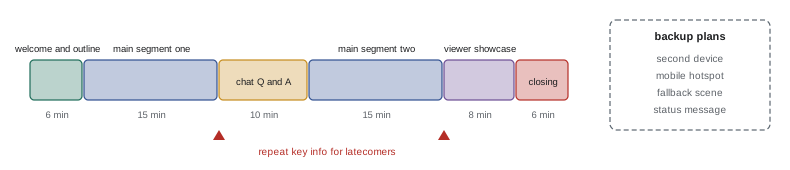
Live streaming adds pressure: there are no retakes, technical problems happen in public, and viewer numbers and comments appear in real time, which can be distracting or discouraging. Practical habits for live delivery include: preparing and testing all equipment well before going live; starting with a clear plan for the first few minutes while viewers join, such as a welcome and an outline of what is coming; repeating key information periodically for people who join late; pacing the stream with segments; staying hydrated and taking breaks in long streams; and ending with a clear close rather than drifting off. CRE-250 covers live streaming in detail, including equipment, software and moderation; this lesson focuses on delivery.
Responding to chat and comments in real time
Interaction is the heart of live content. Reading and responding to chat makes viewers feel seen: greet regulars by name, answer questions, and build on comments. But constant chat reading can derail the content and lose viewers who came for the planned segments. Balanced approaches include setting specific times for Q&A; having a moderator or co-host who highlights good questions; reading comments aloud before responding, so viewers who watch later understand the reply; and ignoring or moderating trolling rather than engaging with it. When viewers ask questions you cannot answer, saying "I don't know, but I'll find out" is better than guessing. Be careful about reading out viewers' personal information or names that could identify them in sensitive contexts.
Recovering from technical problems
Technical problems are inevitable in live content: audio drops, frozen video, crashed software, internet failures. Calm recovery matters more than perfection. Keep a backup plan: a second device, a mobile hotspot, a simple fallback scene in streaming software, and a short message you can post if the stream fails. Acknowledge problems briefly and with humour if possible ("my internet decided to take a break; it's back now"), fix them efficiently, and summarize what viewers missed. Viewers are generally forgiving of technical problems if the presenter handles them calmly.
Handling difficult moments live
Live content can bring difficult moments: hostile comments, a guest saying something offensive, a factual error, an emotional reaction, or news breaking during the stream. Preparing for these in advance helps. Have moderation tools and rules ready; decide in advance how you will respond to harassment (often by not engaging, removing the comment and moving on); if a guest makes harmful statements, address them calmly and, if necessary, end the segment; correct factual errors promptly and openly; and give yourself permission to take a break or end the stream if you are overwhelmed. Your safety and wellbeing come before the stream. CRE-350 covers harassment and creator safety.
Practising improvisation
Improvisation improves with practice. Exercises include: picking a random topic and speaking on it for one minute without stopping or using filler words; answering questions from a list using PREP; describing your surroundings or day as an engaging story; recording unscripted practice videos that you do not publish; taking improv classes or joining speaking clubs; and doing short, low-stakes live streams regularly before attempting long ones. Reviewing recordings to identify filler words, rambling and strong moments helps refine your skills. Many creators find that their improvised delivery becomes stronger than their scripted delivery once they are comfortable.
Event coverage and on-the-spot reporting
Creators covering events, such as conferences, festivals, launches, sports or protests, often speak to camera with little preparation, in noisy, changing conditions. Useful techniques borrowed from broadcast reporting include a quick structure: where you are, what is happening, why it matters and what comes next; a short standup line rehearsed a few times before recording; speaking in short, complete sentences that can be edited easily; and describing what viewers can see and what they cannot. Accuracy matters most in fast-moving situations: say what you know, distinguish facts from rumours, and correct errors quickly. In crowded or tense settings, consider your safety and the privacy of people around you.
Reactions and commentary
Reaction and commentary formats, in which creators respond to videos, news, products or games, depend on genuine, insightful responses rather than exaggerated performance. Strong reaction content adds value through expertise, humour or perspective: explaining what is happening, noticing details others miss, or connecting the subject to wider ideas. Prepare by knowing the subject and the context, but react honestly in the moment. Using others' content in reactions raises copyright questions; commentary and criticism may qualify as fair dealing in Canada or fair use in the United States in some circumstances, but not all reaction videos do, so add substantial commentary and use only what you need (CRE-320).
Unscripted delivery in recorded content
Even in recorded videos, many creators prefer unscripted delivery for its natural feel, then shape it in editing. To make this efficient, speak in clear, complete thoughts, pause between ideas, and redo sections that wander. Recording a short summary at the end of an unscripted session, restating the main points concisely, often provides useful material for openings, shorts or descriptions.
Q&A segments
Question-and-answer segments are among the most popular unscripted formats. Collecting questions in advance, from comments, community posts or a form, lets you choose the most interesting and prepare briefly, while still answering naturally. Group similar questions, answer the most common ones first, and read each question aloud before answering. Keep answers concise, using structures such as PREP, and be honest when a question is outside your expertise. Ending with a question for the audience, such as asking what they would like covered next, invites future engagement and gives you material for the next session.
Pacing a long live session
Long live sessions, of one to several hours, need deliberate pacing to keep both the presenter and the audience engaged. Plan segments of 10 to 20 minutes with different activities, schedule short breaks, vary energy between high-interaction moments and calmer segments, and drink water regularly. A visible agenda or a regular recap helps viewers who drop in and out.
Using silence and pauses live
In live content, short pauses feel risky, but they are useful: pausing after a viewer's question to think shows respect for the question, and pausing after a key point lets it land. Narrating briefly what you are doing during necessary silences, such as setting up a demonstration, keeps viewers oriented without filling every moment with chatter.
Common mistakes
MistakeGoing unscripted without preparation.
InsteadPrepare knowledge, structure, opening and close.
MistakeRambling through answers.
InsteadUse PREP or three-point structures.
MistakeBlocking a co-host's ideas.
InsteadUse "yes, and" and build on offers.
MistakePanicking during silences.
InsteadPause calmly, summarize or glance at your run sheet.
MistakeEngaging with trolls live.
InsteadModerate and move on.
Summary and key terms
- Unscripted delivery offers immediacy, authenticity and community.
- Prepare knowledge, key points, stories, opening, close and a run sheet.
- PREP, three-point and other structures organize answers quickly.
- Improv principles: yes-and, listening, commitment, mistakes as offers.
- Pauses look thoughtful; summarize to recover your thread.
- Live delivery needs planning, segments, repetition and backups.
- Balance chat interaction, recover calmly and protect your wellbeing.
- Unscripted delivery
- Speaking without a prepared script.
- Run sheet
- One-page plan of segments, points and timings.
- PREP
- Point, reason, example, point structure.
- Rule of three
- Organizing ideas into three points.
- Yes, and
- Accepting and building on offers.
- Blocking
- Rejecting or shutting down an offer.
- Offer
- An idea, comment or event a performer can build on.
- Live stream
- Real-time broadcast to viewers.
- Moderator
- Person managing chat during a stream.
- Fallback scene
- Prepared screen shown during technical problems.
Practice problems
Work each problem on paper first, then reveal the answer to check.
Name two benefits of unscripted delivery.
Show answer
Immediacy, authenticity, community, efficiency.
What goes on a run sheet?
Show answer
Segments, key points and timings.
What does PREP stand for?
Show answer
Point, reason, example, point.
Which structure suits news reactions?
Show answer
What, so what, now what.
What is "yes, and"?
Show answer
Accepting an offer and building on it.
How long can a pause be before it looks awkward?
Show answer
Two or three seconds usually look thoughtful.
Why repeat key information in live streams?
Show answer
For viewers who join late.
How should questions be handled for later viewers?
Show answer
Read the comment aloud before responding.
Name two technical backup plans.
Show answer
Second device, hotspot, fallback scene, status message.
Name an improvisation exercise.
Show answer
One minute on a random topic without filler.
Lesson quiz · 5 questions
Score 60% or more to complete this lesson.
Create a free account to save your progress, take quizzes and earn a certificate.