
CINE-330 · Lesson 8 of 12 · 30 min
Playback, lip sync and off-speed shooting
In a music video, the artist almost never sings live for the final picture. Instead, the finished recording plays through speakers on set, and the artist performs along with it. This technique, called playback, lets editors cut freely between takes because every take matches the same recording. Playback also makes possible one of the most beautiful effects in music videos: singing in slow motion while the lips stay perfectly in sync. This lesson explains how playback works, how timecode keeps sound and picture together, how to calculate off-speed playback for slow and fast motion, how to plan cuts to the beat, and the practical routines that make a playback day run smoothly.
How playback works
On a music video set, a playback operator controls the song using a laptop or dedicated playback system connected to speakers. Before each take, the assistant director calls for playback, the operator starts the track from a chosen point, and the artist performs. The camera records picture, usually with a guide audio track so the editor can find sync.
- The playback track is the final mix or an approved version, so the performance matches what the audience will hear.
- The operator can start from any section using cue points, saving time when only a chorus or verse is needed.
- A count-in, such as a few clicks or beats before the section starts, helps the artist prepare.
- Speakers must be loud enough for the artist to perform with energy, but some locations limit volume; in-ear monitors can replace speakers.
- In-ear monitors also help when shooting high-speed or off-speed, when the track is played at an unusual speed.
Because the song is the same on every take, an editor can cut between a wide shot from pass one, a close-up from pass four and a crane move from pass seven, and the lips will match. This only works if the timing reference is reliable.
Timecode and sync references
The editor needs to know where each take sits in the song. Several methods provide that reference.
- Timecode playback: the playback system outputs the song with embedded timecode that matches the song's timeline. A timecode slate or the camera's timecode input records that timecode, so each frame is labelled with its position in the song.
- Guide audio: the camera records the playback sound through its microphone, and the editor syncs by matching the waveform to the master track.
- Smart slate: a slate displays the song timecode at the start of each take for visual reference.
- Clap or marker: a simple clap at the start of a take helps sync when other methods fail.
Timecode playback is the most efficient for complex videos with many takes. For off-speed shooting, special care is needed, because the song plays at a different speed from the camera's capture rate.
Off-speed shooting with playback
To create slow motion with perfect lip sync, the song is played faster than normal on set while the camera shoots at a higher frame rate. When the footage is played back at normal speed, the motion slows down and the lips match the normal-speed song.
The rule is simple: the playback speed on set must be multiplied by the same factor as the frame rate.
If the project runs at 24 fps and the camera shoots at 48 fps, the song must play at 2× speed on set. The artist sings along with the fast song; in the edit, the footage plays at 24 fps, half speed, and the lips match the song at normal speed.
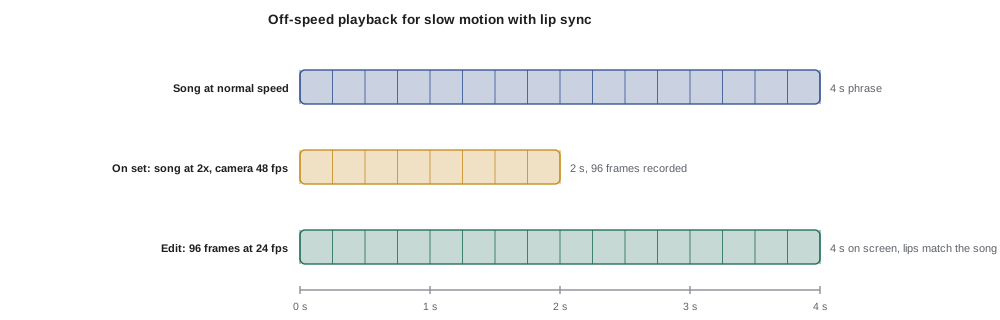
Worked problem
Slow motion lip sync at 48 fps
A project runs at 24 fps. The director wants the chorus in half-speed slow motion with perfect lip sync. At what frame rate should the camera shoot, and how should the playback be set? How long does a 16-second chorus last on set?
Show solution
- Half-speed slow motion means a slowdown factor of 2, so capture at 2 × 24 = 48 fps.
- Playback speed on set = 48 ÷ 24 = 2×.
- The 16-second chorus plays in 16 ÷ 2 = 8 seconds on set.
Answer: Shoot at 48 fps with the song playing at 2× speed. The artist sings an 8-second burst on set, which becomes a 16-second slow-motion chorus with lips in sync.
Singing along at double speed is difficult. The pitch rises an octave if the playback is simply sped up, and lyrics fly past. Playback operators often use software that changes speed without changing pitch, but the artist must still form words very quickly. Many artists rehearse with the sped-up track before the shoot. For higher slowdown factors, such as 4× at 96 fps, singing in sync becomes extremely hard; directors often use short phrases, mouth shapes on key words, or choose moments where the artist holds a long note.
Worked problem
Higher speeds and their limits
For a 4× slow-motion effect in a 25 fps project, what frame rate and playback speed are needed? If a lyric phrase lasts 3 s in the song, how long does the artist have to sing it on set?
Show solution
- Capture rate = 4 × 25 = 100 fps.
- Playback speed = 100 ÷ 25 = 4×.
- On-set duration = 3 ÷ 4 = 0.75 s.
Answer: Shoot at 100 fps with 4× playback; the artist must sing a 3-second phrase in three-quarters of a second, possible only for short phrases or held notes.
Fast motion with playback
The same principle works in reverse. If the song plays at half speed on set and the camera shoots at half the project rate, the artist moves slowly on set but appears to move fast on screen, while the lips still match.
- Project at 24 fps, camera at 12 fps, playback at 0.5×. The artist sings slowly, but the final footage shows sped-up surroundings and movement with normal lip sync.
- This creates surreal effects: crowds and traffic rushing past while the artist sings calmly at normal pace.
- At low frame rates, exposure time rises, adding motion blur; a narrower shutter angle can keep images crisp.
Fast-motion playback is often combined with real-world movement. An artist walking slowly through a busy street at half-speed playback, filmed at 12 fps, appears to walk normally while the people around them rush by at double speed. Getting the artist to move at exactly half speed takes rehearsal.
Beats, frames and cutting to the music
Editors cut music videos to the rhythm of the song. Cinematographers who understand the relationship between tempo and frames can plan camera moves and actions that land on the beat.
At 24 fps and 120 BPM, each beat lasts 12 frames. At 25 fps and 100 BPM, each beat lasts 15 frames. When the beat does not divide evenly into frames, editors cut to the nearest frame, and the difference is too small for viewers to notice.
Worked problem
Timing a camera move to a bar
A song is at 96 BPM in 4/4 time. The director wants a crane move that lasts exactly two bars, starting on the downbeat of the chorus. The project is 24 fps. How long is the move in seconds and in frames?
Show solution
- Beats in two bars of 4/4: 2 × 4 = 8 beats.
- Seconds per beat: 60 ÷ 96 = 0.625 s.
- Duration: 8 × 0.625 = 5 s.
- Frames: 5 × 24 = 120 frames, or 15 frames per beat × 8 beats.
Answer: The move should last 5 seconds, 120 frames. The grip and camera operator rehearse with the playback until the move consistently starts and ends on the downbeats.
| Tempo (BPM) | Seconds per beat | Frames per beat | Frames per bar of 4 |
|---|---|---|---|
| 80 | 0.75 | 18 | 72 |
| 96 | 0.625 | 15 | 60 |
| 100 | 0.6 | 14.4 | 57.6 |
| 120 | 0.5 | 12 | 48 |
| 128 | 0.469 | 11.25 | 45 |
| 140 | 0.429 | 10.3 | 41.1 |
Practical routines on a playback set
A playback day has a rhythm that experienced crews follow.
- Prepare the playback files in advance: full song, sections, sped-up and slowed-down versions with timecode, clearly named.
- Rehearse each set-up with playback before rolling, so camera, focus and moves are timed.
- Call playback clearly: the assistant director calls "playback", the operator confirms "playback rolling" and the camera team rolls.
- Log takes with section, playback speed, frame rate and timecode.
- Watch the artist's lip sync on a monitor; a script supervisor or director's assistant can note errors.
- Protect the artist's voice and energy, especially when they sing along at full volume for many hours.
- Keep speakers away from microphones if any live sound is recorded for behind-the-scenes content.
Worked problem
Planning playback files
A video will use the full song at normal speed for performance, the chorus at 2× for 48 fps slow motion, and the bridge at 0.5× for 12 fps fast motion. The project is 24 fps. List the files and frame rates.
Show solution
- File 1: full song at 1×, camera at 24 fps.
- File 2: chorus at 2× speed (pitch-corrected if desired), camera at 48 fps.
- File 3: bridge at 0.5× speed, camera at 12 fps.
- Each file carries timecode that maps back to the original song timeline, divided or multiplied by the speed factor.
Answer: Three files, each matched to a frame rate, all clearly labelled with speed and frame rate to avoid mistakes on the day.
Lip sync problems and fixes
Common sync problems include wrong frame rates, wrong playback speeds, latency in wireless audio and drift between devices. If the camera shoots 50 fps with a 2× track in a 24 fps project, the result will be slightly off and the lips will drift. If wireless in-ear monitors introduce a delay, the artist sings late; the playback operator may need to advance the track slightly. Checking sync on the first take of each new frame rate, by syncing a short clip on set, catches errors before they ruin a day's footage.
Live sound versus playback
Occasionally a video records the performance live, for example a live session or a stripped-down acoustic version. Live recording changes the camera department's work: generators must be far away or silent, lights with noisy fans may be switched to quiet modes, camera moves must avoid squeaks and dolly track noise, and crew must stay silent during takes. Cameras must be locked to the same timecode as the sound recorder. Live videos usually need more cameras, because each performance is unique and cannot be intercut freely with others. Many productions combine approaches: a live take for authenticity, with playback passes for close-ups and specialty shots.
Rehearsing with the artist
Off-speed playback is difficult to perform without rehearsal. Send the artist the sped-up or slowed-down tracks before the shoot day so they can practise. On the day, run each off-speed section a few times before recording, check sync on a monitor and adjust expectations: a long phrase at 2× may be possible after practice, while 3× or 4× usually needs short phrases or held notes.
Common mistakes
MistakePlaying the song at normal speed while shooting at high frame rate.
InsteadMultiply playback speed by capture rate divided by project rate.
MistakeConfusing 24, 25 and 30 fps projects.
InsteadConfirm the project frame rate before preparing playback files.
MistakeIgnoring audio latency in in-ear systems.
InsteadTest latency and adjust the track timing if needed.
MistakeAsking artists to sing long phrases at 4× speed.
InsteadUse short phrases or held notes for high slowdown factors.
MistakeUnlabelled playback files.
InsteadName files with section, speed and frame rate.
Summary and key terms
- Playback lets artists perform to the recorded song so editors can cut between takes.
- Timecode playback, guide audio and smart slates give editors a sync reference.
- For slow motion with lip sync, playback speed equals capture rate divided by project rate.
- Fast motion uses slower playback and lower frame rates, keeping lips in sync.
- Frames per beat equals 60 times frame rate divided by BPM; moves can be timed to bars.
- Well-prepared files, clear calls and logging keep playback days efficient.
- Checking sync on set catches frame rate, speed and latency errors early.
- Playback
- Playing the recorded song on set for the artist to perform with.
- Lip sync
- Matching the artist's mouth movements to the recorded vocals.
- Timecode playback
- A playback system that outputs song timecode for syncing takes.
- Smart slate
- A slate that displays timecode.
- Off-speed
- Shooting at a frame rate different from the project rate.
- Count-in
- Clicks or beats before a section starts to cue the performer.
- In-ear monitor
- A small earpiece that delivers playback directly to the performer.
- Pitch correction
- Changing speed without changing pitch.
- Downbeat
- The first beat of a bar.
- Latency
- A delay between a signal being sent and received.
Practice problems
Work each problem on paper first, then reveal the answer to check.
Playback speed for 72 fps in a 24 fps project?
Show answer
3×.
Capture rate for half-speed slow motion in a 25 fps project?
Show answer
50 fps.
How long does a 12 s chorus play on set at 2×?
Show answer
6 s.
Frames per beat at 24 fps and 80 BPM?
Show answer
18.
Duration of four bars of 4/4 at 120 BPM?
Show answer
8 s.
Fast motion at 2× in a 24 fps project needs what frame rate and playback?
Show answer
12 fps with 0.5× playback.
Why use pitch correction for sped-up playback?
Show answer
So the song does not rise in pitch and stays recognizable.
What reference helps editors sync takes?
Show answer
Timecode, guide audio or a smart slate.
Why test sync on the first off-speed take?
Show answer
To catch frame rate or speed errors early.
What can in-ear monitors introduce?
Show answer
Latency.
Lesson quiz · 5 questions
Score 60% or more to complete this lesson.
Create a free account to save your progress, take quizzes and earn a certificate.