
CINE-330 · Lesson 5 of 12 · 27 min
Motion control and robotic camera systems
A motion control rig is a computer-controlled camera support that can perform a move exactly the same way, again and again. The first motion control systems were built for visual effects in the 1970s so that model spaceships could be filmed in several passes and combined. Today, motion control is a daily tool in commercials: robot arms swing a camera around a sneaker at high speed, track along a row of products, repeat a move for a composite or fly past a drink in perfect sync with a splash. This lesson explains how motion control systems work, the kinds of rigs available, how moves are programmed and timed, the precision they achieve, how they combine with high-speed cameras and effects, and the safety and logistics of working with industrial robots on set.
What motion control does
The defining feature of motion control is repeatability. Once a move is programmed, the rig can perform it identically for every take, with the camera in the same place at the same moment. That makes several things possible.
- Multiple passes. The same move can be shot several times with different lighting, elements or subjects, then combined in post: one pass for the product, one for the background, one for a reflection, one clean plate.
- Scale changes. Moves can be scaled up or down, so a move on a miniature can be matched to a full-size set.
- Precise timing. Camera moves can be synchronized with effects rigs, turntables, lights and high-speed cameras.
- Speed beyond human operators. High-speed robots can move a camera several metres per second and stop precisely, creating dynamic moves impossible on a dolly.
- Exact framing at key moments. A move can land on a perfect packshot frame every time.
- Previsualization. Moves can be designed in software, sometimes from 3-D animation, and then executed by the rig.
Kinds of motion control rigs
Motion control comes in many forms, from small sliders to large industrial robots.
- Motorized sliders and pan-tilt heads with programmable keyframes are inexpensive and useful for time-lapse, product moves and small music videos.
- Track-based rigs combine a track, a lifting column and an arm with a pan-tilt-roll head. They can perform long, smooth moves at moderate speeds and are standard for visual effects passes.
- Industrial robot arms adapted for film carry a camera on a six-axis arm, sometimes mounted on a track. Fast, compact versions are designed for tabletop and high-speed commercials.
- Cable-suspended and crane systems cover larger areas, such as sports arenas, with repeatable moves.
- Encoded heads and cranes record their positions as they are operated by hand, so the move can be repeated or used to drive computer graphics.
Programming a move
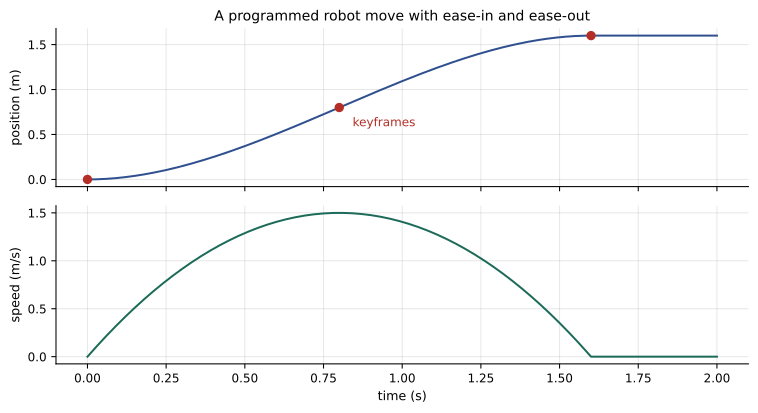
Motion control moves are programmed by setting keyframes, positions of each axis at specific times, and letting the software interpolate a smooth path between them. Each axis, such as track position, lift, arm rotation, pan, tilt, roll, focus and zoom, has its own curve.
- Keyframes can be set by jogging the rig with a controller, by moving it by hand in a teach mode, or by importing a move from 3-D software.
- Interpolation creates the path between keyframes. Ease-in and ease-out avoid jerks at the start and end.
- The operator watches a preview of the move at slow speed, then gradually increases to full speed.
- Focus and zoom are programmed as axes too, so focus can be pulled precisely through the move.
- The move is triggered by the operator or by a signal from another device, such as an effects rig or a timecode cue.
A motion control operator, sometimes with an assistant, programs and runs the rig. The director of photography designs the shot with the director, then works with the operator to refine the path, the timing and the focus.
Speed, acceleration and timing
Fast robots can move a camera quickly, but physics sets limits. A camera package has mass, and accelerating it quickly creates large forces on the rig and the mount. Programs include limits on velocity and acceleration for each axis.
Worked problem
How fast does the camera travel?
A robot must move a camera 1.6 m along a track in 0.8 s, starting and ending at rest. If the move uses a smooth profile where the peak speed is about 1.5 times the average speed, what is the average speed and the approximate peak speed?
Show solution
- Average speed = distance ÷ time = 1.6 ÷ 0.8 = 2.0 m/s.
- Peak speed ≈ 1.5 × 2.0 = 3.0 m/s.
- That is about 11 km/h, fast enough to be dangerous to anyone in the path.
Answer: Average 2.0 m/s and peak about 3.0 m/s. The rig and mount must handle the acceleration, and a safety zone must keep people out.
When a move is combined with high-speed recording, real-time speed and screen speed differ. A robot move lasting 0.8 s at 1,000 fps becomes 32 s at 25 fps, a slow, graceful glide on screen. Motion control operators therefore plan moves in real time but think about how they will feel in slow motion.
Worked problem
Timing a move with a splash
A splash peaks 0.15 s after an effects rig fires. The robot needs 0.6 s to travel from its start to the frame where the splash should be centred. When must the robot start relative to the rig firing?
Show solution
- The robot must reach the target frame at the same moment the splash peaks.
- Splash peak time after firing: 0.15 s. Robot travel time: 0.6 s.
- Robot start = 0.15 − 0.6 = −0.45 s, so the robot starts 0.45 s before the rig fires.
Answer: The robot starts 0.45 s before the effects rig; the motion control software triggers the rig at the correct moment during the move, usually with a programmed delay.
Repeatability and precision
Motion control systems are judged by how closely they repeat. Industrial robots used in film can repeat positions to within fractions of a millimetre at the camera mount under good conditions. In practice, repeatability on set also depends on the stiffness of the mount, the weight of the camera, cable drag, temperature and the floor.
- Bolt the base firmly to a solid floor or a heavy platform.
- Balance and secure the camera package; avoid loose cables that change how the arm moves.
- Warm up the rig with a few passes before recording passes that must match.
- Check alignment by overlaying passes in the monitor; the digital imaging technician or compositor can do a quick check on set.
- Record the move file and all settings with the take notes so the pass can be repeated later if needed.
A small error at the camera can be magnified at the subject. If a camera pivots by a tiny angle, the frame shifts more at a long distance than at a short one. For tabletop work at close range, millimetre errors matter; for wide shots, angular errors matter more.
Here \( s \) is the shift at the subject, \( d \) the distance and \( \theta \) the angular error in radians. An error of 0.001 radians (about 0.06 degrees) shifts the frame by 3 mm at 3 m.
Passes and compositing
Commercials often use motion control to shoot several passes that are combined in post. A typical product sequence might include:
- A beauty pass with the product lit for highlights and shape.
- A label pass with light optimized for the label, then combined so both the bottle and label are perfect.
- A background or environment pass.
- A clean plate without the product or rigs.
- Element passes such as liquid, smoke or particles filmed separately.
- A reference pass with a grey ball and chrome ball for visual effects lighting reference.
Every pass must use the same move, frame rate and lens. The cinematographer keeps lighting changes isolated so that passes can be combined without mismatched shadows or reflections.
Robots and high-speed: the modern product spot
The combination of a fast robot arm and a high-speed camera has become a recognizable commercial style: the camera whips around a product while liquid splashes, ingredients fly and everything appears to float in slow motion. Creating these shots requires tight coordination.
- The robot, the high-speed camera, the effects rig and sometimes the lights are linked by a trigger system.
- Each take is reviewed at playback speed; adjustments of a few milliseconds may be needed.
- Offloading high-speed takes slows the cycle, so the team rehearses with the robot at real speed and records only promising takes.
- Lighting must be bright for high speed and must work through a fast-moving camera path; reflections on products change rapidly.
- Cleaning and resetting the set after splashes takes time and should be in the schedule.
Safety around robots
Industrial robots are powerful machines designed for factories where people are kept out of their working area by fences and interlocks. On film sets, people work close to them, which creates serious risks. A fast arm can strike a person with great force, and a programming mistake can send the arm somewhere unexpected.
In Canada, provincial occupational health and safety law requires employers to identify and control hazards, including machinery. Robot safety is addressed in CSA Z434, the Canadian adoption of the international ISO 10218 robot safety standards, which call for risk assessment, safeguarding and safe operating procedures. Film industry safety guidance, such as Ontario's safety guidelines for the film and television industry and WorkSafeBC and Actsafe resources in British Columbia, expects a hazard assessment and a designated safe zone for any special equipment.
- Define an exclusion zone around the robot's full reach, marked on the floor and enforced by the operator and first assistant director.
- Use emergency stops within reach of the operator and, where possible, a second person.
- Run moves at slow speed first with everyone clear and watching.
- Announce every move clearly ("robot moving") and confirm the zone is clear.
- Never reach into the arm's path while it is powered, even if it appears stationary.
- Keep cables managed so they cannot catch on the arm.
Logistics and cost
Motion control rigs are rented with their operators, usually by the day. Large rigs need time to unload, assemble, level and calibrate, sometimes half a day. They are heavy and may need a solid floor, power and space. For these reasons, productions often schedule a dedicated motion control day for packshots and effects passes, rather than keeping the rig all week.
| Need | Suitable rig | Trade-off |
|---|---|---|
| Simple repeatable product slide | Motorized slider and head | Limited reach and speed |
| Long VFX passes on a set | Track-based rig with arm | Slower, larger footprint |
| Fast product moves with splashes | High-speed robot arm | Cost, safety zone, prep time |
| Large live events, sports | Cable or crane systems | Complex installation |
| Matching handheld feel to CG | Encoded crane or head | Requires operator skill |
Motion control on a small budget
Not every production can afford an industrial robot. Programmable sliders with motorized pan and tilt heads can repeat simple moves accurately enough for product passes, time-lapse and modest compositing, and they fit in a car. Many cinematographers use them on music videos and social content to create a polished look, for example a slow, repeated push past a product with a lighting change between passes, or a time-lapse that moves smoothly across a day. The principles are the same as on a large rig: secure the base, program keyframes with ease-in and ease-out, preview at low speed, log the move file and keep everyone clear of moving parts.
Common mistakes
MistakeLetting people near the robot during moves.
InsteadEnforce a marked exclusion zone and announce every move.
MistakeGoing straight to full speed.
InsteadPreview at slow speed and increase gradually.
MistakeAssuming passes will match automatically.
InsteadSecure the base, warm up the rig and check overlays.
MistakeForgetting how a move will feel in slow motion.
InsteadCalculate screen time from capture rate and real move duration.
MistakeBooking the rig for the whole shoot without need.
InsteadSchedule motion control shots together on a dedicated day.
Summary and key terms
- Motion control repeats camera moves exactly, enabling passes, timing and speed beyond human operators.
- Rigs range from motorized sliders to track-based arms and fast industrial robots.
- Moves are programmed with keyframes and interpolation for every axis, including focus.
- Speed and acceleration are limited by physics and safety; timing synchronizes moves with effects.
- Repeatability depends on mounting, balance, warm-up and checking overlays.
- Multiple passes are combined in post; lighting changes must be isolated.
- Robots are dangerous; safety standards and film guidance require risk assessment, exclusion zones and emergency stops.
- Motion control
- A computer-controlled camera support that repeats moves exactly.
- Keyframe
- A defined position of an axis at a specific time.
- Interpolation
- The calculated path between keyframes.
- Ease-in and ease-out
- Gradual acceleration and deceleration at the start and end of a move.
- Pass
- One recording of a repeated move with a particular lighting or element.
- Repeatability
- How closely a rig returns to the same position on repeated moves.
- Teach mode
- Moving a robot by hand to set keyframes.
- Exclusion zone
- The marked area around a robot where people may not enter during moves.
- Encoded head
- A camera head that records its positions as it is operated.
- Emergency stop
- A control that immediately halts a machine.
Practice problems
Work each problem on paper first, then reveal the answer to check.
Average speed for a 2 m move in 1 s?
Show answer
2 m/s.
Screen time of a 0.5 s move shot at 1,000 fps, played at 25 fps?
Show answer
20 s.
Shift at 5 m for a 0.001 radian error?
Show answer
5 mm.
Name three passes in a product sequence.
Show answer
Beauty pass, label pass, clean plate.
Why warm up a rig before matching passes?
Show answer
So it settles and repeats more consistently.
What does ease-in do?
Show answer
Starts a move gradually to avoid jerks.
A splash peaks 0.2 s after firing; the robot needs 0.5 s. When does it start?
Show answer
0.3 s before the rig fires.
Which standard covers robot safety in Canada?
Show answer
CSA Z434, adopting ISO 10218.
Which standard covers robot safety in the US?
Show answer
ANSI/A3 R15.06, adopting ISO 10218.
Why schedule a dedicated motion control day?
Show answer
Set-up is long and rental is costly.
Lesson quiz · 5 questions
Score 60% or more to complete this lesson.
Create a free account to save your progress, take quizzes and earn a certificate.