
CINE-330 · Lesson 10 of 12 · 27 min
Virtual production and LED volumes
Virtual production uses real-time computer graphics and large LED screens to place actors and products inside digital environments while the camera rolls. Instead of filming in front of green screen and adding backgrounds months later, the crew sees the final world on set, the actors react to it and the screens light the scene with realistic reflections and colour. Commercials and music videos adopted these methods quickly because they suit short shoots with many looks: a car can drive through five cities in one day, a product can sit on a mountain top and then on a beach, and a singer can perform in an impossible landscape. This lesson explains how LED volumes work, the role of real-time engines and camera tracking, how to light and expose with LED walls, the technical limits such as moiré and frustum, and how to plan a virtual production shoot.
What an LED volume is
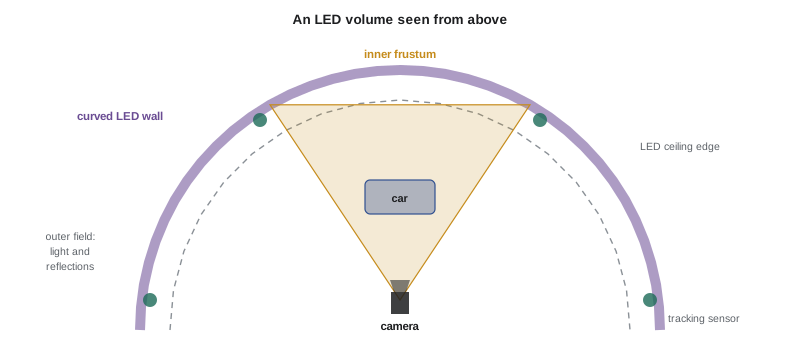
An LED volume is a stage surrounded by large walls of LED panels, often curved, sometimes with an LED ceiling. The panels display images: pre-recorded video plates, still images or real-time 3-D environments rendered by a game engine. The camera films actors and props in front of the panels, capturing the background in camera.
- The main wall is the background seen by the camera.
- Side walls and ceilings provide reflections and light, even when not in frame.
- Floor and set pieces blend the physical foreground into the digital background.
- Separate LED panels on stands or wheels act as movable light sources showing specific images.
Volumes range from huge permanent stages for features and series to small portable walls for commercials, music videos and product work. Many rental companies offer pop-up volumes for a day or two.
Real-time engines and camera tracking
When the background is a 3-D environment, a real-time engine renders it from the camera's point of view. To do this, the system must know exactly where the camera is and where it points, so the perspective on the wall matches the camera's movement.
- Camera tracking systems use infrared markers, sensors or encoders to report the camera's position and rotation many times per second.
- Lens data, such as focal length, focus and iris, are sent to the engine so the virtual depth of field and distortion match.
- The engine renders the "inner frustum", the area of the wall the camera sees, at high quality and with correct perspective.
- The rest of the wall, the "outer field", shows a lower-detail version that provides light and reflections.
- Latency between camera movement and the wall update must be small; fast camera moves can reveal delays.
When the camera moves, the inner frustum moves with it, creating parallax: nearby virtual objects shift more than distant ones, as they would in real life. This is what makes the illusion convincing.
Lighting with LED walls
LED walls emit light, so they act as huge soft sources. A sunset environment lights the actor with warm light; a neon city reflects coloured highlights on a car. This interactive light is one of the biggest advantages over green screen.
However, LED walls are not perfect light sources. Most use red, green and blue emitters with narrow spectral peaks. Skin tones and some colours may look different under this light than under broad-spectrum sources. Many productions add traditional fixtures or LED lights with wider spectra to light faces and products accurately, while letting the walls provide ambience and reflections.
- Use the wall for reflections, edges and ambience.
- Add key light from fixtures with good colour rendering for faces and products.
- Match the colour temperature and direction of added light to the virtual environment.
- Control spill from fixtures onto the wall, which can wash out the black levels of the background.
- Program DMX-controlled lights to follow changes in the environment, such as passing streetlights in a driving scene.
Exposure, brightness and the camera
LED walls have a maximum brightness, measured in nits (candelas per square metre). The cinematographer must balance the brightness of the wall with the foreground lighting and the camera's exposure.
Worked problem
Balancing wall brightness and foreground
An LED wall runs at 1,000 nits for a bright daytime sky. The cinematographer wants the sky to sit about one stop above the actor's face in the image. If the wall is too bright, it can be dimmed. If the camera is exposed so that the actor sits at a key level of 250 nits equivalent, what wall brightness gives a one-stop difference?
Show solution
- One stop above 250 is 2 × 250 = 500 nits.
- The wall must be dimmed from 1,000 nits to 500 nits, a reduction of one stop.
- Dimming the wall also reduces the light it throws on the actor, so foreground fixtures may need adjustment.
Answer: About 500 nits. Wall brightness, foreground lighting and camera exposure are adjusted together to balance the image.
Camera settings must also be matched to the wall. LED panels refresh their images at a certain rate and are driven by processors that must be synchronized with the camera. If the shutter is not synchronized, the image may show flicker, rolling bands or scan lines. Shooting at frame rates and shutter angles approved by the LED technician avoids these problems; high-speed shooting with LED walls requires panels and processors designed for it.
Moiré, pixel pitch and focus
LED panels are made of tiny emitters arranged in a grid. The distance between them is the pixel pitch, measured in millimetres. When the camera focuses on the wall, the grid can interfere with the sensor's pixel grid, producing moiré, a shimmering pattern.
- Keep the camera at a sufficient distance from the wall relative to the pixel pitch.
- Keep the wall out of focus by placing actors well in front of it and using shallower depth of field.
- Avoid long lenses focused near the wall.
- Test the specific camera, lens and wall combination for moiré before the shoot.
A common rule of thumb is that the minimum comfortable viewing or camera distance in metres is roughly equal to the pixel pitch in millimetres, multiplied by a factor that depends on the camera and lens. A 2.6 mm pitch wall might need the camera several metres away to avoid moiré, but testing is essential.
Worked problem
Pixel pitch and minimum distance
A wall has a pixel pitch of 2.6 mm. A rental company advises a minimum camera distance of about 1.5 m per millimetre of pitch when the wall is near focus. What minimum distance should the camera keep, and how does placing the actor halfway between help?
Show solution
- Minimum distance ≈ 1.5 × 2.6 ≈ 3.9 m.
- If the actor stands 2 m in front of the wall and the camera 2 m in front of the actor, the camera is 4 m from the wall, just above the minimum.
- Focusing on the actor rather than the wall keeps the wall softer and further reduces moiré.
Answer: About 3.9 m. Keeping the camera at least that far from the wall and focusing on the actor greatly reduces the risk of moiré.
Planning a virtual production shoot
Virtual production moves many decisions earlier. Environments must be built, tested and approved before the shoot, so the art department, visual effects team and cinematographer collaborate in pre-production.
- Choose between 2-D plates (video or photos) and 3-D environments. Plates are cheaper and fast; 3-D environments allow parallax and camera freedom.
- Hold a virtual scout in the environment using a headset or monitor to plan camera positions and lenses.
- Build physical foreground elements, such as floors, props and set pieces, that blend into the digital background.
- Plan lighting so that physical fixtures and the wall work together.
- Test camera, lenses, shutter and frame rates with the wall for flicker and moiré.
- Schedule time for the "brain bar", the team running the engine, to adjust environments on the day.
| Factor | Green screen | LED volume |
|---|---|---|
| Background seen on set | No, added in post | Yes, in camera |
| Interactive light and reflections | Must be faked | Natural from the wall |
| Actor experience | Imagine the world | See and react to it |
| Spill and colour issues | Green spill on subjects | Coloured light, possible narrow spectrum |
| Post-production work | Keying and compositing | Less, but fixes are harder |
| Pre-production work | Moderate | Heavy: environments must be ready |
| Technical limits | Keying quality | Moiré, latency, brightness, frustum |
| Cost profile | Lower stage cost, more post | Higher stage cost, less post |
Virtual production in commercials and music videos
Commercials benefit from virtual production when they need many environments, controlled reflections on products and cars, or repeatable conditions for client approvals. Music videos use LED walls for impossible worlds and for lighting effects synchronized with the song. LED walls can also act as giant programmable lights, displaying abstract colour patterns rather than realistic environments. For small productions, a single LED wall behind a performer or product, showing simple moving images, can add a lot of production value at modest cost.
Crew roles and contracts
Virtual production brings new roles: virtual production supervisor, engine operators, tracking technicians, LED engineers and content creators. The cinematographer must communicate clearly with them, especially about lighting changes and camera moves. In both Canada and the United States, these roles are evolving under union agreements, and some are covered by technician or visual effects unions while others are freelance. Productions should clarify who is responsible for the wall's content, the engine and the safety of rigging large LED structures.
Content for the wall
The images on the wall must be prepared with the same care as a physical set. For 2-D plates, the content team shoots high-resolution footage with the right lens perspective, direction of light and time of day, often with multiple cameras to cover wide walls. For 3-D environments, artists build digital worlds in the real-time engine, optimized to render at the required frame rate. The cinematographer reviews content in advance for colour, brightness and contrast, because images that look good on a computer monitor may look different on a large LED wall seen through a camera. Colour management between the engine, the LED processor and the camera is essential; many productions calibrate the wall with the camera on a test day so that colours on the wall record accurately.
Blending the foreground and the wall
The most convincing virtual production shots hide the line between real and digital. Physical floors, props and set pieces extend into the virtual background, and their colours and textures are matched to it. Lighting on the foreground must match the direction and quality of light in the environment. Atmospheric effects such as haze can help blend the two, but haze also scatters light from the wall and reduces its contrast, so it must be used carefully.
When an LED volume is not the right choice
Virtual production is not always the best tool. Very wide shots may reveal the edges of the wall or require an enormous volume; fast camera moves can expose latency; scenes needing hard, direct sunlight are difficult because walls produce soft light; and small budgets may be better spent on a real location. The cinematographer weighs these limits honestly with the producer before committing.
Common mistakes
MistakeAssuming LED walls light faces accurately.
InsteadAdd broad-spectrum fixtures for faces and products, using the wall for ambience.
MistakeFocusing on the wall with a long lens.
InsteadKeep the wall soft and the camera far enough away to avoid moiré.
MistakeIgnoring camera and wall synchronization.
InsteadUse approved frame rates and shutter settings and test for flicker.
MistakeArriving with unfinished environments.
InsteadFinish and approve environments in pre-production.
MistakeLetting fixture spill wash out the wall.
InsteadFlag lights to protect the wall's black levels.
Summary and key terms
- LED volumes display backgrounds in camera, providing interactive light and reflections.
- Real-time engines render the inner frustum from the tracked camera's point of view for correct parallax.
- LED walls are large soft sources but may have narrow spectra; add fixtures for faces and products.
- Wall brightness, foreground light and camera exposure are balanced together.
- Camera and wall must be synchronized to avoid flicker and banding.
- Moiré depends on pixel pitch, distance and focus; testing is essential.
- Virtual production moves decisions into pre-production and adds new crew roles.
- LED volume
- A stage surrounded by LED walls displaying backgrounds.
- Inner frustum
- The area of the wall rendered from the camera's view at high quality.
- Outer field
- The rest of the wall, providing light and reflections.
- Camera tracking
- Measuring a camera's position and orientation in real time.
- Real-time engine
- Software that renders 3-D environments instantly.
- Pixel pitch
- The distance between LED emitters.
- Moiré
- An interference pattern from overlapping grids.
- Nit
- A unit of luminance, one candela per square metre.
- Parallax
- The apparent shift of nearer objects relative to distant ones as the viewpoint moves.
- Brain bar
- The team operating the engine and wall during a shoot.
Practice problems
Work each problem on paper first, then reveal the answer to check.
What does the inner frustum do?
Show answer
Shows a high-quality, perspective-correct view where the camera looks.
One stop above 300 nits?
Show answer
600 nits.
Minimum distance for 1.9 mm pitch at 1.5 m per mm?
Show answer
About 2.9 m.
Why add fixtures in an LED volume?
Show answer
The wall's narrow spectrum may render skin and products poorly.
What causes moiré?
Show answer
Interference between the LED grid and the sensor grid.
Why must the camera be synchronized with the wall?
Show answer
To avoid flicker, banding and scan lines.
Name one advantage of LED volumes over green screen.
Show answer
Natural reflections and interactive light.
What is a virtual scout?
Show answer
Exploring the digital environment to plan shots before the shoot.
Why focus on the actor rather than the wall?
Show answer
It keeps the wall soft and reduces moiré.
What does camera tracking provide?
Show answer
The camera's position and rotation for rendering correct perspective.
Lesson quiz · 5 questions
Score 60% or more to complete this lesson.
Create a free account to save your progress, take quizzes and earn a certificate.