
CINE-330 · Lesson 4 of 12 · 33 min
High-speed cinematography
Slow motion is one of the signature looks of commercials and music videos. A splash of juice that unfolds like a flower, hair that floats through the air, a sprinter's muscles rippling, a champagne cork leaving the bottle: these images are possible because high-speed cameras record many more frames per second than the playback rate. CINE-320 introduced the basic slowdown factor for documentary slow motion. This lesson goes much further, into the specialist world of cameras that shoot hundreds or thousands of frames per second. It covers how high-speed recording works, the light it demands, flicker, triggering and timing, data and workflow, and the crew who run these systems.
Frame rate, playback rate and the slowdown factor
When footage is recorded at a high frame rate and played back at a normal rate, time stretches. The slowdown factor is the ratio of the capture rate to the playback rate.
A shot captured at 1,000 frames per second and played at 25 frames per second is slowed by a factor of 40; one real second fills 40 seconds of screen time. At 24 frames per second playback, the factor is about 41.7.
The slowdown factor also tells you how long a real event will last on screen.
Worked problem
Stretching a splash to fit the boards
The animatic shows a milk splash lasting 3 seconds on screen at 24 fps. The real splash lasts about 0.12 seconds from impact to the collapse of the crown. What capture rate is needed?
Show solution
- Required slowdown factor: \( k = t_{\text{screen}} / t_{\text{real}} = 3 / 0.12 = 25 \).
- Capture rate: \( f_{\text{capture}} = k \times f_{\text{playback}} = 25 \times 24 = 600 \) fps.
- Allow some margin, because editors prefer to choose the best part of the event.
Answer: About 600 fps; many cinematographers would shoot at 750 to 1,000 fps to have choices in the edit.
Kinds of high-speed cameras
Cameras that shoot high frame rates fall into broad groups. Cinematographers should understand the categories rather than brand names, because models change quickly.
- Cinema cameras with high-speed modes record 100 to 240 fps or more, often at reduced resolution or with a cropped sensor. They are convenient because the look matches the main camera.
- Mirrorless and compact cameras can record 120 or 240 fps at modest resolutions, useful for low-budget music videos and social content.
- Dedicated high-speed cinema cameras, often called "Phantom-class" after a well-known line, record roughly 1,000 to 2,000 fps at high definition or 4K, and many thousands of frames per second at reduced resolution. They record to internal memory in short bursts and then offload to storage.
- Scientific and industrial high-speed cameras reach tens or hundreds of thousands of frames per second at very small resolutions, used for extreme effects like bullets or explosions.
Dedicated high-speed cameras usually hold only a few seconds of footage in their internal memory at maximum rate. A camera with 64 GB of memory at 1,000 fps at 2K might hold under ten seconds of recording. This short window is why triggering matters so much.
Shutter, exposure and the light problem
At normal frame rates with a 180-degree shutter, the exposure time per frame is half the frame interval: 1/48 second at 24 fps. At high frame rates, the exposure time becomes very short.
Here \( \theta \) is the shutter angle and \( f \) the frame rate. At 1,000 fps with a 180-degree shutter, \( t_{\text{exp}} = 0.5 / 1000 = 1/2000 \) s.
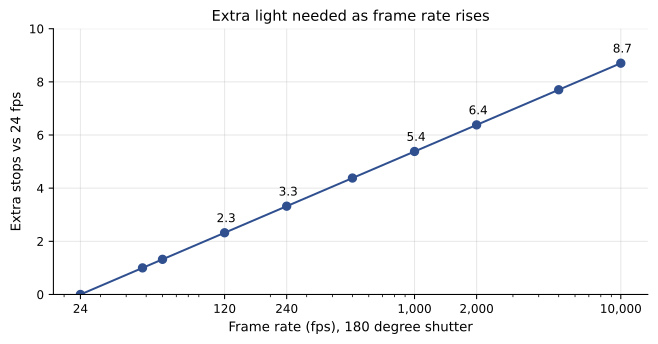
Shorter exposure means less light reaches the sensor for each frame. The number of stops of light lost compared with normal speed is:
Worked problem
How much more light at 1,000 fps?
A product shot is lit for f/8 at 24 fps with a 180-degree shutter and ISO 800. The cinematographer wants the same f/8 and ISO at 1,000 fps, 180-degree shutter. How many more stops of light are needed, and what does that mean in practice?
Show solution
- Normal exposure time: 1/48 s. High-speed exposure time: 1/2000 s.
- Ratio: \( (1/48) / (1/2000) = 2000/48 \approx 41.7 \).
- Stops: \( \log_2 41.7 \approx 5.4 \) stops.
- Each stop doubles the light, so the light must increase by about 41 times.
Answer: About 5.4 stops more light, roughly 41 times the original level. In practice, the gaffer brings in much larger fixtures, moves them closer, uses harder sources or accepts a wider aperture or higher ISO.
Because of the light requirement, high-speed tabletop sets are among the brightest places in filmmaking. Large HMIs, powerful LED fixtures and tungsten sources are placed close to small products. Heat can melt food, warp plastic and make talent uncomfortable, so cool LED sources are popular, and heat-sensitive subjects are kept out of the light until the take.
Flicker at high frame rates
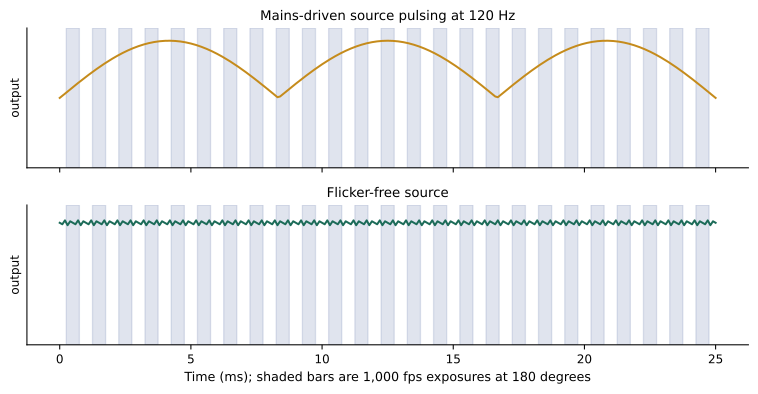
Many light sources flicker. Mains electricity alternates at 60 Hz in North America, and many sources pulse twice per cycle, at 120 Hz. At normal frame rates with a shutter synchronized to the mains, this flicker is invisible. At high frame rates, each frame captures a different part of the light's cycle, so brightness varies from frame to frame and the footage pulses visibly.
- Tungsten sources have thermal inertia, so their filaments cool only slightly between pulses. They flicker less but still show some variation at very high frame rates, especially small, low-wattage bulbs.
- HMI sources need flicker-free electronic ballasts, often with a special high-speed mode at high frequency.
- LED sources vary: some use pulse-width modulation dimming, which flickers at frequencies that may show at high speed. Fixtures marketed for high-speed work use constant-current drivers or very high PWM frequencies.
- Fluorescent tubes and practical lights in locations often flicker badly and must be tested or replaced.
- Daylight does not flicker, which makes it ideal when it is strong enough.
Testing is essential. Before a high-speed day, the camera team shoots each fixture at the planned frame rate and dimmer settings and watches for pulsing. Some fixtures are flicker-free only at full output; dimming them can introduce flicker.
Worked problem
Frames per flicker cycle
A practical light flickers at 120 Hz. How many frames does each flicker cycle span at 1,000 fps, and what happens at 240 fps?
Show solution
- Cycle period at 120 Hz: 1/120 s ≈ 8.33 ms.
- At 1,000 fps, frame interval = 1 ms; frames per cycle = 8.33.
- At 240 fps, frame interval = 4.17 ms; frames per cycle = 2.
Answer: At 1,000 fps each cycle spans about 8 frames, producing a visible wave of brightness; at 240 fps each cycle spans 2 frames, which can produce a fast flutter unless the shutter is matched to the cycle or the source is flicker-free.
Triggering and timing
High-speed cameras record in a loop. They continuously fill their memory and overwrite old frames until the operator presses a trigger. The trigger can be set to save frames before it, after it or around it.
- Pre-trigger: the camera keeps the frames recorded before the trigger. Useful when the operator reacts after an event, such as a balloon bursting.
- Post-trigger: the camera records after the trigger, useful when the event starts on cue.
- Centre trigger: the camera keeps some frames before and some after, a common default.
For repeatable effects, the action itself is triggered electronically. A solenoid drops a strawberry, a pneumatic ram fires a splash, or a robot arm throws liquid, all synchronized with the camera trigger so every take is timed to the millisecond. Laser beams or sound triggers can also start recording when something crosses a line.
Worked problem
Choosing a trigger position
A camera records 6 seconds of memory at 1,000 fps. The operator presses the trigger the moment they hear a cork pop, but their reaction time is about 0.25 s. The pop sequence lasts about 0.5 s. What trigger setting saves the event?
Show solution
- The event begins about 0.25 s before the trigger and ends about 0.25 s after.
- A pre-trigger or centre trigger that keeps at least 1 s before the trigger and 1 s after easily covers the event.
- With 6 s of memory, a centre trigger keeps 3 s on each side.
Answer: A centre or pre-trigger setting saves the event with plenty of margin; a post-trigger setting would miss the start.
Data, offload and workflow
After each take, the high-speed camera must offload its memory to storage before it can record again at full speed. Offloading can take a minute or more, which affects the rhythm of the day. Some cameras let the operator review the take and save only the useful part, which saves time and storage.
- Plan the number of takes and the offload time in the schedule.
- Trim takes to the useful frames before offloading when the camera allows it.
- Use fast media and a dedicated data wrangler or digital imaging technician.
- Record metadata: frame rate, shutter, trigger position and take notes.
- Review every take at playback speed with the director and client before moving on.
Worked problem
Storage for a high-speed day
A camera records 2K frames of about 3 MB each at 1,000 fps. Each saved take keeps 3 seconds. The day has 40 saved takes. How much storage is needed, and how long does a 3-second take play on screen at 25 fps?
Show solution
- Frames per take: 3 × 1,000 = 3,000.
- Data per take: 3,000 × 3 MB = 9,000 MB ≈ 9 GB.
- Day total: 40 × 9 GB = 360 GB, before backups.
- Screen time: 3,000 frames ÷ 25 fps = 120 s.
Answer: About 360 GB per copy, so about 720 GB to 1.1 TB with backups; each 3-second take becomes 2 minutes of slow-motion footage.
Lighting and art direction for slow motion
Slow motion reveals details that real-time viewing hides. Every dust particle, smudge, stray hair and wobble becomes visible. High-speed sets therefore need meticulous preparation.
- Clean surfaces and air: dust floating in a backlight becomes an obvious distraction at 1,000 fps.
- Plan movement: hair, fabric and liquids need wind, rigs and rehearsals to move beautifully.
- Light for the moment of action rather than the static frame; a splash crown may rise into an area that is dark.
- Use backlight and edge light to define fast-moving liquids and particles.
- Control the background so that motion reads clearly, often with dark or plain backgrounds.
The high-speed crew
Specialist high-speed cameras usually come with a technician from the rental house, who operates the camera system, manages triggers, offloads data and troubleshoots. The director of photography decides frame rate, exposure and composition; the technician makes sure the system works. On large jobs, effects rigs are built by a special effects team, and a robot arm operator may also be present (Lesson 5).
| Subject | Typical capture rate | Notes |
|---|---|---|
| Hair flip, fabric | 150 to 500 fps | Needs wind and rehearsal |
| Food drop, ingredient fall | 500 to 1,000 fps | Solenoid triggers help |
| Liquid splash crown | 1,000 to 2,000 fps | Very bright light, backlight |
| Athlete movement | 200 to 1,000 fps | Large spaces need lots of light |
| Glass breaking, balloons | 2,000 fps and higher | Safety glasses, effects team |
| Bullet, spark effects | 10,000 fps and higher | Specialist cameras and safety |
Common mistakes
MistakeChoosing frame rate without checking screen time.
InsteadCalculate the slowdown factor from the board's duration and the real event length.
MistakeIgnoring the light lost at high frame rates.
InsteadCalculate extra stops and plan larger or closer fixtures.
MistakeAssuming all LED lights are flicker-free.
InsteadTest every fixture at the planned frame rate and dimmer level.
MistakeUsing a post-trigger when reacting to an event.
InsteadUse pre- or centre-trigger so frames before the reaction are saved.
MistakeForgetting offload time in the schedule.
InsteadPlan offload minutes for each take and trim takes when possible.
Summary and key terms
- The slowdown factor is capture rate divided by playback rate; it sets how long events last on screen.
- High-speed cameras range from cinema cameras at 120–240 fps to dedicated cameras at thousands of frames per second.
- Exposure time falls as frame rate rises; 1,000 fps needs about 5.4 more stops than 24 fps at the same shutter angle.
- Mains-powered lights can flicker at 120 Hz; high-speed work needs flicker-free sources and testing.
- Cameras record in loops and use pre-, post- or centre-triggers; effects rigs synchronize action with the camera.
- Offload time and storage must be planned, and every take reviewed at playback speed.
- Slow motion reveals every detail, so sets must be clean, movement rehearsed and light placed for the action.
- High frame rate
- Capture at more frames per second than playback to create slow motion.
- Slowdown factor
- Capture rate divided by playback rate.
- Shutter angle
- The fraction of each frame interval during which the sensor is exposed, in degrees.
- Flicker
- Visible variation in brightness caused by pulsing light sources.
- Flicker-free ballast
- An electronic ballast that drives an HMI without visible flicker at high speed.
- Pre-trigger
- A setting that saves frames recorded before the trigger.
- Centre trigger
- A setting that saves frames both before and after the trigger.
- Solenoid
- An electrically operated actuator used to release objects on cue.
- Offload
- Transferring footage from a camera's internal memory to storage.
- High-speed technician
- The specialist who operates and manages a high-speed camera system.
Practice problems
Work each problem on paper first, then reveal the answer to check.
Slowdown factor at 500 fps played at 25 fps?
Show answer
20.
Exposure time at 240 fps with a 180-degree shutter?
Show answer
1/480 s.
Extra stops at 240 fps compared with 24 fps, same shutter?
Show answer
log₂(10) ≈ 3.3 stops.
How long does a 0.2 s event last on screen at k = 40?
Show answer
8 s.
Capture rate needed to make a 0.1 s event last 2 s at 24 fps?
Show answer
480 fps.
Why do tungsten lights flicker less?
Show answer
Thermal inertia keeps the filament glowing between pulses.
Frames per 120 Hz cycle at 2,000 fps?
Show answer
About 16.7.
What is a centre trigger?
Show answer
Saving frames both before and after the trigger.
Data for 2 s at 1,000 fps with 3 MB frames?
Show answer
6 GB.
Why keep sets very clean for slow motion?
Show answer
Dust and smudges become obvious.
Lesson quiz · 5 questions
Score 60% or more to complete this lesson.
Create a free account to save your progress, take quizzes and earn a certificate.