
CINE-301 · Lesson 10 of 12 · 27 min
Shot lists, storyboards, floor plans and previs
Shot design happens mostly before the camera rolls. In prep, directors and cinematographers translate the script into specific shots and communicate them to the crew, so that everyone, from the production designer to the gaffer and the 1st AD, knows what is needed. The main planning tools are the shot list, storyboards, floor plans and, increasingly, previsualization (previs) in 3D software or game engines. This lesson covers script breakdown for shot design, writing shot lists, storyboards and their styles, overhead floor plans, photo boards and location stand-ins, digital previs and virtual scouting, technical previs, and how to keep plans flexible on set.
Breaking down the script for shots
Shot design begins with reading the script closely, often many times. Directors and DPs identify the dramatic beats of each scene, the moments where something changes; whose point of view the scene belongs to; key moments that need emphasis; physical actions, props and effects; locations and time of day; and the emotional arc. From this analysis, they decide the approach for each scene: a oner, full coverage, a handheld observational style, a sequence of precise graphic shots, and so on. Many directors write notes in the margins of the script, draw small thumbnail sketches, or mark the beats where the camera should change. This is the creative foundation for all the planning documents that follow.
Shot lists
A shot list is a table of every planned shot for a scene or for the whole film, used to communicate the plan and organize the schedule. Typical columns include scene number, shot number or letter, shot size, angle, lens, movement, subject and action, the lines or section of the scene covered, equipment needed, and notes on effects, extras or special requirements. Shot numbers often use the scene number plus a letter, such as 12A, 12B, 12C, which also appears on the slate. Shot lists can be organized in story order for creative review and then reordered by setup for shooting (Lesson 11). They are living documents, updated after scouts, rehearsals and changes.
| Shot | Size / angle | Lens | Movement | Subject and action | Covers |
|---|---|---|---|---|---|
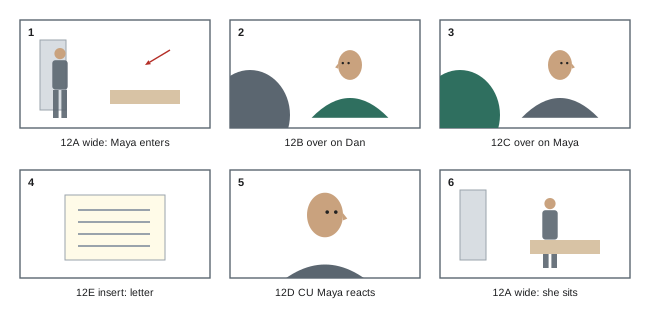
| 12A | Wide, eye level | 24 mm | Slow push in | Kitchen; Maya enters, crosses to the sink | Whole scene (master) |
| 12B | OTS on Maya over Dan | 40 mm | Static | Maya at sink, Dan at table | Lines 1–12 |
| 12C | OTS on Dan over Maya | 40 mm | Static | Dan at table | Lines 1–12 |
| 12D | CU Maya | 65 mm | Static | Maya reacts to the news | Lines 9–14 |
| 12E | Insert | 100 mm macro | Static | Letter on the table | Line 8 |
Storyboards
Storyboards are sequences of drawings showing each planned shot, like a comic strip of the film. They communicate composition, angle, size, movement and the relationship between shots more vividly than words, and are especially valuable for action sequences, visual effects, stunts, complex camera moves and scenes involving many departments. Storyboard styles range from rough stick-figure thumbnails drawn by the director, through clean professional illustrations by storyboard artists, to digital boards made with software that allows camera framing, timing and animatics, storyboards edited with timing and sound into a rough moving preview. Arrows indicate camera and character movement, and frame numbers link to the shot list. Some directors, such as Alfred Hitchcock and Ridley Scott, were known for detailed boards; others prefer to discover shots on set and board only key sequences.
Floor plans
Floor plans, also called overheads or camera plots, are top-down diagrams of a location or set showing furniture, doors and windows, actor positions and movement, camera positions with their angles of view, and sometimes lighting positions. They are excellent for planning coverage and the 180-degree line, because the geography is clear at a glance, and they help the gaffer, key grip and production designer understand where equipment and walls are needed. Floor plans can be drawn by hand on graph paper, made with simple drawing tools, or created with specialized software that calculates field of view for given lenses and sensor sizes. Combining a floor plan with a shot list, by numbering camera positions to match shot numbers, gives the crew a complete picture of each setup.
Worked problem
Checking a lens choice on a floor plan
On a floor plan, the camera position for a wide master is 4 m from the far wall of a set that is 5 m wide. The DP plans to use a Super 35 camera with a sensor width of about 24.9 mm. Which focal length will just cover the 5 m wall?
Show solution
- Horizontal angle needed: \(2 \arctan(2.5 / 4) \approx 2 \times 32° = 64°\).
- Focal length for a 24.9 mm sensor width: \(f = (24.9 / 2) / \tan(32°) \approx 12.45 / 0.625 \approx 19.9\) mm.
- An 18 mm lens would show slightly more than the wall, a 21 mm slightly less.
- If the camera can move back to 5 m, a 25 mm lens would cover the same width.
Answer: About 20 mm; an 18 mm lens gives a little margin, or the camera can move back and use a longer lens.
Photo boards and stand-ins on location
A practical alternative to drawn storyboards is the photo board: during location scouts or rehearsals, the director and DP photograph each planned shot using a phone or still camera with a viewfinder app that simulates the production camera's lenses and aspect ratio, sometimes with crew members standing in for actors. These photographs show real geography, light and lens perspective, and they can be arranged into boards or attached to the shot list. Director's viewfinder apps, such as Artemis, let users choose the camera, sensor mode, lens set and aspect ratio, and record the frame, lens and camera position for each shot. Photo boards are fast, accurate and particularly useful for smaller productions without storyboard artists.
Digital previs and virtual scouting
Previsualization uses 3D software, such as Blender, Maya, Cinema 4D or real-time game engines like Unreal Engine, to create animated rough versions of sequences before shooting. Previs lets filmmakers design complex action, effects and camera moves, test timing and editing, and communicate precisely with visual effects, stunts and camera teams. It is standard on large action and effects films and increasingly accessible to smaller productions through real-time engines and affordable assets. Virtual scouting places the director and DP inside a 3D model of a set or location, often in virtual reality, where they can "walk" through the space, choose camera positions and lenses, and record shots. For productions using LED volumes and virtual production, previs and virtual scouting are integral to designing both the virtual environments and the shots (CINE-302).
Technical previs
Technical previs, sometimes called techvis, adds real-world precision to previs: accurate dimensions of sets, lenses, camera heights, crane reach, dolly track lengths, speeds of vehicles and timing of moves. It answers practical questions such as whether a crane can reach a particular height, how long a track needs to be, whether a camera car can keep pace, or where to place a green screen. Techvis is particularly valuable for expensive, dangerous or one-chance shots, where getting the logistics right in advance saves time and risk. Simpler versions, using calculations on a floor plan as in the example above, are useful on any production.
| Planning tool | Best for | Limitations |
|---|---|---|
| Shot list | Every scene; scheduling and communication | Words only; no visual composition |
| Drawn storyboards | Action, effects, complex sequences | Time and skill; may not match real lenses |
| Photo boards | Real locations, accurate lenses | Needs access to locations and stand-ins |
| Floor plans | Coverage, the line, equipment positions | No sense of composition or performance |
| Animatic / previs | Timing, effects, complex moves | Cost and time; risk of over-planning |
| Techvis | Logistics of cranes, cars, rigs | Specialist skills and software |
Keeping plans flexible
Plans are tools, not contracts. On set, actors may discover blocking that works better than planned, the weather may change, a location may look different than expected, or the schedule may slip. Directors and DPs who know the purpose of each shot can adapt: if a planned crane shot is impossible, they ask what the shot was meant to achieve, such as revealing scale, and find another way. Good prep makes improvisation easier, not harder, because it frees attention for the unexpected. Many experienced filmmakers prepare thoroughly and then remain open to better ideas, keeping a prioritized list of the essential shots in case time runs short (Lesson 11).
The director's notebook
Many directors keep a working notebook or digital document for each scene, combining the script page, beats, references, thumbnails, a floor plan and the shot list. This scene book becomes the central reference in prep and on set, and it can be shared with the DP, 1st AD and script supervisor. Some directors write a short paragraph for each scene describing its purpose, the point of view and the feeling the audience should have, which helps everyone make consistent decisions. On the day, the director can glance at the notebook between setups to remember the plan and its reasons.
Location scouts and tech scouts
Planning shots depends on knowing the spaces. Location scouts, early in prep, find and evaluate places to shoot; the director and DP visit to judge whether each location suits the story, its light and its practicalities. Tech scouts, later in prep, bring heads of department to finalized locations to plan equipment, power, rigging, sound, parking and access. During tech scouts, the director and DP walk through each scene, showing where the camera will be and what it will see, and departments ask questions about their needs. Photographs, measurements and floor plans from scouts feed into shot lists and storyboards. Skipping tech scouts saves a day in prep but often costs more time during the shoot.
Sharing plans with the crew
Planning documents are useful only if the crew sees them. Productions typically distribute shot lists and storyboards with the call sheet or through a shared production app, post floor plans on set, and brief department heads at production meetings. The 1st AD may include the number of setups planned for each scene on the call sheet. On set, a printed shot list attached to the monitor or camera cart lets the camera crew anticipate the next setup and prepare lenses and equipment in advance, saving time.
Worked problem
Converting a shot list to shooting order
A scene's shot list in story order is: 5A wide master facing the window, 5B over on Ana facing the window, 5C over on Ben facing the door, 5D close-up of Ana facing the window, 5E close-up of Ben facing the door, 5F insert of a phone on the table. How should the shots be ordered for shooting?
Show solution
- Group by direction: facing the window are 5A, 5B and 5D; facing the door are 5C and 5E.
- Shoot the master 5A first, then 5B and 5D in the same direction, from wider to tighter.
- Turn around and shoot 5C and then 5E.
- Shoot the insert 5F last, possibly with a smaller crew or as a pickup.
Answer: Order: 5A, 5B, 5D, turnaround, 5C, 5E, then 5F.
Storyboards for different departments
Different departments read storyboards for different information. The production designer looks for what will be visible and what must be built or dressed; the gaffer looks at the direction of view to plan where lights can hide; the key grip looks at camera movements and heights; the visual effects supervisor marks shots that need effects work; the stunt coordinator checks action beats; and the 1st AD counts setups for the schedule. Annotating boards with these concerns, or holding a storyboard walkthrough meeting, makes the boards a shared planning tool rather than a director's private sketchbook.
Finally, planning documents should be versioned and dated, because shot lists and boards change frequently in prep and during the shoot. A clear label such as "Scene 12 shot list, version 4, 18 March" prevents departments from preparing for an outdated plan. Production apps and shared folders help keep everyone on the current version, and the 1st AD often confirms the latest version at each production meeting and on the call sheet.
Common mistakes
MistakePlanning shots without analysing the script's beats.
InsteadBreak down beats, point of view and emotion first.
MistakeShot lists without lines covered or equipment notes.
InsteadInclude coverage, lenses and special requirements.
MistakeStoryboards that ignore real lenses and spaces.
InsteadUse photo boards or viewfinder apps on location.
MistakeFloor plans without the line or camera numbers.
InsteadDraw the axis and number setups to match the shot list.
MistakeTreating plans as rigid contracts.
InsteadKnow each shot's purpose and adapt on set.
Summary and key terms
- Shot design starts with script breakdown into beats and point of view.
- Shot lists record every planned shot with size, lens, movement and coverage.
- Storyboards show composition and continuity visually; animatics add timing.
- Floor plans show geography, the line and camera positions.
- Photo boards and viewfinder apps use real locations and lenses.
- Previs, virtual scouting and techvis plan complex and costly shots.
- Plans should guide, not constrain, decisions on set.
- Script breakdown
- Analysis of a script for planning.
- Beat
- A moment where something changes in a scene.
- Shot list
- Table of planned shots.
- Storyboard
- Drawn sequence of planned shots.
- Animatic
- Storyboards edited with timing and sound.
- Floor plan
- Top-down diagram of set, actors and cameras.
- Photo board
- Storyboard made from photographs.
- Previs
- Animated 3D preview of shots and sequences.
- Virtual scouting
- Exploring a 3D model of a set to plan shots.
- Techvis
- Technical previs with real-world dimensions.
Practice problems
Work each problem on paper first, then reveal the answer to check.
What do directors look for in script breakdown?
Show answer
Beats, point of view, key moments, actions, arc.
Name five shot list columns.
Show answer
Shot number, size, angle, lens, movement, subject, lines covered.
How are shots usually numbered?
Show answer
Scene number plus letter, such as 12A.
When are storyboards most valuable?
Show answer
Action, effects, stunts, complex moves.
What is an animatic?
Show answer
Storyboards edited with timing and sound.
Why are floor plans good for coverage?
Show answer
They show geography and the line at a glance.
Horizontal angle to cover a 6 m wall from 4 m?
Show answer
About 74°.
What does a viewfinder app simulate?
Show answer
Camera, sensor, lenses and aspect ratio.
What does techvis add to previs?
Show answer
Real dimensions, rigs, speeds and timings.
What should you ask if a planned shot fails?
Show answer
What the shot was meant to achieve.
Lesson quiz · 5 questions
Score 60% or more to complete this lesson.
Create a free account to save your progress, take quizzes and earn a certificate.