
CINE-230 · Lesson 1 of 12 · 26 min
The language of camera movement
A moving camera changes what the audience sees, how they feel and where their attention goes. A slow push toward an actor's face draws the viewer into a character's thoughts; a sweeping crane shot reveals the scale of a city; a handheld shot running beside a character makes the audience share their panic. Movement is one of the most expressive tools a cinematographer has, and one of the most expensive: every move needs equipment, crew, rehearsal and time. This course covers the craft and technology of moving the camera, from tripods and fluid heads through dollies, track, sliders, jibs, cranes, telescopic cranes, Steadicam, gimbals, handheld rigs and vehicle mounts, to the grip department and the safety practices that keep everyone on set unharmed. This first lesson sets out the language of movement: the basic types of camera move, what they mean, how movement is motivated, and how to plan moves that serve the story.
Why the camera moves
In the earliest films, the camera rarely moved. Cameras were heavy, hand-cranked and mounted on rigid tripods, and filmmakers staged action in front of a fixed frame much as they would on a theatre stage. Within a few years, however, filmmakers discovered that moving the camera could create effects impossible in the theatre. Camera operators mounted cameras on trains, cars and boats to create travelling shots, sometimes called phantom rides. Giovanni Pastrone's Cabiria (1914) used slow tracking shots across its enormous sets, and the movement became known in some circles as the "Cabiria movement". In the 1920s, German filmmakers such as F. W. Murnau and cinematographer Karl Freund made the camera itself expressive, unchaining it from the tripod in films such as The Last Laugh (1924), where the camera rode on bicycles, cranes and the operator's body. Sound film briefly immobilized cameras inside soundproof booths around 1928 to 1930, but blimped cameras, dollies and cranes soon restored movement, and by the late 1930s elaborate crane shots were part of the Hollywood vocabulary.
Later innovations each changed what was possible: lightweight handheld cameras in the 1950s and 1960s enabled documentary and New Wave styles; the Steadicam, introduced in the mid-1970s, gave smooth movement anywhere a person could walk; remote heads and telescopic cranes in the 1980s and 1990s allowed the lens to fly through spaces and around actors; and motorized gimbals and drones in the 2010s brought stabilized movement to productions of every size. Today almost any movement is technically possible. The question is no longer whether the camera can move, but whether it should, and how.
The basic moves
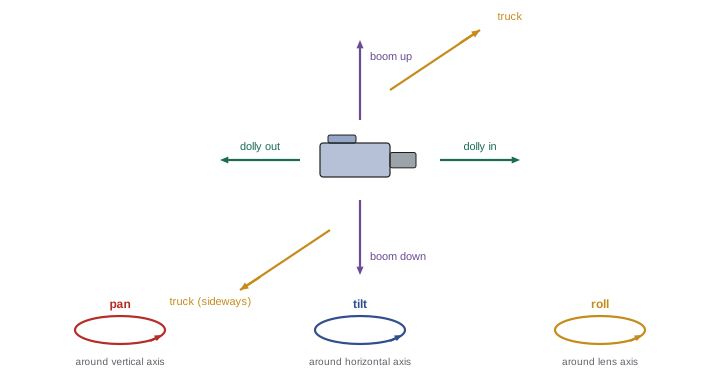
Camera movements are named by what the camera does. Rotational moves keep the camera in one place and turn it; translational moves carry the camera through space.
| Move | What the camera does | Typical equipment | Typical effect |
|---|---|---|---|
| Pan | Rotates horizontally around a vertical axis | Tripod head, remote head | Follows action, surveys a space, connects subjects |
| Tilt | Rotates vertically around a horizontal axis | Tripod head, remote head | Reveals height, follows vertical action |
| Roll (Dutch) | Rotates around the lens axis | Dutch head, remote head, gimbal | Unease, disorientation, energy |
| Dolly in / out (push / pull) | Moves toward or away from the subject | Dolly, slider, Steadicam | Intensifies or releases attention |
| Truck / track | Moves sideways, parallel to the subject | Dolly on track, slider | Accompanies movement, reveals layers |
| Boom / pedestal | Rises or descends vertically | Dolly arm, jib, pedestal, crane | Reveals, shifts perspective, elevates |
| Crane / arc | Combines height, reach and swing | Jib, crane, telescopic crane | Spectacle, scale, transitions |
| Follow and lead | Moves with a moving subject | Steadicam, gimbal, dolly, vehicle | Keeps audience with the character |
| Zoom | Changes focal length, no physical movement | Zoom lens | Magnifies, flattens, draws attention to the device |
Real shots often combine several moves at once. A dolly may push in while the operator pans to follow an actor and the dolly grip booms up as the actor stands; a crane may swing, telescope and descend while the remote head tilts and rolls. The skill lies in combining moves so that the result feels like one purposeful gesture rather than several unrelated motions.
Moving the camera versus zooming
A zoom and a dolly-in both make the subject larger in the frame, but they look very different. A zoom changes only magnification: the relationship between foreground and background stays the same, so the image simply enlarges, and the change in perspective is flat. A dolly-in physically moves the camera, so nearer objects grow faster than distant ones and parallax reveals the space: objects slide past each other, and the audience feels they are moving through the scene. Zooms have their own expressive history, notably in 1960s and 1970s cinema and in documentary, where a quick zoom suggests observation and immediacy; but when filmmakers want the audience to feel physical presence and depth, they move the camera. Combining a dolly-out with a zoom-in, keeping the subject the same size while the background appears to stretch or compress, creates the dolly zoom, famously used in Hitchcock's Vertigo (1958) and Spielberg's Jaws (1975).
Parallax and the sensation of movement
Parallax, the apparent shift of near objects against distant ones as the viewpoint moves, is what makes camera movement feel three-dimensional. The apparent angular speed of an object depends on its distance from the camera: for a camera moving sideways at speed \(v\), an object at distance \(d\) crosses the field of view at an angular rate of approximately:
An object at 1 m moves across the frame ten times faster than an object at 10 m. Cinematographers exploit this by placing foreground elements, such as door frames, plants, pillars or extras, close to the lens during tracking moves: their rapid movement gives the shot depth and energy, while the subject in the middle ground moves more slowly and the background barely shifts. Without foreground, a tracking shot past a distant wall can look almost static.
Worked problem
Foreground speed in a tracking shot
A dolly tracks sideways at 0.5 m/s past a café window. A pillar is 1.2 m from the lens, the actor 4 m away and the street outside 20 m away. Roughly how fast does each move across the frame, in degrees per second?
Show solution
- Pillar: \(\omega \approx 0.5 / 1.2 \approx 0.42\) rad/s, about 24° per second.
- Actor: \(0.5 / 4 = 0.125\) rad/s, about 7° per second.
- Street: \(0.5 / 20 = 0.025\) rad/s, about 1.4° per second.
- With a lens covering roughly 40° horizontally, the pillar crosses the frame in under 2 seconds, the actor would take about 6 seconds, and the street barely moves.
Answer: About 24°/s for the pillar, 7°/s for the actor and 1.4°/s for the street, so the foreground gives the move its sense of speed and depth.
Motivated and unmotivated movement
Movement is motivated when something in the scene or the story justifies it. Common motivations include following a character who walks, runs or drives; revealing information, such as craning up to show a crowd or tracking past a wall to reveal who is waiting; changing emphasis, such as pushing in as a character realizes something; connecting characters or spaces, such as panning between two people in conversation; and expressing a point of view, such as a handheld shot representing what a character sees. Unmotivated movement, a slow drift or push that no action prompts, can still be powerful when it expresses the filmmaker's attitude: an ominous creep toward a house, or a gentle float that suggests memory. The danger is movement for its own sake, which audiences experience as decoration or distraction. A good test is to ask what the audience would lose if the shot were static.
Movement, emotion and point of view
Different kinds of movement carry different emotional associations, though context always shapes meaning. Smooth, slow movement on a dolly or crane suggests control, calm, inevitability or grandeur. Handheld movement suggests immediacy, instability, documentary truth or a character's agitation. Floating Steadicam or gimbal movement can feel dreamlike, curious or ghostly. Rapid whip pans convey energy, surprise or comedy. Pushing in tends to increase intimacy and tension; pulling out tends to release tension, isolate a character or reveal context. Rising shots can suggest freedom, transcendence or detachment; descending shots can suggest arrival, oppression or a return to earth. Movement can align the audience with a character, travelling with them as a companion, or with an observer, watching from outside. Deciding whose point of view the camera represents in each scene shapes the choice of moves.
Speed, timing and the strobing problem
How fast the camera moves matters as much as which way. Moves timed to the rhythm of the actors and the scene feel natural; moves that start before the actor does, or lag behind, feel awkward. Camera speed also interacts with the frame rate and shutter. At 24 frames per second with a 180-degree shutter, fast pans across detailed subjects produce strobing or judder: vertical lines appear to jump rather than glide, because each frame captures the scene at a discrete moment. A common rule of thumb is that an object should take at least five to seven seconds to cross the frame during a pan to avoid objectionable judder, though the exact limit depends on the lens, subject detail, shutter angle and display. Following a moving subject, so that the subject remains sharp while the background blurs, reduces the problem, as does adding motion blur through a wider shutter or lowering the contrast of the background. High frame rate and HDR presentation make judder more visible.
Here \(\theta_{\text{h}}\) is the horizontal angle of view and \(\omega_{\text{pan}}\) the pan rate. With a 40° horizontal view, keeping \(t_{\text{cross}}\) above 6 seconds limits the pan rate to about 7° per second.
Planning moves: blocking, marks and rehearsal
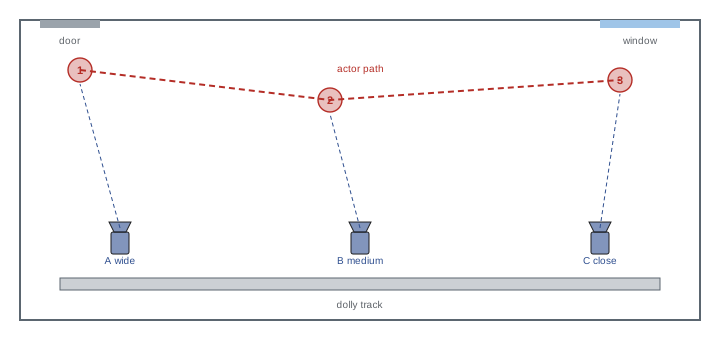
Camera movement is designed together with blocking, the movement of actors. Directors and cinematographers plan where actors will stand and move, then design camera moves that frame each beat of the scene. Marks on the floor, made with tape or chalk, show actors where to stop and the dolly grip where to land the dolly; focus pullers measure marks for each position. Rehearsals with stand-ins establish the timing, then with actors refine it. Complex moves may be planned with floor plans, overhead diagrams, storyboards, animatics or previsualization in 3D software, which can show exactly which lens, track length and crane reach a move needs. On the day, the move is rehearsed until the operator, dolly grip, focus puller and actors are coordinated, then shot in several takes. A well-planned move can replace several static setups, saving time, but a poorly planned one can consume an entire morning.
The oner and the long take
A oner, a scene played in a single continuous shot, is one of the most ambitious uses of movement. Famous examples include the opening of Orson Welles's Touch of Evil (1958), the Copacabana entrance in Martin Scorsese's Goodfellas (1990), long takes in Alfonso Cuarón's Children of Men (2006) and films designed to appear as one or two continuous shots, such as Sam Mendes's 1917 (2019), shot by Roger Deakins. Oners create immersion and tension, because the audience cannot escape the moment, and they showcase performance and choreography. They demand meticulous planning: lighting that works for every angle, hidden equipment and crew, moving walls, handoffs between camera systems, such as from a crane to a Steadicam operator or from a vehicle to a cable rig, and extensive rehearsal. Some apparent oners hide cuts in whip pans, dark frames or passing objects. A oner should serve the story; when it exists mainly to impress, audiences may admire the technique and lose the emotion.
Choosing equipment for a move
Once a move is designed, the crew chooses equipment based on the path, the speed, the terrain, the height and reach required, the weight of the camera package, the space available, the time and the budget. A straight push on a smooth floor might use a dolly on its wheels or a slider; a long move over rough ground needs track; a move that rises from the floor to above head height needs a dolly arm or jib; a move through doorways and up stairs needs Steadicam or a gimbal; a move over water or a crowd needs a crane, cable system or drone. Each tool has characteristic qualities of movement as well as practical limits, and the following lessons explore them in turn.
Common mistakes
MistakeMoving the camera because it looks impressive.
InsteadGive every move a story or emotional purpose.
MistakeUsing a zoom when physical presence is needed.
InsteadDolly to create parallax and depth.
MistakeTracking past a featureless background.
InsteadAdd foreground elements for depth and speed.
MistakePanning fast across detailed scenes at 24 fps.
InsteadSlow the pan or follow the subject to reduce judder.
MistakeDesigning moves without blocking and rehearsal.
InsteadPlan moves with marks, floor plans and rehearsals.
Summary and key terms
- Camera movement developed from fixed tripods to cranes, Steadicam, remote heads and gimbals.
- Rotational moves turn the camera; translational moves carry it through space.
- Dollying creates parallax; zooming only magnifies.
- Angular speed of objects is about v/d, so foreground adds depth to moves.
- Movement should be motivated by action, revelation, emphasis or point of view.
- Pan speed and frame rate affect judder; slow pans or follow subjects.
- Moves are planned with blocking, marks, floor plans and rehearsal.
- Pan
- Horizontal rotation of the camera.
- Tilt
- Vertical rotation of the camera.
- Dutch angle
- Camera rolled around the lens axis.
- Dolly in
- Moving the camera toward the subject.
- Truck
- Moving the camera sideways.
- Boom
- Raising or lowering the camera vertically.
- Parallax
- Apparent shift of near objects against far ones.
- Dolly zoom
- Dolly and zoom in opposite directions to keep the subject size.
- Judder
- Jerky motion from fast movement at low frame rates.
- Oner
- A scene filmed in one continuous shot.
Practice problems
Work each problem on paper first, then reveal the answer to check.
What did The Last Laugh (1924) demonstrate?
Show answer
An unchained, expressive moving camera.
Name the three rotational moves.
Show answer
Pan, tilt and roll.
How does a zoom differ from a dolly-in?
Show answer
A zoom only magnifies; a dolly creates parallax.
Angular speed of an object 2 m away with the camera moving 1 m/s?
Show answer
About 0.5 rad/s, roughly 29°/s.
Give three motivations for movement.
Show answer
Following, revealing, emphasis, connecting, point of view.
What does pulling out often suggest?
Show answer
Release, isolation or revealing context.
Maximum pan rate for a 6 s crossing of a 48° view?
Show answer
About 8°/s.
What are marks for?
Show answer
Positions for actors, dolly and focus.
Name a famous oner.
Show answer
Touch of Evil opening, Goodfellas Copacabana.
Name three factors in choosing movement equipment.
Show answer
Path, speed, terrain, height, weight, space, time, budget.
Lesson quiz · 5 questions
Score 60% or more to complete this lesson.
Create a free account to save your progress, take quizzes and earn a certificate.