
AWS-104 · Lesson 7 of 12 · 19 min
AWS Organizations and consolidated billing
▶ Video coming soon A video version of this lesson is on the way.
The sandbox was one AWS account. Production will be several. On November 10, after the tagging session, Gwen draws the account structure Cascade Ridge will use and explains why a veterinary group with 420 staff needs more than one AWS account at all. The answer is partly about security and partly about money, and both depend on AWS Organizations.
Why more than one account
An AWS account is a hard boundary. Resources, permissions and limits in one account do not affect another unless you connect them on purpose. Using separate accounts for different purposes gives several benefits at once:
- Security isolation. A mistake or a compromised password in the development account cannot touch production data.
- Clear costs. Each account's charges appear separately on the bill, so production costs are not mixed with experiments, even before tags are perfect.
- Separate limits. Service quotas apply per account, so a runaway test cannot use up production's capacity.
- Simpler permissions. People can be given broad rights in a sandbox and narrow rights in production.
The cost of many accounts is managing them. Without a central tool, each account would have its own bill, its own payment method and its own settings. AWS Organizations solves that.
What AWS Organizations is
AWS Organizations lets you create and manage a group of AWS accounts centrally. One account is the management account: it creates the organization, invites or creates member accounts, and pays the bill for all of them. Accounts can be grouped into organizational units (OUs), and policies can be attached to the organization, to OUs or to individual accounts. AWS Organizations itself has no charge.
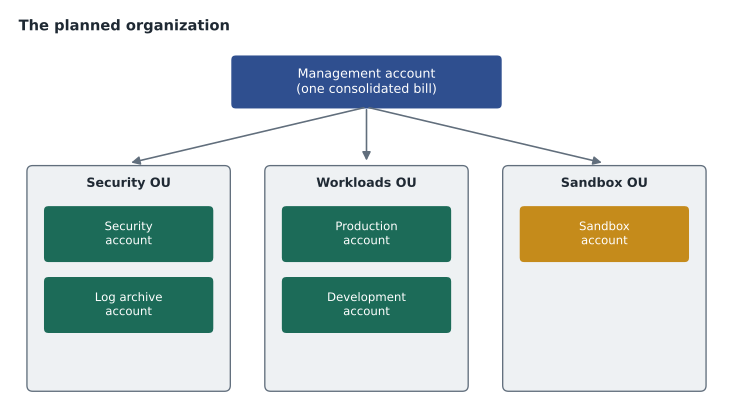
| Account | OU | Purpose |
|---|---|---|
| Management | Root of the organization | Billing, organization settings and nothing else |
| Security | Security | Security tooling and the security team's access |
| Log archive | Security | Central, protected copies of CloudTrail and other logs |
| Production | Workloads | VetLedger, imaging, BookVet in production |
| Development | Workloads | Testing new versions before production |
| Sandbox | Sandbox | Learning and experiments, with a strict budget |
Gwen keeps the management account empty of workloads. It has special powers over the whole organization, so the fewer people and resources inside it, the safer. The sandbox, which started life as a standalone account in October, will be invited into the organization as a member account.
Consolidated billing
Consolidated billing is the part of AWS Organizations that combines the charges of every member account into one bill paid by the management account. It brings several benefits that the exam expects you to name:
- One bill and one payment method. Lorraine receives one invoice for all accounts, with each account's charges itemized.
- Combined usage for volume pricing. Usage is added up across accounts for services with volume tiers, such as S3 storage or data transfer, so the organization reaches cheaper tiers sooner than separate accounts would.
- Shared commitments. Reserved Instance and Savings Plan discounts can apply to matching usage in any account of the organization (lesson 2), unless the management account turns off sharing for some accounts.
- Easy cost tracking per account. Cost Explorer and the Cost and Usage Report break costs down by linked account.
- No extra charge. Consolidated billing is free.
# Illustrative S3 storage tiers: first 50 TB at one rate, next 450 TB cheaper.
def monthly(gb):
    first = min(gb, 50_000) * 0.023
    rest = max(gb - 50_000, 0) * 0.022
    return first + rest
accounts = {"production": 42_000, "development": 6_000, "backup": 40_000}
separate = sum(monthly(gb) for gb in accounts.values())
combined = monthly(sum(accounts.values()))
print(f"Billed separately : {separate:9.2f} USD")
print(f"Consolidated      : {combined:9.2f} USD")
print(f"Difference : {separate - combined:9.2f} USD a month")Billed separately : 2024.00 USD Consolidated : 1986.00 USD Difference : 38.00 USD a month
What this code does
It applies illustrative tiered S3 pricing, where the first 50 terabytes cost slightly more per gigabyte than the next tier, to three accounts billed separately and to the same storage combined under consolidated billing. Combining the accounts pushes part of the storage into the cheaper tier. The difference shows a small monthly saving from consolidated billing.
The saving in this illustrative example is modest, because the price step between tiers is small. For organizations with very large usage, combining usage across accounts can matter more. The bigger practical benefits for Cascade Ridge are one bill, shared commitments and clear per-account costs.
The Free Tier in an organization
One rule surprises people: an organization is treated as one customer for Free Tier offers. The legacy free tier allowances and always-free amounts apply across the whole consolidated billing family, not per member account. Creating many accounts does not multiply free usage. Lesson 8 covers the Free Tier in detail.
Allocating costs between accounts
With consolidated billing, the management account pays, but Lorraine still wants to charge costs back to the budgets that caused them. Several tools help:
- Linked account is a dimension in Cost Explorer, Budgets and the Cost and Usage Report, so each account's costs can be seen and budgeted separately.
- Cost allocation tags divide costs within an account (lesson 6).
- AWS Cost Categories combine accounts, tags and services into business groupings, such as "clinical systems" or "IT platform".
- Commitment sharing settings decide whether a Savings Plan bought for production may also discount development.
Some organizations also use AWS Billing Conductor to show internal groups a customized version of their costs, for example with internal rates instead of AWS discounts. Cascade Ridge does not need that, but large enterprises and resellers do.
Service control policies and governance
AWS Organizations also controls what accounts may do. A service control policy (SCP) sets the maximum permissions available in the accounts it is attached to. Even an administrator in a member account cannot do something an SCP denies. Gwen plans a few cost-related SCPs: one that allows resources only in the two chosen Regions, which also supports data residency; one that stops anyone from leaving the organization; and, for the sandbox, one that denies very large instance types. Organizations also supports tag policies, which define allowed tag keys and values, and backup policies for AWS Backup.
For a larger landing zone with ready-made guardrails, AWS offers AWS Control Tower, which sets up a multi-account organization following AWS best practices. Gwen considers it, then decides to start with a small, hand-built organization the team can understand, and revisit Control Tower in 2027.
Who pays, who sees
In the management account, Lorraine's finance team sees the full bill and every account's charges. In a member account, people with billing permissions see that account's own costs; they do not see other accounts. Payment methods, invoices and tax settings are handled in the management account. This separation is useful: Kwame can see BookVet's costs in the production account's Cost Explorer, while only finance can change how the organization pays.
# Read-only: list member accounts and the organization's structure.
aws organizations list-accounts
aws organizations list-organizational-units-for-parent --parent-id r-examplerootid
Bringing the sandbox into the organization
The sandbox was created on its own in October, so it already has a payment method and its own bill. Joining the organization takes a few steps, and Gwen walks Mateo through them in order.
- Create the organization from the new management account, with all features turned on so that policies such as SCPs and tag policies can be used.
- Invite the sandbox account from the management account. An invitation is sent to the sandbox's root email address.
- Accept the invitation from the sandbox account. From that moment, its charges move to the consolidated bill.
- Move it to the Sandbox OU, where the sandbox SCPs apply.
- Remove its old payment method if no longer needed, and check its alternate contacts.
New accounts for production, development, security and logs are created directly from the management account rather than invited, which is quicker and keeps their root credentials under central control from the start.
Sharing commitments on purpose
Commitment sharing is usually a benefit, but it can surprise people. Suppose development buys nothing and production buys a Savings Plan. In a quiet production hour, unused commitment flows to development's usage, and development's costs fall. That is good for the organization's total, but it means development's bill is lower than its true cost. If a department needs to see its own unsubsidized cost, the management account can turn off sharing for it, or finance can use Cost Explorer's views of amortized and net costs to show what each account would have paid.
# Illustrative: one account's Savings Plan helping another in a quiet hour.
commitment = 3.00            # USD per hour of On-Demand-equivalent usage covered
prod_usage = 2.40            # production's eligible usage this hour
dev_usage = 1.10             # development's eligible usage this hour
used_by_prod = min(prod_usage, commitment)
left_over = commitment - used_by_prod
used_by_dev = min(dev_usage, left_over)
print("used by production :", round(used_by_prod, 2))
print("shared to dev      :", round(used_by_dev, 2))
print("unused this hour :", round(left_over - used_by_dev, 2))used by production : 2.4 shared to dev : 0.6 unused this hour : 0.0
What this code does
It shows how a Savings Plan bought in one account can cover another account in the same organization during a single hour. The commitment is applied to production's eligible usage first, and whatever is left over goes to development. Here production uses most of it and development picks up the rest, so none of the commitment is wasted.
Leaving and closing accounts
An account can leave an organization only if it can stand alone, which means it needs its own payment method and contact details; an SCP can prevent member accounts from leaving at all. Accounts that are no longer needed can be closed. A closed account enters a period during which it can be reopened, and resources left in it may still be billed until they are gone, so the safe order is to delete resources first, then close the account. Mateo notes this for the old intranet wiki, which will be retired rather than migrated.
A bill with several accounts
On a consolidated bill, the management account sees the total and a breakdown by account, each with its own services and charges. Discounts and credits appear where AWS applied them, and commitment benefits shared from one account show up as reduced charges in another. When Lorraine first sees the planned layout, she asks for two numbers every month: the organization's total, which she pays, and each account's share, which she charges back to the right budget. Cost Explorer grouped by linked account gives her both without any spreadsheet work.
Gwen adds one caution. The management account itself should have almost no charges of its own. If its line ever grows, someone has started running workloads in the account that should only handle billing and governance, and that should be moved out at once.
Mateo writes the structure into the team wiki with one sentence per account explaining its purpose, who may use it and which budget it belongs to. When someone later asks to create a new account for a project, the question to answer first is which OU it belongs in and who will own its costs. Accounts are cheap to create, but every account is another set of costs, contacts and settings that someone has to look after, so the team agrees to create new ones only for a clear reason, such as a separate environment or a separate security boundary.
Worked problem
Why one bill helps
In the old world, each Cascade Ridge system had its own supplier invoice. With AWS, the team could open separate accounts with separate cards, or one organization. Give three reasons the organization with consolidated billing is better.
Show solution
- One invoice and payment method for finance, with each account itemized.
- Usage combined across accounts for volume pricing, and commitments shared between accounts.
- Central control through SCPs and tag policies, while each account stays isolated for security.
Answer: One bill with per-account detail, combined volume pricing and shared commitments, and central governance with account isolation.
Common mistakes
MistakeConsolidated billing costs extra.
InsteadConsolidated billing is part of AWS Organizations, which has no charge.
MistakeEach member account gets its own Free Tier.
InsteadThe organization is treated as one customer for Free Tier offers.
MistakeMember account administrators can do anything an SCP denies if their IAM policy allows it.
InsteadAn SCP sets the maximum permissions in an account; IAM cannot exceed it.
MistakeThe management account is a good place to run workloads.
InsteadKeep the management account for billing and organization tasks only, because of its powers over all accounts.
Summary and key terms
- Separate AWS accounts isolate security, costs and limits.
- AWS Organizations manages them centrally: a management account creates the organization, owns member accounts grouped in OUs, and pays one consolidated bill.
- Consolidated billing gives one bill and payment method, combines usage for volume pricing, shares Reserved Instance and Savings Plan benefits across accounts, and itemizes costs by linked account, at no charge.
- The organization counts as one customer for the Free Tier.
- Costs are allocated with linked account views, tags and Cost Categories.
- Service control policies, tag policies and backup policies govern accounts centrally, and AWS Control Tower can set up a best-practice multi-account landing zone.
- AWS Organizations
- A service for managing many AWS accounts centrally
- Management account
- The account that creates an organization and pays its consolidated bill
- Member account
- An account that belongs to an organization
- Organizational unit
- A group of accounts within an organization, used to apply policies
- Consolidated billing
- Combining the charges of all accounts in an organization into one bill
- Service control policy
- An Organizations policy that sets the maximum permissions in accounts
- Tag policy
- An Organizations policy that defines allowed tag keys and values
- AWS Control Tower
- A service that sets up and governs a multi-account environment with guardrails
Practice problems
Work each problem on paper first, then reveal the answer to check.
Who pays the bill in an organization with consolidated billing?
Show answer
The management account.
Name two cost benefits of consolidated billing.
Show answer
Combined usage for volume pricing tiers and shared Reserved Instance and Savings Plan discounts; also one bill.
Does creating more member accounts give more Free Tier usage?
Show answer
No; the organization is treated as one customer.
What does a service control policy do?
Show answer
It sets the maximum permissions available in the accounts it applies to.
Lesson quiz · 5 questions
Score 60% or more to complete this lesson.
Create a free account to save your progress, take quizzes and earn a certificate.