
AWS-104 · Lesson 2 of 12 · 20 min
Compute purchase options: On-Demand, Savings Plans, Reserved and Spot
▶ Video coming soon A video version of this lesson is on the way.
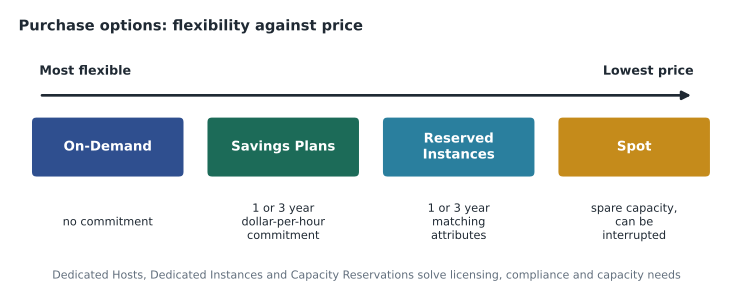
On November 4, Gwen draws a long horizontal line on the whiteboard. At the left end she writes "flexible", at the right end "cheap". "Every way of paying for EC2 sits somewhere on this line," she says. "The more you promise AWS, the less you pay per hour. The trick is to promise only what you are sure you will use."
Compute is usually the largest part of a cloud bill, and it was the largest line on the sandbox invoice. This lesson covers the purchase options the Cloud Practitioner exam expects you to compare: On-Demand Instances, Savings Plans, Reserved Instances, Spot Instances, Dedicated Hosts, Dedicated Instances and Capacity Reservations. It ends with the blend Gwen recommends for Cascade Ridge's production systems once they have run long enough to show a steady pattern.
On-Demand Instances
On-Demand is the default. You launch an instance, pay a fixed rate per second or per hour while it runs, and stop paying when you stop or terminate it. There is no commitment and no up-front payment. On-Demand suits work that is short, unpredictable or new: experiments, development servers, a test of a vendor's software, a sudden spike, or any workload whose long-term size you do not know yet.
Its weakness is price. On-Demand is the most expensive way to run a server for a long time. Everything else on Gwen's line is a way to pay less for usage you can predict. That is why AWS advice is to start new workloads On-Demand, measure them, and only then commit.
Savings Plans
A Savings Plan is a commitment to spend a fixed amount per hour on compute, measured in US dollars per hour, for a one-year or three-year term. In return, usage up to that amount is charged at a lower rate. Usage above the commitment is charged at normal On-Demand rates. If your usage falls below the commitment in some hour, you still pay the committed amount for that hour. Savings Plans can be paid all up front, partly up front or with no up-front payment; paying more up front and choosing three years give the biggest discounts.
AWS currently offers four types, and the exam expects you to know the first two well:
| Savings Plan type | What it covers | Flexibility | Largest stated discount |
|---|---|---|---|
| Compute Savings Plans | EC2 in any family, size, Region, operating system or tenancy, plus AWS Fargate and AWS Lambda | Highest: you can change instance types or Regions freely | Up to 66 off every 100 dollars of On-Demand cost |
| EC2 Instance Savings Plans | EC2 in one instance family in one Region (any size, operating system or tenancy within it) | Lower: locked to a family and Region | Up to 72 off every 100 |
| SageMaker AI Savings Plans | Amazon SageMaker AI instance usage | Any family, size, Region or component | Up to 64 off every 100 |
| Database Savings Plans | Several managed databases, including Amazon RDS, Aurora and DynamoDB | Across supported database services | Up to 35 off every 100 (introduced in December 2025) |
Mateo asks why anyone would pick the less flexible EC2 Instance Savings Plan. "A slightly bigger discount," Gwen says, "if you are very sure you will stay in one family in one Region for the whole term. Compute Savings Plans cost a little more but survive changes in architecture, such as moving BookVet from EC2 to Lambda in phase 2."
Reserved Instances
Reserved Instances (RIs) are the older commitment model. An RI is not a server; it is a billing discount applied to matching On-Demand usage. You commit to an instance type and other attributes for one or three years, and any running instance that matches those attributes is billed at the lower RI rate. Like Savings Plans, RIs offer All Upfront, Partial Upfront and No Upfront payment options.
Reserved Instances exist for EC2 and for several managed services such as Amazon RDS, Amazon ElastiCache, Amazon Redshift and Amazon OpenSearch Service, which matters for Cascade Ridge's SQL Server database in RDS. For EC2, AWS now generally recommends Savings Plans because they are simpler and more flexible, but the exam still tests how RIs behave.
Reserved Instance flexibility
RIs are less rigid than they first appear, and the exam guide lists "Reserved Instance flexibility" as a skill. The main points are these:
- Standard and Convertible. A Standard RI gives the larger discount but its attributes can be changed only in limited ways. A Convertible RI gives a smaller discount but can be exchanged for an RI with different attributes, such as another instance family, as long as the new one is of equal or greater value.
- Regional and zonal scope. A regional RI applies its discount to matching usage in any Availability Zone of its Region. A zonal RI is tied to one Availability Zone and also reserves capacity there.
- Instance size flexibility. A regional RI for Linux in a given family can apply across sizes in that family. A discount bought for one large instance can cover two medium instances of the same family, because the discount is shared by a normalized size.
- Selling unused Standard RIs. Standard RIs that are no longer needed can, subject to conditions, be listed for sale in the Reserved Instance Marketplace.
Reserved Instances and Savings Plans in AWS Organizations
Cascade Ridge will run several AWS accounts under AWS Organizations (lesson 7). Commitment discounts follow the money: by default, the benefit of an RI or Savings Plan bought in any account of the organization can apply to matching usage in any other account in the same consolidated billing family. AWS first applies the discount to the account that bought it, then shares any unused benefit with other accounts. The management account can turn off this sharing for particular accounts if, for example, a department that paid for a commitment wants to keep its benefit.
This sharing is one reason Gwen wants commitments bought centrally. If the development account and the production account each bought their own plan, unused hours in one could still help the other, but planning one commitment for the whole organization is simpler and wastes less.
Spot Instances
Spot Instances use spare EC2 capacity that AWS is not currently selling at On-Demand rates. AWS states that Spot can cost up to 90 out of every 100 dollars less than On-Demand. The catch is that AWS can take the capacity back when it needs it, giving the instance a short interruption notice (two minutes) before it is stopped or terminated.
Spot suits work that can be interrupted and restarted without harm: batch jobs, image processing, test environments that can be rebuilt, rendering, data analysis and stateless web servers behind a load balancer that has other servers too. It does not suit a single database server or anything that must not stop. For Cascade Ridge, Gwen suggests Spot for a nightly job that converts radiograph images into small previews: if a Spot instance is interrupted, the job simply picks up the remaining images on the next instance.
Dedicated Hosts, Dedicated Instances and Capacity Reservations
Three more options appear in the exam guide. They solve specific problems rather than general cost.
| Option | What it is | Typical reason |
|---|---|---|
| Dedicated Hosts | A physical server fully dedicated to your use, with visibility of its sockets and cores | Bringing your own software licences that are counted per socket or per core, or strict compliance needs |
| Dedicated Instances | Instances on hardware dedicated to your account, without host-level visibility or control | Compliance rules that require single-tenant hardware |
| On-Demand Capacity Reservations | Reserved EC2 capacity in a specific Availability Zone, billed at On-Demand rates whether used or not | Guaranteeing capacity for a critical event or a disaster recovery plan; can be combined with Savings Plans or regional RIs for a discount |
Dedicated Hosts often come up with Microsoft licences. If Cascade Ridge chooses to bring its own SQL Server licences, some licence terms may require dedicated hardware, which is why Mateo's licence check from lesson 1 matters before any purchase.
Choosing an option
Gwen gives Mateo a short decision path for any compute workload.
- Is the workload new or its size unknown? Run it On-Demand and measure it for several weeks.
- Can it be interrupted and restarted safely? Consider Spot for some or all of its capacity.
- Will a baseline of usage run steadily for at least a year? Cover that baseline with a Savings Plan (or RIs for services such as RDS).
- Is there a licensing or compliance reason for single-tenant hardware? Consider Dedicated Hosts or Dedicated Instances.
- Must capacity be guaranteed in one Availability Zone? Add a Capacity Reservation.
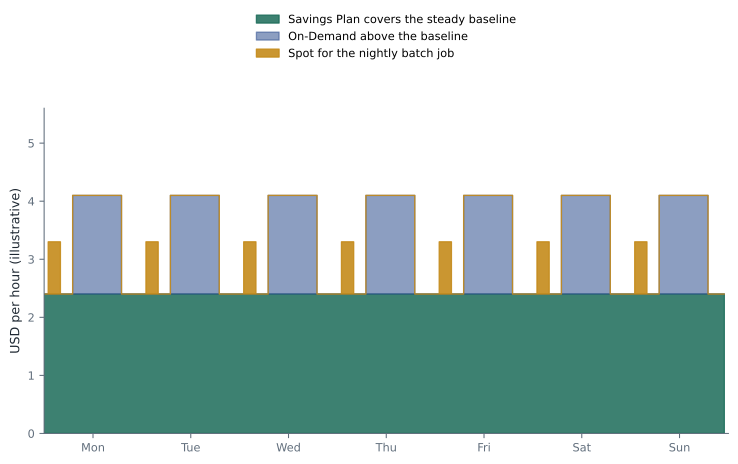
The usual result is a blend: commitments cover the steady base of usage that is always running, On-Demand covers the variable part on top, and Spot covers interruptible work. Committing to the peak would waste money in every hour below the peak.
Working out a commitment
Cascade Ridge's production systems do not exist yet, so Gwen uses a projected pattern to show the method. Suppose the planned production EC2 usage costs about 2.40 USD an hour On-Demand overnight and up to 4.10 USD an hour during clinic hours, and a three-year Compute Savings Plan offers an illustrative rate that is 40 cents cheaper per On-Demand dollar.
# Illustrative hourly On-Demand spend for one week: 168 hours.
day = [4.10] * 12 + [2.40] * 12           # 12 busy hours, 12 quiet hours
week = day * 7
discount = 0.40                           # illustrative Savings Plan discount
def cost(commit):
    # commit is On-Demand-equivalent USD per hour covered by the plan
    total = 0
    for od in week:
        covered = min(od, commit)
        total += commit * (1 - discount)    # pay the plan every hour
        total += od - covered               # the rest at On-Demand
    return total
on_demand = sum(week)
for commit in [0, 1.5, 2.4, 3.0, 4.1]:
    c = cost(commit)
print(f"commit {commit:4.1f}/h weekly cost {c:7.2f} saving {on_demand - c:6.2f}")commit 0.0/h weekly cost 546.00 saving 0.00 commit 1.5/h weekly cost 445.20 saving 100.80 commit 2.4/h weekly cost 384.72 saving 161.28 commit 3.0/h weekly cost 394.80 saving 151.20 commit 4.1/h weekly cost 413.28 saving 132.72
What this code does
It models a week of illustrative On-Demand spending with 12 busy and 12 quiet hours each day, then tests Savings Plan commitments of different sizes. Each hour the plan is paid at a discount whether or not it is used, and any spending above the commitment is charged at the On-Demand rate. The table shows the saving grows until the commitment matches the quiet-hour level and then shrinks, because a larger commitment is partly wasted in quiet hours.
The saving grows until the commitment reaches the steady overnight level of 2.40, then shrinks: above the baseline, the plan pays for hours that are not always used. That is the whole idea of committing to the baseline in one small program. The exact discount will differ, but the shape of the answer does not.
Gwen adds a rule of thumb for Lorraine: wait until production has run steadily for about three months, use the Savings Plans recommendations in the console (which look at your real usage history), and start with a commitment a little below the recommended amount. More can always be added later; a commitment cannot be cancelled.
What the bill shows
After a commitment is in place, each line on the bill shows how usage was covered. Cost Explorer (lesson 6) has reports for utilization (how much of the commitment was used) and coverage (how much of the eligible usage the commitment covered). High utilization with modest coverage is normal for a careful buyer. Low utilization means the commitment is too large.
Worked problem
Choosing for three workloads
Cascade Ridge has (1) the VetLedger application servers, expected to run all day every day for years; (2) a two-week load test before cutover; (3) the nightly preview-image conversion job, which can restart if stopped. Which purchase option suits each?
Show solution
- Steady, long-running servers: cover the baseline with a Compute Savings Plan once usage is measured.
- A two-week test with no long-term need: On-Demand.
- An interruptible batch job: Spot.
Answer: Savings Plan for the steady servers, On-Demand for the short test, Spot for the restartable batch job.
Common mistakes
MistakeA Reserved Instance is a server that AWS keeps for you.
InsteadAn RI is a billing discount applied to matching usage; only zonal RIs also reserve capacity.
MistakeA Savings Plan covers all usage at the discounted rate.
InsteadIt covers usage only up to the hourly commitment; usage above it is billed at On-Demand rates.
MistakeSpot Instances are cheap, so they suit the main database.
InsteadSpot capacity can be reclaimed with a short notice, so it suits interruptible work, not a single critical server.
MistakeA commitment should match peak usage.
InsteadCommitting to the peak wastes money in quieter hours; commit to the steady baseline.
Summary and key terms
- On-Demand has no commitment and the highest rate; it suits new, short or unpredictable work.
- Savings Plans commit to a dollar amount per hour of compute for one or three years and come in Compute, EC2 Instance, SageMaker AI and Database types.
- Reserved Instances are billing discounts for matching usage, available as Standard or Convertible and as regional or zonal, with size flexibility for regional Linux RIs.
- In an organization, RI and Savings Plan benefits are shared across accounts by default.
- Spot uses spare capacity at large discounts but can be interrupted with a two-minute notice.
- Dedicated Hosts, Dedicated Instances and Capacity Reservations solve licensing, compliance and capacity needs.
- The best result is usually a blend that commits only to the steady baseline.
- On-Demand Instance
- An instance paid per second or hour with no commitment
- Savings Plan
- A one- or three-year commitment to a dollar amount of usage per hour in exchange for lower rates
- Reserved Instance
- A billing discount for matching usage in exchange for a one- or three-year commitment
- Convertible RI
- An RI that can be exchanged for one with different attributes
- Spot Instance
- Spare EC2 capacity at a large discount that AWS can reclaim with short notice
- Dedicated Host
- A physical server dedicated to one customer with visibility of sockets and cores
- Capacity Reservation
- Reserved EC2 capacity in one Availability Zone billed at On-Demand rates
- Coverage
- The share of eligible usage paid for by commitments
Practice problems
Work each problem on paper first, then reveal the answer to check.
Which Savings Plan type would still apply if BookVet moved from EC2 to AWS Lambda?
Show answer
A Compute Savings Plan, because it covers EC2, Fargate and Lambda.
What happens to usage above a Savings Plan's hourly commitment?
Show answer
It is billed at On-Demand rates.
Why might a company buy a Dedicated Host?
Show answer
To use licences counted per socket or per core, or to meet a compliance need for dedicated hardware.
By default, can a Savings Plan bought in one member account reduce costs in another account in the same organization?
Show answer
Yes; the benefit is shared across the consolidated billing family unless sharing is turned off.
Lesson quiz · 5 questions
Score 60% or more to complete this lesson.
Create a free account to save your progress, take quizzes and earn a certificate.