
AWS-104 · Lesson 1 of 12 · 22 min
Pay-as-you-go pricing fundamentals
▶ Video coming soon A video version of this lesson is on the way.
On the morning of November 3, 2026, Lorraine Beaudry, the chief financial officer of Cascade Ridge Veterinary Partners, forwards an email to Gwen Halvorsen and Mateo Ruiz with one line added at the top: "Why is a test account costing more than our phone system?" The email is the first AWS invoice for the sandbox account the team opened on October 5 to try things out before the pilot. It shows a total of 612.40 US dollars (all figures in this course are illustrative unless a lesson says otherwise).
Nobody had meant to spend that much. Mateo had launched a few servers, copied some imaging files and followed a couple of tutorials. Gwen sees an opportunity. "Before we move a single clinic," she tells Mateo, "you need to be able to read this bill, predict the next one and control the one after that. Billing and pricing are a full domain of the Cloud Practitioner exam, but more importantly, Lorraine will ask you about every line." Over the next week and a half she runs a series of short billing sessions, and this course follows them.
This first lesson explains how AWS charges for what you use. Every later lesson builds on these ideas: the purchase options in lesson 2, storage and transfer pricing in lesson 3, the estimating and tracking tools in lessons 4 to 8, and the support and partner resources in lessons 9 to 11.
The pay-as-you-go model
Traditional IT works like buying a building. Cascade Ridge bought two servers and a storage array years ago, paid for them up front, and then paid for power, cooling, maintenance contracts and staff time whether the equipment was busy or idle. AWS works more like a utility. You pay for the resources you actually use, for as long as you use them, with no long-term contract required and no up-front purchase. When you stop using a resource and delete it, the charges for it stop.
AWS describes its pricing with a few principles that appear on the exam in different words:
- Pay as you go. You pay only for the individual services you need, for as long as you use them, without long-term contracts or complex licensing.
- Save when you commit. If you can commit to a steady amount of usage for one or three years, AWS offers lower rates through Savings Plans and Reserved Instances (lesson 2).
- Pay less per unit as you use more. Many services have volume tiers, so the price of each additional gigabyte stored or transferred falls as total usage grows.
- Benefit from economies of scale. Because AWS buys hardware and power for millions of customers, its costs per unit are lower than one company could achieve, and AWS has lowered prices many times over the years.
Mateo writes the four phrases on a sticky note. Gwen adds a fifth underneath: "and pay for what you forget." Pay as you go cuts both ways. A server nobody remembers is still a server you use, as far as the bill is concerned.
Capital expense and operating expense
Accountants divide spending into two kinds. A capital expense (often called capex) is money spent up front on an asset that is used for years, such as a server or a storage array, and then depreciated. An operating expense (opex) is ongoing spending on day-to-day running, such as rent, electricity or a subscription. Moving to the cloud shifts most IT spending from capex to opex: instead of buying a 38 TB storage array, Cascade Ridge will pay each month for the imaging data it keeps in Amazon S3.
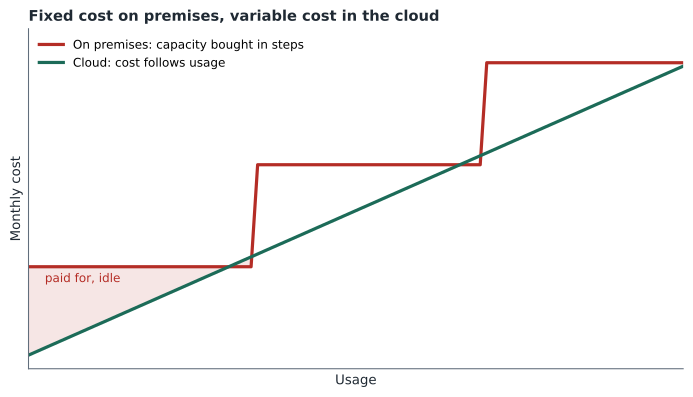
The shift also changes the shape of cost. On premises, cost is mostly fixed: the array costs the same whether it holds 10 TB or 38 TB, and when it fills up the next purchase is a big step. In the cloud, cost is mostly variable: it rises and falls with what you use. Variable cost removes the need to guess capacity years ahead. It also means the bill can surprise you, because nothing stops usage from growing.
What actually costs money
Almost every AWS charge comes from one of three fundamental drivers. Learning to sort a bill into these three makes it much easier to read.
- Compute. Running servers, containers or functions. Amazon EC2 instances are usually billed by the second (with a one-minute minimum) for Linux and by the hour for some other operating systems. AWS Lambda is billed by the number of requests and the time each one runs.
- Storage. Keeping data. Most storage is billed per gigabyte per month: Amazon S3 for objects, Amazon EBS for the disk volumes attached to servers, and database storage in Amazon RDS.
- Data transfer out. Moving data out of AWS to the internet, and in some cases between Regions or Availability Zones. Data coming into AWS from the internet is generally free. Lesson 3 covers the details.
On top of these, many services add their own measurements, called pricing dimensions or meters: the number of requests, the number of API calls, the amount of data a service processes, the number of hours a managed feature is turned on. A NAT gateway, for example, charges both for each hour it exists and for each gigabyte it processes.
Mateo and Gwen open the October bill in the AWS Billing and Cost Management console and sort its lines. The biggest is EC2: a large test server Mateo launched on October 7 to try the practice management software and never stopped. Next comes a NAT gateway from a tutorial, then 4 TB of test copies of radiograph images in S3, and finally a 1 TB EBS volume that was left behind when he terminated another test server. None of it was wrong; all of it was forgotten.
| Bill line | Driver | Why it kept charging |
|---|---|---|
| EC2 instance running all month | Compute | Billed for every second it was running, busy or idle |
| NAT gateway | Other meter (hourly and per gigabyte) | Charged per hour from creation, even with little traffic |
| S3 storage of 4 TB of test images | Storage | Charged per gigabyte per month in the Standard class |
| Unattached 1 TB EBS volume | Storage | Volumes are billed for provisioned size even when no server uses them |
| Small data transfer out | Data transfer | Images viewed from home over the internet |
How a price is built
Every AWS price is a rate multiplied by a quantity. The rate depends on the service, the Region, the configuration and sometimes the operating system or licence; the quantity comes from the meter. To estimate a monthly cost, multiply each rate by the expected usage and add the results. Gwen asks Mateo to rebuild the EC2 line from the console's usage report.
# Illustrative rates only; real prices vary by Region and change over time.
hourly_rate = 0.384        # USD per hour for a large general-purpose instance
hours_running = 25 * 24    # launched October 7, still running at month end
storage_gb = 4000          # test images in S3 Standard
s3_rate = 0.025            # USD per GB-month
ebs_gb = 1000
ebs_rate = 0.08            # USD per GB-month for a general-purpose SSD volume
ec2 = hourly_rate * hours_running
s3 = storage_gb * s3_rate
ebs = ebs_gb * ebs_rate
print(f"EC2 : {ec2:8.2f} USD")
print(f"S3  : {s3:8.2f} USD")
print(f"EBS : {ebs:8.2f} USD")
print(f"Sum : {ec2 + s3 + ebs:8.2f} USD before the NAT gateway and transfer")EC2 : 230.40 USD S3 : 100.00 USD EBS : 80.00 USD Sum : 410.40 USD before the NAT gateway and transfer
What this code does
It rebuilds part of a surprising bill from illustrative prices: an EC2 instance's hourly rate multiplied by the 600 hours it was left running, plus the monthly storage cost of 4,000 gigabytes in S3 and a 1,000-gigabyte EBS volume. It prints each service's charge and the sum. Breaking the bill into rate multiplied by quantity shows exactly which resource drove the cost.
The numbers are illustrative, but the method is exactly how AWS bills: rate times quantity, line by line. Mateo notices something important. The test server used almost no CPU after the first afternoon, yet it cost the most. You pay for what is provisioned and running, not for how hard it works.
Prices vary by Region
The same resource does not cost the same everywhere. AWS sets prices per Region, reflecting local costs for land, power, taxes and network. A general-purpose instance in one Region can cost noticeably more or less than the identical instance in another. For Cascade Ridge, the board's decision to keep client data in Canada means using Canada (Central) and Canada West (Calgary) anyway, but the team still compares prices between those two Regions for the backup copy.
Some services are global and are not priced by Region, such as AWS Identity and Access Management, which has no charge at all. Others, such as Amazon CloudFront, are priced by the edge location area that serves the user.
Things that are free
A surprising number of AWS features cost nothing in themselves. IAM users, roles and policies are free. Creating a VPC, subnets, route tables and security groups is free. AWS Organizations and consolidated billing are free. AWS CloudFormation is free for AWS resources (you pay for what it creates). The AWS Pricing Calculator, AWS Budgets for a modest number of budgets, Cost Explorer's console and the basic level of AWS Trusted Advisor are free. Inbound data transfer from the internet is free.
Free features are not free systems, though. Gwen points at the VPC in the sandbox: the VPC was free, but the NAT gateway inside it was not, and neither were the servers it served. Exam questions often test whether you can tell the free control-plane features from the billable resources they configure.
Total cost of ownership
Comparing the cloud with on premises fairly means comparing total cost of ownership (TCO), not just the price of a server. On the on-premises side, Lorraine's spreadsheet must include the hardware, its replacement every few years, the maintenance contracts, the Windows Server and SQL Server licences, the power and cooling for the server room (which overheated twice in summer 2026), the floor space, the backup tapes and the hours Mateo spends patching, replacing disks and driving tapes to her house. On the cloud side it must include the AWS bill, any migration project costs, training, and the staff time to run the new environment.
Some on-premises costs are easy to miss because they are hidden in other budgets: the electricity is in the hospital's utility bill, and the server room takes up space the pharmacy wants. Some cloud costs are also easy to miss: data transfer, support plans, and the time to learn new tools. A good TCO comparison lists both sides honestly and over the same period, usually three or five years.
Licences: included or bring your own
Software licences are a large part of TCO for Cascade Ridge because its practice management system runs on Microsoft SQL Server. AWS offers two broad approaches. With licence-included pricing, the licence cost is built into the hourly rate of the instance or database, so you need no separate licence and pay only while it runs. With bring your own licence (BYOL), you use licences you already own, subject to the vendor's licensing terms, and pay AWS a lower rate for the infrastructure. BYOL can save money if you already own eligible licences; licence-included is simpler and avoids buying licences you might not need for long. Mateo adds a task to check what the current SQL Server agreement allows before the team picks an option.
Rightsizing and automation
Two habits keep pay-as-you-go cheap. Rightsizing means choosing the smallest resource that comfortably does the job, then adjusting it based on measured use rather than guesses. The forgotten test server was several sizes larger than the trial needed. Automation means letting machines turn things off: scheduling development servers to stop at night and on weekends, using lifecycle rules to move old files to cheaper storage, and letting Auto Scaling add or remove servers as demand changes. A development server that runs only 50 hours a week instead of 168 costs less than a third as much.
hours_week_always_on = 7 * 24
hours_week_business = 5 * 10    # 10 hours a day, weekdays only
saving_share = 1 - hours_week_business / hours_week_always_on
print("hours always on:", hours_week_always_on)
print("hours on schedule:", hours_week_business)
print(f"share of compute cost avoided: {saving_share:.2f}")hours always on: 168 hours on schedule: 50 share of compute cost avoided: 0.70
What this code does
It compares 168 hours a week for a server that is always on with 50 hours for one that runs 10 hours a day on weekdays. It prints both totals and the share of hours avoided. About 70 in 100 of the compute cost disappears when non-production servers are switched off outside working hours.
About 70 cents of every dollar of compute cost disappears for a server that only needs to run during working hours. That simple calculation is behind many of the savings in lesson 12.
Worked problem
Estimating a small website
Kwame's BookVet booking site runs on one small instance at an illustrative 0.0416 USD an hour, with a 30 GB disk at 0.08 USD per GB-month, and sends about 50 GB a month to the internet, which falls inside a free monthly allowance. What is the monthly estimate for a 730-hour month?
Show solution
- Compute: 0.0416 × 730 = 30.37 USD.
- Storage: 30 × 0.08 = 2.40 USD.
- Data transfer: 50 GB is within the free allowance, so 0 USD.
- Add the lines: 30.37 + 2.40 + 0 = 32.77 USD.
Answer: About 32.77 USD a month, illustrative. The method — rate times quantity for each meter, then add — is what matters.
Common mistakes
MistakeThe cloud is always cheaper than on premises.
InsteadThe cloud can be cheaper, but only a total cost of ownership comparison over the same period shows it; idle or oversized resources can make it more expensive.
MistakeA stopped or idle resource costs nothing.
InsteadIdle running resources cost the same as busy ones, and some resources such as EBS volumes, Elastic IP addresses and NAT gateways charge even when nothing uses them.
MistakeData transfer into AWS is charged like data transfer out.
InsteadInbound data transfer from the internet is generally free; outbound transfer and some transfers between Regions and Availability Zones are charged.
MistakeEvery AWS feature has a price.
InsteadMany control features, such as IAM, VPCs, Organizations and CloudFormation itself, are free; you pay for the resources they create or manage.
Summary and key terms
- Pay-as-you-go means paying for the resources you use, for as long as you use them, without up-front purchases or long contracts.
- AWS also lowers unit prices when you commit to usage, when you use more, and through economies of scale.
- Moving to the cloud shifts IT spending from capital to operating expense and from fixed to variable cost.
- Most charges come from compute, storage and data transfer out, plus service-specific meters.
- Prices are rate times quantity and differ by Region.
- Many control features are free, but the resources they create are not.
- A fair comparison uses total cost of ownership, including licences, staff time, power and space.
- Rightsizing and automation are the two habits that keep variable cost under control.
- Pay as you go
- Paying only for the resources used, for as long as they are used, with no up-front commitment
- Capital expense
- Up-front spending on an asset used for years, such as a server
- Operating expense
- Ongoing spending on running costs, such as a monthly cloud bill
- Pricing dimension
- A measured quantity a service charges for, such as hours, gigabyte-months or requests
- Total cost of ownership
- The full cost of running a system over a period, including hardware, licences, power, space and staff
- Licence included
- Pricing where the software licence is built into the hourly rate
- Bring your own licence
- Using licences you already own and paying AWS only for the infrastructure
- Rightsizing
- Matching a resource's size to its measured need
Practice problems
Work each problem on paper first, then reveal the answer to check.
Why did the idle test server cost more than anything else on the sandbox bill?
Show answer
Because EC2 charges for the time an instance runs, not for how busy it is; it ran all month.
Name the three fundamental drivers of AWS cost.
Show answer
Compute, storage and data transfer out.
What is the difference between licence-included and BYOL pricing?
Show answer
Licence included builds the licence cost into the hourly rate; BYOL uses licences you already own and pays a lower infrastructure rate.
Give two examples of AWS features with no charge of their own.
Show answer
IAM and creating a VPC; also Organizations and consolidated billing, and CloudFormation for AWS resources.
Lesson quiz · 5 questions
Score 60% or more to complete this lesson.
Create a free account to save your progress, take quizzes and earn a certificate.