
AWS-104 · Lesson 5 of 12 · 19 min
AWS Billing and Cost Management console
▶ Video coming soon A video version of this lesson is on the way.
On November 9, Mateo signs in to the sandbox account and finds he cannot open the bills page at all. He is using an IAM role with broad technical permissions, but every billing screen says access is denied. Gwen smiles. "Good. That is the first lesson about billing: by default, only the root user can see it." The rest of the session is a tour of the AWS Billing and Cost Management console, the place where AWS shows what you owe, how you pay and what tools you have to control it.
Who can see billing
An AWS account's billing information is sensitive: it shows what the organization runs, how much it spends and how it pays. When an account is created, only the root user can see billing pages. For IAM users and roles to see them, two things are needed: the root user must turn on IAM user and role access to billing information in the account settings, and the IAM identity needs a policy that allows the billing actions it should use. AWS provides managed policies for common jobs, such as a read-only billing policy for someone who should see costs but not change payment details.
Gwen does this for the sandbox in front of Mateo, then explains the plan for production: billing will be managed centrally in the organization's management account (lesson 7), and only Lorraine, Gwen and Mateo will have billing roles there. Everyone else can see the costs of their own accounts through Cost Explorer views and reports, without access to payment methods.
A tour of the console
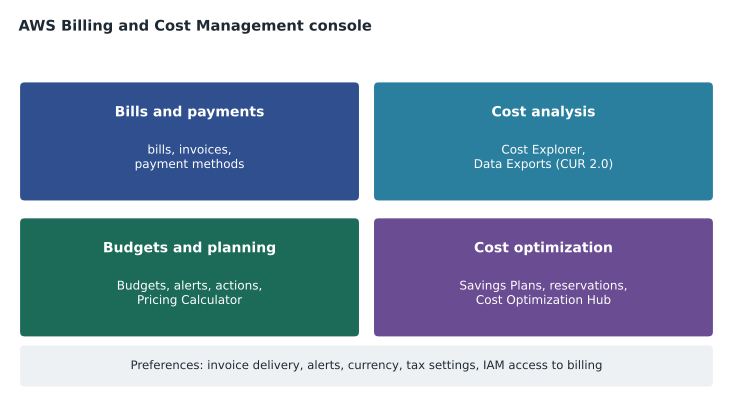
| Area | What it contains |
|---|---|
| Home | A summary of month-to-date and forecast spend, top services and alerts |
| Bills | Monthly bills by service, Region and account, with every charge, credit and tax line |
| Payments and invoices | Invoices to download, payment status, payment methods and payment profiles |
| Cost Explorer and Data Exports | Analysis of costs over time and detailed exports such as the Cost and Usage Report (lesson 6) |
| Budgets and the Pricing Calculator | Budgets with alerts and actions; estimates that can use your account's rates |
| Savings Plans and reservations | Purchases, recommendations, utilization and coverage of commitments |
| Cost Optimization Hub | Recommendations gathered from several AWS tools, such as rightsizing and idle resources |
| Billing preferences and tax settings | Invoice delivery, alert preferences, currency, tax registration details |
The bill
The Bills page shows charges for the selected month, grouped by service and then by Region and usage type. For each line it shows the usage quantity, the rate and the total. Mateo finds the sandbox's October lines again: the EC2 instance hours, the NAT gateway hours and gigabytes processed, the S3 gigabyte-months and requests, and the EBS gigabyte-months. Credits, such as Free Tier credits (lesson 8), appear as negative lines. Taxes appear as their own lines.
Bills are finalized shortly after the end of each month, and the invoice is issued then. During the month, the console shows estimated month-to-date charges that update several times a day. This is why a billing surprise is best caught during the month, by a budget alert, rather than when the invoice arrives.
Paying the bill
AWS charges the payment method on file when an invoice is issued. Accounts can pay by card, and some can arrange other methods such as bank transfer or invoicing with payment terms, depending on country and eligibility. Payment profiles let an organization direct invoices for different service providers to different payment methods.
For Canadian accounts, AWS issues invoices through its Canadian entity, adds Canadian taxes such as GST/HST, and, where they apply, provincial sales taxes. Lorraine's team enters Cascade Ridge's GST/HST registration number in the tax settings. In the payment preferences, she chooses to pay in Canadian dollars; the invoice still lists the US dollar charges and shows the exchange rate AWS used.
Billing alarms and the free tier alerts
Before AWS Budgets existed, the usual way to watch spending was a billing alarm: an Amazon CloudWatch alarm on the account's estimated charges metric. Billing metrics are published in the US East (N. Virginia) Region for all accounts, so the alarm is created there no matter where the workloads run. Billing alarms still work, but AWS Budgets (lesson 6) is now the recommended tool because it can track forecasts, filter by service or tag and take actions.
The console can also send email alerts when usage approaches the limits of a Free Tier offer. Mateo had ignored those emails in October because they went to an old shared mailbox. Gwen changes the account's billing contact to a monitored distribution list that includes Lorraine.
Alternate contacts
Each account can record alternate contacts for billing, operations and security. AWS uses them to send notices about invoices, service events and security issues. The root user's email address is not a good place for these messages, because it may be one person's mailbox. Gwen sets the billing contact to Lorraine's finance team list, the operations contact to the IT list and the security contact to Hannah Weiss's list.
Cost Optimization Hub and Compute Optimizer
Two tools in and around the console look for savings. Cost Optimization Hub collects recommendations from several sources into one place, such as resources that look idle, instances that could be smaller and commitments that could save money, and shows an estimated monthly saving for each. AWS Compute Optimizer analyzes the usage of EC2 instances, EBS volumes, Lambda functions and some other resources and suggests better-fitting sizes or types. Both rely on your actual usage, so they become more useful the longer a workload runs.
Gwen opens Cost Optimization Hub in the sandbox. It already flags the idle test instance and the unattached volume. "These tools would have told you in week two," she says. "They only help if somebody looks." The monthly cost review in production will start here.
Billing support
Questions about bills, payments and account settings can be raised in the AWS Support Center as account and billing cases. Account and billing support is available to every customer, including those on the free Basic Support plan (lesson 9). Mateo opens a practice case asking how to download all October invoices for the organization at once, and gets an answer the next morning.
Credits and refunds
Credits reduce a bill. They come from promotions, the Free Tier credit model, programs for startups and non-profits, and sometimes from AWS as a goodwill gesture after a billing mistake. Each credit has terms: which services it applies to and when it expires. The bill lists credits used. For a genuine mistake, such as resources left running by accident, customers can ask AWS through a billing case to review charges, but there is no guarantee of a refund, and the case is stronger if the account shows that controls such as budgets have since been put in place.
# Illustrative: how a month's invoice is assembled.
usage = {"EC2": 288.00, "NAT gateway": 39.50, "S3": 102.40, "EBS": 80.00, "Transfer": 0.00}
credits = -50.00          # example promotional credit
tax_rate = 0.05           # illustrative sales tax rate; real rates depend on location
subtotal = sum(usage.values()) + credits
tax = round(subtotal * tax_rate, 2)
print(f"Usage    {sum(usage.values()):8.2f}")
print(f"Credits  {credits:8.2f}")
print(f"Subtotal {subtotal:8.2f}")
print(f"Tax      {tax:8.2f}")
print(f"Invoice {subtotal + tax:8.2f} USD")Usage 509.90 Credits -50.00 Subtotal 459.90 Tax 23.00 Invoice 482.90 USD
What this code does
It assembles an illustrative monthly invoice: it adds up usage by service, subtracts a promotional credit to get a subtotal, applies an example sales tax rate and prints the final amount. Each line mirrors a section of a real AWS invoice. It shows that tax is calculated after credits are applied.
Data Exports and the Cost and Usage Report
For detailed analysis, the console can deliver billing data to an Amazon S3 bucket on a schedule. AWS Data Exports creates these exports. The most detailed is the Cost and Usage Report (CUR): one row for every resource, usage type and hour (or day), with prices, discounts, tags and account information. AWS recommends CUR 2.0, which has a fixed schema and is created through Data Exports; the legacy CUR is still available. Data Exports can also produce tables in the FOCUS open billing format, cost optimization recommendations and carbon emissions estimates.
The CUR is too large to read by eye. Teams query it with Amazon Athena, load it into a data warehouse, or use the cost and usage dashboard that Data Exports can deploy in Amazon QuickSight. For Cascade Ridge, Gwen plans a CUR 2.0 export to an S3 bucket in the management account from the first day of production, because detailed history cannot be recreated later for months that were never exported.
# Read-only examples with the AWS CLI (run with billing permissions).
aws ce get-cost-and-usage --time-period Start=2026-10-01,End=2026-11-01 \
    --granularity MONTHLY --metrics UnblendedCost --group-by Type=DIMENSION,Key=SERVICE
aws bcm-data-exports list-exports
Reading a usage type
Every line on an AWS bill carries a usage type, a short code that says exactly what was measured. Usage types combine a Region code, a resource type and sometimes a size, for example a code meaning "box usage" (instance hours) for a particular instance type in a particular Region, or one meaning data transferred out to the internet from a Region. The codes look cryptic at first, but they are what Cost Explorer groups by when you choose usage type, and they are what the Cost and Usage Report uses. Once Mateo learns to read the instance-hours, volume-storage, NAT-gateway-hours and data-transfer usage types, the sandbox bill stops looking like a list of mysteries.
Invoices for a finance team
Lorraine's team needs invoices that fit their accounting process. The console lets finance download invoices as PDF files, see each invoice's payment status, and set up invoice delivery by email to the finance mailbox. Organizations that need a purchase order number on each invoice can record purchase orders in the console so that they appear on matching invoices. Payment profiles can direct different invoices to different payment methods. These features matter more to the accountant than to the engineer, but the exam expects you to know that billing support and information are part of what AWS provides to every customer.
Who to ask about a charge
When a line on the bill makes no sense, there is a sensible order of steps. First, look up the usage type in Cost Explorer to see which resource and account caused it. Second, check Cost Optimization Hub and Trusted Advisor for an idle or forgotten resource. Third, read the service's pricing page to understand the meter. Only then, if the charge still looks wrong, open an account and billing case in the Support Center, attaching the invoice and usage details. Mateo's practice run on the sandbox bill took fifteen minutes and needed no case at all.
Worked problem
Finding who can see the bill
Kwame, the BookVet developer, has an IAM role with full EC2 and S3 permissions in the production account. He cannot see the account's charges. Hannah wants him to see costs for BookVet only, without access to payment methods. What is the simplest approach?
Show solution
- Make sure IAM access to billing is turned on for the account.
- Give him read-only access to cost data rather than billing administration.
- Better still, give him a saved Cost Explorer view or report filtered to the BookVet tag, so he sees only his application.
Answer: Turn on IAM access to billing, grant read-only cost permissions, and share a filtered view of BookVet costs, not payment or invoice access.
Common mistakes
MistakeAny administrator can see billing by default.
InsteadBilling is visible only to the root user until IAM access to billing is turned on and policies grant it.
MistakeThe month-to-date figure is the final bill.
InsteadDuring the month the console shows estimated charges; the bill is finalized after the month ends.
MistakeBilling alarms can be created in any Region.
InsteadBilling metrics are published in US East (N. Virginia), so billing alarms are created there.
MistakeAccount and billing questions need a paid support plan.
InsteadAccount and billing support is available on every plan, including Basic.
Summary and key terms
- The Billing and Cost Management console shows bills, invoices, payments, cost analysis, budgets, commitments and optimization recommendations.
- Only the root user can see billing until IAM access to billing is turned on and policies grant it.
- Bills show each charge by service, Region and usage type, with credits and taxes, and are finalized after the month ends.
- Payment methods, currency and tax settings are managed in the console; Canadian and US accounts see different tax lines.
- Billing alarms use CloudWatch in US East (N.
- Virginia), but AWS Budgets is the preferred alerting tool.
- Cost Optimization Hub and Compute Optimizer recommend savings from real usage.
- AWS Data Exports delivers detailed data such as CUR 2.0 and FOCUS to S3.
- Account and billing support is free on every plan.
- Billing and Cost Management console
- The AWS console area for bills, payments, cost analysis, budgets and optimization
- IAM access to billing
- An account setting that lets IAM users and roles with permission view billing
- Billing alarm
- A CloudWatch alarm on the estimated charges metric
- Alternate contacts
- Billing, operations and security contacts that AWS uses for notices
- Cost Optimization Hub
- A console feature that gathers savings recommendations in one place
- AWS Compute Optimizer
- A service that recommends better-fitting resource sizes from usage data
- AWS Data Exports
- A feature that delivers detailed billing data, such as CUR 2.0, to S3
- Cost and Usage Report
- The most detailed record of AWS costs and usage, with a row per resource and period
Practice problems
Work each problem on paper first, then reveal the answer to check.
Why could Mateo's administrator role not see the bill?
Show answer
IAM access to billing had not been turned on by the root user, and his role had no billing permissions.
In which Region are billing alarms created?
Show answer
US East (N. Virginia), where billing metrics are published.
What does AWS recommend for detailed billing exports today?
Show answer
CUR 2.0 through AWS Data Exports.
Can a Basic Support customer open a billing case?
Show answer
Yes; account and billing support is available on every plan.
Lesson quiz · 5 questions
Score 60% or more to complete this lesson.
Create a free account to save your progress, take quizzes and earn a certificate.