
AWS-101 · Lesson 9 of 12 · 18 min
Migration strategies: the 7 Rs
▶ Video coming soon A video version of this lesson is on the way.
By November Gwen and Mateo have a list of everything Cascade Ridge runs: fourteen applications and data stores, from VetLedger and the image archive to a dusty intranet wiki nobody has edited since 2022. For each one they must answer the same question: what should happen to it in the move? AWS's guidance offers seven answers, known as the 7 Rs of migration. The CLF-C02 exam guide asks candidates to identify appropriate migration strategies, and the 7 Rs are the standard vocabulary.
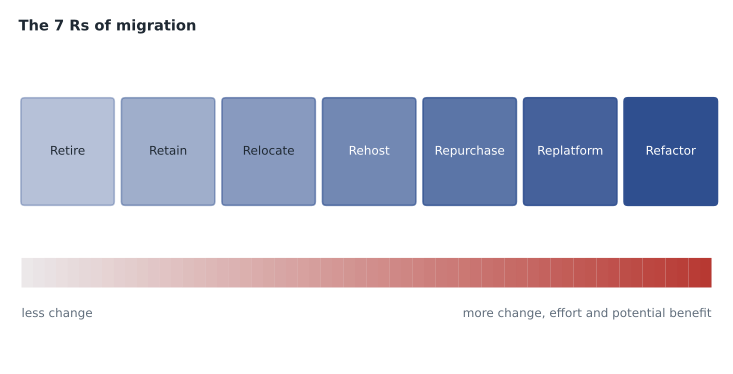
The seven strategies
Each strategy describes what happens to one application. A single organization almost always uses several of them, because its applications differ in value, age and complexity.
| Strategy | Also called | What happens | Typical reason |
|---|---|---|---|
| Retire | Decommission | Shut the application down and archive what must be kept | No longer needed or used |
| Retain | Revisit | Keep it where it is for now | Not ready, recently upgraded, tied to hardware or rules |
| Rehost | Lift and shift | Move servers to AWS without changing the application | Fast, low-risk move at scale |
| Relocate | Hypervisor-level lift and shift | Move whole virtualized environments or resources to a cloud version of the same platform, or between accounts, Regions or VPCs | Quickest move with no change to architecture |
| Repurchase | Drop and shop | Replace the application with a different product, often SaaS | A better commercial product exists |
| Replatform | Lift, tinker and shift | Move with some optimization, such as a managed database | Gain cloud benefits without a rewrite |
| Refactor | Re-architect | Redesign the application to use cloud-native features | Strong need for scale, speed or new capabilities |
Retire
Some applications are simply not worth moving. Retiring an application means switching it off and keeping only the data that must be archived. AWS's guidance points to signs such as very low use, no inbound connections for months, or an unsupported operating system that creates security risk. Cascade Ridge's intranet wiki fits: its last edit was in 2022, and the three useful pages can move into the staff portal Hannah already runs on Microsoft 365. Retiring it saves a server, a licence and a patching job.
Retain
Retaining means keeping an application in its current location, at least for now. Reasons include data residency rules, dependencies on other systems that must move first, recent investment in an upgrade, specialized hardware with no cloud equivalent, or simply that the business case is weak. The pharmacy dispensing cabinet's control PC is retained: it is supplied by the cabinet vendor, it must sit beside the cabinet, and moving it would add risk with no benefit. Retained does not mean forgotten; Gwen adds a review date to every retained item.
Rehost
Rehosting, or lift and shift, moves servers to AWS without changing the application. A server running Windows on site becomes an EC2 instance running the same Windows, with the same software and configuration. It is fast and low-risk, and it is the most common strategy in large migrations. Once an application runs in AWS, it is easier to optimize later. AWS's main service for rehosting, formerly called AWS Application Migration Service, was renamed AWS Transform MGN in June 2026; it replicates source servers into AWS continuously and then cuts over with a short outage.
VetLedger's two application servers will be rehosted. The vendor supports its software on a particular Windows Server version, and changing that during the move would turn one project into two.
Relocate
Relocating moves a whole set of servers from an on-premises virtualization platform to a cloud version of that platform without buying hardware or changing applications, for example moving VMware-based virtual machines to a VMware environment running on AWS infrastructure. AWS's guidance also uses relocate for moving resources such as databases or instances to a different VPC, Region or account. It is often the quickest way to move a large virtualized estate.
Cascade Ridge has no large virtualized estate, but Gwen uses the term for the image archive: the radiograph files will be moved as they are into Amazon S3, with no change to the files and no change to how the imaging viewer reads them through its storage connector. Strictly, moving files into S3 is a data migration rather than a platform relocation, and Gwen tells Mateo that exam questions about relocate will usually describe virtual machines moving between platforms.
Repurchase
Repurchasing means replacing an application with a different product, often a SaaS version, and moving the data across. Typical cases are moving from a licensed product installed on servers to the vendor's cloud subscription, or replacing an in-house application with a commercial one. Cascade Ridge's tape backup software is the clearest example: instead of moving it, the team will replace it with AWS Backup, a managed service that schedules, stores and copies backups across Regions.
Replatform
Replatforming, or lift, tinker and shift, moves an application to the cloud and makes targeted changes to gain cloud benefits without rewriting it. The classic example, used by AWS itself, is moving a self-managed SQL Server database to Amazon RDS for SQL Server: the application keeps talking to SQL Server, but AWS now handles patching, backups and failover. That is exactly the plan for VetLedger's database.
The exam guide mentions database replication as an example in migration strategy questions. AWS Database Migration Service (AWS DMS) copies data from a source database to a target, keeping them in sync while the application keeps running, so the final switch takes minutes instead of a long outage. When source and target engines differ, the AWS Schema Conversion Tool helps convert the database structure. VetLedger's move from SQL Server to RDS for SQL Server is the same engine, so DMS or native backup and restore can do the job.
Refactor
Refactoring, or re-architecting, redesigns an application to take full advantage of the cloud: breaking a large application into smaller services, moving to serverless or containers, or rebuilding around managed services. It offers the most long-term benefit and costs the most effort and risk. AWS's guidance for large migrations is to refactor only when the business need is strong, and otherwise to move first and modernize afterwards.
BookVet will be rehosted on EC2 for the move, then refactored to a serverless design in phase 2, once Kwame has learned Lambda and DynamoDB. Gwen approves of the two-step plan: it gets BookVet off the struggling rented server before spring, and it leaves the redesign until the team has time to do it well.
| Cascade Ridge system | Strategy | Why |
|---|---|---|
| Intranet wiki | Retire | Unused since 2022; three pages move to the staff portal |
| Pharmacy dispensing PC | Retain | Vendor-supplied and tied to the cabinet |
| Email, phones, payroll | Retain (already SaaS) | Already in other providers' clouds |
| VetLedger application servers | Rehost | Vendor supports the current setup; move without change |
| VetLedger database | Replatform | SQL Server to Amazon RDS for SQL Server |
| Image archive | Move data as is into Amazon S3 | Same files, cheaper and more durable storage |
| Tape backup | Repurchase | Replaced by AWS Backup |
| BookVet | Rehost now, refactor later | Escape the rented server first; redesign in phase 2 |
Moving the data
Applications are only part of a migration; data has to move too. For Cascade Ridge's 38 terabytes of images, the choice is between sending them over the network and shipping them on a device. AWS DataSync copies files from on-premises storage to S3 over the network, verifying and resuming automatically. AWS's physical transfer devices, the Snow Family, are now restricted: AWS states that AWS Snowball Edge is no longer available to new customers and points them to DataSync. At Cascade Ridge's connection speed the network is fast enough, as the calculation shows.
# How long would it take to copy the image archive over the network?
terabytes = 38
link_megabits_per_second = 500     # head office internet link
usable_share = 0.7                 # leave capacity for daily work and protocol overhead
bits = terabytes * 8 * 10**12
seconds = bits / (link_megabits_per_second * 10**6 * usable_share)
print("Days of continuous copying:", round(seconds / 86400, 1))Days of continuous copying: 10.1
What this code does
It estimates how long copying a 38-terabyte image archive over a 500 megabit-per-second internet link would take, keeping 30 in 100 of the link free for daily work. It converts terabytes to bits, divides by the usable speed and turns the seconds into days. The answer of about ten days of non-stop copying helps decide whether a network transfer or another migration method makes sense.
About ten days of steady copying, spread over evenings and weekends, followed by a short final pass for new images, is acceptable. AWS Migration Hub gives a single place to track the progress of each application across these tools.
Common mistakes
MistakeAssuming every application should be refactored.
InsteadRefactoring is the costliest strategy; most migrations rehost or replatform first and modernize later.
MistakeConfusing rehost with replatform.
InsteadRehost changes nothing; replatform makes targeted changes, such as moving to a managed database.
MistakeTreating retain as a failure.
InsteadRetaining is a valid choice for systems with good reasons to stay; review them periodically.
MistakeForgetting data volumes in the plan.
InsteadLarge data sets can take days to copy; estimate transfer time early.
Choosing a strategy: questions to ask
Gwen gives Mateo a short sequence of questions to ask about each application, which turns the 7 Rs from a list into a decision.
- Is anyone using it, and does the business still need it? If not, retire it.
- Is there a reason it cannot or should not move yet? Hardware ties, recent upgrades, unresolved dependencies or rules point to retain, with a review date.
- Is there a better product, often SaaS, that does the job? If so, consider repurchase, and plan the data move and training.
- Can it move unchanged, and is that good enough for now? Rehost, or relocate if it runs on a virtualization platform with a cloud equivalent.
- Would a small change bring a clear benefit, such as a managed database? Replatform.
- Does the business need something the current design cannot deliver? Only then refactor, and consider doing it after an initial move.
Asked in that order, the questions push toward the simplest strategy that meets the need, which matches AWS's guidance for large migrations. They also expose dependencies: VetLedger's servers and database must move together, so they share a cutover date even though they use different strategies.
Waves and dependencies
Migrations of more than a few systems are usually grouped into waves, batches of applications that move together. Systems that depend heavily on each other go in the same wave so that they are never split across environments with slow links between them. Cascade Ridge's plan has three waves: BookVet first, as a low-risk pilot in December; the image archive copy over the winter; and VetLedger, with its database, in spring. Each wave ends with a short review, and lessons from one wave change the plan for the next.
Gwen insists on one more element in each wave: a rollback plan. If a cutover fails, the team must know how to return to the old system and how long it can wait before deciding. For VetLedger, the old servers stay switched on but unused for two weeks after cutover, so that the team could return to them if a serious problem appeared.
Each wave also has a short communication plan: who is told, when, and what they should do differently. For the BookVet pilot, that means a note to clinic reception teams and a banner on the booking page during the switch.
Worked problem
Choosing strategies for three systems
A partner clinic group asks for advice on three systems: a licensed accounting package installed on a server, with a vendor SaaS version available; a custom inventory app that must handle ten times more stores next year; and an old fax server used twice last year. Which strategy fits each?
Show solution
- The accounting package has a SaaS equivalent from the same vendor, so repurchase.
- The inventory app needs to scale far beyond its design, a strong business reason for refactoring, possibly after an initial rehost.
- The fax server is barely used, so retire it and keep any records required by law.
Answer: Repurchase, refactor and retire: the strategy follows the business value and the state of each application.
Mateo's spreadsheet now has a strategy column, an owner column and a target month for every system. Lesson 10 adds the column Lorraine cares about most: what each one will cost.
Summary and key terms
- The 7 Rs are the migration strategies in AWS guidance.
- Retire switches an application off.
- Retain keeps it where it is for now.
- Rehost (lift and shift) moves servers without change, now often with AWS Transform MGN.
- Relocate moves virtualized environments or resources to a cloud version of the same platform or to another account, Region or VPC.
- Repurchase (drop and shop) replaces it, often with SaaS.
- Replatform (lift, tinker and shift) makes targeted changes, such as moving to Amazon RDS.
- Refactor (re-architect) redesigns for cloud-native features.
- AWS DMS replicates databases during migration; AWS DataSync copies files; AWS Migration Hub tracks progress.
- Retire
- Decommission an application that is no longer needed.
- Retain
- Keep an application where it is for now.
- Rehost
- Lift and shift: move without changing the application.
- Relocate
- Move virtualized environments or resources to a cloud version of the same platform, or between accounts, Regions or VPCs.
- Repurchase
- Drop and shop: replace with a different product, often SaaS.
- Replatform
- Lift, tinker and shift: move with targeted optimizations.
- Refactor
- Re-architect to use cloud-native features.
- AWS DMS
- AWS Database Migration Service: copies and replicates databases with minimal downtime.
- AWS DataSync
- Copies files from on-premises storage to AWS over the network.
Practice problems
Work each problem on paper first, then reveal the answer to check.
Which strategy moves a self-managed database to Amazon RDS without rewriting the application?
Show answer
Replatform.
Which strategy is known as lift and shift?
Show answer
Rehost.
What does AWS DMS do during a migration?
Show answer
It copies data to the target database and keeps it in sync until cutover.
Lesson quiz · 5 questions
Score 60% or more to complete this lesson.
Create a free account to save your progress, take quizzes and earn a certificate.