
WEB-201 · Lesson 7 of 12 · 25 min
Inserting, updating and deleting data
▶ Video coming soon A video version of this lesson is on the way.
Reading data had been safe: a wrong SELECT only shows the wrong rows. On the following Wednesday, Theo moved on to the statements that change things. He started with a story from his first job, where a colleague ran an UPDATE meant for one customer without a WHERE clause and set every customer's email address to the same value. "It took a night of restoring backups," he said. "So we'll learn the statements, and we'll learn the habits that make them safe."
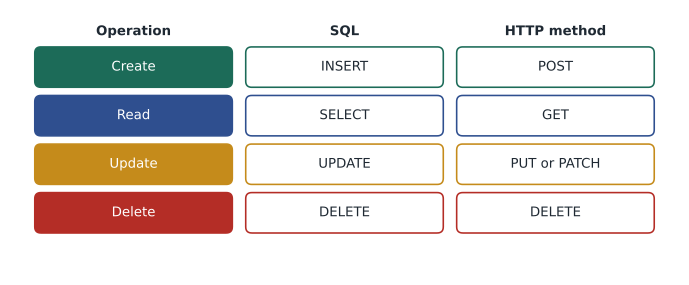
This lesson covers INSERT, UPDATE and DELETE, the statements that add, change and remove rows, along with upserts that insert or update in one step, getting back generated keys, and running many changes efficiently from code. Together with SELECT these are often called CRUD: create, read, update and delete. The lesson ends with what deleting means when the data is about people.
INSERT: adding rows
An INSERT names the table, lists the columns being filled and supplies the values in the same order. Always list the columns. INSERT INTO volunteers VALUES (...) without a column list depends on the exact order of the columns in the table, and it breaks or, worse, puts values in the wrong columns when someone adds a column later. Columns you leave out get their default value (NULL unless a DEFAULT is declared), and a column such as volunteer_id INTEGER PRIMARY KEY is numbered automatically.
INSERT INTO volunteers (first_name, last_name, email, joined_on)
VALUES ('Ines', 'Moreau', 'ines@example.com', '2026-11-14');

SELECT volunteer_id, first_name, last_name, phone, joined_on
FROM volunteers
WHERE volunteer_id >= 7;

-- Result: 3 rows
-- volunteer_id | first_name | last_name | phone    | joined_on
-- -------------+------------+-----------+----------+-----------
-- 7            | Grace      | Liu       | 555-0199 | 2026-08-14
-- 8            | Hamza      | Ali       | 555-0123 | 2026-10-01
-- 9            | Ines       | Moreau    | NULL     | 2026-11-14
One INSERT can add several rows by listing several groups of values separated by commas. This is much faster than separate statements when loading data, because the database processes and commits them together.
INSERT INTO signups (volunteer_id, shift_id)
VALUES (8, 5), (8, 7), (2, 8);

SELECT volunteer_id, shift_id, status
FROM signups
WHERE volunteer_id = 8 OR shift_id = 8
ORDER BY shift_id, volunteer_id;

-- Result: 4 rows
-- volunteer_id | shift_id | status
-- -------------+----------+-------
-- 8            | 5        | booked
-- 8            | 7        | booked
-- 1            | 8        | booked
-- 2            | 8        | booked
Hamza's two new signups and Ben's took the default status 'booked' declared on the column. INSERT ... SELECT inserts the rows a query returns, which lesson 3 used to split the wide schedule table. It is also how you copy next week's regular shifts from this week's: select this week's shifts with date(shift_date, '+7 days') and insert the results.
Getting the new key back
After inserting a volunteer, the application usually needs the new volunteer_id, for example to redirect to their profile page. There are three common ways to get it.
| Method | Where it works | Example |
|---|---|---|
| RETURNING clause | PostgreSQL; SQLite 3.35 and later; MariaDB 10.5 and later | INSERT INTO volunteers (...) VALUES (...) RETURNING volunteer_id |
| Driver property for the last inserted ID | Python sqlite3 and MySQL drivers | cursor.lastrowid in Python; insertId in mysql2; lastInsertId() in PDO |
| Generated keys from the statement | Java JDBC | prepareStatement(sql, Statement.RETURN_GENERATED_KEYS), then getGeneratedKeys() |
Never find the new row by selecting MAX(volunteer_id) afterwards. Another user may insert a row between your INSERT and your SELECT, and you would pick up their ID. The methods in the table return the ID generated by your own statement on your own connection.
import sqlite3

conn = sqlite3.connect(':memory:')
conn.execute("""CREATE TABLE volunteers (
    volunteer_id INTEGER PRIMARY KEY, first_name TEXT NOT NULL,
    email TEXT NOT NULL UNIQUE, joined_on TEXT NOT NULL)""")

cur = conn.execute("INSERT INTO volunteers (first_name, email, joined_on) VALUES (?, ?, ?)",
                   ('Ines', 'ines@example.com', '2026-11-14'))
print('New volunteer ID:', cur.lastrowid)

new_people = [('Jonah', 'jonah@example.com', '2026-11-14'),
              ('Kemi',  'kemi@example.com',  '2026-11-15')]
cur = conn.executemany("INSERT INTO volunteers (first_name, email, joined_on) VALUES (?, ?, ?)",
                       new_people)
print('Rows added by executemany:', cur.rowcount)
conn.commit()

for row in conn.execute("SELECT volunteer_id, first_name FROM volunteers"):
print(row)New volunteer ID: 1 Rows added by executemany: 2 (1, 'Ines') (2, 'Jonah') (3, 'Kemi')
What this code does
Makes a volunteers table and adds Ines, then prints the ID number the database gave her. It then adds two more people in one call by handing over a list, prints how many rows that added, saves the changes and lists everyone with their ID.
executemany runs the same statement once for each item in the list, with the values supplied as parameters each time. It is the right way to load a list of rows from code: one prepared statement, many sets of values, and no SQL text built by joining strings.
UPDATE: changing rows
An UPDATE names the table, sets one or more columns with SET, and chooses the rows with WHERE. Every row that matches the WHERE clause is changed; if there is no WHERE clause, every row in the table is changed. That is the mistake from Theo's story, and it is why the WHERE clause deserves more attention than the SET clause.
UPDATE volunteers
SET phone = '555-0177'
WHERE volunteer_id = 3;

SELECT volunteer_id, first_name, phone
FROM volunteers
WHERE volunteer_id = 3;

-- Result: 1 row
-- volunteer_id | first_name | phone
-- -------------+------------+---------
-- 3            | Chloe      | 555-0177
Choose the row by its primary key whenever the change is about one specific thing, rather than by a name or email that might match more than one row or none. A SET clause can use the row's current values, and can set several columns at once, separated by commas. When Lucy decided the November 20 lunch counter shift needed an extra person, the update added one to the existing value.
UPDATE shifts
SET spots = spots + 1,
    end_time = '14:30'
WHERE shift_id = 8;

SELECT shift_id, start_time, end_time, spots
FROM shifts
WHERE shift_id = 8;

-- Result: 1 row
-- shift_id | start_time | end_time | spots
-- ---------+------------+----------+------
-- 8        | 11:00      | 14:30    | 4
The WHERE clause of an UPDATE can use a subquery, so the rows to change can depend on other tables. After the November 12 kitchen shift, Lucy marked everyone still "booked" on past shifts as attended, then corrected the one no-show by hand.
UPDATE signups
SET status = 'attended'
WHERE status = 'booked'
  AND shift_id IN (SELECT shift_id FROM shifts WHERE shift_date < '2026-11-16');

SELECT status, COUNT(*) AS signups
FROM signups
GROUP BY status
ORDER BY status;

-- Result: 3 rows
-- status   | signups
-- ---------+--------
-- attended | 6
-- booked   | 9
-- no-show  | 1
DELETE: removing rows
A DELETE removes the rows its WHERE clause matches, and, exactly like UPDATE, every row if the WHERE clause is missing. Foreign keys protect related data: deleting a volunteer who still has signups fails, unless the foreign key was declared with ON DELETE CASCADE, in which case their signups are deleted too. PostgreSQL and MySQL also have TRUNCATE, which empties a whole table very quickly; it is for test data and staging tables, not for application code.
DELETE FROM signups
WHERE volunteer_id = 1 AND shift_id = 8;

SELECT volunteer_id, shift_id, status
FROM signups
WHERE shift_id = 8;

-- Result: 0 rows
-- volunteer_id | shift_id | status
-- -------------+----------+-------
Upserts: insert or update
Sometimes you want to insert a row if it does not exist and update it if it does. A volunteer who re-submits the sign-up form for a shift they had canceled should get their booking back, not an error. Checking first with a SELECT and then deciding to INSERT or UPDATE has a race: two requests can both see "no row" and both insert. An upsert does it in one atomic statement, relying on a UNIQUE constraint or primary key to detect the conflict.
UPDATE signups SET status = 'cancelled' WHERE volunteer_id = 3 AND shift_id = 5;

INSERT INTO signups (volunteer_id, shift_id, status)
VALUES (3, 5, 'booked')
ON CONFLICT (volunteer_id, shift_id)
DO UPDATE SET status = excluded.status;

SELECT volunteer_id, shift_id, status
FROM signups
WHERE shift_id = 5;

-- Result: 2 rows
-- volunteer_id | shift_id | status
-- -------------+----------+-------
-- 3            | 5        | booked
-- 7            | 5        | booked
In the DO UPDATE clause, excluded refers to the row you tried to insert. PostgreSQL uses the same ON CONFLICT syntax; MySQL writes INSERT ... ON DUPLICATE KEY UPDATE status = VALUES(status) (or a row alias in newer versions). ON CONFLICT DO NOTHING simply skips the insert when the row exists, which suits "add this volunteer to the mailing list if they are not already on it".
import sqlite3

conn = sqlite3.connect(':memory:')
conn.execute("""CREATE TABLE signups (volunteer_id INTEGER, shift_id INTEGER,
                status TEXT NOT NULL DEFAULT 'booked', PRIMARY KEY (volunteer_id, shift_id))""")

book = """INSERT INTO signups (volunteer_id, shift_id, status) VALUES (?, ?, 'booked')
          ON CONFLICT (volunteer_id, shift_id) DO UPDATE SET status = 'booked'"""

conn.execute(book, (3, 5))
conn.execute("UPDATE signups SET status = 'cancelled' WHERE volunteer_id = ? AND shift_id = ?", (3, 5))
print(conn.execute("SELECT * FROM signups").fetchall())

conn.execute(book, (3, 5))
print(conn.execute("SELECT * FROM signups").fetchall())
print('Rows in table:', conn.execute("SELECT COUNT(*) FROM signups").fetchone()[0])[(3, 5, 'canceled')] [(3, 5, 'booked')] Rows in table: 1
What this code does
Makes a signups table and defines one booking statement that adds a booking or, if that person already has a row for that shift, sets it back to booked. Chloe books, cancels and books again. The printed rows show her status going from canceled back to booked, and the final count shows there is still only one row for her.
Checking how many rows changed
Every UPDATE and DELETE reports how many rows it affected: cursor.rowcount in Python, rowCount() in PDO, affectedRows in mysql2, rowCount in the pg result, and the int returned by executeUpdate() in JDBC. Check it. If a request to cancel one booking reports 0 rows, the booking did not exist or belonged to someone else, and the page should say so. If it reports 300, something is badly wrong and the transaction should be rolled back before it is committed.
import sqlite3

conn = sqlite3.connect(':memory:')
conn.executescript("""
    CREATE TABLE signups (volunteer_id INTEGER, shift_id INTEGER, status TEXT,
                          PRIMARY KEY (volunteer_id, shift_id));
    INSERT INTO signups VALUES (1, 4, 'booked'), (2, 4, 'booked'), (6, 4, 'booked'), (3, 5, 'booked');
""")

def cancel(volunteer_id, shift_id):
    cur = conn.execute("""UPDATE signups SET status = 'cancelled'
                          WHERE volunteer_id = ? AND shift_id = ? AND status = 'booked'""",
                       (volunteer_id, shift_id))
    if cur.rowcount != 1:
        conn.rollback()
        return 'No booking found to cancel'
    conn.commit()
    return 'Booking cancelled'

print(cancel(2, 4))
print(cancel(2, 4))
print(cancel(9, 4))
print(conn.execute("SELECT COUNT(*) FROM signups WHERE status = 'booked'").fetchone()[0], 'bookings left')Booking canceled No booking found to cancel No booking found to cancel 3 bookings left
What this code does
Sets up four bookings and a cancel function that changes one person's booking for one shift to canceled. The function checks that exactly one row changed; if not, it undoes the change and reports that there was nothing to cancel. Canceling Ben's booking works, trying again finds nothing, and an unknown volunteer finds nothing. Three bookings remain.
Habits that make changes safe
Theo's checklist for running a change by hand on a real database, which Mira copied onto a card for her desk:
- Write the SELECT first. Run SELECT with exactly the WHERE clause you plan to use and check the rows and the count. Then change SELECT to UPDATE or DELETE without touching the WHERE clause.
- Use a transaction. Start with BEGIN, run the change, check the row count and the result, then COMMIT, or ROLLBACK if anything is unexpected (lesson 8).
- Choose by key. Target rows by primary key when the change is about specific rows.
- Know where the backup is. Before a large change, know when the last backup was taken and how to restore it (lesson 11).
- Prefer the application. Routine changes should go through the application's code, which applies the business rules, rather than ad hoc SQL typed into a console.
Soft deletes
A soft delete marks a row as removed instead of deleting it, using a status value or a deleted_at timestamp column, and every query then excludes marked rows. Canceling a signup by setting its status to 'canceled' is a soft delete: Lucy can still see who canceled and how late. Soft deletes make mistakes recoverable and keep history for reports. Their costs are that every query must remember the filter (WHERE deleted_at IS NULL), that UNIQUE constraints still see the hidden rows, and that the data is not really gone, which matters a great deal when the data is personal.
Deleting personal information
When a volunteer leaves and asks to be removed, a soft delete is not enough: their name, email and phone number are still in the table. At the same time, the Food Hub needs to keep the count of hours they gave for its annual report. The usual answer is to anonymize the person: delete or overwrite everything that identifies them, and keep the non-identifying facts that statistics need.
UPDATE volunteers
SET first_name = 'Former',
    last_name  = 'volunteer',
    email      = 'removed-' || volunteer_id || '@invalid',
    phone      = NULL
WHERE volunteer_id = 6;

SELECT v.volunteer_id, v.first_name, v.last_name, v.email, v.phone,
       COUNT(s.shift_id) AS signups_kept
FROM volunteers AS v
LEFT JOIN signups AS s ON s.volunteer_id = v.volunteer_id
WHERE v.volunteer_id = 6
GROUP BY v.volunteer_id;

-- Result: 1 row
-- volunteer_id | first_name | last_name | email             | phone | signups_kept
-- -------------+------------+-----------+-------------------+-------+-------------
-- 6            | Former     | volunteer | removed-6@invalid | NULL  | 1
The email is overwritten with a unique placeholder because the column is UNIQUE and NOT NULL; the reserved .invalid domain can never receive mail. Anonymizing the main table is not the end of the job: copies of the data in backups, logs, exported spreadsheets and email systems have to be covered by the retention plan too.
Wisconsin law does not set a general retention limit for volunteer records, but holding personal information longer than needed only increases what a breach could expose. Mira drafted a rule for Lucy to approve: anonymize volunteers who have not booked a shift for two years, and act on any removal request within 30 days.
Common mistakes
MistakeUPDATE volunteers SET phone = NULL; removes Farid's phone.
InsteadWithout WHERE, every row is updated. Add WHERE volunteer_id = 6, and run the matching SELECT first.
MistakeINSERT INTO volunteers VALUES (...) is shorter, so it is better.
InsteadList the columns. Without a list, the statement depends on column order and breaks when the table changes.
MistakeAfter inserting, SELECT MAX(id) to find the new row.
InsteadAnother user's insert can come in between. Use RETURNING, lastrowid, lastInsertId() or getGeneratedKeys().
MistakeCheck whether the row exists, then INSERT or UPDATE.
InsteadTwo requests can pass the check at once. Use an upsert with ON CONFLICT (or ON DUPLICATE KEY UPDATE).
MistakeA soft delete removes a volunteer's personal information.
InsteadThe data is still there. Anonymize or delete the identifying columns when a person leaves or asks to be removed.
Try it yourself
Cancel a booking safely
The setup builds the Food Hub sample database in conn. Grace (volunteer 7) wants to cancel her booking on shift 5. Write an UPDATE that sets the status to 'canceled' for that volunteer and shift only, using ? placeholders, and keep the cursor it returns.
Print the number of rows changed, then print how many signups on shift 5 are still 'booked'. The output should be Changed: 1 and then Still booked: 1.
cur = conn.execute("SELECT 1")   # replace with your UPDATE

print('Changed:', 0)
left = conn.execute("SELECT COUNT(*) FROM signups WHERE shift_id = 5 AND status = 'booked'").fetchone()[0]
print('Still booked:', left)
Practice problems
Work each problem on paper first, then reveal the answer to check.
Write an INSERT that adds a Youth garden shift on 2026-11-26 from 15:00 to 17:00 with 5 spots, listing the columns.
Show answer
INSERT INTO shifts (area_id, shift_date, start_time, end_time, spots) VALUES (4, '2026-11-26', '15:00', '17:00', 5);
Why should an application check the row count after an UPDATE that cancels a booking?
Show answer
A count of 0 means there was no matching booking, perhaps a wrong ID or someone else's booking, and the user should be told. An unexpectedly large count signals a bad WHERE clause, and the transaction should be rolled back.
What does excluded mean in ON CONFLICT ... DO UPDATE SET status = excluded.status?
Show answer
It refers to the row the INSERT tried to add, so the existing row takes the new status value.
Lucy asks you to delete every signup for shifts before November 1, 2026. What do you run first, and why?
Show answer
SELECT COUNT(*) FROM signups WHERE shift_id IN (SELECT shift_id FROM shifts WHERE shift_date < '2026-11-01'); to confirm the rows and count, inside a transaction, before changing SELECT COUNT(*) to DELETE. Also check whether the hours report still needs those rows.
Summary and key terms
- INSERT adds rows; always list the columns, use multi-row VALUES or executemany for many rows, and INSERT ...
- SELECT to insert query results.
- Get a generated key with RETURNING, the driver's last-insert ID or JDBC generated keys, never MAX(id).
- UPDATE changes every row its WHERE clause matches and DELETE removes them; without WHERE, the whole table is affected.
- Choose rows by primary key, run the matching SELECT first, work inside a transaction and check the affected row count.
- Upserts with ON CONFLICT (or MySQL's ON DUPLICATE KEY UPDATE) insert or update atomically without a race.
- Soft deletes mark rows instead of removing them, keeping history but not removing personal information.
- When a person leaves, anonymize identifying columns and keep only non-identifying facts, under a retention rule that also covers backups and exports.
- CRUD
- Create, read, update and delete: the four basic operations on stored data.
- INSERT
- The SQL statement that adds rows to a table.
- UPDATE
- The SQL statement that changes values in existing rows.
- DELETE
- The SQL statement that removes rows from a table.
- Default value
- The value a column takes when an INSERT does not supply one.
- RETURNING
- A clause that makes an INSERT, UPDATE or DELETE return values from the affected rows.
- Upsert
- A single statement that inserts a row or, if it already exists, updates it.
- Row count
- The number of rows an UPDATE or DELETE affected, reported by the driver.
- Soft delete
- Marking a row as deleted with a status or timestamp instead of removing it.
- Anonymize
- To remove or overwrite the information that identifies a person while keeping other facts.
Lesson quiz · 5 questions
Score 60% or more to complete this lesson.
Create a free account to save your progress, take quizzes and earn a certificate.