
WEB-201 · Lesson 2 of 12 · 27 min
Tables, keys and relationships
▶ Video coming soon A video version of this lesson is on the way.
On Friday morning Theo printed the four tabs of Mira's spreadsheet that mattered for sign-ups and laid them side by side on the studio table: the volunteer list, the list of areas, the monthly shift grid and a tab where Lucy ticked who actually turned up. "Every one of these is already almost a table," he said. "What they're missing is a reliable way to point from one to another. In a spreadsheet you point with a name, and names change. In a database you point with a key."
This lesson builds the Food Hub sample database used throughout the course. You will choose column types, decide what may be left empty, give every table a primary key, and link tables with foreign keys so the database itself refuses a signup for a shift that does not exist. Along the way you will meet the three kinds of relationship between tables: one-to-many, many-to-many and one-to-one.
Tables, rows and columns
A table describes one kind of thing, called an entity: volunteers, areas, shifts. Each row is one instance, such as the volunteer Amara Okafor, and each column is one fact about every instance, such as her email address. Table names are usually plural nouns in lower case with underscores (volunteers, shift_notes), and column names are singular (email, start_time). Pick one style and keep it; Theo's rule is lower case with underscores everywhere, because some databases treat MixedCase names differently depending on quoting.
You create a table with CREATE TABLE, listing each column with its name, its data type and any constraints. Here is the areas table and the volunteers table from the sample database.
CREATE TABLE areas (
  area_id INTEGER PRIMARY KEY,
  name    TEXT NOT NULL UNIQUE
);

CREATE TABLE volunteers (
  volunteer_id INTEGER PRIMARY KEY,
  first_name   TEXT NOT NULL,
  last_name    TEXT NOT NULL,
  email        TEXT NOT NULL UNIQUE,
  phone        TEXT,
  joined_on    TEXT NOT NULL
);
Data types
Every column has a type that says what kind of value it holds. Choosing the right type catches mistakes early (a date column will not accept "next Tues" in a strict database), makes sorting and comparison work correctly (dates sort by time, not alphabetically) and saves space. The common types have slightly different names in each system.
| Kind of value | PostgreSQL | MySQL | SQLite | Food Hub use |
|---|---|---|---|---|
| Whole number | integer, bigint | INT, BIGINT | INTEGER | spots, IDs |
| Exact decimal | numeric(10,2) | DECIMAL(10,2) | NUMERIC (or whole cents as INTEGER) | donation amounts |
| Text | text, varchar(n) | VARCHAR(n), TEXT | TEXT | names, emails |
| True or false | boolean | BOOLEAN (stored as TINYINT) | INTEGER 0 or 1 | has completed food-safety training |
| Calendar date | date | DATE | TEXT in 'YYYY-MM-DD' form | shift_date, joined_on |
| Date and time | timestamptz | DATETIME or TIMESTAMP | TEXT in 'YYYY-MM-DD HH:MM:SS' form | when a booking was made |
Never store money in a floating-point type such as REAL, FLOAT or DOUBLE: those store binary fractions, so 0.1 plus 0.2 is not exactly 0.3. Use an exact decimal type, or store whole cents as an integer. Store dates in a date type where one exists; in SQLite, which has no date type, store them as ISO 8601 text such as '2026-11-16', which sorts and compares correctly as text.
SQLite is unusually relaxed about types. A column's declared type is only a preference, called its type affinity, and by default SQLite will store the text 'four' in an INTEGER column without complaint. PostgreSQL would reject it. Since version 3.37, SQLite can be made strict by adding the STRICT keyword after the closing parenthesis of CREATE TABLE. The Python example shows the relaxed behavior so you know to watch for it.
import sqlite3

conn = sqlite3.connect(':memory:')
conn.execute("CREATE TABLE shifts (shift_id INTEGER PRIMARY KEY, spots INTEGER NOT NULL)")
conn.execute("INSERT INTO shifts (spots) VALUES (?)", (4,))
conn.execute("INSERT INTO shifts (spots) VALUES (?)", ('4',))
conn.execute("INSERT INTO shifts (spots) VALUES (?)", ('four',))

for row in conn.execute("SELECT shift_id, spots, typeof(spots) FROM shifts"):
print(row)(1, 4, 'integer') (2, 4, 'integer') (3, 'four', 'text')
What this code does
Makes a shifts table whose spots column is meant to hold whole numbers, then stores three values: the number 4, the text '4' and the word 'four'. Printing each row with the type SQLite actually stored shows that the text '4' was quietly turned into a number but the word 'four' was kept as text, which a stricter database would have refused.
The lesson for SQLite is to validate values in the application and, for new tables, consider STRICT. The lesson for every database is that types are your first line of defense against bad data, so choose them deliberately.
NULL: no value
A column with no value holds NULL. NULL is not zero, not an empty string and not the word "none"; it means "unknown or not applicable". Chloe Martin and Farid Haddad have NULL phone numbers because they chose not to give one. Mark a column NOT NULL whenever every row must have a value, as the Food Hub does for names, emails and shift dates. Allow NULL only when "we don't know" or "doesn't apply" is a genuine answer.
NULL has unusual rules in comparisons that lesson 4 explains: nothing is equal to NULL, not even another NULL, so you test for it with IS NULL. For now, the habit is simply to make columns NOT NULL unless you have a reason not to.
Primary keys
A primary key is a column, or a set of columns, whose value identifies exactly one row. It must be unique and never NULL, and it should never change. Every table should have one. Other tables refer to a row by its primary key, so it is the database's equivalent of a reliable name.
There are two ways to choose one. A natural key is a real-world value that is already unique, such as an email address or a product code. A surrogate key is a number (or a random identifier) made up by the database just to identify the row, such as volunteer_id. Theo's advice is to use surrogate keys for almost every entity, because real-world values change: Ben Kowalski changed his email address twice in four years. Keep the natural value as an ordinary column with a UNIQUE constraint, so it still cannot be duplicated.
| System | Automatically numbered primary key |
|---|---|
| SQLite | volunteer_id INTEGER PRIMARY KEY |
| PostgreSQL | volunteer_id integer GENERATED ALWAYS AS IDENTITY PRIMARY KEY (older code uses serial) |
| MySQL | volunteer_id INT AUTO_INCREMENT PRIMARY KEY |
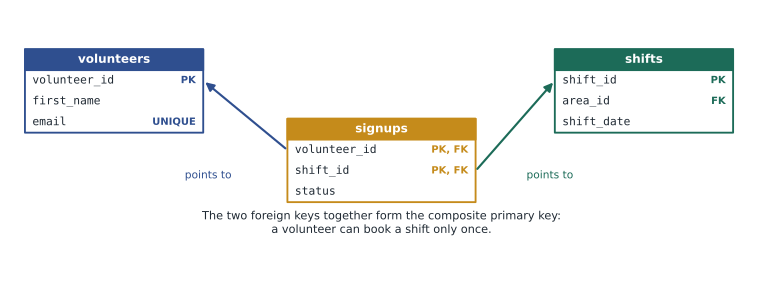
Some tables have a composite primary key made of two or more columns. The signups table records which volunteer booked which shift, and a volunteer can book a given shift only once, so the pair (volunteer_id, shift_id) is the primary key. Neither column is unique on its own: Amara has several signups, and shift 4 has several volunteers.
Foreign keys
A foreign key is a column whose values must match the primary key of a row in another table (or the same table). The shifts table has an area_id column that references areas, so every shift belongs to an area that exists. The signups table has two foreign keys, one to volunteers and one to shifts. This is called referential integrity: the database guarantees that every reference points to something real.
CREATE TABLE shifts (
  shift_id   INTEGER PRIMARY KEY,
  area_id    INTEGER NOT NULL REFERENCES areas(area_id),
  shift_date TEXT NOT NULL,
  start_time TEXT NOT NULL,
  end_time   TEXT NOT NULL,
  spots      INTEGER NOT NULL CHECK (spots > 0)
);

CREATE TABLE signups (
  volunteer_id INTEGER NOT NULL REFERENCES volunteers(volunteer_id),
  shift_id     INTEGER NOT NULL REFERENCES shifts(shift_id),
  status       TEXT NOT NULL DEFAULT 'booked'
               CHECK (status IN ('booked', 'attended', 'no-show', 'cancelled')),
  PRIMARY KEY (volunteer_id, shift_id)
);
SQLite has one important quirk: for historical reasons it does not enforce foreign keys unless each connection turns them on with PRAGMA foreign_keys = ON. PostgreSQL and MySQL (with its default InnoDB storage engine) always enforce them. Every Python example in this course that uses foreign keys runs that PRAGMA first.
import sqlite3

conn = sqlite3.connect(':memory:')
conn.execute("PRAGMA foreign_keys = ON")
conn.executescript("""
    CREATE TABLE areas (area_id INTEGER PRIMARY KEY, name TEXT NOT NULL UNIQUE);
    CREATE TABLE shifts (
        shift_id   INTEGER PRIMARY KEY,
        area_id    INTEGER NOT NULL REFERENCES areas(area_id),
        shift_date TEXT NOT NULL
    );
    INSERT INTO areas (area_id, name) VALUES (1, 'Grocery'), (2, 'Kitchen');
""")

conn.execute("INSERT INTO shifts (area_id, shift_date) VALUES (?, ?)", (2, '2026-11-18'))
print('Kitchen shift added')

try:
    conn.execute("INSERT INTO shifts (area_id, shift_date) VALUES (?, ?)", (9, '2026-11-18'))
except sqlite3.IntegrityError as err:
print('Rejected:', err)Kitchen shift added Rejected: FOREIGN KEY constraint failed
What this code does
Turns on foreign key checking, creates areas and shifts tables where each shift must belong to an existing area, and adds two areas. A shift in area 2, the kitchen, is accepted. A shift in area 9 is refused, because there is no area 9.
Foreign keys also control what happens when the referenced row is deleted or its key changes. By default the database refuses to delete an area that still has shifts. You can instead declare ON DELETE CASCADE (delete the shifts too) or ON DELETE SET NULL (keep the shifts but clear the area). Cascading deletes are convenient and dangerous; lesson 8 discusses when each is appropriate.
Relationships between tables
Keys let you express how entities relate. There are three kinds of relationship, described by how many rows on each side can be linked.
| Relationship | Meaning | How it is built | Food Hub example |
|---|---|---|---|
| One-to-many | One row on one side links to many on the other | A foreign key on the "many" side | One area has many shifts; each shift has one area |
| Many-to-many | Many rows on each side can link to many on the other | A third table (junction table) with a foreign key to each side | Volunteers and shifts, linked by signups |
| One-to-one | Each row links to at most one row on the other side | A foreign key that is also UNIQUE (or the primary key) | A volunteer and their sign-in account |
One-to-many is by far the most common. The rule for building it is easy to remember: the foreign key goes on the "many" side. Each shift row holds one area_id; an area does not hold a list of shifts. Putting a list in a single column, such as "4, 7, 12", is one of the classic design mistakes, and lesson 3 explains why.
A many-to-many relationship cannot be built with a single foreign key, because neither side can hold a list. Instead you create a junction table (also called an association or link table) whose rows each record one pairing. Each signups row says "this volunteer booked this shift", and it is also the natural place for facts about the pairing itself, such as its status (booked, attended, no-show or canceled). A junction table often grows into an entity of its own: a signup has a status and could later have a booking time and a check-in time.
A one-to-one relationship is used to split rarely used or sensitive columns into their own table. When the sign-up site gains log-ins, Theo plans an accounts table holding each volunteer's password hash and last sign-in time, with a volunteer_id column that is both a foreign key and UNIQUE. Keeping it separate means queries about shifts never touch password data, and access to that table can be restricted more tightly.
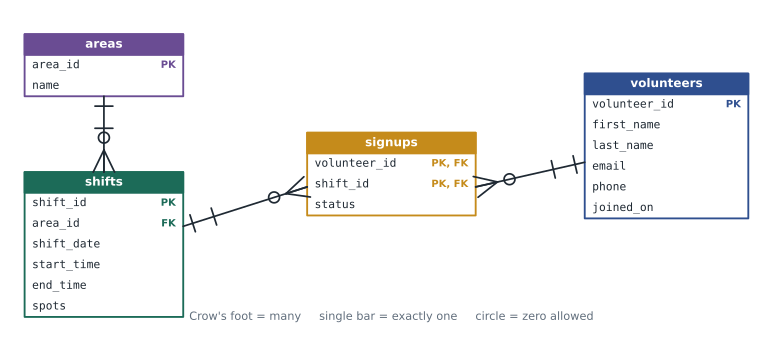
This drawing is an entity relationship diagram (ERD). Each box is a table listing its columns, and each line is a relationship. The forked "crow's foot" end means "many", and the single bar means "one". Lesson 3 explains the notation fully and shows how to draw an ERD from a description of what an organization needs.
Seeing the relationships in data
With the four tables in place, the database can answer questions that took Mira an afternoon in the spreadsheet. Lesson 5 explains joins properly; this preview shows how the keys connect a volunteer's name to their shifts and areas.
SELECT v.first_name, sh.shift_date, a.name AS area, s.status
FROM signups s
JOIN volunteers v ON v.volunteer_id = s.volunteer_id
JOIN shifts sh    ON sh.shift_id = s.shift_id
JOIN areas a      ON a.area_id = sh.area_id
WHERE v.first_name = 'Amara'
ORDER BY sh.shift_date;

-- Result: 4 rows
-- first_name | shift_date | area          | status
-- -----------+------------+---------------+---------
-- Amara      | 2026-11-09 | Grocery       | attended
-- Amara      | 2026-11-10 | Lunch counter | attended
-- Amara      | 2026-11-16 | Grocery       | booked
-- Amara      | 2026-11-20 | Lunch counter | booked
Worked problem
Where does the foreign key go?
Each cooking class at the Food Hub has one instructor, and an instructor can teach many classes. Should the classes table hold an instructor_id, or the instructors table hold a class_id?
Show solution
- Identify the sides: one instructor, many classes. Classes are the "many" side.
- The foreign key goes on the many side, so the classes table gets an instructor_id column referencing instructors.
- If instructors held a class_id, an instructor could teach only one class, or the column would need a list, which a column should never hold.
Answer: classes.instructor_id REFERENCES instructors(instructor_id).
Worked problem
Choosing a primary key for signups
Mira suggests giving signups its own signup_id surrogate key instead of the composite key (volunteer_id, shift_id). What does each choice guarantee?
Show solution
- With only a composite primary key on (volunteer_id, shift_id), the database guarantees a volunteer cannot book the same shift twice.
- With a surrogate signup_id as the primary key, that guarantee is lost unless you also add UNIQUE (volunteer_id, shift_id).
- A surrogate key is handy if other tables will refer to individual signups, for example a reminder_emails table.
Answer: Either works if the pair is unique. Keep the composite key, or add a surrogate key plus UNIQUE (volunteer_id, shift_id); never a surrogate key alone.
Common mistakes
MistakeEmail is unique, so it makes a good primary key.
InsteadEmails change. Use a surrogate key such as volunteer_id and keep email as a UNIQUE column.
MistakeForeign keys are enforced automatically in SQLite.
InsteadSQLite enforces them only after PRAGMA foreign_keys = ON on each connection. PostgreSQL and MySQL's InnoDB always enforce them.
MistakeA volunteer's shifts can be stored in one column as a list of IDs.
InsteadUse a junction table with one row per volunteer and shift. A list in a column cannot be checked, joined or indexed properly.
MistakeNULL and an empty string mean the same thing.
InsteadNULL means no value is known; an empty string is a known value that happens to be empty. Choose one meaning per column, and prefer NOT NULL.
MistakeMoney can be stored in a FLOAT column.
InsteadFloating-point types store approximations. Use an exact decimal type or whole cents in an integer column.
Try it yourself
Count the rejected shifts
The setup creates an areas table with areas 1 to 4 and an empty shifts table whose area_id is a foreign key, with foreign keys turned on. The list new_shifts holds (area_id, shift_date) pairs from Lucy's draft schedule, and two of them use areas that do not exist.
Insert each pair with a parameterized INSERT. Catch sqlite3.IntegrityError for each rejected row and count it. Then print the number of shifts stored and the number rejected, exactly as shown in the expected output: Stored: 4 on the first line and Rejected: 2 on the second.
new_shifts = [(1, '2026-11-23'), (3, '2026-11-24'), (7, '2026-11-24'),
              (2, '2026-11-25'), (5, '2026-11-26'), (4, '2026-11-26')]
rejected = 0

# Insert each shift here, counting rejections

stored = conn.execute("SELECT COUNT(*) FROM shifts").fetchone()[0]
print('Stored:', stored)
Practice problems
Work each problem on paper first, then reveal the answer to check.
Why is (volunteer_id, shift_id) a good primary key for signups, and what does it prevent?
Show answer
The pair identifies exactly one booking and is never NULL. As a primary key it must be unique, so the same volunteer cannot book the same shift twice.
The Food Hub wants to record which volunteers have completed food-safety training and on what date. Each volunteer completes it at most once. Which relationship is this, and how would you build it?
Show answer
Each volunteer has at most one training record, a one-to-one or one-to-zero-or-one relationship. Either add a nullable food_safety_date column to volunteers, or create a table with volunteer_id as both its primary key and a foreign key.
What happens in SQLite if you forget PRAGMA foreign_keys = ON and insert a signup for shift 99?
Show answer
The row is stored even though shift 99 does not exist, leaving an orphaned signup. With the PRAGMA on, the insert would be rejected.
Give the SQLite, PostgreSQL and MySQL ways to declare an automatically numbered key.
Show answer
SQLite: INTEGER PRIMARY KEY. PostgreSQL: integer GENERATED ALWAYS AS IDENTITY PRIMARY KEY. MySQL: INT AUTO_INCREMENT PRIMARY KEY.
Summary and key terms
- A table describes one kind of entity; each row is one instance and each column one typed fact about it.
- Choose types deliberately: exact decimals for money, date types or ISO 8601 text for dates, and NOT NULL unless no value is a real answer.
- SQLite's type affinity is relaxed, so validate in the application or use STRICT tables.
- A primary key uniquely identifies each row; prefer surrogate keys and keep natural values UNIQUE.
- A foreign key must match a primary key in another table, which gives referential integrity; SQLite enforces it only after PRAGMA foreign_keys = ON.
- One-to-many puts the foreign key on the many side, many-to-many needs a junction table, and one-to-one uses a foreign key that is also unique.
- An entity relationship diagram shows tables as boxes and relationships as lines, with a crow's foot for the many end.
- Entity
- A kind of thing an organization keeps data about, usually stored as one table.
- Data type
- The kind of value a column holds, such as integer, text or date.
- NULL
- The marker for a missing or not-applicable value; not the same as zero or an empty string.
- Primary key
- A column or set of columns whose value uniquely identifies each row and is never NULL.
- Surrogate key
- A primary key with no real-world meaning, such as an automatically numbered ID.
- Natural key
- A real-world value, such as an email address, that is unique for each row.
- Composite key
- A key made of two or more columns together.
- Foreign key
- A column whose values must match the primary key of rows in another table.
- Referential integrity
- The guarantee that every foreign key value refers to a row that exists.
- Junction table
- A table that links two tables in a many-to-many relationship, one row per pairing.
- Type affinity
- SQLite's preferred type for a column, which it applies loosely rather than enforcing.
Lesson quiz · 5 questions
Score 60% or more to complete this lesson.
Create a free account to save your progress, take quizzes and earn a certificate.