
WEB-201 · Lesson 12 of 12 · 35 min
Capstone: designing and querying an application database
▶ Video coming soon A video version of this lesson is on the way.
On Friday, November 13, 2026, the same morning the new site was approved for its December launch, Mira presented the design for the volunteer sign-up database to Lucy Tran and Paul Desrosiers in the Food Hub's meeting room, with Theo beside her. She had twenty minutes, a printed ERD, a laptop running the schema in SQLite, and a list of Lucy's questions with the query that answers each one. "Five weeks ago this was a spreadsheet with color-coded cells," Paul said at the end. "I followed every word of that."
This lesson walks through the whole design as Mira presented it, so you can see how the parts of the course fit together: requirements, the data model, the schema with its constraints, the queries, the booking transaction, indexes, parameterized access from code, migrations, access control, privacy and backups. The PHP back end that uses it is planned for the PHP courses in early 2027, with a pilot on the kitchen and lunch counter shifts planned for April 2027.
1. Requirements
Mira's first slide restated what the system must do, in Lucy's words, with the decisions made along the way. Restating requirements at the start of a review catches misunderstandings before anyone looks at a table.
- Volunteers create an account, see open shifts by area and date, book and cancel (up to 24 hours before the start), and see their own upcoming shifts.
- A shift is in one area, on one date, with a start and end time and a number of spots. It can never be overbooked.
- Kitchen shifts need food-safety training and volunteers aged 16 or older; the system stores a training date and a yes-or-no age confirmation, not a birth date.
- Coordinators mark attendance (attended or no-show) after each shift and see no-show counts.
- Paul gets total attended hours by volunteer and by area for any date range.
- Volunteers can ask to be removed; inactive volunteers are anonymized after two years; personal information is seen only by those who need it.
2. The data model
The model grew from the four tables of the sample database. Two new entities came from the requirements: staff, because each area has a lead, and accounts, the one-to-one table holding sign-in details, kept separate so queries about shifts never touch password hashes. A third, accommodations, holds the few notes a volunteer asks Lucy to keep, such as needing a seated task, in a table only coordinators can read.
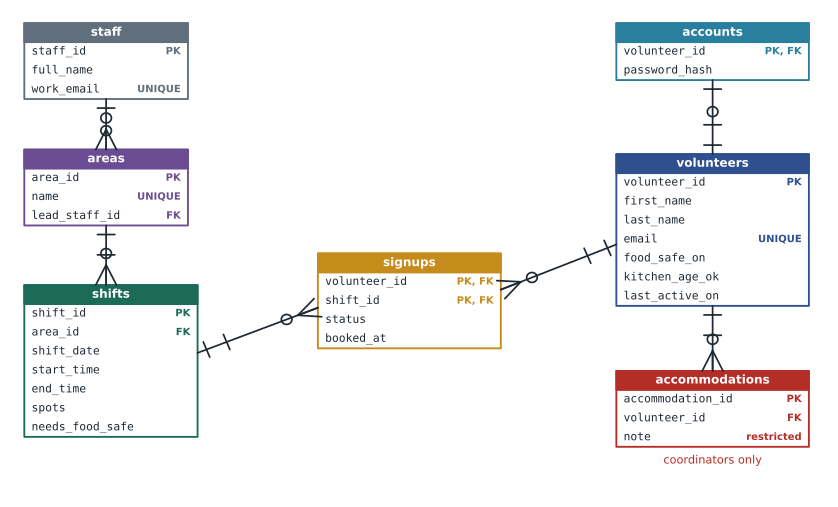
Mira read every relationship aloud, as lesson 3 recommends. "Each shift is in exactly one area; an area has zero or more shifts. Each signup is one volunteer on one shift; a volunteer can have many signups, and so can a shift. Each volunteer has at most one account." Lucy stopped her once: "Can an area have two leads?" Not in this design, and Lucy confirmed that was right; a deputy, if needed later, would be a second column or a small table, added by a migration.
3. The schema
The live database will be PostgreSQL, so the schema slide showed PostgreSQL types: identity keys, real date and time types, boolean, and timestamptz for when a booking was made. Every rule the database can enforce on its own is a constraint.
CREATE TABLE staff (
  staff_id   integer GENERATED ALWAYS AS IDENTITY PRIMARY KEY,
  full_name  text NOT NULL,
  work_email text NOT NULL UNIQUE
);

CREATE TABLE areas (
  area_id       integer GENERATED ALWAYS AS IDENTITY PRIMARY KEY,
  name          text NOT NULL UNIQUE,
  lead_staff_id integer REFERENCES staff(staff_id) ON DELETE SET NULL
);

CREATE TABLE volunteers (
  volunteer_id   integer GENERATED ALWAYS AS IDENTITY PRIMARY KEY,
  first_name     text NOT NULL,
  last_name      text NOT NULL,
  email          text NOT NULL UNIQUE CHECK (email = lower(email)),
  phone          text,
  joined_on      date NOT NULL DEFAULT current_date,
  food_safe_on   date,
  kitchen_age_ok boolean NOT NULL DEFAULT false,
  last_active_on date
);

CREATE TABLE shifts (
  shift_id        integer GENERATED ALWAYS AS IDENTITY PRIMARY KEY,
  area_id         integer NOT NULL REFERENCES areas(area_id),
  shift_date      date NOT NULL,
  start_time      time NOT NULL,
  end_time        time NOT NULL,
  spots           integer NOT NULL CHECK (spots BETWEEN 1 AND 40),
  needs_food_safe boolean NOT NULL DEFAULT false,
  CHECK (end_time > start_time),
  UNIQUE (area_id, shift_date, start_time)
);

CREATE TABLE signups (
  volunteer_id integer NOT NULL REFERENCES volunteers(volunteer_id),
  shift_id     integer NOT NULL REFERENCES shifts(shift_id),
  status       text NOT NULL DEFAULT 'booked'
               CHECK (status IN ('booked', 'attended', 'no-show', 'cancelled')),
  booked_at    timestamptz NOT NULL DEFAULT now(),
  PRIMARY KEY (volunteer_id, shift_id)
);

CREATE TABLE accounts (
  volunteer_id  integer PRIMARY KEY REFERENCES volunteers(volunteer_id),
  password_hash text NOT NULL,
  last_login_at timestamptz
);

CREATE TABLE accommodations (
  accommodation_id integer GENERATED ALWAYS AS IDENTITY PRIMARY KEY,
  volunteer_id     integer NOT NULL REFERENCES volunteers(volunteer_id) ON DELETE CASCADE,
  note             text NOT NULL,
  recorded_by      integer NOT NULL REFERENCES staff(staff_id),
  recorded_on      date NOT NULL DEFAULT current_date
);
A few choices are worth pointing out. Emails must be stored in lower case, enforced by a CHECK, so lookups never need lower() and can use the UNIQUE index. Signups have no ON DELETE action, so the default RESTRICT protects the hours history, and volunteers are anonymized rather than deleted. Accommodations cascade, because a note about a person must go when the person's record goes. The accounts table stores only a password hash produced by PHP's password_hash function, never a password. Times are stored without time zones because each shift happens in one place; booked_at is a timestamptz because it records a moment.
| Index | Serves |
|---|---|
| Primary keys and UNIQUE constraints (automatic) | Lookups by ID and by email; the no-duplicate-booking rule |
| signups (shift_id) | Who is on a shift; counting booked spots; the foreign key to shifts |
| shifts (area_id, shift_date) | The open-shifts page, filtered by area and sorted by date |
| shifts (shift_date) | The coordinators' day view and the hours report by date range |
| accommodations (volunteer_id) | The foreign key; a coordinator viewing one volunteer |
4. The queries
Mira's demonstration ran on SQLite with the same tables in simplified form, which you can run here. The setup builds the schema with its constraints and indexes and adds a few rows for the week of November 16. The first query is the open-shifts page: upcoming shifts with spots left, for any area, using a CTE to count booked signups first.
import sqlite3

conn = sqlite3.connect(':memory:')
conn.execute("PRAGMA foreign_keys = ON")
conn.executescript("""
CREATE TABLE areas (area_id INTEGER PRIMARY KEY, name TEXT NOT NULL UNIQUE);
CREATE TABLE volunteers (
  volunteer_id INTEGER PRIMARY KEY, first_name TEXT NOT NULL, last_name TEXT NOT NULL,
  email TEXT NOT NULL UNIQUE, food_safe_on TEXT, kitchen_age_ok INTEGER NOT NULL DEFAULT 0);
CREATE TABLE shifts (
  shift_id INTEGER PRIMARY KEY, area_id INTEGER NOT NULL REFERENCES areas(area_id),
  shift_date TEXT NOT NULL, start_time TEXT NOT NULL, end_time TEXT NOT NULL,
  spots INTEGER NOT NULL CHECK (spots > 0),
  needs_food_safe INTEGER NOT NULL DEFAULT 0 CHECK (needs_food_safe IN (0, 1)),
  CHECK (end_time > start_time), UNIQUE (area_id, shift_date, start_time));
CREATE TABLE signups (
  volunteer_id INTEGER NOT NULL REFERENCES volunteers(volunteer_id),
  shift_id INTEGER NOT NULL REFERENCES shifts(shift_id),
  status TEXT NOT NULL DEFAULT 'booked'
         CHECK (status IN ('booked', 'attended', 'no-show', 'cancelled')),
  PRIMARY KEY (volunteer_id, shift_id));
CREATE INDEX idx_signups_shift ON signups (shift_id);
CREATE INDEX idx_shifts_area_date ON shifts (area_id, shift_date);

INSERT INTO areas VALUES (1, 'Grocery'), (2, 'Kitchen'), (3, 'Lunch counter');
INSERT INTO volunteers VALUES
  (1, 'Amara', 'Okafor', 'amara@example.com', '2025-03-02', 1),
  (2, 'Ben', 'Kowalski', 'ben@example.com', NULL, 1),
  (3, 'Chloe', 'Martin', 'chloe@example.com', '2026-05-19', 1),
  (4, 'Diego', 'Ramos', 'diego@example.com', '2024-10-08', 1);
INSERT INTO shifts VALUES
  (10, 2, '2026-11-18', '08:00', '11:00', 2, 1),
  (11, 3, '2026-11-17', '11:00', '14:00', 3, 0),
  (12, 1, '2026-11-16', '09:00', '12:00', 4, 0);
INSERT INTO signups VALUES (4, 10, 'booked'), (3, 11, 'booked'), (1, 12, 'booked'), (2, 12, 'booked');
""")

OPEN_SHIFTS = """
WITH taken AS (
    SELECT shift_id, COUNT(*) AS n FROM signups WHERE status = 'booked' GROUP BY shift_id
)
SELECT sh.shift_id, sh.shift_date, sh.start_time, a.name,
       sh.spots - COALESCE(t.n, 0) AS open_spots, sh.needs_food_safe
FROM shifts AS sh
JOIN areas AS a ON a.area_id = sh.area_id
LEFT JOIN taken AS t ON t.shift_id = sh.shift_id
WHERE sh.shift_date >= ?
ORDER BY sh.shift_date, sh.start_time
"""
for shift_id, day, start, area, open_spots, food_safe in conn.execute(OPEN_SHIFTS, ('2026-11-16',)):
    note = '  (food-safety training needed)' if food_safe else ''
print(f"{day} {start} {area:<14} {open_spots} open{note}")2026-11-16 09:00 Grocery 2 open 2026-11-17 11:00 Lunch counter 2 open 2026-11-18 08:00 Kitchen 1 open (food-safety training needed)
What this code does
Builds a simplified copy of the sign-up database with three areas, four volunteers, three shifts next week and four bookings. It then asks for every shift from November 16 onward with how many spots are still open, by counting the bookings for each shift first and subtracting them from the spots. Each shift prints on one line, with a note when the shift needs food-safety training.
The second piece is the booking itself. The rules are: the shift must have a free spot; a kitchen shift needs a training date and the age confirmation; and the same volunteer cannot book twice (the primary key handles that). In SQLite one INSERT ... SELECT does it all safely; the PHP version for PostgreSQL appears in the next section with its row lock.
import sqlite3

conn = sqlite3.connect(':memory:')
conn.execute("PRAGMA foreign_keys = ON")
conn.executescript("""
CREATE TABLE areas (area_id INTEGER PRIMARY KEY, name TEXT NOT NULL UNIQUE);
CREATE TABLE volunteers (
  volunteer_id INTEGER PRIMARY KEY, first_name TEXT NOT NULL, last_name TEXT NOT NULL,
  email TEXT NOT NULL UNIQUE, food_safe_on TEXT, kitchen_age_ok INTEGER NOT NULL DEFAULT 0);
CREATE TABLE shifts (
  shift_id INTEGER PRIMARY KEY, area_id INTEGER NOT NULL REFERENCES areas(area_id),
  shift_date TEXT NOT NULL, start_time TEXT NOT NULL, end_time TEXT NOT NULL,
  spots INTEGER NOT NULL CHECK (spots > 0),
  needs_food_safe INTEGER NOT NULL DEFAULT 0 CHECK (needs_food_safe IN (0, 1)),
  CHECK (end_time > start_time), UNIQUE (area_id, shift_date, start_time));
CREATE TABLE signups (
  volunteer_id INTEGER NOT NULL REFERENCES volunteers(volunteer_id),
  shift_id INTEGER NOT NULL REFERENCES shifts(shift_id),
  status TEXT NOT NULL DEFAULT 'booked'
         CHECK (status IN ('booked', 'attended', 'no-show', 'cancelled')),
  PRIMARY KEY (volunteer_id, shift_id));
CREATE INDEX idx_signups_shift ON signups (shift_id);
CREATE INDEX idx_shifts_area_date ON shifts (area_id, shift_date);

INSERT INTO areas VALUES (1, 'Grocery'), (2, 'Kitchen'), (3, 'Lunch counter');
INSERT INTO volunteers VALUES
  (1, 'Amara', 'Okafor', 'amara@example.com', '2025-03-02', 1),
  (2, 'Ben', 'Kowalski', 'ben@example.com', NULL, 1),
  (3, 'Chloe', 'Martin', 'chloe@example.com', '2026-05-19', 1),
  (4, 'Diego', 'Ramos', 'diego@example.com', '2024-10-08', 1);
INSERT INTO shifts VALUES
  (10, 2, '2026-11-18', '08:00', '11:00', 2, 1),
  (11, 3, '2026-11-17', '11:00', '14:00', 3, 0),
  (12, 1, '2026-11-16', '09:00', '12:00', 4, 0);
INSERT INTO signups VALUES (4, 10, 'booked'), (3, 11, 'booked'), (1, 12, 'booked'), (2, 12, 'booked');
""")

BOOK = """
INSERT INTO signups (volunteer_id, shift_id)
SELECT v.volunteer_id, sh.shift_id
FROM shifts AS sh, volunteers AS v
WHERE sh.shift_id = ? AND v.volunteer_id = ?
  AND (sh.needs_food_safe = 0 OR (v.food_safe_on IS NOT NULL AND v.kitchen_age_ok = 1))
  AND (SELECT COUNT(*) FROM signups AS s
       WHERE s.shift_id = sh.shift_id AND s.status = 'booked') < sh.spots
"""

def book(volunteer_id, shift_id):
    try:
        with conn:
            cur = conn.execute(BOOK, (shift_id, volunteer_id))
    except sqlite3.IntegrityError:
        return 'Already booked'
    return 'Booked' if cur.rowcount == 1 else 'Not allowed: full or training needed'

print('Ben, kitchen:      ', book(2, 10))
print('Amara, kitchen:    ', book(1, 10))
print('Chloe, kitchen:    ', book(3, 10))
print('Chloe, lunch again:', book(3, 11))Ben, kitchen: Not allowed: full or training needed Amara, kitchen: Booked Chloe, kitchen: Not allowed: full or training needed Chloe, lunch again: Already booked
What this code does
Builds the same small database and defines a booking that only goes through when the shift has room and, for kitchen shifts, the volunteer has food-safety training and has confirmed their age. Ben is turned away from the kitchen because he has no training date. Amara takes the last kitchen spot. Chloe is then turned away because the kitchen is full, and her second booking for a lunch shift she already has is refused as a duplicate.
The page tells Ben which rule stopped him by running a cheaper check first ("this shift needs food-safety training"), but the guarded INSERT is what guarantees the rules hold even if two requests arrive together. The hours report from lesson 6 and the no-show query complete the set Lucy asked for.
SELECT a.name AS area,
       COUNT(*) AS shifts_attended,
       SUM(ROUND((julianday(sh.end_time) - julianday(sh.start_time)) * 24, 1)) AS hours
FROM signups AS s
JOIN shifts AS sh ON sh.shift_id = s.shift_id
JOIN areas  AS a  ON a.area_id = sh.area_id
WHERE s.status = 'attended'
  AND sh.shift_date BETWEEN '2026-11-01' AND '2026-11-30'
GROUP BY a.name
ORDER BY hours DESC, a.name;

-- Result: 3 rows
-- area          | shifts_attended | hours
-- --------------+-----------------+------
-- Grocery       | 2               | 6.0
-- Kitchen       | 2               | 6.0
-- Lunch counter | 2               | 6.0
5. Access from code
Every query in the application passes values as parameters. Theo's draft of the PHP booking function for PostgreSQL shows all the pieces together: settings from the environment, a transaction, a row lock on the shift, the rules, and a clear result.
<?php
function bookShift(PDO $pdo, int $volunteerId, int $shiftId): string
{
    $pdo->beginTransaction();
    try {
        $shift = $pdo->prepare('SELECT spots, needs_food_safe FROM shifts WHERE shift_id = ? FOR UPDATE');
        $shift->execute([$shiftId]);
        $row = $shift->fetch();
        if (!$row) { $pdo->rollBack(); return 'No such shift'; }

        $taken = $pdo->prepare("SELECT COUNT(*) FROM signups WHERE shift_id = ? AND status = 'booked'");
        $taken->execute([$shiftId]);
        if ((int) $taken->fetchColumn() >= (int) $row['spots']) { $pdo->rollBack(); return 'Shift full'; }

        $insert = $pdo->prepare(
            "INSERT INTO signups (volunteer_id, shift_id) VALUES (:v, :s)
             ON CONFLICT (volunteer_id, shift_id) DO UPDATE SET status = 'booked'
             WHERE signups.status = 'cancelled'"
        );
        $insert->execute(['v' => $volunteerId, 's' => $shiftId]);
        $pdo->commit();
        return $insert->rowCount() === 1 ? 'Booked' : 'Already booked';
    } catch (Throwable $e) {
        $pdo->rollBack();
        throw $e;
    }
}
The same function in Node.js with pg takes one client from the pool for the whole transaction, because a transaction belongs to one connection. In Java, JDBC turns off autocommit on the connection and commits at the end.
export async function bookShift(pool, volunteerId, shiftId) {
  const client = await pool.connect();          // one connection for the whole transaction
  try {
    await client.query('BEGIN');
    const shift = await client.query('SELECT spots FROM shifts WHERE shift_id = $1 FOR UPDATE', [shiftId]);
    if (shift.rowCount === 0) { await client.query('ROLLBACK'); return 'No such shift'; }
    const taken = await client.query(
      "SELECT COUNT(*)::int AS n FROM signups WHERE shift_id = $1 AND status = 'booked'", [shiftId]);
    if (taken.rows[0].n >= shift.rows[0].spots) { await client.query('ROLLBACK'); return 'Shift full'; }
    await client.query('INSERT INTO signups (volunteer_id, shift_id) VALUES ($1, $2)', [volunteerId, shiftId]);
    await client.query('COMMIT');
    return 'Booked';
  } catch (err) {
    await client.query('ROLLBACK');
    throw err;
  } finally {
    client.release();
  }
}public String bookShift(Connection conn, int volunteerId, int shiftId) throws SQLException {
conn.setAutoCommit(false);
try (PreparedStatement lock = conn.prepareStatement(
"SELECT spots FROM shifts WHERE shift_id = ? FOR UPDATE");
PreparedStatement count = conn.prepareStatement(
"SELECT COUNT(*) FROM signups WHERE shift_id = ? AND status = 'booked'");
PreparedStatement insert = conn.prepareStatement(
"INSERT INTO signups (volunteer_id, shift_id) VALUES (?, ?)")) {
lock.setInt(1, shiftId);
int spots;
try (ResultSet rs = lock.executeQuery()) {
if (!rs.next()) { conn.rollback(); return "No such shift"; }
spots = rs.getInt(1);
}
count.setInt(1, shiftId);
try (ResultSet rs = count.executeQuery()) {
rs.next();
if (rs.getInt(1) >= spots) { conn.rollback(); return "Shift full"; }
}
insert.setInt(1, volunteerId);
insert.setInt(2, shiftId);
insert.executeUpdate();
conn.commit();
return "Booked";
} catch (SQLException e) {
conn.rollback();
throw e;
}
}Before the pilot, Theo will test the booking code by sending twenty simultaneous requests at a two-spot shift and checking that exactly two succeed, and Mira added names with apostrophes and accents to the test data.
6. Migrations and releases
The schema will be built by numbered migrations from the first day, with the expand and contract pattern for any change after the pilot starts. The plan, as of November 13:
| Step | Content | Planned for |
|---|---|---|
| Migrations 0001 to 0007 | Tables, constraints and indexes as designed | January 2027, with the start of the PHP back end |
| Import | Clean and import 300 volunteers and the 2026 history from the spreadsheet, matching duplicates by email and phone | February 2027 |
| Pilot | Kitchen and lunch counter shifts booked online; others by phone as now | April 2027 |
| Full launch | All areas online; the spreadsheet retired | After the pilot review |
7. Access control, privacy and breach planning
The database has three login roles, each with the least privilege it needs. The application role can read and change rows in the application tables and nothing else. The migration role owns the tables and runs schema changes during deployments only. A read-only reporting role is used for Paul's reports, and it cannot see accounts or accommodations at all.
CREATE ROLE hub_app LOGIN;          -- password set outside the code, in the host's secret store
GRANT SELECT, INSERT, UPDATE ON areas, shifts, volunteers, signups, accounts TO hub_app;
GRANT SELECT, INSERT, UPDATE, DELETE ON accommodations TO hub_app;

CREATE ROLE hub_report LOGIN;
GRANT SELECT ON areas, shifts, signups TO hub_report;
GRANT SELECT (volunteer_id, first_name, last_name) ON volunteers TO hub_report;
-- no grants on accounts or accommodations for reports
In the application, only users with the coordinator role can open a volunteer's accommodations, and every view of that page is logged. Mira's retention rule from lesson 7 is in the design: a monthly job anonymizes volunteers whose last_active_on is more than two years ago, and removal requests are handled within 30 days. Database backups are encrypted and kept for 35 days, so an anonymized record disappears from the backups within five weeks.
Paul asked what would happen if the database were ever breached. Wisconsin's breach notification law, Wisconsin Statutes section 134.98, applies when personal information as the law defines it, a person's name together with a Social Security number, a driver's license or state ID number, a financial account number with its access code, DNA profile or biometric data, is acquired by someone not authorized to have it. Affected people must then be notified within a reasonable time, no more than 45 days after the organization learns of it, and if more than 1,000 people are affected, the nationwide consumer reporting agencies must also be told. The sign-up database deliberately stores none of those data elements, so a breach of it would probably not trigger the statute, but Brightwater's plan is to notify volunteers promptly anyway, because their names, emails and phone numbers could be used for scams. Wisconsin has no comprehensive privacy law (bills AB 172 and SB 166 failed in March 2026), so the Food Hub's own policy sets the rest of the rules.
The breach plan itself is short: contain the problem (revoke credentials, take the affected server offline if needed), assess what was accessed using the database and application logs, decide on notifications with the Food Hub's leadership, notify, and record what happened and what was changed afterwards.
8. Backups and recovery
The managed PostgreSQL service takes continuous backups with point-in-time recovery, meeting the 15-minute recovery point and 4-hour recovery time Lucy and Theo agreed. A nightly logical dump is copied, encrypted, to storage with a different provider, which satisfies the 3-2-1 rule. Every migration in production is preceded by a fresh snapshot, and a test restore is done each quarter.
Worked problem
Answering a question Lucy didn't ask in advance
During the review, Lucy asked: "Which volunteers booked kitchen shifts next week but haven't done food-safety training?" Write the query on the spot.
Show solution
- The rows are signups, joined to shifts (for the date and the food-safety flag) and volunteers (for the name and training date).
- Conditions: status is booked; the shift date is between November 16 and 22; the shift needs food safety; the volunteer's food_safe_on IS NULL.
- With the booking rules in place this should return nothing, so the query is also a test that the rules work.
Answer: SELECT v.first_name, v.last_name, sh.shift_date FROM signups s JOIN shifts sh ON sh.shift_id = s.shift_id JOIN volunteers v ON v.volunteer_id = s.volunteer_id WHERE s.status = 'booked' AND sh.needs_food_safe AND sh.shift_date BETWEEN '2026-11-16' AND '2026-11-22' AND v.food_safe_on IS NULL; An empty result confirms the booking rule works.
Worked problem
Reviewing the design against the course
Theo's last slide checked the design against each topic of the course. Summarize it.
Show solution
- Why a database: shared, concurrent, rule-enforcing storage replacing the spreadsheet.
- Keys and relationships: surrogate keys, foreign keys on the many side, a junction table, one-to-one accounts.
- Modeling and normalization: each fact once, hours derived, no birth dates or free-text notes.
- Queries: open shifts, my shifts, hours and no-shows, written and tested.
- Changes and transactions: a guarded booking that cannot overbook, upserts for rebooking, row counts checked.
- Indexes: on foreign keys and the open-shifts query, confirmed with plans.
- Security: parameters everywhere, an allowlist for sorting, least-privilege roles, secrets outside the code.
- Operations: migrations from day one, expand and contract later, tested backups and a breach plan.
Answer: Every requirement maps to a table, a constraint, a query or a procedure, and each has been tested or is scheduled to be.
Common mistakes
MistakeA design review is about the tables, so skip the requirements slide.
InsteadRestate the requirements first. Most design errors are misunderstood requirements, and they are cheapest to catch before the schema is built.
MistakeThe booking check on the page is enough to stop overbooking.
InsteadThe page check gives a friendly message. The guarded INSERT or row lock in a transaction is what guarantees the rule under concurrency.
MistakeReports can run as the application's database user.
InsteadGive reports a read-only role that cannot see accounts or accommodations, following least privilege.
MistakeAnonymizing a volunteer removes them everywhere immediately.
InsteadBackups, logs and exports still hold the data until they expire. The retention plan has to cover them.
MistakeBreach planning can wait until something happens.
InsteadDecide in advance who assesses, who decides and who notifies, and keep the logs that make an assessment possible.
Try it yourself
Next week for one volunteer
The setup builds the Food Hub sample database in conn. Write the "my shifts" query for the sign-up page: for a given volunteer_id and start date, return the shift date, start time and area name of every signup with status 'booked' on or after the start date, ordered by date and start time.
Use ? placeholders for the volunteer and the date, run it for Amara (volunteer 1) from 2026-11-16, and print each row as the date, the start time and the area separated by single spaces.
def my_shifts(volunteer_id, from_date):
    sql = "SELECT shift_date, start_time, area_id FROM shifts WHERE shift_date >= ?"
    return conn.execute(sql, (from_date,)).fetchall()

for day, start, area in my_shifts(1, '2026-11-16'):
    print(day, start, area)
Practice problems
Work each problem on paper first, then reveal the answer to check.
Why are accounts and accommodations separate tables rather than columns on volunteers?
Show answer
So the most common queries never touch password hashes or sensitive notes, and so database permissions can deny the reporting role access to them completely.
Which parts of the booking rules are enforced by constraints, and which by the transaction?
Show answer
No duplicate booking is the primary key; valid status values and spots are CHECK constraints; shifts and volunteers must exist by foreign keys. The spot limit and the food-safety rule involve other rows, so the guarded insert or locked transaction enforces them.
Lucy asks to add a mobile market area after launch. What has to change?
Show answer
Only data: insert a row into areas, and create shifts in it. No migration is needed, which is one benefit of areas being a table rather than a fixed list.
Give the three database roles in the design and what each may do.
Show answer
hub_app reads and changes the application tables; the migration role owns the schema and runs migrations during deployments; hub_report reads areas, shifts, signups and volunteer names only.
Summary and key terms
- A design review starts from requirements and reads every relationship aloud with the people who own the data.
- The Food Hub design adds staff, a one-to-one accounts table and a restricted accommodations table to the sample model.
- The PostgreSQL schema uses identity keys, real date and time types, NOT NULL, UNIQUE, CHECK and foreign keys with deliberate delete actions, plus indexes on foreign keys and the main queries.
- The open-shifts query aggregates in a CTE before joining; the booking is a guarded insert in SQLite, or a transaction with a FOR UPDATE row lock in PostgreSQL, from PHP, Node.js or Java with parameters.
- Migrations build the schema from day one, and the release plan runs from January to April 2027.
- Least-privilege roles, logging, a retention rule, a breach plan based on the applicable law, and tested point-in-time backups complete the design.
- Requirements
- A statement of what a system must do, in the words of the people who will use it.
- Design review
- A meeting in which a design is checked against requirements before it is built.
- Role
- A database login or group that is granted specific privileges.
- GRANT
- The SQL statement that gives a role privileges on tables or columns.
- Guarded insert
- An INSERT ... SELECT whose WHERE clause checks the business rules, so it inserts nothing if they fail.
- Retention rule
- A rule for how long data is kept before it is deleted or anonymized.
- Breach of security safeguards
- PIPEDA's term for loss of, unauthorized access to or disclosure of personal information.
- Real risk of significant harm
- The PIPEDA threshold above which a breach must be reported and individuals notified.
- Pilot
- A limited first use of a system with some users before full launch.
Lesson quiz · 5 questions
Score 60% or more to complete this lesson.
Create a free account to save your progress, take quizzes and earn a certificate.