
WEB-201 · Lesson 11 of 12 · 24 min
Migrations and schema changes
▶ Video coming soon A video version of this lesson is on the way.
Lucy's list had one item the schema didn't cover yet: some kitchen shifts need food-safety training. "So we add a column," Mira said, and typed an ALTER TABLE into her test database. Theo let her finish, then asked three questions. "How will the copy on my laptop get that column? How will the live database get it on launch night without anyone typing it by hand? And when we need to undo it, what do we run?" The answer to all three is a migration.
A database schema changes throughout an application's life: new tables, new columns, new constraints, renamed and removed things. This lesson shows how teams manage those changes as versioned migration files, how to change a live database without breaking the running application, what object-relational mappers (ORMs) do and when to use plain SQL instead, and how backups make every change, and every mistake, recoverable.
What a migration is
A migration is a small file that changes the schema from one version to the next, such as "add needs_food_safe to shifts". Migrations are numbered or timestamped, kept in the code repository next to the application code, and applied in order. The database records which ones have been applied, usually in a table such as schema_migrations, so the migration tool can tell which are new and run only those. Every copy of the database, on each developer's laptop, the test server and the live server, reaches the same schema by running the same files in the same order.
migrations/
  0001_create_areas_volunteers.sql
  0002_create_shifts_signups.sql
  0003_add_needs_food_safe_to_shifts.sql
  0004_add_food_safe_on_to_volunteers.sql
  0005_create_index_shifts_area_date.sql
Because migrations live in version control, a schema change is reviewed in a pull request alongside the code that uses it, and the history shows when and why every column appeared. Nobody changes the live schema by hand. If a change is not in a migration, it does not exist.
-- 0003_add_needs_food_safe_to_shifts.sql
ALTER TABLE shifts
  ADD COLUMN needs_food_safe INTEGER NOT NULL DEFAULT 0
  CHECK (needs_food_safe IN (0, 1));

-- 0004_add_food_safe_on_to_volunteers.sql
ALTER TABLE volunteers
  ADD COLUMN food_safe_on TEXT;   -- date of training; NULL if not trained
A tiny migration runner
Migration tools do more than this, but the core idea fits in a few lines. SQLite has a built-in integer called user_version, stored in the database file, which makes a convenient version number. The runner reads the current version, applies each newer migration in its own transaction and bumps the version after each one.
import sqlite3

MIGRATIONS = [
    "CREATE TABLE shifts (shift_id INTEGER PRIMARY KEY, shift_date TEXT NOT NULL, spots INTEGER NOT NULL)",
    "ALTER TABLE shifts ADD COLUMN needs_food_safe INTEGER NOT NULL DEFAULT 0",
    "CREATE INDEX idx_shifts_date ON shifts (shift_date)",
]

def migrate(conn):
    current = conn.execute("PRAGMA user_version").fetchone()[0]
    for number, sql in enumerate(MIGRATIONS, start=1):
        if number <= current:
            continue
        with conn:
            conn.execute(sql)
            conn.execute(f"PRAGMA user_version = {number}")
        print(f"Applied migration {number}")
    return conn.execute("PRAGMA user_version").fetchone()[0]

conn = sqlite3.connect(':memory:')
print('Version now', migrate(conn))
print('Version now', migrate(conn))
print([row[1] for row in conn.execute("PRAGMA table_info(shifts)")])Applied migration 1 Applied migration 2 Applied migration 3 Version now 3 Version now 3 ['shift_id', 'shift_date', 'spots', 'needs_food_safe']
What this code does
Lists three schema changes in order and defines a function that checks which version the database is at and applies only the changes it has not had yet, recording the new version after each one. The first run applies all three. The second run finds nothing new to apply. Finally it prints the columns the shifts table now has.
The version number is written into the SQL with an f-string, which is safe here because the number comes from the program's own loop, not from any user. PRAGMA statements do not accept parameters, which is one of the few places this is necessary.
Tools for each language
Real projects use a migration tool, which adds features such as timestamps instead of numbers (so two developers' migrations don't collide), locking so two servers never migrate at once, checksums that detect an edited migration, and commands to show status.
| Language | Common migration tools |
|---|---|
| Java | Flyway, Liquibase |
| JavaScript (Node.js) | Knex migrations, Prisma Migrate, node-pg-migrate, Sequelize migrations |
| PHP | Laravel migrations, Doctrine Migrations, Phinx |
| Python | Alembic, Django migrations |
Flyway's convention shows the idea clearly: files named V1__create_areas.sql, V2__add_shifts.sql and so on, applied in version order and recorded in a flyway_schema_history table. Laravel writes migrations as PHP classes with an up() method that applies the change and a down() method that reverses it.
Undoing a change: down migrations and rolling forward
Many tools let each migration have a down step that reverses it: drop the column the up step added. Down steps are useful during development, when you are changing a migration you have not shared yet. On a live database they are less useful than they look. Dropping a column that has been collecting data for a week destroys that data, and a down step that has never been tested may not work. Most teams therefore roll forward: if a migration causes a problem in production, they write a new migration that fixes it. Two rules follow: never edit a migration that has already been applied anywhere shared, and always have a backup taken before a risky migration runs.
What each database can change
Systems differ in how much ALTER TABLE can do and whether schema changes can be rolled back.
- PostgreSQL supports almost every change with ALTER TABLE, and its schema changes are transactional: a migration can run inside BEGIN ... COMMIT and, if any step fails, the whole migration is rolled back, leaving the schema unchanged.
- MySQL also supports most changes, but each schema statement commits implicitly, so a migration that fails half way leaves the earlier steps applied. Keep each MySQL migration to one change where possible.
- SQLite supports ADD COLUMN, RENAME TABLE, RENAME COLUMN (since 3.25) and DROP COLUMN (since 3.35). To change a column's type or constraints you rebuild the table: create a new table with the right definition, copy the rows across, drop the old table and rename the new one, all in one transaction. Migration tools for SQLite do this for you.
Some changes lock a table while they run. Adding an index on a large PostgreSQL table blocks writes until it finishes, unless you use CREATE INDEX CONCURRENTLY. Adding a column with a constant default is instant in modern PostgreSQL and MySQL, but adding a NOT NULL constraint to an existing column has to check every row. On the Food Hub's tables these take milliseconds; on a table with a hundred million rows they need planning.
Changing a live schema safely: expand and contract
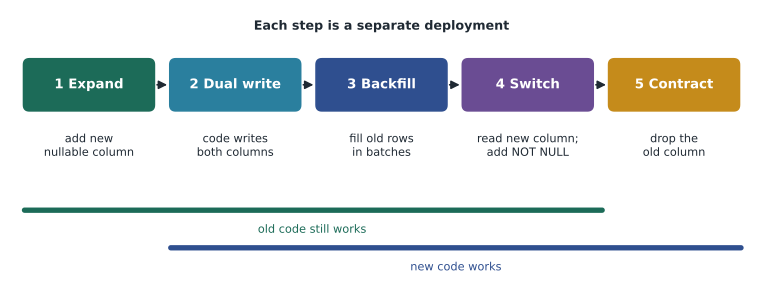
The application and the database are deployed separately, and for a short time old code runs against the new schema (or new code against the old one). A migration that renames a column breaks every running copy of the old code the instant it runs. The standard way to avoid that is the expand and contract pattern, also called parallel change: first expand the schema so both old and new code work, then move the code over, then contract the schema to remove what is no longer needed.
Worked problem
Renaming a column without downtime
Lucy wants volunteers' phone numbers stored in the international format, so phone (free text such as 555-0141) is to be replaced by phone_e164 (such as +16085550141). Plan the change so the live site never breaks.
Show solution
- Expand: a migration adds phone_e164 as a nullable column. Old code ignores it.
- Deploy code that writes both phone and phone_e164 whenever a volunteer saves their profile.
- Backfill: a script converts every existing phone value and fills phone_e164, in batches of a few hundred rows so it never holds long locks. Numbers it cannot convert are listed for Lucy.
- Deploy code that reads phone_e164 only. Once every row has a value (or is genuinely empty), a migration adds any constraints needed.
- Contract: after a week with no problems, a final migration drops the old phone column.
Answer: Five small, separately deployed steps, each reversible, with both versions of the code working at every stage.
It looks like a lot of ceremony for one column, and for a site with a planned maintenance window a simpler plan might be acceptable. But the habit of separating schema changes from code changes, and of never making a change that breaks the code currently running, prevents most migration incidents.
ORMs and plain SQL
An object-relational mapper (ORM) is a library that maps database tables to classes in the application's language and rows to objects. Instead of writing SQL, you work with objects, and the ORM generates the SQL. Each ecosystem has popular ones: Hibernate and JPA in Java, Eloquent (Laravel) and Doctrine in PHP, Prisma, Sequelize and TypeORM in JavaScript, and SQLAlchemy and the Django ORM in Python. Between ORMs and raw SQL sit query builders, such as Knex in JavaScript and jOOQ in Java, which build SQL from method calls without mapping objects.
| ORM | Plain SQL with parameters | |
|---|---|---|
| Everyday create, read, update, delete | Very quick to write | More typing, but explicit |
| Parameters and injection safety | Automatic in normal query methods | Automatic if you always use placeholders |
| Complex reports, window functions, CTEs | Often awkward; many fall back to raw SQL | Natural |
| Seeing the actual SQL | Hidden unless you turn on logging | Always visible |
| Performance traps | Lazy loading causes N+1 queries easily | You write each query, so you see each round trip |
| Migrations | Usually included, often generated from the classes | Separate tool, hand-written files |
The two are not opposites. Most teams use an ORM for routine work and drop to SQL for reports and performance-critical queries, and a good developer understands the SQL the ORM generates. The most common ORM performance problem is the N+1 query from lesson 5: loading 50 shifts, then touching shift.volunteers in a loop, quietly runs 50 more queries. Every ORM has an eager loading option (with() in Eloquent, include in Prisma, JOIN FETCH in JPA) that loads the related rows in one or two queries instead. Turn on SQL logging in development and watch the number of queries on each page.
For the Food Hub back end, Theo plans Laravel's Eloquent for accounts and bookings, Laravel migrations for the schema, and hand-written SQL for the annual hours report and the open-spots query, so Mira will meet both. That work begins in the PHP courses, planned for early 2027.
Backups
Every database needs backups, and a backup that has never been restored is only a hope. Backups protect against hardware failure, but more often against people: a bad migration, an UPDATE without WHERE, a deleted table, or an attack. There are two broad kinds.
| Kind | How it works | Examples | Good for |
|---|---|---|---|
| Logical | Exports the schema and data as SQL statements or a portable archive | pg_dump, mysqldump, the SQLite .backup command or VACUUM INTO | Small and medium databases, moving data between versions, restoring one table |
| Physical | Copies the database files, plus the log of changes since | PostgreSQL base backups with WAL archiving, managed cloud snapshots | Large databases and point-in-time recovery |
Point-in-time recovery uses a physical backup plus the archived log of every change since, so you can restore the database to its state at, say, 10:14, one minute before a mistaken DELETE. Two numbers describe what a backup plan promises. The recovery point objective (RPO) is how much recent data you could lose: a nightly backup alone means up to a day. The recovery time objective (RTO) is how long a restore may take. Lucy and Theo agreed on an RPO of 15 minutes and an RTO of 4 hours for the sign-up database, which the hosting provider's managed PostgreSQL with point-in-time recovery meets.
Theo follows the 3-2-1 rule: three copies of the data, on two different kinds of storage, with one copy off site (or in a different cloud region). Backups contain all the personal information in the database, so they are encrypted, access to them is restricted, and they are deleted on a schedule. That last point matters for privacy: a volunteer anonymized today still appears in backups until those backups expire, so the retention period for backups belongs in the privacy plan.
import sqlite3

live = sqlite3.connect(':memory:')
live.executescript("""
    CREATE TABLE volunteers (volunteer_id INTEGER PRIMARY KEY, first_name TEXT);
    INSERT INTO volunteers (first_name) VALUES ('Amara'), ('Ben'), ('Chloe');
""")

backup = sqlite3.connect(':memory:')
live.backup(backup)                          # copy the whole database
print('Backed up', backup.execute("SELECT COUNT(*) FROM volunteers").fetchone()[0], 'volunteers')

live.execute("DELETE FROM volunteers")       # a mistake: no WHERE clause
live.commit()
print('Live database now has', live.execute("SELECT COUNT(*) FROM volunteers").fetchone()[0], 'volunteers')

restored = sqlite3.connect(':memory:')
backup.backup(restored)                      # restore into a fresh database and check it
names = [r[0] for r in restored.execute("SELECT first_name FROM volunteers ORDER BY volunteer_id")]
print('Restored:', names)Backed up 3 volunteers Live database now has 0 volunteers Restored: ['Amara', 'Ben', 'Chloe']
What this code does
Makes a small database of three volunteers and copies the whole thing into a backup. A mistaken delete then empties the volunteers table in the live database. Restoring from the backup into a fresh database brings back all three names, which the program prints to show the restore worked.
The final step in the example, checking the restored data, is the one people skip. Theo schedules a test restore of the Food Hub database every quarter into a separate server, runs the hours report against it and compares the result with the live report.
Common mistakes
MistakeChange the live schema by hand in a database console; it's only one column.
InsteadEvery change goes in a migration file in version control, so every copy of the database gets it and the history is recorded.
MistakeEdit an old migration to fix a mistake.
InsteadOnce a migration has been applied anywhere shared, never edit it. Write a new migration that fixes the problem.
MistakeRename a column in one migration and deploy the new code at the same moment.
InsteadRunning copies of the old code break. Use expand and contract: add, write both, backfill, switch, then drop.
MistakeThe ORM handles the SQL, so I don't need to know what it runs.
InsteadTurn on query logging and read the SQL. Lazy loading creates N+1 queries that only show up in the log.
MistakeWe take nightly backups, so we're covered.
InsteadA backup you have never restored may not work, and nightly backups can lose a day. Test restores regularly and choose an RPO and RTO deliberately.
Try it yourself
Apply only the new migrations
The setup creates a database already at version 1 (PRAGMA user_version = 1) with a volunteers table, and a list MIGRATIONS of three SQL statements, the first of which has already been applied.
Complete migrate(conn) so it reads the current user_version, runs each migration whose number (counting from 1) is greater than the current version inside with conn:, sets user_version to that number after each one, and prints Applied followed by the number. The program then prints the final version and the volunteers table's columns.
def migrate(conn):
    current = conn.execute("PRAGMA user_version").fetchone()[0]
    # apply the migrations that are newer than current here

migrate(conn)
print('Version:', conn.execute("PRAGMA user_version").fetchone()[0])
print([row[1] for row in conn.execute("PRAGMA table_info(volunteers)")])
Practice problems
Work each problem on paper first, then reveal the answer to check.
Why does a migration tool record applied migrations in the database itself?
Show answer
So it can compare the files in the repository with what this particular database has had, and run only the new ones, in order, on every copy.
Why do most teams roll forward instead of running down migrations in production?
Show answer
A down step can destroy data collected since the change and is often untested. A new forward migration can fix the problem while preserving data.
List the expand and contract steps for replacing a column.
Show answer
Add the new column; deploy code that writes both; backfill old rows in batches; switch reads to the new column and add constraints; drop the old column.
What do RPO and RTO mean, and what plan meets an RPO of 15 minutes?
Show answer
RPO is how much recent data may be lost; RTO is how long a restore may take. A physical backup with continuous log archiving, giving point-in-time recovery, meets a 15-minute RPO; a nightly dump alone does not.
Summary and key terms
- A migration is a versioned file that moves the schema from one version to the next; migrations live in version control, run in order, and are recorded in the database so each copy gets exactly the new ones.
- Migration tools exist for every language, such as Flyway, Knex or Prisma, Laravel or Doctrine, and Alembic.
- Never edit an applied migration; roll forward with a new one, and back up before risky changes.
- PostgreSQL schema changes are transactional, MySQL's commit implicitly, and SQLite rebuilds tables for changes ALTER TABLE cannot make.
- Expand and contract changes a live schema in steps so old and new code both work.
- ORMs map rows to objects and generate parameterized SQL, but watch the generated SQL for N+1 queries and use plain SQL for complex reports.
- Logical and physical backups, point-in-time recovery, an agreed RPO and RTO, the 3-2-1 rule, encryption, retention and regular test restores make mistakes recoverable.
- Migration
- A versioned script that changes a database schema from one version to the next.
- Schema
- The structure of a database: its tables, columns, types, constraints and indexes.
- Roll forward
- Fixing a bad change with a new migration rather than reversing the old one.
- Transactional DDL
- Schema changes that can be committed or rolled back as part of a transaction.
- Expand and contract
- Changing a live schema in steps so old and new application code both keep working.
- Backfill
- Filling a new column for existing rows, usually in batches.
- ORM
- Object-relational mapper: a library that maps tables to classes and generates SQL.
- Eager loading
- Loading related rows in advance in a few queries to avoid N+1 queries.
- Point-in-time recovery
- Restoring a database to its state at a chosen moment using backups and archived logs.
- RPO
- Recovery point objective: the most recent data a plan allows to be lost.
- RTO
- Recovery time objective: the longest a restore is allowed to take.
Lesson quiz · 5 questions
Score 60% or more to complete this lesson.
Create a free account to save your progress, take quizzes and earn a certificate.