
WEB-201 · Lesson 10 of 12 · 30 min
Parameterized queries and SQL injection defense
▶ Video coming soon A video version of this lesson is on the way.
While moving content off the Food Hub's 2014 site, Theo had found a small PHP script that handled its newsletter sign-up form. On Friday, November 6, he put it on the big screen. It was nine lines long, and line six built an SQL statement by gluing the visitor's email address into the middle of a string. "Nobody ever attacked this as far as we know," Theo said. "But it would have broken the first time someone with an apostrophe in their address signed up, and in the wrong hands it could have done far worse. Today you learn the one habit that makes that whole class of bug impossible."
SQL injection happens when text supplied by a user is pasted into an SQL statement, so that the database treats part of the user's text as SQL rather than as a value. It has been among the most damaging web security flaws for over twenty years, and it is completely preventable. This lesson explains, from the defender's side, why it happens, how parameterized queries prevent it, how to write them in Python, JavaScript, PHP and Java, what parameters cannot do and how to handle those cases safely, and the further layers of defense that limit the damage of any mistake.
Code and data
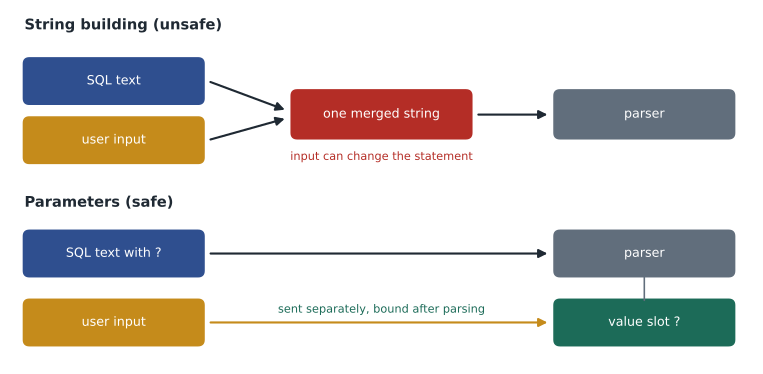
An SQL statement is code: the database parses it into a structure of keywords, table names, operators and values, and then runs that structure. When an application builds the statement by joining strings, the user's input becomes part of the text that gets parsed. Ordinary input happens to parse as a value. Input containing characters that mean something in SQL, such as a single quote, changes how the statement parses, and the statement no longer means what the programmer intended. The problem is not bad input; it is mixing data into code.
The pattern to recognize, and never write, looks like this. It is shown only so you can spot it in old code and in reviews.
<?php
// DON'T DO THIS: user input is pasted into the SQL text
$email = $_POST['email'];
$sql = "INSERT INTO subscribers (email) VALUES ('" . $email . "')";
$pdo->exec($sql);
Even a perfectly honest visitor breaks it. Siobhan O'Neill's address contains an apostrophe, which ends the quoted value early, and the rest of the address is left over as stray SQL, so the statement fails with a syntax error. The same mechanism lets a hostile visitor craft input that turns the leftover text into SQL of their choosing, which could read other people's data, change it or delete it, using whatever permissions the application's database account has. You do not need to know how attackers write that input to defend against it, and this course does not teach it; you need to make it impossible for input to be parsed as SQL.
The fix: parameters
A parameterized query keeps code and data apart. The SQL text contains placeholders where values will go, and the values are sent separately. The database parses the statement first, with the placeholders standing for values, and only then binds the actual values into those slots. Whatever the values contain, they can only ever be values: an apostrophe is just a character in an email address, and nothing in a value can change the statement's structure.
In Python's sqlite3, the placeholder is a question mark, and the values go in a tuple as the second argument to execute. Named placeholders, written with a colon and a name, take a dictionary instead and are easier to read when a statement has many values.
import sqlite3

conn = sqlite3.connect(':memory:')
conn.execute("CREATE TABLE subscribers (subscriber_id INTEGER PRIMARY KEY, name TEXT, email TEXT UNIQUE)")

people = [("Siobhan O'Neill", "s.oneill@example.com"),
          ('Dev Bhatt', 'dev@example.com')]
for name, email in people:
    conn.execute("INSERT INTO subscribers (name, email) VALUES (?, ?)", (name, email))

row = conn.execute("SELECT subscriber_id, name FROM subscribers WHERE name = :name",
                   {'name': "Siobhan O'Neill"}).fetchone()
print('Found:', row)

count = conn.execute("SELECT COUNT(*) FROM subscribers WHERE email LIKE ?", ('%example.com',)).fetchone()[0]
print('Subscribers at example.com:', count)Found: (1, "Siobhan O'Neill") Subscribers at example.com: 2
What this code does
Makes a table of newsletter subscribers and adds two people, one of them Siobhan O'Neill, whose name contains an apostrophe. Because the names and emails are handed over separately from the instructions, the apostrophe causes no trouble. The program then finds Siobhan by name and counts the subscribers whose email ends in example.com.
There is no escaping to remember, no characters to strip and no special case for names like O'Neill. That is why parameters are the fix and not just one fix among several. Escaping functions and hand-written filters are fragile: they depend on the character set, the database, the context in the statement and the programmer remembering every time.
Placeholders in each language
The idea is identical everywhere; only the placeholder style differs. SQLite, MySQL drivers, JDBC and PDO's positional form use a question mark. PDO and Python also accept named placeholders with a colon. The pg package for PostgreSQL numbers its placeholders with a dollar sign and the position, as the listing below shows.
| Language and library | Placeholder style | How values are passed |
|---|---|---|
| Python sqlite3 | Question mark, or a colon and a name | A tuple, or a dictionary for named placeholders |
| Node.js pg (PostgreSQL) | Numbered by position (see listing) | An array as the second argument to query() |
| Node.js mysql2 | Question mark | An array as the second argument to execute() |
| PHP PDO | Question mark, or a colon and a name | An array passed to execute() on a prepared statement |
| Java JDBC | Question mark | setString, setInt and similar methods on a PreparedStatement, numbered from 1 |
The JavaScript listings run in Node.js on the server, where they can reach a database; the browser runner on this page cannot. In both, the values travel in an array, separate from the SQL text. With mysql2, use execute(), which sends a real prepared statement, rather than building strings for query().
// Node.js with the pg package (PostgreSQL). Settings come from environment variables.
import pg from 'pg';
const pool = new pg.Pool();   // reads PGHOST, PGUSER, PGPASSWORD, PGDATABASE

export async function shiftsForVolunteer(volunteerId, fromDate) {
  const result = await pool.query(
    `SELECT sh.shift_id, sh.shift_date, a.name AS area
       FROM signups s
       JOIN shifts sh ON sh.shift_id = s.shift_id
       JOIN areas a   ON a.area_id = sh.area_id
      WHERE s.volunteer_id = $1 AND sh.shift_date >= $2
      ORDER BY sh.shift_date`,
    [volunteerId, fromDate]
  );
  return result.rows;
}// Node.js with the mysql2 package (MySQL or MariaDB)
import mysql from 'mysql2/promise';
const pool = mysql.createPool({
host: process.env.DB_HOST, user: process.env.DB_USER,
password: process.env.DB_PASSWORD, database: process.env.DB_NAME
});
export async function subscribe(name, email) {
const [result] = await pool.execute(
'INSERT INTO subscribers (name, email) VALUES (?, ?)',
[name, email]
);
return result.insertId;
}In PHP, PDO's prepare() sends the statement with placeholders and returns a statement object; execute() then supplies the values. Two connection options matter. Setting the error mode to exceptions makes failures impossible to ignore, and turning off emulated prepares makes PDO use the database's own prepared statements rather than substituting values into the text itself (which is safe when done by PDO, but native prepares also keep types exact).
<?php
// PHP with PDO. The DSN, user and password come from the environment, not the code.
$pdo = new PDO(getenv('DB_DSN'), getenv('DB_USER'), getenv('DB_PASSWORD'), [
    PDO::ATTR_ERRMODE            => PDO::ERRMODE_EXCEPTION,
    PDO::ATTR_EMULATE_PREPARES   => false,
    PDO::ATTR_DEFAULT_FETCH_MODE => PDO::FETCH_ASSOC,
]);

$stmt = $pdo->prepare('INSERT INTO subscribers (name, email) VALUES (:name, :email)');
$stmt->execute(['name' => $name, 'email' => $email]);

$stmt = $pdo->prepare('SELECT shift_id, shift_date FROM shifts WHERE area_id = ? AND shift_date >= ?');
$stmt->execute([$areaId, $fromDate]);
foreach ($stmt as $row) {
    echo $row['shift_date'], "\n";
}
In Java, JDBC's PreparedStatement does the same job. The statement is prepared from SQL with question marks, each value is bound with a typed setter numbered from 1, and try-with-resources closes the statement, result set and connection even if an exception is thrown.
import java.sql.*;

public class ShiftDao {
    private final String url = System.getenv("DB_URL");       // for example a jdbc:postgresql URL
    private final String user = System.getenv("DB_USER");
    private final String password = System.getenv("DB_PASSWORD");

    public int countBooked(int shiftId) throws SQLException {
        String sql = "SELECT COUNT(*) FROM signups WHERE shift_id = ? AND status = ?";
        try (Connection conn = DriverManager.getConnection(url, user, password);
             PreparedStatement ps = conn.prepareStatement(sql)) {
            ps.setInt(1, shiftId);
            ps.setString(2, "booked");
            try (ResultSet rs = ps.executeQuery()) {
                rs.next();
                return rs.getInt(1);
            }
        }
    }
}
What parameters cannot do
A placeholder stands for a value. It cannot stand for an identifier (a table or column name), a keyword such as ASC or DESC, or a piece of SQL syntax. Sign-up pages often let the user choose how to sort a list, which means the column name in ORDER BY depends on input. The safe approach is an allowlist: the application maps each permitted choice to a fixed piece of SQL that the programmer wrote, and anything else falls back to a default. User text never reaches the SQL; only the programmer's own strings do.
import java.util.List;
import java.util.Map;

public class Main {
    // Every column a user may sort by, mapped to SQL written by the programmer
    static final Map<String, String> SORTS = Map.of(
        "date",  "sh.shift_date",
        "area",  "a.name",
        "spots", "sh.spots");

    static String orderBy(String choice, boolean descending) {
        String column = SORTS.getOrDefault(choice, "sh.shift_date");
        String direction = descending ? "DESC" : "ASC";
        return "ORDER BY " + column + " " + direction + ", sh.shift_id";
    }

    public static void main(String[] args) {
        String base = "SELECT sh.shift_id, sh.shift_date FROM shifts sh "
                    + "JOIN areas a ON a.area_id = sh.area_id WHERE sh.area_id = ? ";
        for (String choice : List.of("date", "spots", "area", "something else")) {
            System.out.println(choice + " -> " + orderBy(choice, choice.equals("spots")));
        }
        System.out.println(base.length() > 0 ? "Values still use ? placeholders" : "");
    }
}date -> ORDER BY sh.shift_date ASC, sh.shift_id spots -> ORDER BY sh.spots DESC, sh.shift_id area -> ORDER BY a.name ASC, sh.shift_id something else -> ORDER BY sh.shift_date ASC, sh.shift_id Values still use ? placeholders
What this code does
Defines the only columns a visitor may sort the shift list by, each linked to a fixed piece of the query written by the programmer. For each requested choice, the program prints the sorting part of the query it would use. Choices that are not on the list, such as "something else", get the default order by date, so nothing the visitor types ends up in the query.
Two other cases need care. An IN list with a variable number of values needs one placeholder per value: build the placeholders (not the values) with something like ', '.join('?' * len(ids)) in Python, then pass the values as parameters. Because the code only repeats a question mark it wrote itself, no input reaches the SQL. And a LIKE search with user text is a parameter too, but the wildcard characters inside the user's text still act as wildcards; escape them if the user should be able to search for them literally.
import sqlite3

conn = sqlite3.connect(':memory:')
conn.executescript("""
    CREATE TABLE volunteers (volunteer_id INTEGER PRIMARY KEY, first_name TEXT, notes_tag TEXT);
    INSERT INTO volunteers (first_name, notes_tag) VALUES
      ('Amara', 'kitchen_lead'), ('Ben', 'kitchenlead'), ('Chloe', 'garden'), ('Diego', 'kitchen_helper');
""")

ids = [1, 3, 4]
placeholders = ', '.join('?' * len(ids))          # '?, ?, ?' built from our own text only
sql = f"SELECT first_name FROM volunteers WHERE volunteer_id IN ({placeholders}) ORDER BY volunteer_id"
print([r[0] for r in conn.execute(sql, ids)])

def escape_like(text):
    return text.replace('\\', '\\\\').replace('%', '\\%').replace('_', '\\_')

search = 'kitchen_'
rows = conn.execute("SELECT first_name FROM volunteers WHERE notes_tag LIKE ? ESCAPE '\\' ORDER BY first_name",
                    (escape_like(search) + '%',)).fetchall()
print([r[0] for r in rows])['Amara', 'Chloe', 'Diego'] ['Amara', 'Diego']
What this code does
Shows two careful cases. First it finds three volunteers by ID number, making one question-mark slot for each number and handing the numbers over separately. Then it searches for tags that begin with the text kitchen followed by an underscore; because the underscore is normally a wildcard, the search marks it as an ordinary character, so Ben's tag, which has no underscore, is not matched.
Defense in depth
Parameters are the fix, but good security never relies on one layer. If a mistake slips through somewhere, other layers limit what it can do. Theo's list for the Food Hub back end:
- Least privilege. The application connects as a database user that can only SELECT, INSERT, UPDATE and DELETE on its own tables. It cannot create or drop tables, read other databases or run administrative commands. Schema changes run under a separate migration user (lesson 11).
- Validate input. Check types, lengths and formats at the edge: a shift ID must be a positive whole number, an email must look like an email and be under a sensible length. Validation catches mistakes and gives users good messages; it supports parameters but does not replace them.
- Hide errors. Show users a friendly message and log the details on the server. Database error messages shown on a page reveal table and column names.
- Keep secrets out of code. Database passwords come from environment variables or a secrets manager, never from the repository, so a leaked copy of the code does not hand over the database.
- Review and test. Search the code for SQL built with string joining, f-strings or concatenation, and treat each hit as a bug. Include names with apostrophes, such as O'Neill, in test data, so string-built SQL fails loudly in testing instead of quietly in production.
- Treat stored data as input too. Values read back from the database came from users originally. Building a new statement from them by joining strings is just as unsafe, which is called second-order injection. Use parameters everywhere, not only for form fields.
Frameworks and ORMs (lesson 11) use parameters for you in their normal query methods, which is a big part of their value. Every one of them also has a way to run raw SQL, and that raw SQL is exactly as safe or unsafe as the code that builds it. Stored procedures help only if they use parameters inside too.
A successful injection attack against a database of personal information can trigger breach notification duties. Under Wisconsin's breach law, if certain personal information, such as names with Social Security or driver's license numbers, is acquired by an unauthorized person, the organization must notify the affected people within a reasonable time, no more than 45 days. Lesson 12 covers the details; the cheapest breach is the one parameters prevent.
Worked problem
Fix the newsletter script
Rewrite the 2014 newsletter script so it is safe, using PDO.
Show solution
- Read the input and validate it: trim it, check it with filter_var and FILTER_VALIDATE_EMAIL, and check the length is under 254 characters.
- Prepare the statement with a placeholder: INSERT INTO subscribers (email) VALUES (:email).
- Execute with the value in an array: execute(['email' => the validated email]).
- Catch a unique-constraint violation and show "You're already subscribed" rather than the database error.
- Connect as a user that can only insert into and read subscribers.
Answer: Validation for good messages, a prepared statement with a placeholder for safety, friendly error handling and a least-privilege account.
Worked problem
Sorting by a column the user chooses
The shift list lets volunteers sort by date, area or spots, using a sort value in the page address. Why can't the column be a parameter, and what should the code do?
Show solution
- A placeholder can only stand for a value. ORDER BY ? would sort every row by the same constant, not by the named column.
- So the column name must be part of the SQL text, which means it must not come from user input directly.
- Map each allowed sort value to a column expression the programmer wrote: date to sh.shift_date, area to a.name, spots to sh.spots, and anything else to the default.
- Choose ASC or DESC with a true-or-false test, not by copying text from the address.
Answer: Use an allowlist that maps choices to fixed SQL; never insert the user's text.
Common mistakes
MistakeEscaping quotes in user input is as good as parameters.
InsteadEscaping is fragile and easy to forget. Parameters separate code from data completely; use them for every value.
MistakeOnly form fields need parameters; IDs from the page address are safe numbers.
InsteadAnything from the request can be changed by the user, and stored data can be unsafe too. Parameterize every value.
MistakeORDER BY ? lets the user choose a column safely.
InsteadPlaceholders stand for values, not column names. Use an allowlist that maps choices to fixed SQL.
MistakeUsing an ORM means injection is impossible.
InsteadORM query methods use parameters, but raw SQL inside an ORM is only as safe as the code that builds it.
MistakeThe application can connect as the database owner to keep things simple.
InsteadConnect with the least privilege the application needs. An owner account turns any mistake into a disaster.
Try it yourself
Parameterize the search
The setup builds the Food Hub sample database in conn and adds a ninth volunteer, Siobhan O'Neill. The function find_by_last_name builds its SQL by joining strings, which fails on her apostrophe.
Rewrite the function so it uses a ? placeholder and passes the name as a parameter. The program then looks up O'Neill and Liu and prints each result as a list of first names.
def find_by_last_name(last_name):
    # Unsafe: replace this string building with a parameter
    sql = "SELECT first_name FROM volunteers WHERE last_name = '" + last_name.replace("'", "") + "' ORDER BY first_name"
    return [row[0] for row in conn.execute(sql)]

print(find_by_last_name("O'Neill"))
print(find_by_last_name('Liu'))
Practice problems
Work each problem on paper first, then reveal the answer to check.
In one sentence, why does a parameterized query prevent SQL injection?
Show answer
The statement is parsed with placeholders before the values are bound, so a value can only ever fill a value slot and can never change the statement's structure.
Which of these can be a parameter: a shift ID, a table name, the word DESC, a search term?
Show answer
The shift ID and the search term, which are values. The table name and DESC are part of the SQL structure, so choose them from an allowlist.
Name three layers of defense besides parameters.
Show answer
Least-privilege database accounts, input validation, hiding database errors from users, keeping secrets out of code, code review and testing with names like O'Neill, and parameterizing data read from the database.
A search box lets volunteers find tags containing their text. How do you pass it to LIKE safely, and what extra step stops the user's own wildcard characters acting as wildcards?
Show answer
Pass the pattern as a parameter, adding the wildcards in code around the user's text. Escape any wildcard characters and the escape character in the user's text, and add an ESCAPE clause to the LIKE.
Summary and key terms
- SQL injection happens when user text is joined into SQL, so the database parses part of the data as code; even an apostrophe breaks such statements.
- Parameterized queries send the SQL with placeholders and the values separately, so values can never change the statement, with no escaping needed.
- Placeholders are question marks in SQLite, MySQL drivers, JDBC and PDO, names with a colon in PDO and Python, and numbered positions in the pg package; values go in a tuple, array, dictionary or typed setters.
- Parameters stand for values only: choose identifiers, sort columns and directions from an allowlist, build IN lists from placeholders and pass the values, and escape wildcards in LIKE searches.
- Defense in depth adds least privilege, validation, hidden error details, secrets outside code, code review and tests with real-world names, and parameters for data read back from the database.
- A successful injection against personal information can be a reportable breach.
- SQL injection
- A flaw in which input pasted into SQL text is parsed as part of the statement.
- Parameterized query
- A query whose SQL text contains placeholders, with values supplied separately.
- Placeholder
- A marker, such as ?, in SQL text where a parameter value will be bound.
- Prepared statement
- A statement parsed and planned by the database before values are bound and run.
- Binding
- Supplying a value for a placeholder in a prepared statement.
- Identifier
- The name of a table, column or other database object.
- Allowlist
- A fixed set of permitted choices, each mapped to safe values written by the programmer.
- Least privilege
- Giving an account only the permissions it needs for its job.
- Second-order injection
- Injection using data that was stored earlier and later joined into SQL.
- Defense in depth
- Using several independent layers of protection so one failure is not fatal.
Lesson quiz · 5 questions
Score 60% or more to complete this lesson.
Create a free account to save your progress, take quizzes and earn a certificate.